What Is CDS Hooks? HL7 Standard For Real-Time EHR CDS

CDS Hooks is an HL7 standard that lets external services deliver real-time clinical decision support directly inside an EHR at the exact moment a clinician needs it. Rather than forcing providers to leave their workflow, look something up, or open a separate application, CDS Hooks triggers relevant recommendations, alerts, or suggested actions automatically, based on what's happening in the patient's chart right now. If you've been researching what is CDS Hooks and how it fits into EHR integration, you're in the right place.
The specification works hand-in-hand with SMART on FHIR, the same standard we use at VectorCare to help healthcare vendors build and deploy applications inside EPIC. Where SMART on FHIR handles app launch and data access, CDS Hooks handles the event-driven triggers that push decision support into clinical workflows without requiring a manual app launch. Together, they form the backbone of modern EHR-embedded vendor solutions.
This article breaks down how CDS Hooks actually works, its architecture, hook events, decision cards, and the role of FHIR resources in the request-response cycle. Whether you're a digital health vendor evaluating how to surface your clinical insights inside EPIC or you're trying to understand where CDS Hooks fits in your integration strategy, we'll walk through the technical details and practical implications so you can make informed decisions about your product roadmap.
Why CDS Hooks matters in clinical workflows
Clinical decision support has existed for decades, but most implementations share the same flaw: the right information arrives at the wrong moment. Alerts fire after a decision is already made, or recommendations sit inside a separate portal that clinicians rarely open. Understanding what is CDS Hooks means understanding what clinical decision support looked like before a standardized trigger mechanism existed, and why that gap between data and action costs both patient outcomes and vendor adoption.
The cost of fragmented decision support
Before CDS Hooks, healthcare vendors had two main options for surfacing insights inside an EHR. They could build a standalone application that clinicians launched manually, or they could rely on proprietary EHR-specific APIs that required deep vendor relationships and custom engineering work. Both approaches created friction. A clinician ordering a medication does not stop mid-task to open a separate risk-scoring tool, and a vendor whose product demands that extra step sees low engagement regardless of how strong the underlying data is.
The consequences go beyond workflow inconvenience. Missed decision support at the point of care contributes directly to adverse drug events, redundant testing, and care gaps that health systems are actively trying to close. When a high-risk readmission flag lives outside the ordering screen, both the clinical and financial downstream effects are real and measurable. Without a common standard, each integration required its own negotiation, custom build, and maintenance cycle.
The absence of a universal trigger standard forced vendors to rebuild the same integration logic from scratch for every EHR customer, a cost that made scaling nearly impossible for most digital health companies.
How CDS Hooks closes the gap
CDS Hooks standardizes the conversation between the EHR and your external service by defining exactly when the EHR should request input and what format that response must take. Because HL7 maintains the specification and it runs on open web standards, any compliant EHR can connect to any compliant CDS service without custom negotiation. EPIC supports CDS Hooks natively, which means a vendor building to the specification can reach thousands of health system deployments rather than engineering toward a single customer at a time.
The standard also shifts decision support from passive to active delivery. Instead of a dashboard a provider might review weekly, your service pushes a card into the workflow at the moment it matters most, whether that is during medication ordering, patient scheduling, or a care gap review. Research on alert fatigue consistently shows that contextual, timely alerts tied to a specific workflow step outperform generic alerts by large margins in both acknowledgment and follow-through rates.
What this means for healthcare vendors
If your product generates clinical insights, risk scores, care recommendations, or order suggestions, CDS Hooks is the mechanism that lets you place that value inside the EHR workflow rather than alongside it. That distinction carries significant weight in contract negotiations with health systems. Clinical leaders and IT buyers prefer solutions that require no behavior change from clinicians, because adoption barriers are one of the primary reasons digital health tools fail to deliver on their promised value after go-live.
A recommendation that appears where the clinician already works needs zero additional training and produces adoption figures that a standalone application simply cannot match. For vendors competing for health system contracts, that difference in engagement is often the deciding factor between a pilot that converts and one that stalls.
How CDS Hooks works end to end
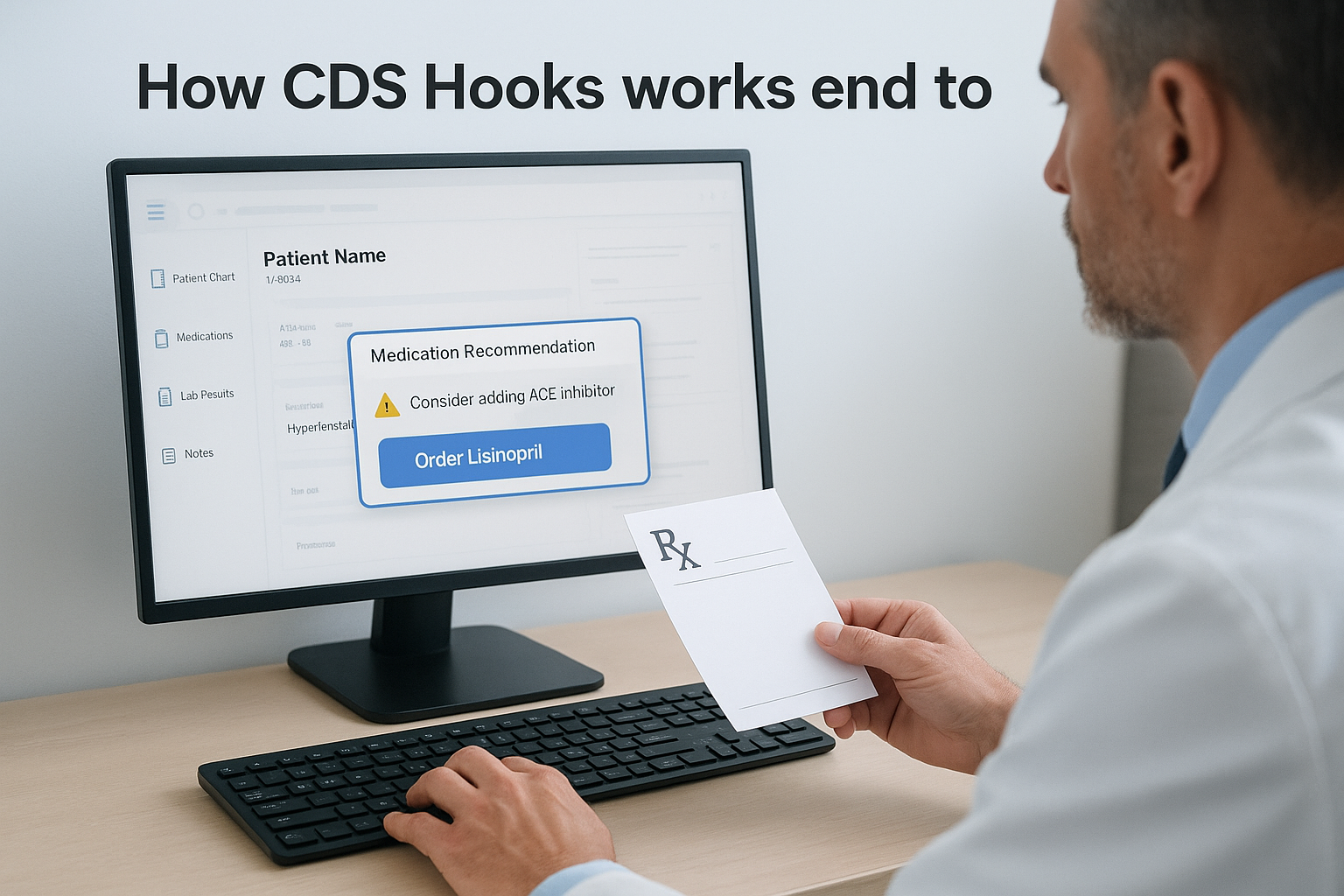
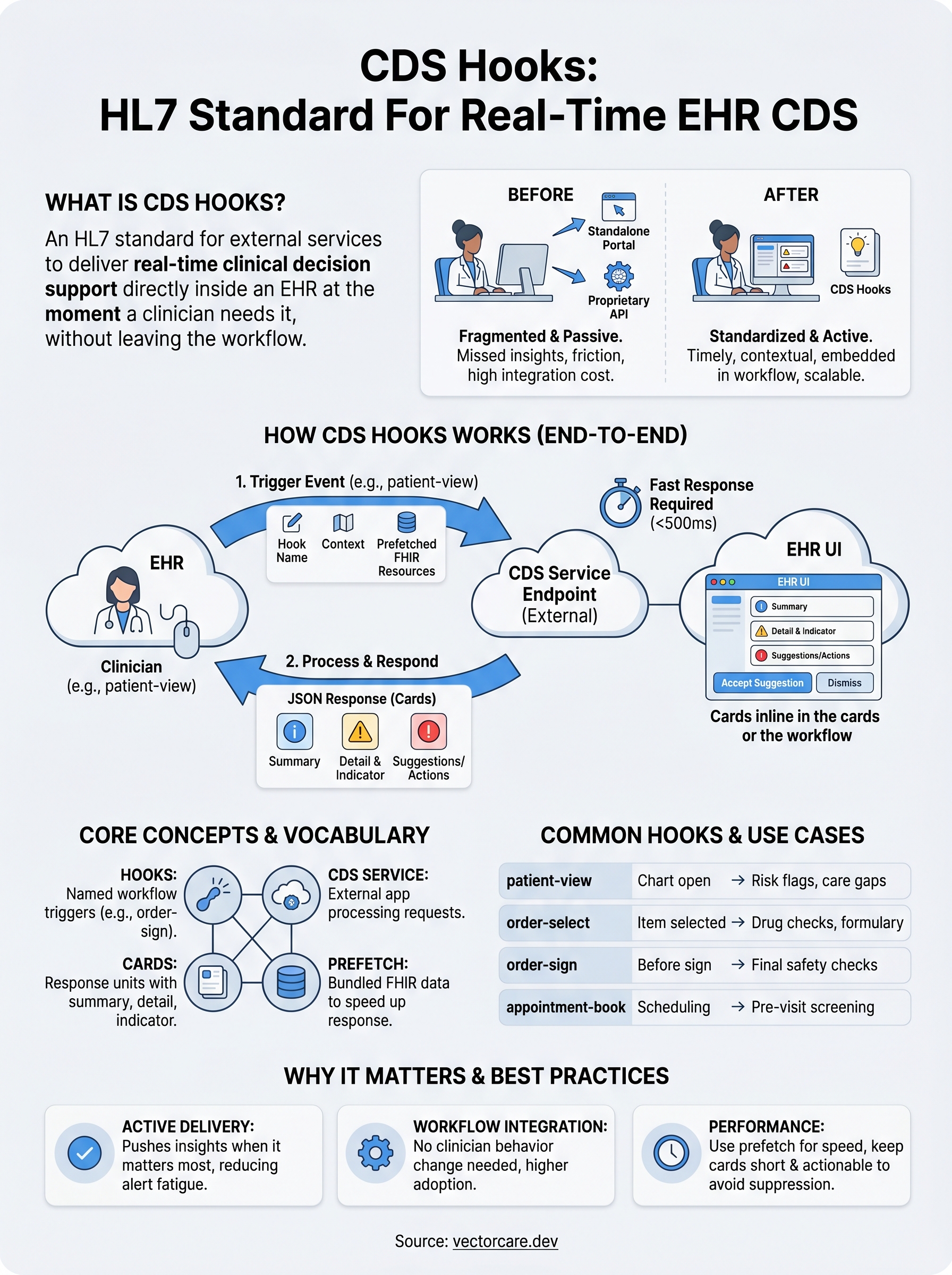
The entire mechanism starts with a trigger event inside the EHR. When a clinician performs a specific action, such as opening a patient chart, placing a medication order, or signing a note, the EHR recognizes that action as a defined hook event. At that point, the EHR sends an HTTP POST request to your registered CDS service endpoint, packages relevant patient context as FHIR resources inside that request, and waits for your service to respond. The exchange happens in the background, invisible to the clinician until your response surfaces as a card in the UI.
The hook event and request
Every interaction begins with the EHR firing a named hook, such as patient-view or order-select. Understanding what is CDS Hooks at this level means recognizing that these hook names define the specific workflow moment that triggers your service. The EHR attaches a context object to the request, which includes identifiers like the patient ID and encounter ID, alongside a prefetch section populated with relevant FHIR resources your service needs to generate a recommendation. You define this prefetch configuration in your service discovery document, so the EHR knows which data to bundle without requiring your service to make additional API calls mid-request.
| Request Component | What it contains |
|---|---|
| Hook | The named event that fired (e.g., order-select) |
| Context | Patient ID, encounter ID, and workflow-specific data |
| Prefetch | Pre-fetched FHIR resources defined by your service |
| FHIRAuthorization | Token allowing your service to query additional FHIR data if needed |
The CDS service response
Your service processes the incoming request and returns a JSON response containing one or more cards. Each card carries a summary, detail explanation, and indicator level (info, warning, or critical), along with optional suggestion links or actions the clinician can take directly inside the EHR. The EHR renders those cards inline within the active workflow screen, requiring no navigation away from the task at hand.
Response speed matters here: EPIC enforces response time limits, and a slow CDS service can result in your cards being suppressed or your integration being flagged for performance review.
Suggestions attached to a card can pre-populate order fields, launch a SMART app, or link to an external resource, giving clinicians multiple response options without forcing them to leave the EHR context.
Core concepts and key vocabulary
Understanding what is CDS Hooks at a deeper level requires getting comfortable with a small set of terms that appear throughout the specification. These concepts appear repeatedly in documentation, EPIC integration guides, and vendor conversations, so building a clear mental model now saves significant confusion later when you're mapping your product logic to the standard.
Hooks and CDS services
A hook is a named event that the EHR recognizes as a trigger point in the clinical workflow. Each hook corresponds to a specific moment in care delivery, such as when a clinician opens a patient record or selects a medication. Your CDS service is the external application that registers to respond to one or more of those hooks. The EHR discovers your service through a publicly accessible endpoint called the discovery endpoint, which returns a list of the hooks your service handles and the prefetch data it needs bundled with each request.
Your discovery endpoint acts as the contract between your service and the EHR. Keeping it accurate and up to date prevents integration failures during health system go-lives.
Cards, indicators, and suggestions
A card is the unit of information your service returns to the EHR after processing a hook request. Each card contains a short summary, optional detail text, and an indicator level that signals urgency: info, warning, or critical. The EHR renders cards inline within the active workflow screen, so the clinician sees your recommendation without changing context. Cards can also carry suggestions, which are structured actions the clinician can accept with a single click, such as adding a specific order or modifying a pre-populated field.
FHIR resources and prefetch
FHIR resources are the structured data objects your service receives alongside each hook request. Common resources include Patient, MedicationRequest, Encounter, and Condition. Your service defines which resources it needs inside its discovery document, and the EHR bundles those resources into the prefetch section of every request it sends. This design keeps response times fast because your service does not need to make separate FHIR API calls mid-request to fetch the data it needs. If a resource is missing from the prefetch, your service can still query the EHR's FHIR server directly using the authorization token included in the request.
Common CDS Hooks and real-world use cases
The HL7 specification defines several named hooks that map to specific workflow moments inside an EHR. Each hook targets a particular clinical action your service can subscribe to, so you receive requests only when the context is relevant to what your product does. Knowing which hooks exist and how vendors are actively using them in production helps you decide where your CDS service will deliver the most meaningful impact.
Named hooks in the HL7 specification
The most widely implemented hooks cover the moments clinicians spend the most time on. patient-view fires when a clinician opens a patient chart, making it useful for surfacing risk scores or care gap alerts before any decisions are made. order-select fires when a clinician selects one or more items to order, which is the right moment to flag drug interactions, duplicate orders, or formulary guidance. order-sign fires immediately before an order set is signed, giving your service a final checkpoint to catch issues before they enter the patient record.
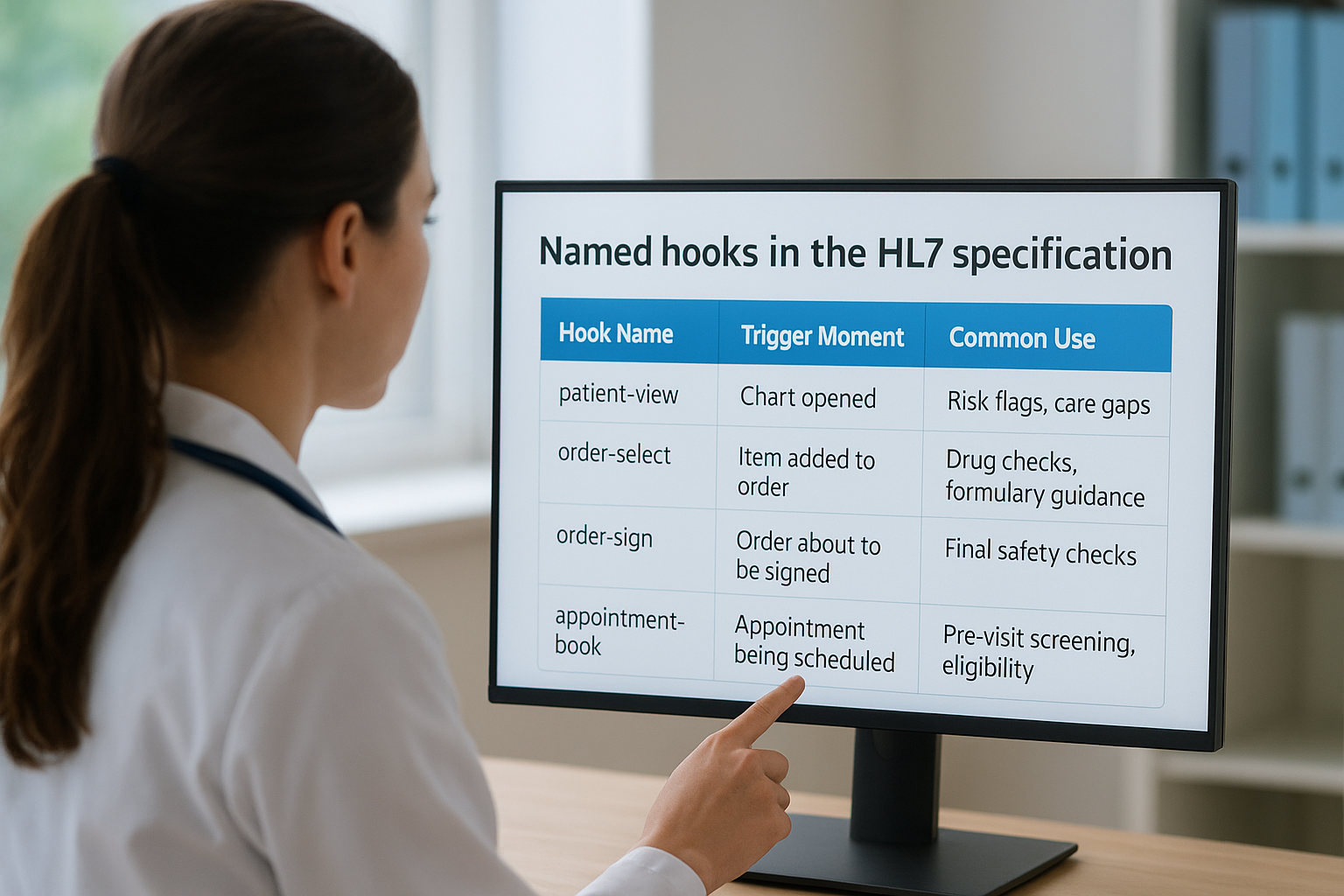
| Hook Name | Trigger Moment | Common Use |
|---|---|---|
patient-view |
Chart opened | Risk flags, care gaps |
order-select |
Item added to order | Drug checks, formulary guidance |
order-sign |
Order about to be signed | Final safety checks |
appointment-book |
Appointment being scheduled | Pre-visit screening, eligibility |
Choosing the right hook for your product is not just a technical decision; it directly determines whether your recommendation arrives early enough to change a clinical action or too late to matter.
Real-world vendor use cases
Remote patient monitoring vendors use patient-view to surface recent out-of-range readings from connected devices the moment a care team member opens the chart, turning passive data collection into an active clinical prompt. Clinical decision support vendors focused on sepsis or deterioration risk fire on patient-view to push early warning scores to nurses and physicians before they begin their assessment.
Pharmacy benefit vendors attach to order-select and order-sign to flag formulary exceptions and prior authorization requirements in real time, reducing the back-and-forth between prescribers and pharmacy that delays patient care. Understanding what is CDS Hooks in this context means recognizing it as the delivery layer that makes your product's insights actionable at the point of prescribing, not discoverable after the fact through a separate portal.
Implementation basics, limits, and best practices
Building a CDS service that actually performs in production requires more than understanding what is CDS Hooks at the specification level. You need to account for hosting requirements, EHR-specific enforcement rules, and the operational limits that will affect whether your cards reach clinicians reliably or get suppressed entirely.
What you need before you build
Your CDS service must run on a publicly accessible HTTPS endpoint that the EHR can reach at request time. You also need a valid discovery endpoint that accurately describes your hooks, prefetch requirements, and supported FHIR versions. Before EPIC routes live traffic to your service, you will go through their testing and certification process, which validates both your technical compliance and response behavior under load.
Your service must handle concurrent requests reliably because multiple clinicians across a health system may trigger the same hook within seconds of each other. Plan your infrastructure for horizontal scaling from the start rather than treating it as a future concern.
EPIC-specific limits to plan around
EPIC enforces strict response time thresholds for CDS services. If your service takes too long to return a response, EPIC may suppress your cards for that session or flag your integration for review. Most implementations target a response time well under 500 milliseconds, which means your service logic, FHIR queries, and card generation must all complete inside a very tight window.
Prefetch is your primary tool for staying within response time limits; every FHIR resource you define in your discovery document is one fewer API call your service makes mid-request.
EPIC also limits the number of cards you can return per hook invocation and applies alert fatigue filtering logic that may suppress cards clinicians have previously dismissed. Designing your cards to be specific and high-value rather than broad reduces the chance of suppression and improves clinician follow-through.
Best practices that reduce integration failures
Keep your card summaries short and action-oriented. Clinicians scan rather than read during active workflows, so a card summary that leads with the clinical action beats one that leads with background context. Pair your summary with a concrete suggestion whenever possible, such as a pre-populated order or a direct link to your SMART app.
Monitor your service logs continuously after go-live. Response errors and timeouts rarely surface through EHR dashboards, so external monitoring is the only reliable way to catch issues before they affect clinical adoption at the health system level.
Next steps
You now have a clear answer to what is CDS Hooks and how the specification fits into real clinical workflows. The standard gives healthcare vendors a structured, reliable way to push decision support directly into EHR workflows at the moments that actually influence clinical action, rather than hoping providers navigate to a separate tool.
Putting that knowledge to work means choosing the right hook for your product's use case, designing cards that are specific enough to survive alert fatigue filtering, and building a service that responds fast enough to meet EPIC's performance thresholds. Each of those steps requires both technical precision and a clear understanding of how health systems evaluate vendor integrations.
If you want to skip the months of custom engineering and get your CDS service live inside EPIC faster, VectorCare handles the entire integration stack for you. See how VectorCare deploys SMART on FHIR apps for healthcare vendors and find out how quickly your product can reach clinicians.
The Future of Patient Logistics
Exploring the future of all things related to patient logistics, technology and how AI is going to re-shape the way we deliver care.
Thank you! Your submission has been received!
Oops! Something went wrong while submitting the form.