Microsoft Entra ID Federation: What It Is and How It Works

When a health system launches a SMART on FHIR application inside EPIC, authentication isn't optional, it's the front door. Microsoft Entra ID federation is the mechanism that lets organizations establish trust between their own identity provider and external systems, so users authenticate once and access resources across organizational boundaries. For healthcare vendors building EHR integrations, understanding how federation works is foundational to getting your app into clinical workflows securely.
At VectorCare, we build and manage SMART on FHIR applications that plug directly into EPIC. Our platform handles the technical complexity of compliance, hosting, and deployment, but identity and access management sits upstream of all of it. Health systems running on Microsoft's identity stack expect federated authentication to work seamlessly, and vendors who can't speak that language lose deals to those who can.
This article breaks down what Microsoft Entra ID federation actually is, how it establishes trust between identity providers, and what you need to know about configuring and verifying federated authentication. Whether you're preparing for an EPIC integration or evaluating your identity architecture, this guide gives you the technical grounding to move forward with confidence.
Why Microsoft Entra ID federation matters
Most healthcare vendors underestimate how much identity infrastructure shapes their go-to-market timeline. Health systems already run established identity environments, often built on Microsoft Entra ID (formerly Azure Active Directory), and they expect vendors to integrate with those environments rather than stand up parallel authentication systems. When you cannot align with a health system's identity provider, onboarding stalls, security reviews extend, and contracts fall through.
Federation is not a technical nicety; it is the condition under which health systems grant your application access to clinical workflows at all.
Why siloed authentication creates real friction
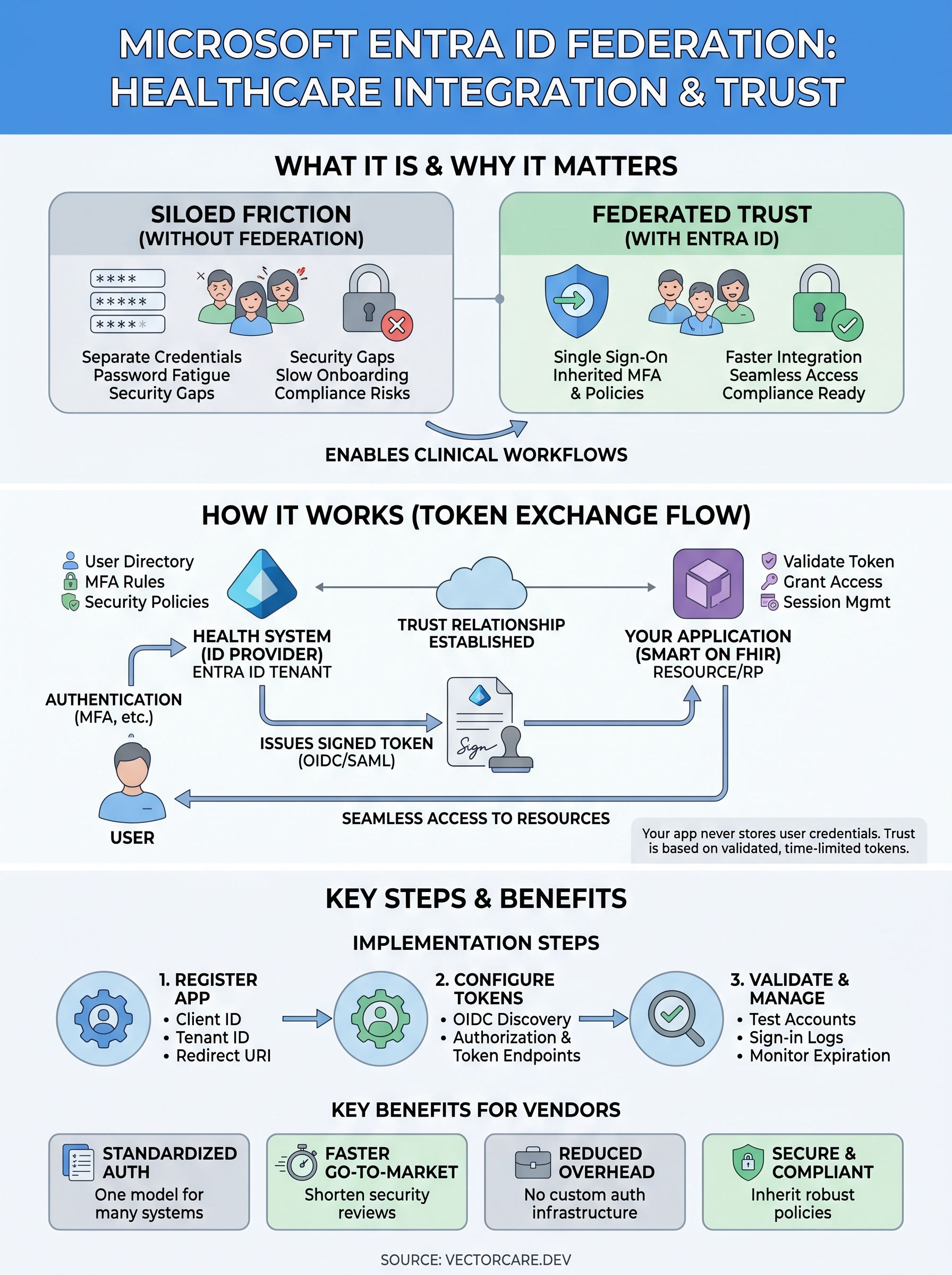
Healthcare organizations manage thousands of clinical users across departments, shifts, and roles. Asking those users to maintain separate credentials for every third-party vendor application is not realistic. It creates password fatigue, support overhead, and security gaps that compliance teams cannot accept. When your application supports federated authentication through Microsoft Entra ID, users sign in with credentials they already have, and your app inherits the security policies the health system has already configured, including multi-factor authentication and conditional access rules.
This friction compounds when you scale across multiple health system contracts. Each new client brings its own identity environment, and building custom credential systems for each one is expensive and difficult to audit. Standardizing on federation as your authentication approach lets you reuse the same identity architecture across every deployment instead of starting from scratch.
What microsoft entra id federation specifically solves
Microsoft Entra ID federation lets you establish a formal trust relationship between your application's identity layer and the health system's Entra ID tenant, without replicating user directories or writing custom authentication logic. Your app accepts tokens that the health system's identity provider issues, and Entra ID handles verification, session management, and policy enforcement. For vendors building SMART on FHIR applications, this means the authentication handshake EPIC requires gets satisfied through a standardized, auditable flow that health system IT teams already recognize.
How Entra ID federation works
At its core, microsoft entra id federation works by establishing a trust relationship between two identity systems: your application and the health system's Entra ID tenant acting as the identity provider. Neither side needs to share a user directory. Instead, both parties agree to accept cryptographically signed tokens that prove a user's identity.
This means your application inherits the health system's security policies without any additional configuration on your end.
Trust relationships and token exchange
When a user signs in, Entra ID authenticates them against its own directory and issues a signed security token. Your application validates the cryptographic signature using a public key shared during federation setup and grants access.

The health system's MFA requirements and conditional access rules apply automatically because authentication happens entirely on their side. Your app never stores user credentials; it only receives verified, time-limited tokens.
Which protocols carry the federation flow
Entra ID supports both SAML 2.0 and OpenID Connect (OIDC) for federation. SMART on FHIR applications typically use OIDC because it pairs naturally with OAuth 2.0, which EPIC's authorization layer expects. You configure your app to redirect authentication requests to the health system's Entra ID authorization endpoint, and the token flow handles the rest.
- SAML 2.0: XML-based assertions; common in enterprise SSO environments
- OIDC: JSON Web Token-based; the standard choice for SMART on FHIR apps
Federation vs SSO and other sign-in options
Federation and SSO are related but not the same thing. SSO (Single Sign-On) describes the user experience: sign in once and access multiple systems without re-entering credentials. Federation describes the underlying mechanism that makes cross-organization SSO possible. You can have SSO within a single organization without any federation involved, but when authentication needs to cross organizational boundaries, federation is what actually establishes the trust.
How federation differs from other sign-in methods
Health system IT teams evaluate several authentication options when reviewing vendor apps. Direct authentication means your app handles credentials itself, which most health systems reject outright for clinical tools because it pulls credential management outside their control. Social login via consumer identity providers is not appropriate for HIPAA-covered environments. Microsoft Entra ID federation gives health systems full control over their own authentication policies while your app gains access through a standardized, auditable token exchange.
- Direct auth: Your app stores credentials; creates compliance and security risk
- Social login: Consumer-grade; not suitable for regulated healthcare workflows
- Federated auth: Health system retains control; your app accepts issued tokens
Federation is the only model that lets a health system enforce its own security policies on your application without granting your app access to its user directory.
How to set up federation with Entra ID
Setting up microsoft entra id federation requires coordination between your application and the health system's IT team. You are not configuring both sides unilaterally; the health system controls their Entra ID tenant, and you configure your application to trust the tokens it issues. Starting with a clear list of what you need from their IT team shortens the setup process significantly.
Register your application in Entra ID
Your first step is registering your app in the health system's Entra ID tenant or your own, depending on the federation model you use. App registration generates the client ID and tenant ID your application needs to direct authentication requests to the correct endpoint. You also define redirect URIs here, which tell Entra ID where to send tokens after successful authentication.

- Client ID: Identifies your application to the identity provider
- Tenant ID: Identifies the health system's Entra ID directory
- Redirect URI: The endpoint that receives tokens post-authentication
Confirm redirect URIs match exactly what your app expects; mismatches are the most common cause of failed token exchanges during initial setup.
Configure your application to accept tokens
Once registration is complete, update your app's authentication configuration to point to the Entra ID authorization and token endpoints. For SMART on FHIR apps, use the OIDC discovery document at the tenant's well-known configuration endpoint to pull these values automatically rather than hardcoding them.
How to validate, manage, and troubleshoot
After you complete the initial setup for microsoft entra id federation, validating the configuration before your app goes into clinical use is not optional. A failed token exchange in a production environment creates immediate friction with health system IT teams and can stall your deployment.
Validate your federation setup
Run a full authentication test using a dedicated test account in the health system's Entra ID tenant before any real users touch the app. Verify that the token your app receives contains the correct claims, including the user's role and tenant information, and that your redirect URI resolves without errors. Microsoft's sign-in logs in the Entra admin center show each authentication attempt and whether it succeeded or failed.
Confirm that token expiration windows and refresh token behavior match what your app's session management expects; mismatches here cause silent logouts during active clinical sessions.
Troubleshoot common token errors
Most federation failures trace back to a small set of root causes: mismatched redirect URIs, expired signing certificates, or incorrect audience values in the token. Check the Entra sign-in logs first. They surface specific error codes that map directly to Microsoft's published documentation, which cuts your debugging time significantly.
What to do next
Microsoft Entra ID federation is a prerequisite for any healthcare vendor serious about placing applications inside clinical workflows. Health systems running on Microsoft's identity stack will not compromise on how authentication works, and your ability to meet that expectation directly affects whether contracts close or stall. The concepts in this article give you the grounding to have informed conversations with health system IT teams and evaluate your own identity architecture clearly.
Your immediate next step is auditing whether your current application registration, redirect URIs, and token validation logic are configured correctly for the health system environments you are targeting. If your app is not yet built, starting with a federated identity architecture from day one saves significant rework later. For healthcare vendors who want to move from architecture decisions to a deployed, compliant SMART on FHIR application without managing every technical layer internally, explore how VectorCare handles EPIC integration end to end.
The Future of Patient Logistics
Exploring the future of all things related to patient logistics, technology and how AI is going to re-shape the way we deliver care.
Thank you! Your submission has been received!
Oops! Something went wrong while submitting the form.