OpenID Connect Specification: Core Flows, Claims, Endpoints

OpenID Connect Specification: Core Flows, Claims, Endpoints
Healthcare vendors building SMART on FHIR applications for EPIC integration face a critical authentication layer: the OpenID Connect specification. This protocol sits on top of OAuth 2.0 and handles how users prove their identity when launching apps from within the EHR. Without a solid grasp of how it works, you're essentially building on a foundation you don't understand.
This article breaks down the core components of OpenID Connect, authentication flows, identity claims, and the endpoints that make it all function. You'll get the technical details you need to understand what happens behind the scenes when a clinician launches your app from EPIC.
At VectorCare, we handle OpenID Connect implementation automatically through our no-code platform. But whether you're building custom integrations or evaluating managed solutions, knowing these fundamentals helps you make better architectural decisions and troubleshoot authentication issues when they arise.
What the OpenID Connect specs include
The OpenID Connect specification breaks down into multiple documents that each address specific functionality. You'll find the Core specification defines authentication flows and token handling, while supplementary specs cover everything from session management to front-channel logout. This modular structure means you only implement what your healthcare application actually needs.
Core specification documents
The Core spec forms the foundation of everything else. It defines how authentication requests work, what tokens you receive, and how to validate identity claims. You'll reference this document when implementing Authorization Code Flow, which SMART on FHIR apps use for clinician authentication within EPIC.
Discovery and Dynamic Registration specs handle how your application finds the right endpoints and registers itself with identity providers. The Discovery document exposes metadata about supported flows, endpoints, and capabilities, while Dynamic Registration automates the client registration process. These specs save you from hardcoding configuration details that vary between different health systems.
The modular design of the OpenID Connect specification lets you implement only what your authentication requirements demand.
Optional specifications and extensions
Session Management and HTTP-based Logout specs address how you handle user sessions after initial authentication. Session Management provides mechanisms to detect when a user logs out from the EHR, while the logout specs define how to properly terminate sessions across multiple applications. These become critical when clinicians switch between multiple SMART on FHIR apps during a single shift.
The OpenID Connect for Identity Assurance extension adds verification requirements for high-security scenarios. You might need this when your application handles sensitive operations that require additional identity verification beyond basic authentication. Form Post Response Mode offers an alternative to URL-based token delivery, using HTTP POST instead of query parameters to reduce exposure in browser history and logs.
Why OIDC matters for authentication
OAuth 2.0 handles authorization well but doesn't tell you who the user actually is. The OpenID Connect specification solves this gap by adding an identity layer that provides verifiable information about the authenticated person. When a clinician launches your SMART on FHIR app from EPIC, you need to know their role, credentials, and permissions to display the right data and functionality.
Identity verification beyond access control
OAuth 2.0 gives your application permission to access resources, but it treats authentication as a black box. OpenID Connect exposes user identity claims in a standardized ID token that includes details like name, email, and authentication time. You can verify these claims cryptographically and trust that the person using your app matches the identity claimed by the EHR system.
OpenID Connect transforms OAuth 2.0 from an authorization protocol into a complete authentication solution.
Healthcare-specific authentication requirements
Healthcare applications face unique identity requirements that generic OAuth implementations can't address. You need to verify clinician credentials, track who accessed patient data for audit logs, and enforce role-based access controls. The OpenID Connect specification provides standardized claims and flows that let you implement these requirements without building custom authentication logic for each health system you integrate with.
Core flows in the specification
The OpenID Connect specification defines three primary authentication flows that determine how your application exchanges credentials for identity tokens. Each flow addresses different security requirements and deployment scenarios, though healthcare applications typically use Authorization Code Flow for its security advantages. Understanding these flows helps you choose the right implementation strategy for your SMART on FHIR integration.
Authorization Code Flow
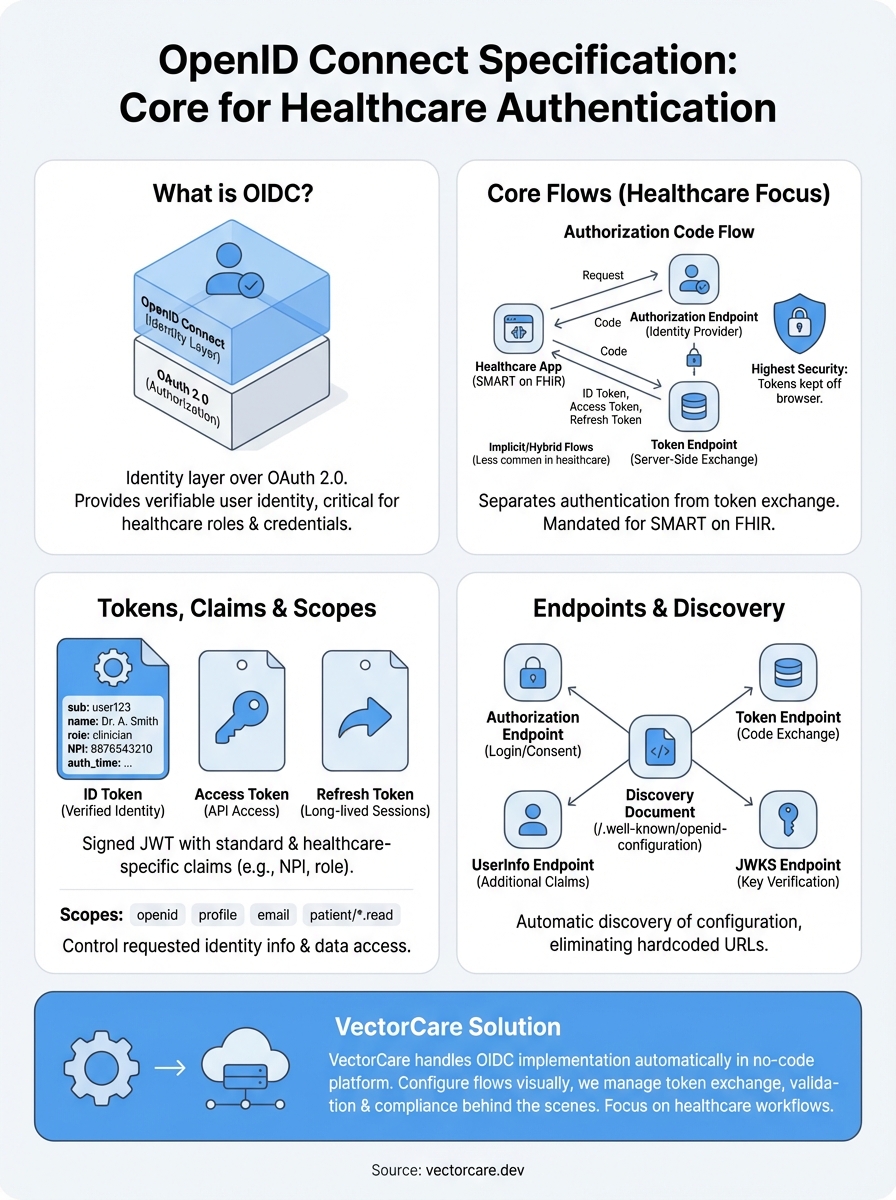
Authorization Code Flow provides the highest security level by keeping tokens away from the browser. Your application receives an authorization code first, then exchanges it for tokens through a back-channel server request. SMART on FHIR mandates this flow because it protects sensitive authentication data from browser-based attacks and allows you to use refresh tokens for long-lived sessions.

Authorization Code Flow separates the authentication step from token retrieval, keeping credentials secure throughout the process.
Implicit and Hybrid Flows
Implicit Flow delivers tokens directly in the URL fragment, skipping the code exchange step. The openid connect specification designed this for browser-based applications without backend servers, but security concerns have pushed most implementations toward Authorization Code Flow with PKCE instead. Hybrid Flow combines elements of both approaches, letting you receive some tokens immediately while exchanging a code for others, though healthcare applications rarely need this complexity.
Tokens, claims, and scopes
The openid connect specification defines three token types that work together to deliver identity and access information. Your application receives an ID token containing verified identity claims, an access token for API calls, and optionally a refresh token for obtaining new credentials. Understanding how these tokens interact helps you implement secure authentication and extract the right user information for your healthcare workflows.
ID tokens and identity claims
ID tokens arrive as signed JSON Web Tokens (JWTs) that contain claims about the authenticated user. You'll find standard claims like sub (subject identifier), name, email, and auth_time (when authentication occurred) in the token payload. Healthcare implementations often add custom claims for NPI numbers, provider roles, and facility identifiers that your SMART on FHIR app needs to function correctly.

ID tokens provide cryptographically signed proof of user identity that you can verify without making additional network calls.
Scopes and data access control
Scopes determine what identity information your application requests and receives. The openid scope triggers OpenID Connect authentication and returns the sub claim, while additional scopes like profile, email, and phone control which claim sets appear in the ID token. SMART on FHIR applications combine OpenID Connect scopes with FHIR resource scopes to request both identity verification and patient data access in a single authorization request.
Endpoints, discovery, and metadata
The openid connect specification uses standardized endpoints that your application discovers automatically through a well-known configuration document. You access these endpoints to request authentication, exchange codes for tokens, and retrieve user information. This discovery mechanism eliminates hardcoded URLs and lets your SMART on FHIR app adapt to different EPIC implementations without configuration changes.
Discovery document structure
Your application retrieves the discovery document from the /.well-known/openid-configuration path at the identity provider's base URL. This JSON document contains every endpoint your app needs, including authorization, token, userinfo, and jwks_uri endpoints. You'll also find supported scopes, grant types, response types, and signing algorithms that tell you exactly what capabilities the identity provider offers.
Discovery documents provide a single source of truth for all authentication configuration, eliminating manual endpoint management.
Core endpoint types
The authorization endpoint handles initial authentication requests and returns authorization codes. Your application exchanges these codes at the token endpoint, which validates requests and issues ID tokens, access tokens, and refresh tokens. The userinfo endpoint lets you retrieve additional identity claims beyond what appears in the ID token, while the jwks_uri endpoint provides public keys for verifying token signatures.
What to do next
You now understand how the openid connect specification defines authentication flows, token structures, and endpoint discovery for identity verification. This knowledge helps you evaluate authentication implementations and troubleshoot integration issues when they arise in your SMART on FHIR applications.
Building OIDC authentication correctly requires implementing multiple specifications, managing token validation, configuring discovery documents, and maintaining security compliance across different health systems. Each EPIC instance may handle identity claims differently, and you need to account for these variations while maintaining consistent behavior in your application. The complexity multiplies when you integrate with multiple health systems that each configure their identity providers with different claim mappings and scope requirements.
VectorCare handles OpenID Connect implementation automatically when you build SMART on FHIR apps through our no-code platform. You configure authentication flows visually while we manage token exchange, claim validation, and compliance requirements behind the scenes. This approach eliminates months of development work and lets you focus on building healthcare workflows instead of debugging OAuth redirects and JWT signatures.
The Future of Patient Logistics
Exploring the future of all things related to patient logistics, technology and how AI is going to re-shape the way we deliver care.
Thank you! Your submission has been received!
Oops! Something went wrong while submitting the form.