Epic App Orchard Tutorial: How to Register and Build Apps

If you've started digging for an epic app orchard tutorial, you already know the official documentation is scattered across half a dozen portals and none of them tell you where to start. You need a clear path: how to register, what Epic expects from your app, and how long the review process actually takes before you can list in the Showroom.
This guide walks through that path step by step, from creating your Open Epic sandbox account to submitting your finished build for Showroom review. Along the way you'll get straight answers on epic app orchard intellectual property rules (who owns your code and data models), how app orchard vs open epic actually differ in practice, and where to find the parts of epic app orchard documentation that matter most for a working integration.
We wrote this because we've taken dozens of vendors through this exact process at VectorCare, and we've seen where teams lose months. If you'd rather skip the manual FHIR work entirely, our no-code platform handles registration, build, and Showroom listing in 3-6 weeks. But first, let's cover how the process works from the ground up.
Understanding Epic App Orchard and Open Epic
Before you write a line of code, you need to know that Open Epic and what Epic App Orchard actually is aren't the same thing, even though vendors use the terms interchangeably. Open Epic is Epic's free developer program, giving you access to FHIR APIs, sandbox test patients, and the technical documentation you need to build a SMART on FHIR app. App Orchard (now branded the Epic Showroom) is the commercial marketplace layer on top of that, where health systems browse and select third-party apps to activate at their organization — Epic's vendor marketplace explained in full. You can build and test in Open Epic without ever touching App Orchard. But if your business model depends on health systems finding and adopting your app, App Orchard is where that discovery happens.
Open Epic: your sandbox and documentation home
Open Epic is where you'll spend most of your early development time. It hosts the fhir.epic.com portal, which includes API specs, sample apps, and a sandbox environment with synthetic patient data that mirrors production FHIR resources. Registration is free and takes minutes, and it's the required first step regardless of whether you eventually list on the Showroom.
App Orchard: the commercial and compliance layer
App Orchard adds the pieces Open Epic doesn't cover: production access requests, business associate agreements, the fees and tiers you should expect, and the review process that gets your app in front of health system IT teams. This is also where epic app orchard intellectual property terms come into play. Epic's agreements typically leave you owning your application code and business logic, while data models and integration patterns built specifically for Epic's platform can carry shared-use provisions, so read the IP section of your agreement closely before signing.
Open Epic gets you building. App Orchard gets you found.
| Layer | Purpose | Cost | Required for testing? |
|---|---|---|---|
| Open Epic | Sandbox access, docs, APIs | Free | Yes |
| App Orchard/Showroom | Production access, listing, health system discovery | Varies by app type | No, only for launch |
Understanding this split now saves you from the most common early mistake: waiting on App Orchard approval before starting development, when you could be building in the Open Epic sandbox the entire time.
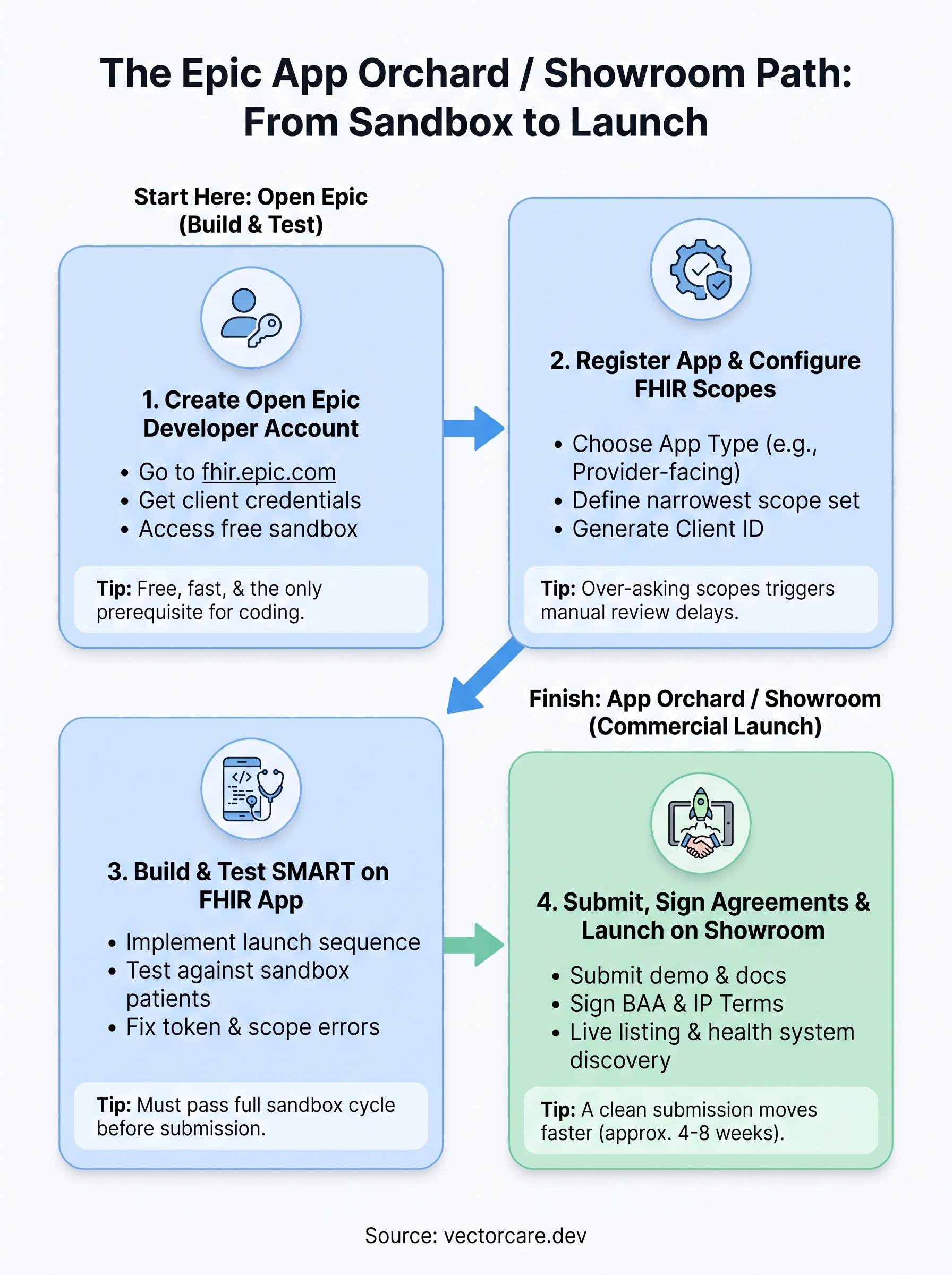
Step 1. Create your Open Epic developer account
Getting into Epic's sandbox starts at fhir.epic.com, not App Orchard, and it's the first thing every vendor should do before writing any FHIR calls. Head to the site, click the developer registration link, and fill out the form with your company name, a work email, and a short description of what your app does. Epic doesn't gatekeep this step with a sales call or a compliance review. You get an account almost immediately, which is exactly why skipping straight to App Orchard paperwork wastes time you could spend building.
Sign up and confirm your access
Once you submit the form, check your inbox for a confirmation email with your client credentials and a link to the sandbox dashboard. These credentials are what you'll use to register your app and request access tokens later, so store them somewhere your dev team can find them, not just in one person's inbox. Log in and confirm you can see the sandbox environment listed under your account before moving on.
Your Open Epic account is free, fast, and the only prerequisite for writing real FHIR code.
What the sandbox gives you
Inside the dashboard you'll find synthetic patient records, a full set of FHIR R4 resource endpoints, and reference implementations you can clone, much like the vendor-neutral SMART Health IT sandbox many teams start with. This is also your entry point into epic app orchard documentation, since the same portal links out to API specs, authentication guides, and sample SMART on FHIR launch sequences — here's where to start in Epic's FHIR API docs. Spend an hour here before Step 2. Reading the OAuth 2.0 flow diagrams now will save you a debugging session later, when your app is trying to launch inside a real EHR context and your token request keeps failing silently.
Step 2. Register your app and configure FHIR scopes
With your Open Epic account active, head back to the dashboard and click "Register App" to create your integration record. Epic asks you to pick an app type first, and this choice determines which FHIR scopes you're even allowed to request, so get it right before you configure anything else.
Register your app in the developer dashboard
Filling out the registration form is straightforward if you know what Epic expects up front:
- App name and description: keep it specific, since this text carries over to your Showroom listing later
- App type: choose Provider-facing (launches inside a clinician's EHR session), Patient-facing (launches through MyChart), or Backend (system-to-system, no user context)
- Redirect URI: the endpoint Epic sends the authorization code to after login
- Launch URL: where Epic initiates your app from within its workflow
Get the app type wrong here and you'll redo half your scope configuration later, so confirm it against how you actually plan to launch before submitting.
Configure FHIR scopes for your workflow
Scopes control exactly which FHIR resources your app can read or write, and Epic enforces them strictly at the token level, not just in documentation, so it helps to have a step-by-step walkthrough of using Epic's FHIR API open beside you. Request only what your workflow needs.
Request the narrowest scope set your app actually uses. Over-asking is the fastest way to trigger a manual review delay.
| Scope | Grants access to | Common use case |
|---|---|---|
| patient/Patient.read | Demographics | Intake forms |
| patient/Observation.read | Vitals, labs | Remote monitoring |
| patient/MedicationRequest.read | Active prescriptions | Medication reconciliation |
| user/Encounter.write | Encounter creation | Referral or order workflows |
Save your configuration, and Epic will generate a client ID tied to your registered scopes, which you'll use immediately in Step 3 when you build your first live launch sequence.
Step 3. Build and test your SMART on FHIR app
With your client ID and scopes locked in, it's time to write the code that actually launches your app inside Epic's clinical context. This is where the SMART on FHIR EHR launch sequence replaces theory with working requests, and where most vendors hit their first real debugging session.
Implement the EHR launch sequence
Epic supports two launch types: EHR launch (your app opens from inside a clinician's active session) and standalone launch (your app initiates the connection itself). Most provider-facing apps use EHR launch, which follows this basic exchange:
GET /oauth2/authorize?response_type=code&client_id={your_client_id}
  &redirect_uri={your_redirect_uri}&scope={your_scopes}
  &launch={launch_token}&aud={fhir_base_url}
Epic redirects back to your app with an authorization code, which you exchange for an access token before making any FHIR calls. Get this sequence wrong and your token requests fail silently, with no useful error in the response body.
Test against sandbox patients and fix token errors
Open Epic's sandbox ships with a set of named test patients (Camila Lopez and Derrick Lin are common ones) that carry realistic FHIR data across encounters, medications, and observations. Run your full launch-to-data-pull cycle against these patients before touching anything else. Check that your access token includes the exact scopes you configured, since a mismatch here is the single most common cause of a 403 response during testing.
If your app can't complete a full launch-to-data-pull cycle against sandbox patients, it isn't ready for App Orchard review.
Budget real time for this step. Vendors who rush testing end up debugging in front of Epic's reviewers instead of before submission, which slows the whole approval timeline down.
Step 4. Submit, sign agreements, and launch on Showroom
Once your app passes its full sandbox test cycle, you're ready to move into App Orchard proper and start the formal submission. This is where the epic app orchard documentation shifts from developer guides to legal and compliance paperwork, and where most vendors underestimate the timeline. Epic reviews submissions in the order received, so a clean, complete package the first time around beats a fast but sloppy one that bounces back for corrections.
Submit your app for review
Log into the App Orchard portal and open a new submission tied to the client ID you generated in Step 2, following the same checklist we use for Showroom submissions. Epic asks for a working demo environment, a security questionnaire, and documentation of the exact FHIR scopes your app uses in production.
- Confirm your demo environment mirrors your sandbox build exactly
- Attach your security and privacy documentation, including HIPAA safeguards
- List every FHIR scope your app calls, matching what you configured earlier
- Assign one team member to answer reviewer questions within 48 hours
Sign your agreements and go live
Before Epic activates production access, you'll sign a Business Associate Agreement and the App Orchard participation terms, which is also where the epic app orchard intellectual property language becomes binding rather than advisory. Read the shared-use provisions on data models before you sign, since renegotiating after launch is far harder than catching it now.
A clean submission package moves faster than a fast one full of gaps.
Review typically runs four to eight weeks depending on app complexity and how quickly you respond to reviewer feedback. Once approved, your listing goes live on the Showroom, where health systems can find and activate it directly.
Turning your tutorial knowledge into a live app
You now have the full path: Open Epic registration, FHIR scope configuration, sandbox testing, and Showroom submission. That's the real sequence, and every vendor who skips a step ends up redoing work later. But knowing the epic app orchard tutorial steps and actually executing them are two different projects. Most teams spend three to six months on registration, scope debugging, and reviewer back-and-forth, and that's before counting engineering salaries — here's what actually eats those months.
If your team has the FHIR expertise and the runway, follow the steps above and you'll get there. If you'd rather skip the manual build and the months of debugging silent token failures, that's exactly what we handle at VectorCare. Our platform manages FHIR configuration, compliance, and Showroom submission without requiring your team to write integration code. See how to build and deploy your SMART on FHIR app in days instead of months.
The Future of Patient Logistics
Exploring the future of all things related to patient logistics, technology and how AI is going to re-shape the way we deliver care.
Thank you! Your submission has been received!
Oops! Something went wrong while submitting the form.