What Is Single Sign-On? How SSO Works And Benefits For IT

What Is Single Sign-On? How SSO Works And Benefits For IT
Healthcare IT teams manage dozens of applications daily, from EHR systems to clinical decision support tools, patient portals, and vendor integrations. Each login prompt adds friction, creates security risk, and generates helpdesk tickets. So what is single sign on, and why has it become essential infrastructure for health systems?
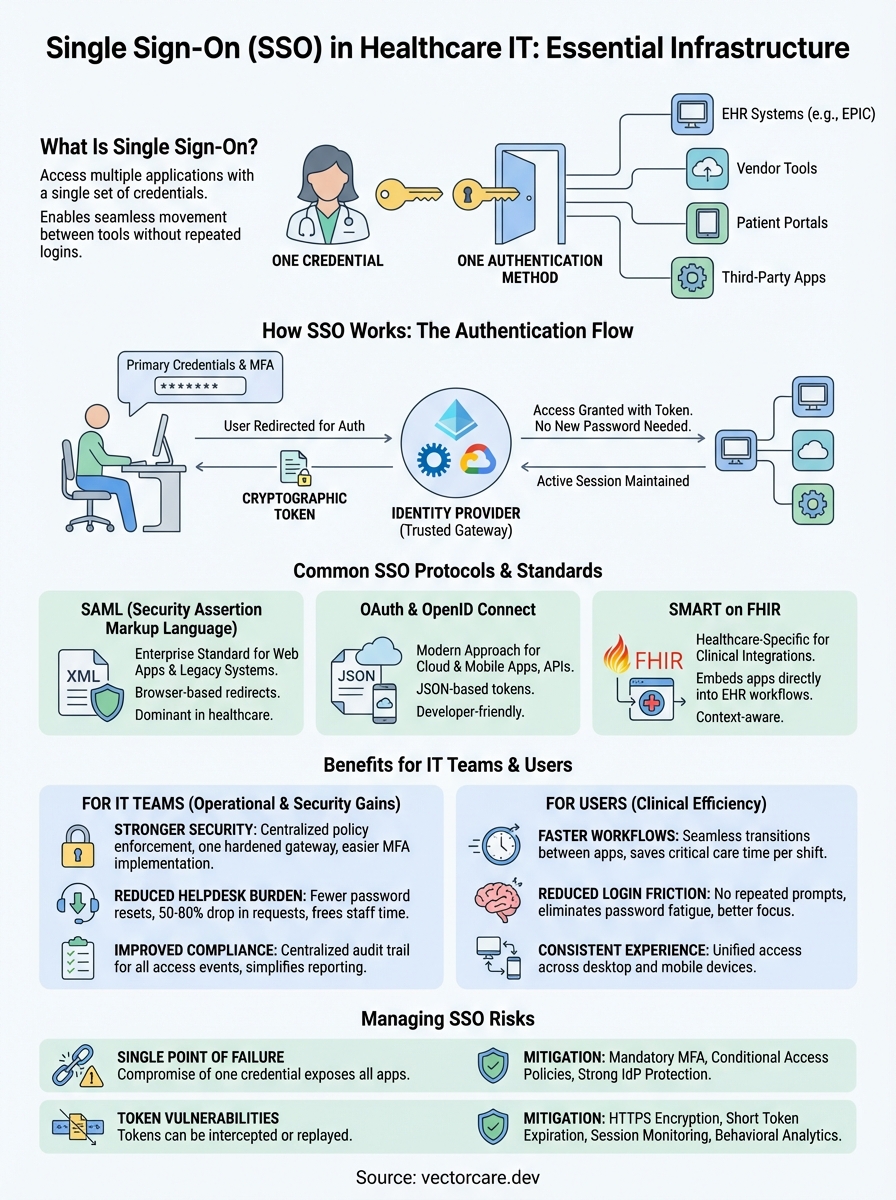
Single Sign-On (SSO) is an authentication method that lets users access multiple applications with one set of credentials. For healthcare organizations, this means clinicians can move between EPIC, third-party apps, and vendor tools without repeatedly entering passwords. The result: faster clinical workflows, reduced password fatigue, and a smaller attack surface for credential-based breaches.
Understanding SSO matters whether you're an IT administrator managing access controls or a healthcare vendor building applications that integrate with EHR systems. At VectorCare, we build SMART on FHIR applications that embed directly into EPIC workflows, and SSO is foundational to how that secure, seamless access works. This article breaks down how SSO functions, the protocols that power it, and the practical benefits for healthcare IT teams.
Why single sign-on matters for IT
Healthcare IT teams face a unique combination of security requirements and operational demands that make authentication particularly challenging. You manage access to systems containing protected health information while supporting clinicians who need instant access to multiple applications throughout their shifts. Every additional login creates friction that slows clinical care and generates support tickets. Understanding what is single sign on and why it matters starts with recognizing how password proliferation creates tangible problems for IT operations.
Password fatigue creates security holes
Your end users follow predictable patterns when forced to manage multiple passwords. They reuse credentials across systems, write passwords on sticky notes, or create simple variations that automated attacks easily crack. Healthcare organizations average 73 cloud applications per employee, according to research from major identity providers, and each application traditionally requires separate authentication. This volume makes secure password management practically impossible without centralized control.
The security implications extend beyond individual accounts. When a clinician uses the same password for their EHR access and a third-party vendor portal, a breach at the vendor exposes your core systems. SSO eliminates this risk by ensuring you control authentication centrally while users maintain a single, strong credential. Your security team can enforce multi-factor authentication, monitor access patterns, and revoke access instantly across all connected applications when someone leaves your organization or changes roles.
SSO centralizes authentication control, turning dozens of potential breach points into one hardened gateway you actively monitor and protect.
SSO reduces helpdesk burden
Password reset requests consume 20 to 50 percent of helpdesk call volume at most healthcare organizations. Your IT team spends valuable time walking users through reset procedures instead of addressing infrastructure issues or strategic projects. Each reset call costs between $15 and $70 when you account for staff time, and large health systems process thousands of these requests monthly. SSO dramatically reduces this volume by cutting the number of credentials users need to remember.
Beyond direct cost savings, you gain operational efficiency across your entire IT organization. Your helpdesk can redirect freed capacity toward proactive support, system improvements, or vendor integration projects. Onboarding new employees becomes faster because you provision access once through your identity provider rather than creating accounts in each individual system. Offboarding becomes more secure because you revoke access centrally with confidence that former employees cannot access any connected applications.
Compliance and audit trails improve with SSO
Healthcare IT operates under strict regulatory frameworks including HIPAA, which requires detailed tracking of who accesses patient data and when. Managing audit logs across dozens of disconnected systems creates gaps in your compliance posture. You cannot easily answer questions like "Which applications did this user access last Tuesday?" or "Who viewed this patient's record across all our systems?" when authentication happens independently in each application.
SSO creates a centralized audit trail that captures every authentication event across your entire application ecosystem. Your identity provider logs each login attempt, successful access, and denied request with timestamps and context. This centralization simplifies compliance reporting and makes incident investigation practical. When a potential breach occurs, you can quickly trace user activity across all systems from one location rather than collecting logs from multiple sources and attempting to correlate timestamps.
How single sign-on works
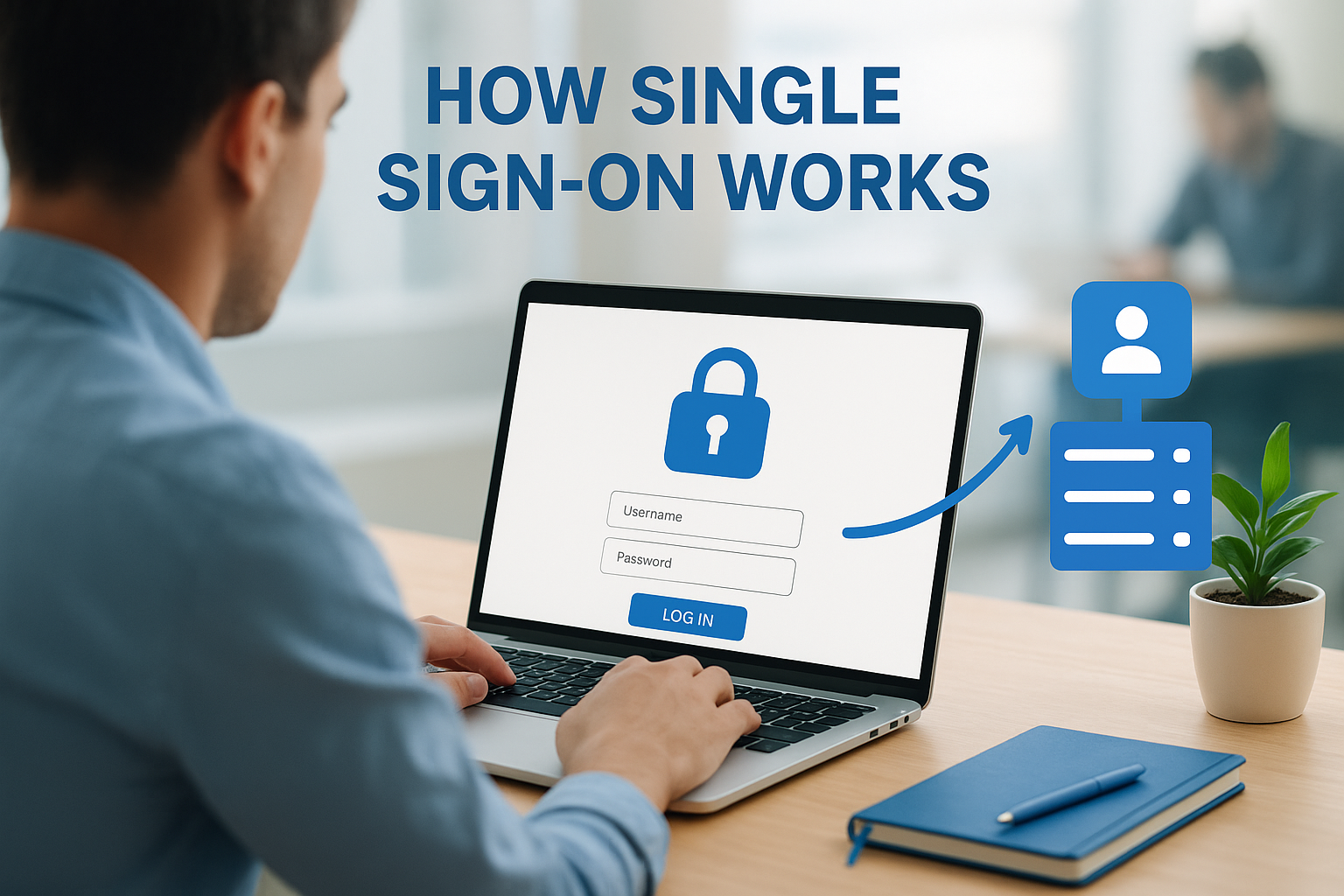
SSO operates through a centralized authentication service that sits between your users and their applications. When a user attempts to access any connected application, the system redirects them to this central identity provider instead of prompting for credentials at each app. This architecture transforms authentication from dozens of independent verification points into a single trusted gateway that confirms identity once and grants access across your entire ecosystem. Understanding this flow helps you plan integrations and troubleshoot access issues when they arise.
The authentication handshake
Your user starts their workday by logging into their workstation or accessing any SSO-connected application through a browser. The application immediately recognizes that authentication has not occurred and redirects the user to your identity provider, typically Azure Active Directory, Okta, or a similar service. The identity provider presents a login screen where the user enters their primary credentials and completes any required multi-factor authentication. This initial authentication creates a secure session with your identity provider.
Once the identity provider verifies the user's credentials, it generates a cryptographic token containing information about the authenticated user and their permissions. The system then redirects the user back to the application they originally requested, passing this token along. The application validates the token with your identity provider to confirm its authenticity and grants access based on the user's permissions. This entire handshake happens in seconds, creating a seamless experience while maintaining strong security controls.
Token-based access to connected applications
After initial authentication, your identity provider maintains an active session with the user's browser. When the user clicks a link to access another SSO-connected application, the system checks whether a valid session already exists. Finding an active session, the identity provider immediately generates a new token for the requested application without prompting for credentials again. The user moves between applications without interruption because the identity provider handles authentication behind the scenes.
The beauty of SSO tokens is that they carry proof of authentication without containing actual passwords, meaning applications never see or store user credentials directly.
These tokens contain specific claims about the user including their identity, group memberships, and allowed actions. Applications use these claims to make authorization decisions about what data and features each user can access. Your identity provider sets token expiration times based on your security policies, typically ranging from one hour to one business day. When tokens expire, the system refreshes them automatically while the user's session remains active, maintaining continuous access without repeated login prompts.
Session monitoring and logout
Your identity provider tracks every active session and provides centralized control over user access. When a user clicks logout in any connected application, the system can terminate their session globally, revoking all active tokens and requiring fresh authentication for subsequent access. This capability extends to your IT team, who can force logout for specific users instantly when responding to security incidents or during offboarding. The central session management means you control access in real-time rather than waiting for individual applications to time out their local sessions.
Common SSO standards and protocols
Understanding what is single sign on requires familiarity with the technical standards that make it work. Your identity provider and connected applications communicate through standardized protocols that ensure secure, reliable authentication across different vendors and platforms. Healthcare IT teams encounter three primary protocols when implementing SSO: SAML for enterprise applications, OAuth/OpenID Connect for modern web and mobile apps, and SMART on FHIR specifically for clinical integrations. Each protocol solves authentication differently based on the application architecture and security requirements you need to meet.

SAML (Security Assertion Markup Language)
SAML has served as the enterprise SSO standard for over two decades, particularly in healthcare organizations with established identity infrastructure. Your identity provider generates XML-based assertions that contain authentication statements and user attributes, then passes these assertions to applications through browser redirects. SAML works well for web applications where users access services through a browser, and most EHR systems including EPIC support SAML for provider authentication. The protocol handles single logout effectively, meaning when users sign out, the system terminates their session across all SAML-connected applications simultaneously.
The primary limitation of SAML appears when you need to authenticate mobile applications or APIs that do not operate through standard web browsers. SAML's reliance on XML and browser-based redirects makes it cumbersome for native mobile apps or server-to-server authentication scenarios. Despite these constraints, SAML remains the dominant protocol in healthcare because legacy systems and enterprise applications have built their authentication around it. Your existing identity provider likely supports SAML as its primary federation protocol.
OAuth and OpenID Connect
OAuth 2.0 and its authentication layer OpenID Connect represent the modern approach to SSO, designed specifically for cloud applications, mobile devices, and API access. OAuth handles authorization by issuing access tokens that applications use to call protected resources, while OpenID Connect adds an identity layer that enables true authentication. These protocols use JSON rather than XML, making them lighter weight and easier for developers to implement. Your users experience the same seamless authentication as SAML provides, but the underlying implementation supports a wider range of application types including native mobile apps.
OpenID Connect has become the preferred protocol for new healthcare integrations because it handles both web and mobile authentication while supporting the API-first architectures that modern clinical applications require.
Healthcare vendors building integrations increasingly choose OAuth and OpenID Connect over SAML because these protocols align better with cloud-native development practices. Microsoft Azure Active Directory, Google Cloud Identity, and Okta all provide robust OpenID Connect support alongside their SAML capabilities. Your organization can run both protocols simultaneously, using SAML for legacy enterprise applications while deploying OpenID Connect for newer cloud services and mobile apps.
SMART on FHIR for healthcare
SMART on FHIR extends OAuth 2.0 specifically for healthcare contexts, adding the ability to launch applications from within EHR workflows and access clinical data through FHIR APIs. When you implement SMART on FHIR, applications inherit the authenticated user's context automatically, including their patient selection and current clinical session. This protocol enables the embedded app experience where third-party tools launch directly inside EPIC without requiring separate authentication. Your users click a link in their EHR workflow and immediately access external applications with their identity and patient context passed seamlessly through the SMART launch sequence.
Benefits of SSO for users and IT teams
The advantages of implementing SSO extend across your entire organization, from the clinicians accessing patient data to the IT administrators managing your security infrastructure. Understanding what is single sign on reveals not just a technical authentication method but a strategic tool that improves both operational efficiency and security posture. Healthcare organizations that deploy SSO typically see measurable improvements in user productivity, reduced security incidents, and lower IT operational costs within the first quarter of implementation.
Faster workflows and reduced login friction
Your clinical staff move between applications constantly throughout their shifts, accessing EHRs, lab systems, imaging tools, and vendor applications dozens of times daily. SSO eliminates the authentication barrier between these transitions, letting providers click between systems without interruption. This seemingly small change compounds throughout the day. A nurse who saves 15 seconds per application switch across 40 daily transitions gains 10 minutes of patient care time every shift. Multiply that across your entire clinical workforce and the productivity gains become substantial.
Beyond raw time savings, SSO reduces the cognitive load your users carry. Clinicians can focus entirely on patient care rather than remembering which password belongs to which system. Your users maintain their workflow momentum instead of breaking concentration to authenticate repeatedly. This sustained focus leads to fewer documentation errors and improved clinical decision-making because providers spend their mental energy on medicine rather than system access.
Stronger security posture
SSO strengthens your security by creating a single enforcement point for authentication policies across all connected applications. Your IT team can mandate multi-factor authentication, enforce password complexity requirements, and implement conditional access rules once rather than configuring each application separately. When you detect suspicious activity, you can terminate access across your entire ecosystem instantly by revoking the user's session at your identity provider.
Centralizing authentication through SSO transforms security from a patchwork of individual application controls into a cohesive, manageable defense layer you can monitor and improve systematically.
The risk of credential reuse disappears when your users need only one password. You eliminate the scenario where a vendor breach exposes credentials that work across multiple systems in your environment. Your audit capabilities improve dramatically because authentication logs from all applications flow through your identity provider, giving you complete visibility into access patterns and potential security incidents.
Cost savings and resource efficiency
Your helpdesk sees immediate relief after SSO deployment because password reset requests drop by 50 to 80 percent. This reduction frees your support team to tackle strategic projects rather than spending hours walking users through credential recovery. The financial impact adds up quickly when you consider that large health systems spend between $500,000 and $2 million annually on password-related support tickets. SSO redirects this budget toward initiatives that improve your infrastructure rather than maintaining the status quo.
SSO risks and how to reduce them
While understanding what is single sign on reveals substantial benefits, implementing SSO introduces specific security risks that your IT team must address proactively. The centralization that makes SSO powerful also creates concentrated attack surfaces where a single compromise can grant access to your entire application ecosystem. Healthcare organizations face particular exposure because breaches involving protected health information trigger regulatory penalties and patient trust erosion. Your security strategy must account for these risks without abandoning SSO's operational advantages.

Single point of failure risk
SSO creates a scenario where compromising one set of credentials grants an attacker access to every connected application in your environment. Your identity provider becomes the crown jewel that adversaries target because breaching it unlocks your complete infrastructure. Traditional multi-application environments distribute risk across many authentication points, whereas SSO concentrates that risk into a single gateway that requires exceptional protection.
You reduce this risk by implementing mandatory multi-factor authentication on your identity provider, forcing users to verify their identity through something they have in addition to something they know. Conditional access policies add another defense layer by requiring additional verification when users access applications from unusual locations or unmanaged devices. Your security team should treat the identity provider with the same protection level as your most sensitive clinical systems, including dedicated monitoring, regular security assessments, and immediate incident response capabilities.
Token security vulnerabilities
SSO tokens contain the cryptographic proof that applications use to verify user identity, making them valuable targets for interception attacks. If an attacker captures a valid token through network sniffing or malware, they can impersonate your user until that token expires. Token replay attacks become particularly dangerous in healthcare environments where attackers could access patient records or modify clinical data using stolen credentials.
Token security depends on short expiration windows, encrypted transmission, and continuous session monitoring to detect suspicious activity before attackers can exploit compromised credentials.
Your organization mitigates token vulnerabilities by enforcing HTTPS encryption for all application traffic, ensuring tokens never transmit in plain text across networks. Set aggressive token expiration policies that balance security with user convenience, typically between 1 and 4 hours for healthcare applications handling sensitive data. Deploy behavioral analytics that detect anomalous access patterns, such as the same user appearing to access systems from geographically distant locations within minutes or accessing unusual applications outside their normal workflow.
Implementing defense-in-depth strategies
You protect your SSO infrastructure by layering multiple security controls rather than relying on any single defense mechanism. Your strategy should include network segmentation that isolates your identity provider, regular penetration testing of authentication flows, and privileged access management for administrators who configure SSO policies. Application-level authorization remains critical because SSO handles only authentication, meaning applications must still verify that authenticated users have appropriate permissions for specific actions.
How to plan and implement SSO in your org
Deploying SSO in a healthcare environment requires careful planning that balances security requirements with minimal disruption to clinical workflows. Your implementation timeline typically spans three to six months from initial assessment through full production deployment, though pilot programs can launch within weeks. Understanding what is single sign on helps frame your project, but successful execution depends on systematic planning that addresses your organization's unique application mix and user needs.
Assess your current application landscape
You begin by cataloging every application your organization uses, including enterprise systems, vendor integrations, and departmental tools. Your inventory should capture which applications support SAML, OAuth/OpenID Connect, or SMART on FHIR authentication protocols. This assessment reveals which systems can integrate immediately and which require vendor upgrades or custom development. Applications lacking modern authentication support may need replacement or remain outside your SSO ecosystem initially.
Prioritize applications based on their usage frequency and security sensitivity. Your EHR system, clinical decision support tools, and patient data repositories should lead your integration list because they handle protected health information and clinicians access them constantly. Administrative systems and less critical applications can follow in later phases.
Choose your identity provider
Your identity provider selection drives your entire SSO strategy because it determines which protocols you support and how you configure access policies. Microsoft Azure Active Directory dominates healthcare deployments because organizations already use Microsoft 365 for email and productivity tools. Okta and Ping Identity offer strong alternatives with specialized healthcare features, while Google Cloud Identity works well for organizations invested in Google Workspace.
Select an identity provider that supports all authentication protocols your applications require while providing the compliance certifications and audit capabilities healthcare regulations demand.
Evaluate providers based on their protocol support, healthcare customer base, compliance certifications (HIPAA, SOC2, HITRUST), and integration documentation quality. Your chosen provider should offer dedicated support for SMART on FHIR if you integrate third-party clinical applications with your EHR.
Plan phased rollout
You reduce implementation risk by deploying SSO in phases rather than attempting organization-wide activation simultaneously. Start with a pilot group of technical users who can provide detailed feedback and help identify configuration issues before they affect clinical operations. Your IT team and select department representatives make ideal pilot participants because they understand both the technology and operational workflows.
Roll out to additional user groups systematically, beginning with departments that experience the highest password-related helpdesk volume. This approach delivers immediate value while you refine your implementation. Monitor authentication logs closely during each phase to identify failed login attempts or access issues that need resolution before expanding to the next group.
SSO recap and what to do next
Understanding what is single sign on gives your IT team the foundation to implement authentication that reduces friction while strengthening security. SSO centralizes user access through one trusted identity provider, eliminating password fatigue and creating comprehensive audit trails across your entire application ecosystem. Your users gain seamless access to clinical applications while you maintain control over authentication policies, multi-factor requirements, and session management from a single administrative interface.
Implementation success depends on careful planning that addresses your application landscape, protocol requirements, and phased rollout strategy. Start with high-impact applications that generate the most helpdesk tickets and expand systematically as you refine your configuration.
Healthcare vendors building EHR integrations face similar authentication challenges when connecting applications to EPIC workflows. VectorCare handles the SMART on FHIR authentication automatically when you build your EPIC integration, letting you deploy applications that inherit user context and SSO capabilities without custom OAuth implementation.
The Future of Patient Logistics
Exploring the future of all things related to patient logistics, technology and how AI is going to re-shape the way we deliver care.
Thank you! Your submission has been received!
Oops! Something went wrong while submitting the form.