12 Best Secrets Management Tools for 2026: Full Comparison

12 Best Secrets Management Tools for 2026: Full Comparison
API keys, OAuth tokens, database credentials, encryption certificates, healthcare vendors juggle a growing number of sensitive secrets across their infrastructure. One leaked credential can trigger a HIPAA breach, tank a health system contract, and cost millions in remediation. Finding the best secrets management tools is no longer optional; it's a core operational requirement for any vendor handling protected health information.
At VectorCare, we build a no-code platform that helps healthcare vendors launch SMART on FHIR applications into EPIC EHR systems. Security sits at the foundation of everything we do, from SOC2 compliance to signed Business Associate Agreements. That work has given us a front-row seat to how credential mismanagement derails integration projects and puts patient data at risk. Secrets management tooling is one of the first things we evaluate when onboarding vendors and architecting their deployment environments.
This guide breaks down 12 secrets management tools worth evaluating in 2026. We compare features, pricing, hosting models, and compliance relevance so you can match a solution to your actual stack, whether you're a two-person startup pushing your first EPIC integration or an established vendor managing credentials across dozens of health system instances. Each tool gets an honest look at what it does well and where it falls short.
1. HashiCorp Vault
HashiCorp Vault is the most widely adopted open-source secrets management platform available today. It gives you a central place to store, access, and rotate secrets across any infrastructure, from on-prem servers to multi-cloud deployments. When evaluating the best secrets management tools, Vault consistently appears at the top of the list because of its flexibility and depth.
What it is and how it works
Vault operates as a secrets engine and identity broker in one system. You authenticate through one of many supported auth methods (AWS IAM, Kubernetes, LDAP, tokens), and Vault issues a short-lived credential with a time-to-live (TTL) attached. When the TTL expires, the credential becomes invalid automatically.
The core concept is dynamic secrets: instead of storing a static database password, Vault generates a unique credential for each request, then revokes it when the session ends. This model eliminates the risk of long-lived credentials sitting in config files or environment variables where they can be accidentally exposed.
Strengths and tradeoffs
Vault's biggest strength is its breadth of secrets engines: databases, PKI, SSH, AWS, Azure, GCP, and more. You get fine-grained policies, audit logging, and a pluggable architecture that grows with your stack.
The tradeoffs are real, though. Vault requires significant operational overhead to run well. You need to manage the Vault cluster itself, handle unsealing, configure high availability, and maintain policies as your infrastructure scales. Teams without dedicated platform engineering capacity often find the self-hosted version more burden than benefit.
If your team lacks dedicated infrastructure engineers, the operational cost of running Vault yourself can quickly outweigh its security benefits.
Integrations and platform fit
Vault integrates with Kubernetes via the Vault Agent Injector and CSI driver, making it a strong fit for containerized workloads. It also connects with Terraform, Ansible, and most CI/CD pipelines through its API or CLI.
For healthcare vendors building SMART on FHIR applications, Vault works well as a backend secrets store, especially when you need to manage multiple client credentials across different health system instances. The API-first design lets you pull secrets programmatically at runtime rather than baking them into deployment configs.
Security and compliance notes
Vault supports FIPS 140-2 compliant encryption and provides a full audit log of every secret access event. These features matter directly for HIPAA and SOC2 compliance, where you need to demonstrate who accessed what credential and when.
HashiCorp also offers a hardened Enterprise version with namespaces, Sentinel policies, and HSM integration for teams with stricter regulatory requirements.
Pricing
The open-source version is free and covers most use cases for small to mid-sized teams. HashiCorp Vault Enterprise adds governance features at pricing that scales with cluster nodes. HCP Vault, the managed cloud version, uses a usage-based model starting around $0.03 per hour for a development cluster on HashiCorp Cloud Platform.
2. AWS Secrets Manager
AWS Secrets Manager is Amazon's native secrets management service built directly into the AWS ecosystem. If your infrastructure already runs on AWS, it's one of the most practical options among the best secrets management tools available today because there's no separate cluster to deploy or maintain.
What it is and how it works
AWS Secrets Manager stores and retrieves secrets through a managed API, with automatic rotation built in for supported AWS database services like RDS and Redshift. You define a rotation schedule, and Secrets Manager calls a Lambda function to update the credential automatically.
Rather than storing a static password in your environment variables, the service hands your application a fresh credential at runtime through the SDK. This keeps secrets out of your source code and deployment configs from the start.
Strengths and tradeoffs
The primary strength is tight AWS-native integration: IAM policies control access, CloudTrail logs every API call, and the SDK behaves consistently with every other AWS service you already use. Setup takes minutes rather than days.
The tradeoff is AWS lock-in. Moving workloads outside AWS means migrating secrets and updating access patterns across all your applications, which is a real engineering project that teams often underestimate.
If your stack is fully AWS today but has any chance of going multi-cloud, factor in the migration effort before committing to Secrets Manager as your long-term foundation.
Integrations and platform fit
Secrets Manager connects natively with ECS, EKS, Lambda, and EC2, injecting secrets at runtime inside existing IAM boundaries. For healthcare vendors deploying FHIR workloads on AWS, this makes credential management straightforward without adding extra infrastructure.
Security and compliance notes
Secrets Manager encrypts all stored secrets using AWS KMS, and you can bring your own key for additional control. The service supports HIPAA-eligible workloads under the AWS Business Associate Agreement, which matters directly for any vendor handling protected health information.
Pricing
AWS charges $0.40 per secret per month plus $0.05 per 10,000 API calls. Smaller deployments stay affordable, but operations with hundreds of secrets and high API call volumes will see costs climb noticeably.
3. Azure Key Vault
Azure Key Vault is Microsoft's managed secrets service for teams running workloads on Azure. If you're evaluating the best secrets management tools for a Microsoft-centric stack, Key Vault removes the need to run your own secrets infrastructure by handling storage, access control, and key lifecycle management directly inside the Azure platform.
What it is and how it works
Key Vault stores three categories of objects: secrets (passwords, connection strings), cryptographic keys, and certificates. Your applications authenticate through Azure Active Directory (now Microsoft Entra ID), and Key Vault returns the requested value only if the calling identity holds the right permissions. You pull secrets through the Azure SDK, REST API, or Azure CLI, keeping credentials out of your application code entirely.
Strengths and tradeoffs
Key Vault's biggest strength is its deep integration with the Microsoft ecosystem: Azure DevOps, App Service, AKS, and Logic Apps all pull secrets natively without extra tooling. Setup is fast if your team already operates within Azure.
If your infrastructure runs top to bottom on Microsoft services, Key Vault removes nearly all friction from secrets management without adding a separate tool to maintain.
The tradeoff mirrors AWS Secrets Manager: Azure lock-in is real. Running workloads outside Azure means you need a separate strategy for secrets, and that split creates operational complexity over time.
Integrations and platform fit
Key Vault connects directly with Azure Kubernetes Service via the Secrets Store CSI Driver and integrates with Azure Pipelines for CI/CD workflows. For healthcare vendors building on Azure, it fits naturally into FHIR server deployments hosted through Azure Health Data Services.
Security and compliance notes
Key Vault supports FIPS 140-2 Level 2 validated hardware security modules through its Premium tier, and Microsoft includes it under its HIPAA BAA coverage. All access events log to Azure Monitor, supporting SOC2 audit requirements for credential access visibility.
Pricing
Azure charges based on operations per 10,000 calls, roughly $0.03 for secrets operations on the Standard tier. Certificates and managed HSM keys cost more. For most small to mid-size deployments, monthly costs stay low, but high-volume applications require careful cost modeling before you commit.
4. Google Cloud Secret Manager
Google Cloud Secret Manager is Google's managed service for storing and accessing sensitive configuration data on Google Cloud Platform (GCP). If you're evaluating the best secrets management tools for a GCP-native stack, Secret Manager gives you a direct path to securing credentials without provisioning separate infrastructure.
What it is and how it works
Secret Manager stores secrets as versioned binary blobs, which means every time you update a credential, the previous version stays accessible until you explicitly destroy it. Your applications authenticate through Google Cloud IAM, and Secret Manager returns the requested secret only if the calling identity carries the right role binding. You pull secrets through the REST API, gRPC, or the Google Cloud SDK, keeping credentials entirely out of your source code and deployment configs.
Strengths and tradeoffs
The primary strength is its simplicity and speed of setup. There's no cluster to provision, no agent to manage, and the IAM model you already use across GCP controls access to secrets without any extra configuration layer.
If your team values fast onboarding over deep feature sets, Secret Manager removes nearly all setup friction for GCP-based workloads.
Where Secret Manager falls short is automatic rotation support, which is limited compared to Vault or AWS Secrets Manager. For most databases and credentials, you'll need to wire up custom rotation logic using Cloud Functions, which adds engineering work the other tools handle natively.
Integrations and platform fit
For GCP workloads, Secret Manager connects natively with Google Kubernetes Engine via the Secrets Store CSI Driver and integrates with Cloud Run, Cloud Functions, and Cloud Build for CI/CD pipelines.
Security and compliance notes
Every secret you store encrypts through Cloud KMS by default, and Google supports customer-managed encryption keys (CMEK) for teams that require additional key control. Google includes Secret Manager under its HIPAA Business Associate Agreement, and all access events stream to Cloud Audit Logs automatically.
Pricing
Pricing runs $0.06 per active secret version per month plus $0.03 per 10,000 access operations. For most deployments, monthly costs stay predictable, though teams that create many secret versions without cleaning up old ones will see charges accumulate faster than expected.
5. CyberArk Conjur Secrets Manager Enterprise
CyberArk Conjur Secrets Manager Enterprise is a machine identity and secrets management platform built specifically for enterprise-scale environments. Among the best secrets management tools for regulated industries, Conjur stands out because it was designed from the ground up for DevOps workloads with strict compliance requirements, not adapted from a general-purpose tool.
What it is and how it works
Conjur uses a policy-as-code model to define which machines, services, and identities can access which secrets. You write policies in YAML, commit them to version control, and Conjur enforces them at runtime. Applications authenticate using their own machine identity, and Conjur issues short-lived access tokens rather than storing long-lived static credentials that can drift out of rotation.
Strengths and tradeoffs
Conjur's strongest feature is its granular policy engine, which gives you precise control over which workload can access which secret, down to the environment and role level. That level of control scales well across large teams with complex permission requirements.
If your organization operates under strict regulatory frameworks like HIPAA or PCI-DSS, Conjur's audit trail and policy enforcement give you concrete evidence of access control during reviews.
The tradeoff is setup complexity. Conjur requires meaningful investment in policy design upfront, and teams without prior PAM (Privileged Access Management) experience often find the learning curve steeper than alternatives like Doppler or AWS Secrets Manager.
Integrations and platform fit
Conjur integrates with Kubernetes, Jenkins, Ansible, and Terraform through native plugins, and CyberArk maintains a Secretless Broker that injects credentials at the network layer without exposing them to the application process at all.
Security and compliance notes
CyberArk holds SOC2 Type II certification and supports FIPS 140-2 validated encryption. Conjur logs every secret retrieval event with full identity attribution, which satisfies HIPAA audit trail requirements for healthcare vendors.
Pricing
CyberArk does not publish Conjur Enterprise pricing publicly. You need to contact their sales team for a custom quote based on workload size and deployment model.
6. Akeyless Vault Platform
Akeyless sits in a different category from most of the best secrets management tools on this list because it's a fully SaaS-native platform, meaning you never provision or manage any infrastructure to run it. That distinction matters immediately for teams without dedicated platform engineers who still need enterprise-grade secrets management.
What it is and how it works
The platform stores and serves secrets through a cloud-hosted API using its proprietary Distributed Fragments Cryptography (DFC) model. With DFC, your encryption key splits into fragments stored across separate locations, so Akeyless never holds your complete key at any point. Your applications authenticate through supported identity providers and retrieve secrets at runtime through the API, CLI, or Kubernetes integration.
Strengths and tradeoffs
The main strength is zero infrastructure overhead: no cluster to unseal, no nodes to patch, and no availability runbooks to maintain. You get dynamic secrets, SSH certificate issuance, and PKI management through a single managed service.
If your team wants Vault-level capabilities without the operational burden of running Vault yourself, Akeyless is one of the few platforms that genuinely delivers on that promise.
One real tradeoff is vendor dependency on a third-party SaaS provider for a critical security layer. Some security teams are uncomfortable routing secret retrieval through a cloud service they don't fully control, even with the DFC model in place.
Integrations and platform fit
Akeyless integrates with Kubernetes, GitHub Actions, Jenkins, and Terraform through native plugins and supports the Vault-compatible API, which means you can migrate from HashiCorp Vault without rewriting your application code.
Security and compliance notes
Akeyless holds SOC2 Type II certification and supports HIPAA-compliant deployments with a signed BAA available. Every access event logs with full identity attribution, giving you the audit trail healthcare vendors need during compliance reviews.
Pricing
Akeyless offers a free tier for up to 5 users with limited operations. Paid plans scale based on usage, and enterprise pricing requires contacting their sales team directly.
7. Doppler
Doppler is a developer-focused secrets manager built around a simple idea: secrets should sync automatically across every environment your team touches. Among the best secrets management tools aimed at application developers rather than infrastructure engineers, Doppler stands out because setup takes minutes and the interface stays approachable even for teams without dedicated platform engineers.

What it is and how it works
Doppler organizes secrets by project and environment, syncing them to your applications at runtime through its CLI, SDK, or API. Instead of manually managing .env files across staging, production, and local development, you define secrets once and Doppler delivers the correct values to the right environment automatically without requiring custom scripts or manual coordination between team members.
Strengths and tradeoffs
The biggest strength is developer experience: onboarding is fast, the UI stays clean, and your team can start using it productively the same day you create an account. Doppler also handles automatic secret syncing across environments, eliminating the drift that happens when teams update credentials in one place and forget to update them in another.
If your engineering team spends more time wrestling with .env files than building product, Doppler removes that problem almost immediately.
The tradeoff is depth. Doppler lacks dynamic secret generation and advanced PKI features available in Vault or Conjur, making it a less complete solution for complex infrastructure environments with strict credential rotation requirements.
Integrations and platform fit
Doppler integrates with GitHub Actions, CircleCI, and most major CI/CD platforms, plus Kubernetes through a native operator. It also supports direct sync to AWS Secrets Manager, Azure Key Vault, and GCP Secret Manager, so you can use Doppler as a central control plane without fully replacing your existing cloud-native tooling.
Security and compliance notes
Doppler encrypts secrets at rest and in transit using AES-256 and TLS, and provides a full audit log of every access event tied to a specific identity. SOC2 Type II certification is included, and a BAA is available for healthcare teams handling protected health information.
Pricing
Doppler offers a free tier for small teams with basic usage. Paid plans start at $6 per user per month, with enterprise pricing available for larger organizations that require SSO and granular access controls.
8. Infisical
Infisical is an open-source secrets manager that gives your team full control over where secrets live and how they're accessed. It positions itself directly against tools like Doppler by offering a similar developer-friendly experience while letting you self-host the entire platform if you prefer to keep credentials inside your own infrastructure rather than a third-party SaaS environment.
What it is and how it works
Infisical organizes secrets by project, environment, and folder, syncing them to your applications through a CLI, SDK, or REST API. Your team defines secrets once and Infisical delivers the correct values to each environment at runtime, eliminating manual .env file management and the credential drift that typically follows. A web dashboard lets non-technical team members view and update secrets without touching the underlying API.
Strengths and tradeoffs
Infisical's strongest selling point is open-source transparency: you can audit the codebase, run it on your own servers, and avoid routing sensitive credentials through infrastructure you don't control. The cloud-hosted version onboards just as fast as Doppler and competes directly with the best secrets management tools in the developer-first category.
If data sovereignty is a hard requirement for your team, Infisical's self-hosted option is one of the few developer-friendly tools that actually delivers on that promise without significant setup complexity.
The tradeoff is that dynamic secret generation and advanced PKI features remain limited compared to Vault or Conjur, so teams with complex rotation requirements will hit that ceiling.
Integrations and platform fit
Infisical connects with GitHub Actions, GitLab CI, and Kubernetes through a native operator, and supports direct sync to AWS Secrets Manager and GCP Secret Manager for teams that want a unified control plane.
Security and compliance notes
Infisical encrypts secrets at rest using AES-256-GCM and logs every access event with full identity attribution. A BAA is available for healthcare teams handling protected health information.
Pricing
Infisical offers a free open-source version with no usage limits. Cloud-hosted paid plans start at $8 per user per month, with enterprise pricing available for SSO and advanced access controls.
9. 1Password Secrets Automation
1Password Secrets Automation extends the familiar 1Password platform into machine-readable secret delivery for development teams. If your team already uses 1Password for employee credentials, this is one of the best secrets management tools for closing the gap between human password management and application-level secret access without adding a separate platform to manage.
What it is and how it works
1Password Secrets Automation works through service accounts and Connect API servers that your applications query at runtime to retrieve credentials. You store secrets in 1Password vaults, assign service accounts scoped access to specific vaults, and your applications pull values through the REST API or official SDKs without storing anything locally. The model keeps credentials out of your codebase and environment files while using the same vault infrastructure your team already maintains.
Strengths and tradeoffs
The biggest strength is unified management across humans and machines: your developers use the same vault for their own credentials and the secrets your applications consume, which reduces the total number of tools your team maintains.
If your team already pays for 1Password at the business tier, Secrets Automation adds machine-to-machine credential access without a significant cost increase or a new vendor relationship to manage.
One real limitation is limited dynamic secret generation compared to Vault or Conjur. 1Password stores and retrieves static secrets reliably, but it does not generate short-lived database credentials on demand, which matters for teams with strict rotation requirements.
Integrations and platform fit
1Password Secrets Automation connects with GitHub Actions and Terraform through official providers, plus Kubernetes via the Connect server for containerized workloads. The CLI fits into most shell-based deployment workflows without extra configuration.
Security and compliance notes
1Password uses end-to-end encryption with a two-secret key derivation model, meaning even 1Password cannot decrypt your vault contents. SOC2 Type II certification is in place, and a BAA is available for healthcare teams handling protected health information.
Pricing
Secrets Automation is included with 1Password Business at $7.99 per user per month. The Teams starter plan begins at $19.95 per month, with enterprise pricing available through their sales team.
10. SOPS (Mozilla)
SOPS (Secrets OPerationS) is a Mozilla open-source tool that encrypts secret files rather than serving them through an API. Among the best secrets management tools for teams that want to store secrets alongside code in version control, SOPS fills a specific niche: you commit encrypted secret files directly to your Git repository without exposing plaintext credentials to anyone without the right decryption key.
What it is and how it works
SOPS encrypts the values inside structured files (YAML, JSON, ENV, and INI) while leaving the key names visible in plaintext. That design keeps diffs readable during code review without revealing actual secret values. You decrypt files locally using a key stored in AWS KMS, GCP KMS, Azure Key Vault, or age/PGP, and SOPS handles encryption and decryption transparently through the CLI.
Strengths and tradeoffs
The tool integrates directly into GitOps workflows where your team already manages infrastructure as code, making it a natural fit for teams versioning Terraform configurations or Helm charts alongside encrypted credential files.
SOPS works best as a complement to a full secrets server rather than a replacement for one; it handles encrypted storage elegantly but lacks dynamic secret generation and runtime access controls.
One real limitation is that SOPS has no central policy engine and produces no audit log for secret retrievals, which limits its usefulness in regulated environments where granular access visibility is a hard requirement.
Integrations and platform fit
SOPS works well with Helm and Argo CD through community plugins like helm-secrets, making it a practical choice for Kubernetes-based GitOps pipelines where secrets need to live close to the configuration they support.
Security and compliance notes
Your encryption strength depends entirely on the KMS backend you choose, and all key management remains your responsibility. SOPS itself carries no built-in compliance certifications, so pairing it with a certified KMS service is necessary for healthcare teams with HIPAA requirements.
Pricing
SOPS is completely free and open source, published under the Mozilla Public License 2.0. Your only recurring costs come from the underlying KMS service you use for key management.
11. External Secrets Operator
External Secrets Operator (ESO) occupies a unique position among the best secrets management tools because it's not a secrets store itself. It's a Kubernetes operator that bridges your existing secrets backend and your cluster, syncing credentials automatically into native Kubernetes secrets so your pods can consume them without any application-level changes.

What it is and how it works
ESO reads from an external secrets backend (AWS Secrets Manager, Azure Key Vault, GCP Secret Manager, HashiCorp Vault, and others) and creates or updates Kubernetes Secret objects in your cluster on a defined refresh interval. You configure an ExternalSecret resource that points to a specific key in your backend, and ESO handles the retrieval and injection automatically. Your application code never needs to know where the secret came from.
Strengths and tradeoffs
The strongest reason to use ESO is that it keeps your existing secrets backend while removing the manual work of syncing credentials into Kubernetes. You don't replace what's already working; you connect it to your cluster more cleanly.
ESO works best when you already have a trusted secrets backend and need a reliable sync layer for Kubernetes, not as a standalone secrets management solution.
One real limitation is that ESO does not generate or rotate secrets on its own. It relies entirely on your backend for those capabilities, so any rotation logic still lives upstream.
Integrations and platform fit
ESO connects with over 20 provider backends through its ClusterSecretStore resource, covering every major cloud provider and self-hosted option. It fits naturally into GitOps workflows using Argo CD or Flux, where you version your ExternalSecret manifests alongside your application configs.
Security and compliance notes
ESO runs entirely inside your cluster, so no credentials leave your Kubernetes environment during the sync process. All compliance guarantees depend on the backend you connect to, including any HIPAA BAA coverage.
Pricing
ESO is completely free and open source, published under the Apache 2.0 license. Operational costs are limited to cluster compute and any charges from your connected secrets backend.
12. GitGuardian
GitGuardian takes a different approach from every other tool in this list of best secrets management tools: instead of storing credentials, it detects them when they leak. The platform scans your Git repositories, CI/CD pipelines, and developer environments in real time to catch exposed secrets before they reach production or surface publicly.
What it is and how it works
GitGuardian runs as a continuous scanning engine that monitors every commit pushed to your repositories and alerts your team when it finds exposed credentials, API keys, or tokens. It uses a library of over 350 secret detectors tuned to recognize patterns from specific providers like AWS, GitHub, and Stripe. When a match surfaces, GitGuardian notifies the responsible developer with context about where the leak occurred and what steps to take for remediation.
Strengths and tradeoffs
The platform's strongest feature is real-time detection speed: it flags a leaked secret within seconds of a commit, giving your team a narrow window to rotate the credential before it gets exploited. Historical scanning is also built in, which surfaces secrets your team accidentally exposed weeks or months before you started monitoring.
GitGuardian works best alongside a dedicated secrets vault rather than as a replacement for one; it catches what slips through rather than preventing secrets from landing in the wrong place.
One real tradeoff is that GitGuardian does not store, rotate, or inject secrets into your applications. It only detects and alerts on them, so you still need a separate storage layer.
Integrations and platform fit
GitGuardian connects with GitHub, GitLab, Bitbucket, and Azure DevOps through native integrations and routes alerts to Jira and Slack, fitting cleanly into your existing developer workflow without adding a separate dashboard your team needs to check manually.
Security and compliance notes
GitGuardian holds SOC2 Type II certification and supports HIPAA-eligible deployments with a BAA available for healthcare vendors handling protected health information.
Pricing
GitGuardian offers a free tier for public repositories and open-source projects. Paid plans start at $29 per developer per month, with enterprise pricing available for larger teams requiring advanced policy controls and priority support.
Final picks and next steps
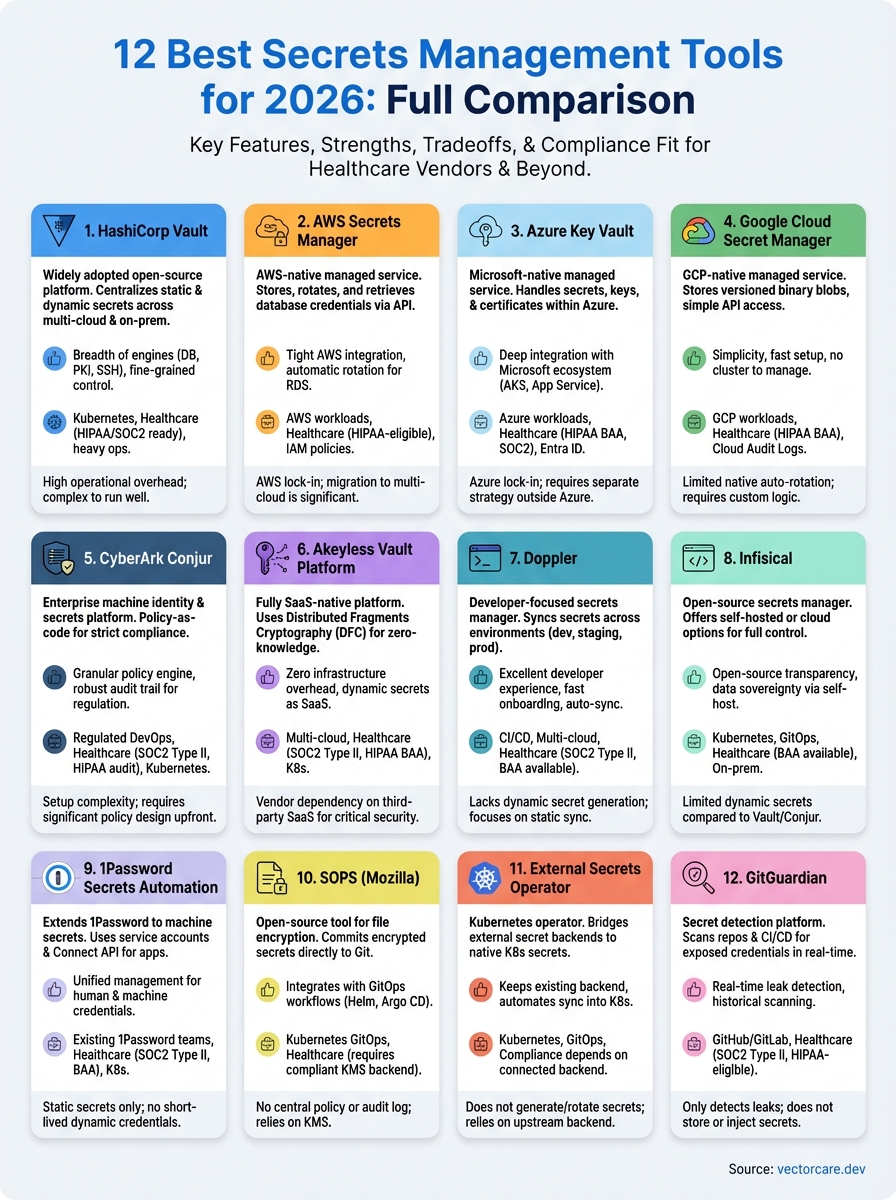
No single tool wins across every situation, and that's the honest takeaway from this comparison of the best secrets management tools available in 2026. Your right pick depends on your stack, your team size, and your compliance requirements. If you run heavily on AWS, AWS Secrets Manager removes friction immediately. If you need maximum control with no vendor lock-in, HashiCorp Vault delivers depth that few tools match. Developer-first teams with limited infrastructure capacity will find Doppler or Infisical far more practical to operate day-to-day.
For healthcare vendors specifically, compliance coverage matters as much as feature depth: confirm BAA availability and audit logging before you commit to any option on this list. If you're building SMART on FHIR applications and want a platform that handles HIPAA compliance, security infrastructure, and EPIC integration from the start, explore what VectorCare can do for your deployment.
The Future of Patient Logistics
Exploring the future of all things related to patient logistics, technology and how AI is going to re-shape the way we deliver care.
Thank you! Your submission has been received!
Oops! Something went wrong while submitting the form.