FHIR R4: What It Is and Why It's the Interoperability Standard

If you build software that touches patient data, you've probably run into the question what is FHIR R4 more than once, usually while a health system's integration team asks you to prove compliance before they'll sign a contract. It sounds like alphabet soup until you realize it's the standard sitting between your product and every EPIC instance you're trying to connect to.
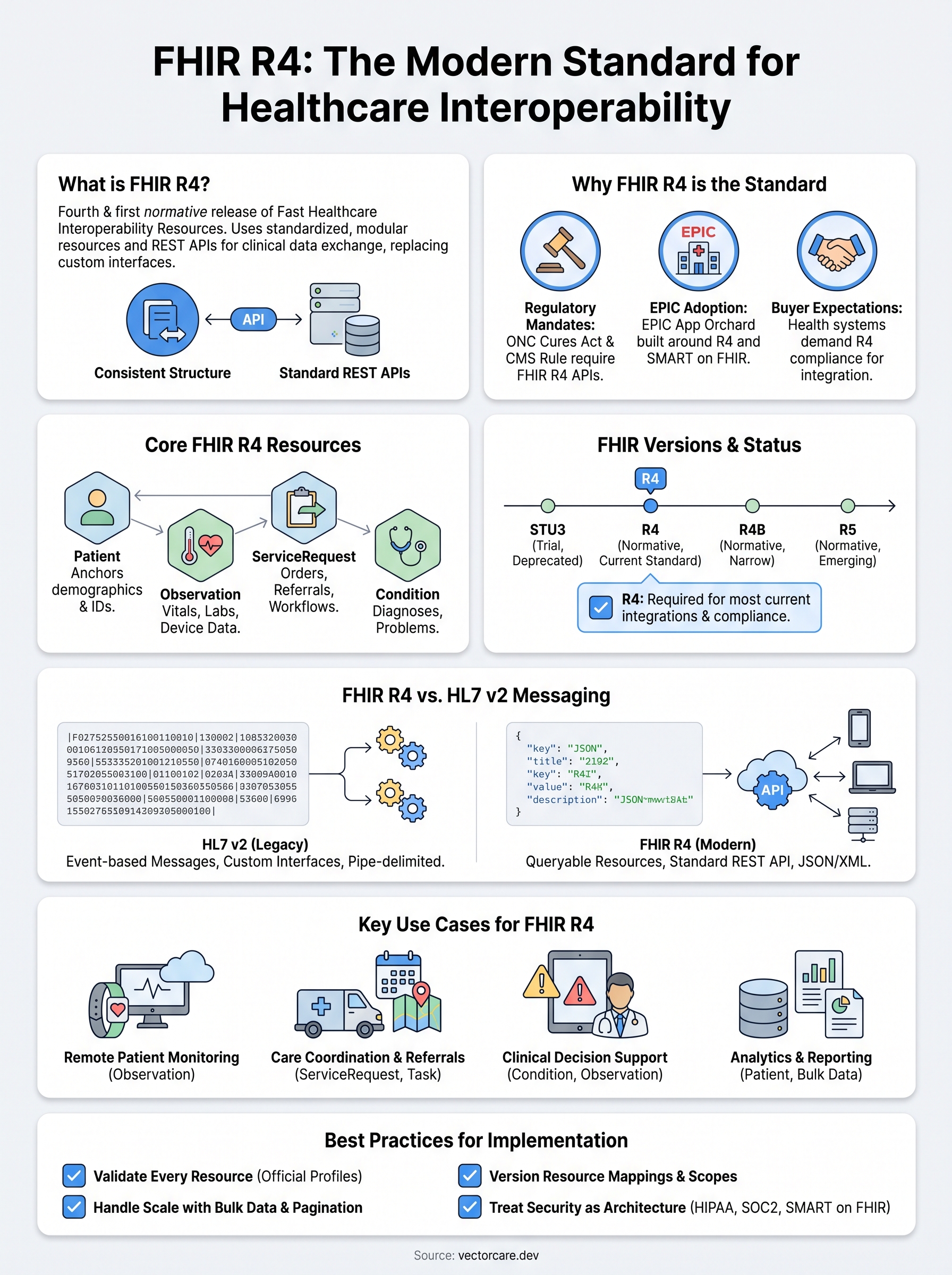
FHIR R4 is the fourth major release of Fast Healthcare Interoperability Resources, and it's the first version HL7 designated as normative, meaning its core content is stable and safe to build on long-term. It organizes clinical data into modular resources like Patient, Observation, and Condition, each with a consistent structure that any system can read using standard REST APIs instead of custom interfaces.
This article breaks down what R4 actually contains, how it differs from earlier FHIR versions (DSTU2, STU3) and from older HL7 v2 messaging, and why EPIC and nearly every major EHR vendor built their integration layer around it. We work with this standard daily helping vendors connect to EPIC, so we'll skip the theory-heavy explanations and focus on what actually matters for getting your app talking to a health record system.
Why FHIR R4 matters for healthcare interoperability
Before FHIR, sharing a single lab result between two systems could take days of manual reconciliation. Hospitals ran on proprietary data formats that never played nicely with each other, and every new integration meant custom code, custom testing, and a custom maintenance headache down the line. FHIR R4 changed that by giving every vendor and every EHR the same blueprint for representing clinical data, so a Condition resource means the same thing in EPIC as it does in Cerner or in your own application.
The interoperability problem before R4
Healthcare data lived in silos because earlier healthcare interoperability standards left too much room for interpretation. HL7 v2 messages could be structured a dozen different ways depending on which vendor wrote the interface engine, and even FHIR's earlier drafts (DSTU2, STU3) changed enough between releases that nobody wanted to build a permanent architecture on top of them. That uncertainty is exactly what kept EPIC integrations expensive: engineering teams had to plan for the standard shifting underneath them, and every shift meant rewriting mapping logic that had taken months to get right.
FHIR R4 is the version where "normative" stopped being a promise and started being a guarantee you could build a business on.
Regulatory mandates locked in R4 as the default
Government regulation made adoption non-negotiable rather than optional. The ONC Cures Act Final Rule and the CMS Interoperability and Patient Access Rule both require certified health IT systems to expose patient data through FHIR R4 APIs. That single regulatory push explains why nearly every EHR vendor standardized on R4 instead of waiting for R5 to mature, and it's a big part of the answer if you're still asking what is FHIR R4 and why you can't avoid it.
| Driver | What it requires | Why it matters for vendors |
|---|---|---|
| ONC Cures Act Final Rule | Certified EHRs must expose FHIR R4 APIs | Health systems expect R4 compliance by default |
| CMS Interoperability Rule | Payers and providers must support patient data access via FHIR | Extends R4 requirements beyond EHR vendors to payers |
| EPIC App Orchard/Showroom | Apps must use SMART on FHIR R4 to list | No listing without R4 compliance |
Given that table, vendors trying to sell into health systems don't really get to pick a different standard. The regulation, the certification process, and the buyer's expectations all point the same direction.
EPIC's adoption sealed R4 as the practical standard
EPIC didn't just support FHIR R4, it built its entire third-party app ecosystem, the Epic App Orchard and Showroom, around it. Every app listed in the EPIC Showroom authenticates through SMART on FHIR and reads or writes data using R4 resources, which means your product's ability to embed into a clinician's workflow depends entirely on how cleanly you implement this one standard. Ignore it or get it wrong, and you end up building one-off HL7 v2 interfaces per hospital, the exact expensive, slow-to-maintain approach R4 was designed to replace.
Hitting this bar without a dedicated FHIR engineering team is where most vendors get stuck, and it's the specific problem our no-code EPIC integration platform is built to solve. Instead of hiring FHIR specialists to map your data model onto forty-plus resource types, you configure the fields and workflows visually, and the platform handles the R4 compliance and Showroom listing underneath.
How to implement FHIR R4 in your application
Getting a working FHIR R4 integration live involves more than reading the spec, and the full path to integrating with Epic EHR has its own steps, costs, and timelines. You need to handle authentication, map your internal data model onto standardized resources, and prove your app behaves correctly before a health system ever sees it. Most vendors underestimate this last part, then spend months in a sandbox environment fixing edge cases their initial architecture never accounted for.
Set up SMART on FHIR authentication first
Every FHIR R4 integration with EPIC starts with SMART on FHIR OAuth 2.0, not the data model. Your app registers as a client, requests scoped access tokens, and launches inside the EHR's context, meaning it knows which patient and which provider are active without you building any of that session logic yourself. Get this wrong, and nothing downstream works, no matter how clean your resource mapping is.
If your OAuth flow isn't solid, your FHIR R4 integration doesn't exist yet, no matter how much resource-mapping work you've done.
Map your data model to FHIR resources
Once authentication works, you translate your application's internal fields into the appropriate FHIR resource types. A referral platform might map its intake form to a ServiceRequest resource, a remote monitoring vendor might push readings as Observation resources tied to a Patient reference. This is where most engineering time disappears, because each resource has required fields, value sets, and extension points that don't always line up cleanly with how your product already stores data.
A basic Observation resource, simplified, looks like this:
{
 "resourceType": "Observation",
 "status": "final",
 "code": {
 "coding": [{ "system": "http://loinc.org", "code": "8867-4", "display": "Heart rate" }]
 },
 "subject": { "reference": "Patient/123" },
 "valueQuantity": { "value": 78, "unit": "beats/minute" }
}
That structure repeats across dozens of resource types, each with its own required fields and coding systems, which is exactly why full FHIR R4 compliance takes real engineering time to get right.
Test against a sandbox before submitting for review
Before anything reaches production, validate your implementation against a SMART Health IT sandbox instance and EPIC's own test patients. A short pre-submission checklist that catches most rejections:
- Confirm OAuth scopes match exactly what your app requests at launch
- Validate every resource against the official FHIR R4 schema, not just your own assumptions
- Test with edge-case patients (missing fields, multiple identifiers, historical records)
- Confirm your app handles paginated Bundle responses correctly
- Log every failed request during testing so you can diagnose mapping errors before submission
Working through this checklist manually, resource by resource, is the part that stretches a 3-week timeline into 6 months for teams without dedicated FHIR engineers. Platforms built specifically for EPIC integration handle this validation layer automatically, which is the practical shortcut most vendors end up needing once they see how much testing a full implementation actually demands.
Core FHIR R4 resources you need to know
FHIR R4 defines more than 145 resource types, but you'll spend 90% of your integration work inside a dozen of them. Every resource follows the same JSON structure with required fields, extensions, and reference links to other resources, which is what makes them predictable once you've learned the pattern. Knowing which ones actually show up in day-to-day EPIC integrations saves you from reading the entire specification before you write a single line of mapping logic.
Learn the dozen resources that carry 90% of the work, and the other 130 stop looking intimidating.
Patient and administrative resources
Every integration starts with Patient, the resource that anchors demographics, identifiers, and contact details to a single record everything else references. Practitioner and Organization sit alongside it, identifying who provided care and where, while Encounter ties a visit together with a start time, end time, and status. Get these four right first, because nearly every clinical resource downstream includes a reference back to one of them.

| Resource | What it holds | Typical use |
|---|---|---|
| Patient | Demographics, identifiers, contact info | Anchors every other resource to a person |
| Practitioner | Provider name, role, credentials | Attributes orders and notes to a clinician |
| Organization | Facility or department details | Scopes data to a specific site or system |
| Encounter | Visit type, status, timeframe | Groups related clinical events together |
Clinical event resources
Once the administrative layer is in place, clinical data flows through resources like Observation, Condition, MedicationRequest, and AllergyIntolerance. Observation covers nearly anything measurable, vitals, lab values, remote monitoring readings, so it's usually the resource you'll touch most if you're building a monitoring or diagnostics product. Condition tracks diagnoses and problems, while MedicationRequest and AllergyIntolerance handle prescribing safety checks that a health system will scrutinize closely during review.
- Observation: vitals, labs, device readings, assessment scores
- Condition: diagnoses, problems, clinical status over time
- MedicationRequest: prescribing orders and dosage instructions
- AllergyIntolerance: documented allergies and adverse reactions
- DocumentReference: links to clinical notes, PDFs, and scanned records
Workflow and referral resources
Workflow-heavy vendors, referral platforms, care coordination tools, transportation and DME companies, lean heavily on ServiceRequest, Task, and CarePlan instead of pure clinical resources. ServiceRequest represents an order or referral request, Task tracks its progress through a workflow, and CarePlan ties multiple actions together into a coordinated plan across providers. These three resources are exactly the ones our no-code workflow builder configures visually, since routing logic and approval flows map almost one-to-one onto how FHIR R4 already structures them, letting you skip writing custom resource-handling code for each new integration.
FHIR R4 vs STU3, R4B, and R5
Once you understand what FHIR R4 actually is, the next question vendors usually ask is which version they should target, since the HL7 FHIR specification has gone through several published releases since the standard started. STU3, R4B, and R5 all exist alongside R4 in production systems today, and picking the wrong one for a given integration can mean rebuilding resource mappings later. The short answer for anyone building against EPIC: build for R4, because that's what the regulation requires and what the EPIC Showroom expects, but knowing how the other versions differ helps you understand why R4 won and what's coming next.
STU3 came before normative status existed
STU3 stands for Standard for Trial Use, and that label tells you everything about why vendors hesitated to build on it. Resources could still change shape between STU3 releases, so an integration built in 2018 might need rework by 2019 just to stay compliant. EPIC and other EHR vendors supported STU3 during the transition period, but almost nobody treats it as a target for new work anymore. If you inherit a legacy integration still running on STU3, plan a migration, because support windows keep shrinking as certified health IT moves fully to R4.
Building on STU3 today means building on a foundation HL7 already told everyone was temporary.
R4B added narrow updates without breaking anything
R4B is a smaller, targeted update released between R4 and R5, mainly to support specific use cases like medication and immunization tracking that needed refinement before R5 was ready. It doesn't replace R4 so much as extend it in a backward-compatible way, which means most vendors never need to think about it directly. EPIC integrations still run on core R4, so unless a specific project requires an R4B-only resource, you can treat this version as a footnote rather than a decision point.
R5 is normative but adoption is still catching up
R5 became normative in 2023 and adds new resources along with cleanup of inconsistencies that R4 carried forward from earlier drafts. The problem for vendors is timing: EPIC's App Orchard requirements, ONC certification rules, and CMS interoperability mandates all still reference R4, so building an app exclusively on R5 today means it won't meet the compliance bar health systems actually enforce. That will shift eventually, but nobody building a product for health system contracts this year should bet the architecture on it.
| Version | Status | Practical use today |
|---|---|---|
| STU3 | Trial use, deprecated | Legacy systems only, migrate away |
| R4 | Normative, industry standard | Required for EPIC, ONC, CMS compliance |
| R4B | Normative, narrow scope | Rare, specific medication/immunization cases |
| R5 | Normative, emerging | Not yet required by major EHR certifications |
The practical takeaway is simple: unless you have a specific technical reason to target R4B or R5, build against R4. It's the version regulators mandate, the version EPIC's Showroom validates against, and the version every other EHR vendor built their FHIR endpoints around, which makes it the only real answer when a health system asks which standard your app supports.
FHIR R4 vs HL7 v2: what actually changed
HL7 v2 has run hospital data exchange since the 1980s, and it still handles the majority of lab, admission, and order messaging inside most health systems today. So when vendors ask what is FHIR R4 in relation to v2, the honest answer is that FHIR didn't replace v2 everywhere, it replaced the parts of v2 that made modern app integration painful. Understanding that difference tells you where each standard actually fits in a real EPIC environment.
Messages versus resources
HL7 v2 sends pipe-delimited messages triggered by events, an ADT message fires when a patient gets admitted, an ORU fires when a lab result posts, and each message bundles everything related to that event into one blob. FHIR R4 instead breaks data into standalone resources like Patient, Observation, and Encounter, each addressable on its own and reusable across any workflow that needs it. That shift from event-triggered messages to queryable resources is the single biggest architectural change between the two standards, and it's what lets your app pull exactly the data it needs instead of parsing an entire message to extract one field.

HL7 v2 tells you what just happened. FHIR R4 lets you ask what's true right now.
Point-to-point interfaces versus REST APIs
Every v2 interface is typically a custom, point-to-point connection configured by an interface engine, meaning a hospital with ten vendor systems often maintains ten separate, hand-tuned message mappings that don't share logic with each other. FHIR R4 exposes data through a standard FHIR REST API with consistent endpoints, so a request for Patient/123 returns the same JSON structure whether you're querying EPIC, Cerner, or a smaller regional EHR. This is the practical reason FHIR integrations take weeks instead of months once the resource mapping is done: you're calling a documented API instead of reverse-engineering someone else's interface engine configuration.
| Aspect | HL7 v2 | FHIR R4 |
|---|---|---|
| Data format | Pipe-delimited text messages | JSON or XML resources |
| Trigger model | Event-based messages (ADT, ORU, ORM) | On-demand REST queries |
| Integration pattern | Point-to-point, custom per connection | Standard REST API, reusable across systems |
| Authentication | Varies by interface engine | SMART on FHIR OAuth 2.0 |
| Versioning consistency | High variation between vendor implementations | Standardized structure across all R4 systems |
Why v2 hasn't disappeared
Don't mistake FHIR's dominance for v2's extinction. Hospitals still run massive amounts of internal messaging traffic, lab interfaces, and legacy system communication over v2 because ripping it out would mean rebuilding decades of stable infrastructure with no clear benefit. What changed is where the new work goes: third-party app integrations, the kind that get vendors into the EPIC Showroom, run on FHIR R4 almost exclusively now, because that's what regulation and EPIC's own platform require. If you're building a product meant to sell into health systems, you're building on FHIR R4, not v2, and that's not a stylistic preference, it's the only path that gets your app certified and listed.
Common use cases for FHIR R4 in healthcare
Most vendors don't ask what is FHIR R4 out of curiosity, they ask because a specific product needs a specific data flow into EPIC. The standard shows up differently depending on what you're building, but the same handful of use cases account for nearly every integration request we see. Walking through them makes the abstract resource list from earlier sections concrete.
Remote patient monitoring and device data
RPM vendors pushing device data into Epic send blood pressure, glucose, weight, and pulse oximetry readings into a patient's chart as Observation resources tied back to a Patient reference. Each reading carries a LOINC code, a value, and a timestamp, which lets clinicians see trend lines inside EPIC instead of logging into a separate portal. This use case drives more FHIR R4 traffic than almost any other category, because the data is high-volume, time-sensitive, and worthless if it sits outside the clinical workflow where a provider actually looks.

A remote monitoring app that can't push Observation data into the chart isn't remote monitoring, it's a spreadsheet nobody reads.
Care coordination, referrals, and transportation
Referral platforms, home health agencies, and non-emergency medical transportation vendors rely on ServiceRequest and Task resources to move a patient from one care setting to another without a phone call or fax. A discharge planner creates a ServiceRequest for transportation, the vendor's system picks it up as a Task, updates its status as the ride happens, and the hospital sees real-time progress without leaving EPIC. CarePlan ties these pieces together when multiple vendors touch the same patient, which is increasingly common as health systems outsource more post-acute coordination.
Clinical decision support at the point of care
Clinical decision support vendors embed logic directly into a clinician's workflow using SMART on FHIR launches that read Condition, MedicationRequest, and Observation data in real time, then surface an alert, a recommendation, or a risk score before the provider finishes the encounter. Because the app reads live FHIR R4 data instead of a nightly data extract, the recommendation reflects what's actually true in the chart at that moment, not what was true yesterday.
Analytics, quality reporting, and population health
Analytics platforms pull large volumes of Patient, Encounter, and Observation data across a population to calculate quality measures, risk scores, and outcomes reporting required by CMS and value-based care contracts. FHIR's Bundle responses make bulk queries manageable, letting a vendor request a defined patient cohort instead of negotiating a custom data extract with every hospital's IT team.
| Use case | Primary resources | Why FHIR R4 fits |
|---|---|---|
| Remote patient monitoring | Observation, Patient | High-volume, time-stamped readings need a standard structure |
| Care coordination/referrals | ServiceRequest, Task, CarePlan | Tracks multi-vendor workflows without phone calls or faxes |
| Clinical decision support | Condition, MedicationRequest, Observation | Real-time chart data beats stale extracts |
| Analytics and quality reporting | Patient, Encounter, Observation | Bulk queries replace custom data extracts |
Whatever category your product falls into, the pattern repeats: you're mapping your existing data model onto a handful of resources and exposing it through the same SMART on FHIR flow. Our no-code EPIC integration platform is built specifically around these four categories, since almost every vendor we work with fits into one of them.
Best practices for working with FHIR R4
Knowing the standard is one thing. Building an implementation that survives an EPIC review, a security audit, and two years of production traffic is another. The teams that avoid rework treat these practices as non-negotiable from day one, not as cleanup work after a rejected submission.
The vendors who pass EPIC review on the first try are the ones who validated against the spec before EPIC ever saw their app.
Validate every resource against the official profiles
Don't trust your own assumptions about what a valid resource looks like, since FHIR profiles define the constraints and extensions each system actually expects. Run every payload through the official FHIR R4 validator before it ever reaches a sandbox, because required fields, cardinality rules, and value set bindings catch mistakes your own testing usually misses. A resource that looks correct in your database can still fail validation if a coded field points to the wrong system or a reference points to a resource that doesn't exist yet.
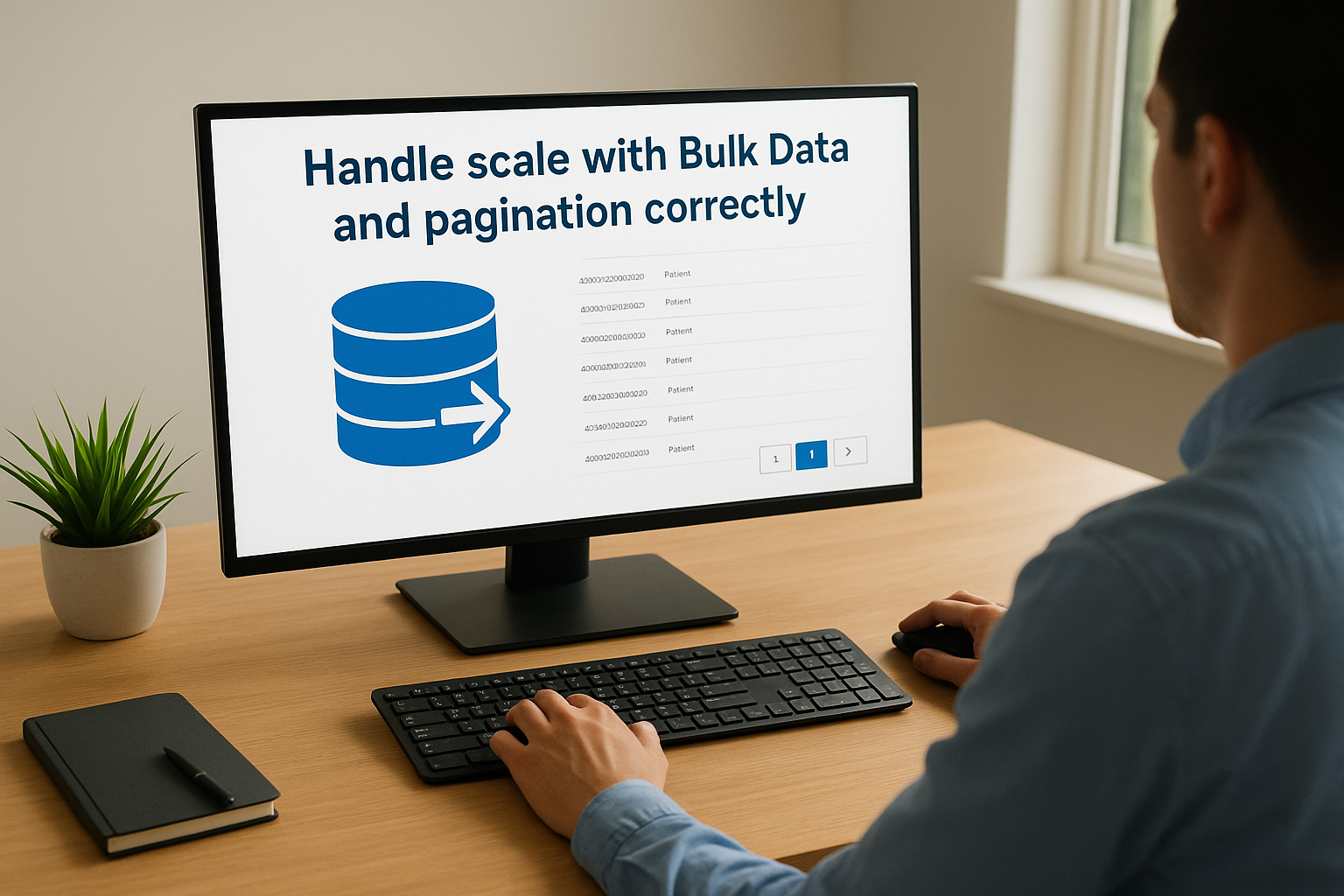
Handle scale with Bulk Data and pagination correctly
Single-patient queries work fine for a demo, but production traffic means pulling data for hundreds or thousands of patients at once. Use the FHIR Bulk Data Access spec for population-level exports instead of looping single requests, and always handle paginated Bundle responses properly. Skipping pagination logic is one of the most common causes of silent data loss we see, where an integration quietly stops pulling records past the first page and nobody notices until a clinician asks why a chart looks incomplete.
Version your resource mappings deliberately
EPIC updates its Epic FHIR API endpoints periodically, and resource behavior can shift slightly between releases even within R4. Keep a changelog of your resource mappings so you can trace exactly what changed when something breaks, and test against EPIC's sandbox after every major EHR update rather than waiting for a production error to surface the problem. A short list of what to track:
- Which resource fields your app reads and writes, mapped to your internal schema
- Which OAuth scopes each app feature requires
- Sandbox test results tied to specific EPIC release versions
- Known deviations between EPIC's documented FHIR implementation and the base R4 spec
Treat security and compliance as part of the architecture, not an afterthought
Every FHIR R4 integration touching EPIC needs to meet HIPAA and SOC2 requirements, which means encryption in transit and at rest, audit logging on every data access, and a signed Business Associate Agreement before a single patient record moves. Building this layer after the resource mapping is done almost always means rearchitecting parts of the app, since access controls and audit trails need to be baked into how you request and store data from the start.
Following these practices consistently is exactly what separates a smooth EPIC Showroom submission from a six-month back-and-forth. It's also why most vendors we talk to eventually stop building this layer themselves. Our managed EPIC integration platform handles validation, compliance, and versioning underneath your workflow configuration, so the best practices above are already built in rather than something your team has to maintain resource by resource.
Where FHIR R4 fits next
FHIR R4 isn't a passing trend you need to track until something newer replaces it. It's the regulatory floor for anyone selling software into health systems today, and that won't change while ONC, CMS, and EPIC's own certification process all point to the same version. R5 will matter eventually, but building for what health systems actually enforce right now means building for R4, full stop.
What is FHIR R4, in the end? It's the reason a remote monitoring app can push a heart rate reading into EPIC without a custom interface, and the reason your product's contract with a health system depends on getting resource mapping, OAuth, and compliance right the first time. Most vendors don't need to become FHIR experts to hit that bar. They need a platform that already has. If you'd rather ship an EPIC-ready app in weeks than spend a year building this layer yourself, see how VectorCare builds and deploys your SMART on FHIR app in days.
The Future of Patient Logistics
Exploring the future of all things related to patient logistics, technology and how AI is going to re-shape the way we deliver care.
Thank you! Your submission has been received!
Oops! Something went wrong while submitting the form.