Epic Interconnect: What It Is And How It Works

If you've been hunting for what is Epic Interconnect and keep landing on vague vendor pages, you're not alone. The term gets tossed around in health system RFPs and integration docs without much explanation, and that's a problem when you're trying to figure out whether it affects your product's path into a hospital's EHR. This confusion usually shows up right when a health system partner mentions it during a contract negotiation, leaving your team scrambling for a straight answer.
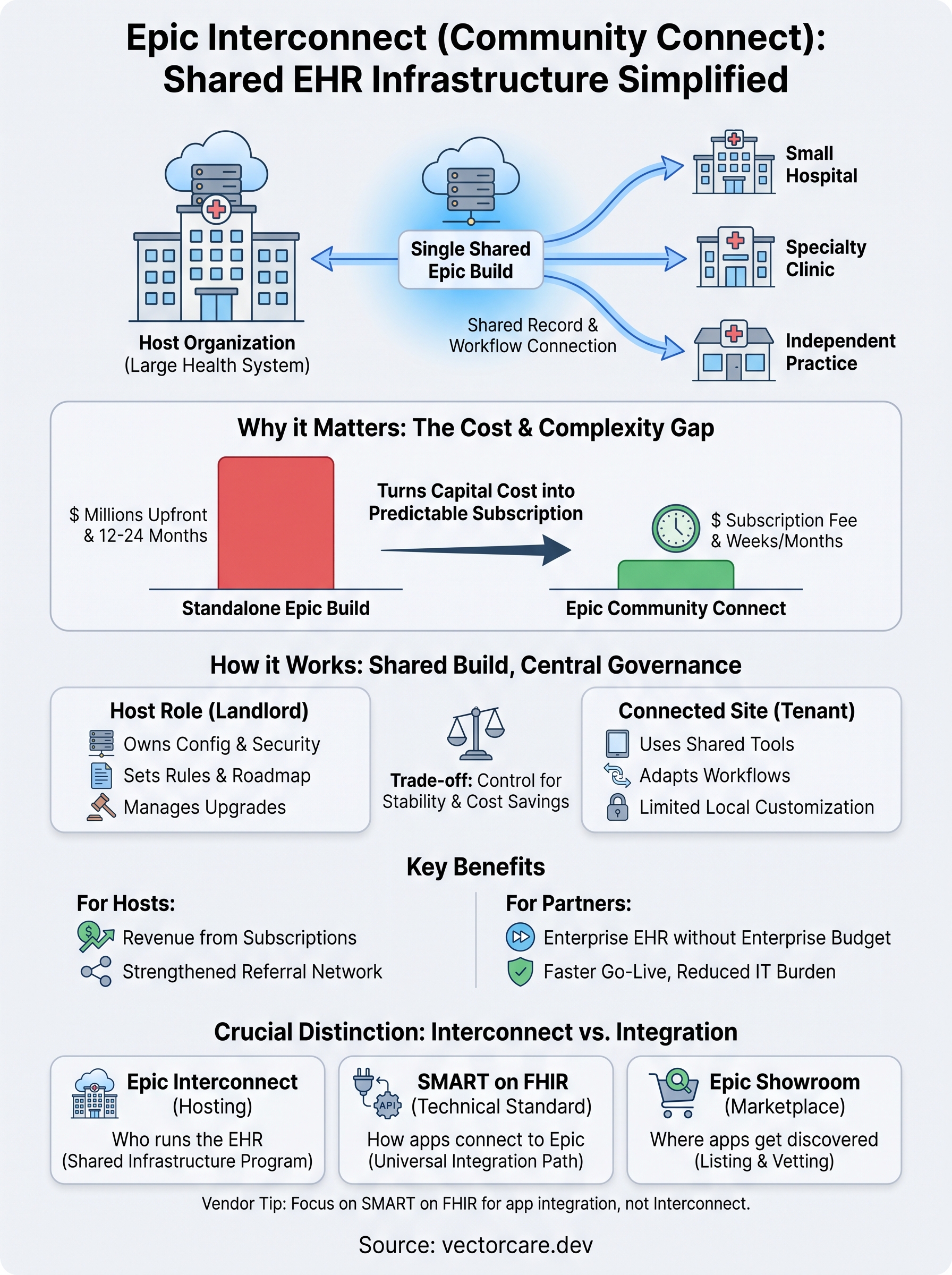
Epic Interconnect, more commonly known as Epic Community Connect, is Epic's program that lets a hospital or health system extend its own Epic instance to affiliated clinics, smaller hospitals, and independent practices. Instead of each site buying and running separate Epic software, they connect into the host organization's system, sharing records and workflows under one shared EHR infrastructure.
In this article, we'll break down exactly how Community Connect works, who typically hosts and who typically connects, and what it means for the affiliated organizations using it. We'll also touch on how this differs from the SMART on FHIR integrations vendors build to plug their apps directly into Epic, since the two get confused often but solve very different problems.
Why Epic Interconnect matters for healthcare organizations
Rural hospitals and small physician groups face a brutal math problem with Epic. A full, standalone Epic implementation runs into the millions before a single patient chart loads, and that number doesn't include the ongoing IT staff, servers, and upgrade cycles that most 50-bed hospitals or independent practice groups simply can't justify. Epic Community Connect exists to solve that exact problem: a larger health system, acting as the "host," extends its own Epic instance to smaller affiliated sites instead of forcing each one to buy and run its own system. Understanding what Epic Interconnect actually does for both sides explains why the program has become the default path for so many smaller providers trying to modernize without a seven-figure IT budget.
The cost gap that drives adoption
Hospitals don't choose Community Connect because it's trendy. They choose it because the alternative is financially out of reach for most independent sites, and the difference shows up clearly when you line the two paths up side by side.

| Approach | Typical upfront cost | Implementation timeline | Ongoing IT burden |
|---|---|---|---|
| Standalone Epic build | $1M-$2M+ | 12-24 months | Full internal IT team, servers, upgrades |
| Epic Community Connect | Setup fee + monthly subscription | Weeks to a few months | Host manages upgrades, security, most maintenance |
Epic Community Connect turns a million-dollar EHR project into a monthly line item that a smaller hospital can actually afford.
That gap is the whole reason regional health networks keep growing their Connect rosters year over year. It's not just cheaper, it's faster to stand up, and it shifts the technical maintenance burden onto the host, which usually has the staff and budget to handle it well.
Continuity of care across a shared record
Beyond the budget argument, Community Connect solves a clinical problem that standalone systems can't touch as easily: fragmented patient records across affiliated sites. When a rural clinic, a specialty practice, and the regional hospital all sit on the same Epic instance, a patient's history, medications, and test results follow them automatically instead of getting faxed or re-entered at every stop. This matters most in referral-heavy relationships, where a primary care site sends patients to a host hospital for specialty care or procedures. Shared infrastructure means the specialist sees the same chart the primary care doctor was looking at that morning, not a summary sheet that's missing half the context.
Why vendors and health system partners should care
If you sell software or services into health systems, Community Connect changes who you're actually negotiating with. A signed contract with a small connect-site hospital doesn't necessarily mean you're integrating with a standalone Epic build, it often means you're really dealing with the host system's Epic environment, governance rules, and IT review process. That distinction affects timelines, approval chains, and even which Epic App Orchard listing applies to your integration. Vendors who understand this upfront avoid the common mistake of scoping a project against the wrong Epic instance, then discovering weeks later that the real decision-maker sits at the host organization, not the smaller site that signed the initial deal.
How Epic Interconnect works in practice
Understanding what Epic Interconnect looks like day-to-day matters more than knowing the definition, because the mechanics determine what your team can and can't control once a site goes live. The host organization owns a single Epic build, including all its configuration, security settings, and clinical content, and every connected site operates inside that same build rather than maintaining a separate one. Picture it less like a partnership between equals and more like a landlord-tenant arrangement, where the host sets the rules of the building and the connected sites move in and adapt their workflows to fit.
Setting up the connection
Getting a new site onto a host's Epic instance follows a fairly predictable sequence, even though the exact timeline varies by health system:

- The host's Epic team assesses the connecting site's clinical workflows and maps them to existing Epic configurations
- IT teams handle network connectivity, security credentials, and data access permissions
- The connecting site's staff go through training on the host's specific Epic build, not a generic version
- A go-live date gets set, often with a support team on-site for the first few days
- Post-launch, the host's team fields support tickets and manages any workflow adjustments
This process typically runs weeks to a few months, depending on how many departments and specialties the connecting site needs configured.
Shared build, local flexibility
Here's where a lot of people misunderstand the model: connected sites aren't just viewing the host's data, they're actively using the same charting tools, order sets, and clinical decision support that the host's own providers use. That shared foundation is what makes Community Connect valuable, but it also means connected sites give up a fair amount of customization control. A clinic can usually request minor tweaks, like adding a specialty-specific order set, but it can't rebuild core workflows the way it could with a standalone system.
A connected site trades customization control for a working, fully-supported EHR it could never afford to build alone.
Where governance decisions actually happen
Governance councils at the host organization typically decide what changes roll out across the shared build, since a change made for one connected site affects everyone on that instance. Requests from smaller sites go through a review process rather than getting implemented immediately, which is a real trade-off worth understanding before you sign on as a connected partner or plan an integration around one.
Key benefits of Epic Interconnect for hosts and partners
Both sides of a Community Connect relationship get something real out of the arrangement, though the benefits look different depending on where you sit. Hosts turn their existing Epic investment into a revenue-generating asset, while connected partners get access to enterprise-grade software they'd never build on their own. Looking at what each party actually gains helps explain why the program keeps expanding across regional health networks instead of staying a niche arrangement.
What hosts get out of the deal
Hospitals that host a Community Connect network aren't doing it out of charity. Every connected site pays a recurring subscription fee, which turns an existing Epic build into a source of ongoing revenue rather than a pure cost center. Beyond the money, hosts strengthen their referral networks, since connected sites tend to send specialty cases and admissions back to the host hospital once records flow seamlessly between the two. That referral pull is often the real strategic reason a health system builds out its Connect program in the first place, not the subscription fees themselves.
What connected partners get
Smaller hospitals, clinics, and independent practice groups get the clearest win: access to a fully built, actively maintained Epic system without the capital outlay a standalone build demands. That access comes with several concrete advantages:
- Faster go-live compared to a from-scratch Epic implementation, often measured in weeks or months instead of years
- Predictable operating costs through subscription pricing instead of large capital expenditures
- Reduced IT staffing burden, since the host handles security patches, upgrades, and most infrastructure work
- Better care coordination with the host hospital and other connected sites through a shared patient record
- Access to Epic's full feature set, including clinical decision support tools that would be expensive to build independently
Connected sites get an enterprise EHR without the enterprise budget, and hosts turn their Epic build into a growth engine.
The trade-off both sides accept
Community Connect works because both parties accept a trade. Hosts take on the operational responsibility of supporting other organizations' clinical staff, which stretches their IT and training teams thinner than running a single-site build. Partners give up governance control in exchange for stability and cost savings. Vendors selling into either side of this relationship should recognize that a connected site's enthusiasm for a new tool doesn't guarantee a fast rollout, since any change still has to clear the host's review process before it reaches the shared build.
Epic Interconnect vs SMART on FHIR and App Orchard
Healthcare vendors often confuse Epic Community Connect with the integration paths they actually need, and that mix-up wastes weeks of scoping time. Community Connect is a hospital-to-hospital arrangement where one organization extends its own Epic build to affiliated sites. SMART on FHIR is something entirely different: a technical standard that lets a third-party application plug directly into any Epic instance, regardless of who owns or hosts it. If you're a digital health vendor trying to embed your product into a clinical workflow, Community Connect isn't your problem to solve. SMART on FHIR is.
Three different layers, three different jobs
Grouping these terms together causes real confusion, so it helps to see them side by side and understand what each one actually governs.

| Term | What it actually is | Who it's for |
|---|---|---|
| Epic Community Connect | Program letting a host extend its Epic build to affiliated sites | Health systems and smaller affiliated hospitals/clinics |
| SMART on FHIR | Technical standard for apps to securely pull/push data via Epic's APIs | Software vendors building integrations |
| Epic App Orchard/Showroom | Epic's marketplace where vendor apps get listed for discovery | Vendors seeking distribution to health systems |
Community Connect decides who runs the EHR, SMART on FHIR decides how your app talks to it, and App Orchard decides who finds out your app exists.
Why vendors need to know which layer applies
A vendor building a remote patient monitoring tool or clinical decision support app doesn't need to negotiate a Community Connect relationship. SMART on FHIR compliance is what gets your app talking to Epic's data, whether the hospital you're connecting to is a Community Connect host, a connected site, or a fully standalone Epic build. That distinction matters because the technical requirements barely change, but the business relationship does. If your target hospital is a connected site, remember from the earlier section that governance decisions often route through the host organization, which can add a review step to your integration timeline.
Where App Orchard fits into the picture
Once your app meets SMART on FHIR standards, listing it on Epic's App Orchard, now called Epic Showroom, gives health systems a way to discover and vet it before signing a contract. This step runs parallel to Community Connect entirely; a hospital doesn't need to be a Connect host or a connected site to browse and adopt an App Orchard listing. Vendors sometimes assume Community Connect status affects their App Orchard eligibility, but the two programs don't interact. One governs shared EHR infrastructure between organizations, the other governs how outside software gets discovered and approved for use inside any Epic environment.
What Epic Interconnect costs and how pricing works
Pricing for Epic Interconnect isn't published anywhere, because each host organization negotiates its own rates with connected sites based on size, specialty mix, and how much support the site needs. That said, most Community Connect subscriptions follow a similar structure across the industry, even if the actual numbers shift from one health system to the next. Knowing the standard pieces helps you budget realistically instead of guessing based on a single vendor's anecdote.
The pieces of a Community Connect bill
Budgets built around Community Connect typically include a few recurring line items rather than one flat number:
- One-time setup fee covering initial configuration, network connectivity, and staff training
- Monthly or annual subscription fee per provider, per department, or per site, depending on the host's model
- Support and maintenance charges, often bundled into the subscription but sometimes billed separately for after-hours help
- Optional add-ons like extra reporting modules or specialty-specific order sets
Hosts price these components to recover their own Epic investment while still undercutting a standalone build by a wide margin.
Why pricing varies so much by host
Costs swing widely because every host is solving a different financial equation. A large academic medical center hosting a dozen rural clinics prices differently than a regional hospital extending its build to two nearby practices. Site size matters too: a solo physician practice pays far less than a multi-specialty group with dozens of providers needing full clinical workflows configured. Even geography plays a role, since some hosts price regionally to stay competitive against nearby health systems running their own Connect programs.
There's no published Epic Interconnect price sheet, because every host prices its own build differently.
Budgeting for the real total cost
Expecting the subscription fee to cover everything is the most common budgeting mistake connected sites make. Training time, workflow adjustments during go-live, and occasional customization requests all carry costs beyond the monthly bill, even when the host absorbs most infrastructure work. Total cost of ownership still lands far below a standalone Epic build, but it's rarely as simple as the subscription number quoted in an initial sales conversation. Sites that budget for a 10-20% buffer above the quoted subscription rate tend to avoid unpleasant surprises once training and configuration work actually starts.
Common challenges and risks to plan for
Epic Interconnect solves real problems, but it introduces new ones that rarely surface until a site is already live. Community Connect shifts control away from the connected organization, and that loss of control creates friction points that both hospital administrators and vendors need to plan around before signing anything. Knowing where these risks show up ahead of time saves you from discovering them mid-implementation, when fixing them costs far more time and goodwill.
Dependence on the host's roadmap
Connected sites don't set their own upgrade schedule. If the host organization decides to delay an Epic upgrade, add a new module, or change a workflow across the shared build, every connected site rides along with that decision whether it fits their needs or not. Smaller practices sometimes find themselves waiting months for a feature the host hasn't prioritized, simply because their voice carries less weight in the governance queue than the host's own departments. That dependency is the price of shared infrastructure, and it's worth naming clearly before a site signs a multi-year agreement.
Joining a shared Epic build means adopting someone else's roadmap, not building your own.
Data governance across organizational lines
Patient data now lives inside the host's infrastructure, which raises real questions about who controls access, audit logs, and breach response when something goes wrong. Business Associate Agreements need to spell out exactly which party handles what under HIPAA, and vague language here creates liability gaps that surface at the worst possible time, usually during an actual security incident. Contracts should specify data ownership, export rights if the relationship ends, and exactly how incident response gets coordinated between host and connected site.
Limited room for local customization
A connected site that needs a workflow the host hasn't built often has two choices: submit a request and wait for governance approval, or work around the limitation with manual processes. This gets frustrating fast for specialty practices with unique documentation needs that don't match the host's general configuration. Sites considering Community Connect should map their must-have workflows against the host's existing build before signing, not after go-live.
Practical risks worth scoping upfront
- Exit costs: leaving a Connect arrangement means migrating years of records to a new system
- Support response times: host IT teams juggle multiple connected sites, not just yours
- Vendor integration delays: any third-party app still needs the host's sign-off before touching the shared build
Each of these risks is manageable with the right contract language and realistic expectations, but they rarely get mentioned in the initial pitch.
Steps to implement or connect through Epic Interconnect
Walking into a Community Connect arrangement without a plan wastes the speed advantage that makes it worth doing in the first place. Whether you're a small hospital evaluating a host relationship or a vendor trying to figure out where your integration fits, the process follows a fairly consistent sequence across health systems. Following these steps in order keeps you from signing a contract before you understand what you're actually agreeing to.
For hospitals and clinics evaluating a host relationship
Smaller organizations considering Epic Interconnect should work through these steps before signing anything:
- Identify potential host organizations in your region that already run active Community Connect programs
- Request a workflow mapping session to see how your current documentation and order sets translate into the host's existing build
- Review the contract's data governance terms, including exit rights and breach response responsibilities
- Compare subscription pricing against your current EHR costs, including staff time and infrastructure you'd retire
- Set a realistic go-live timeline with the host's implementation team, factoring in staff training
Skipping the workflow mapping step is the most common mistake here. Sites that assume the host's build matches their needs often discover gaps only after go-live, when fixing them means submitting a governance request instead of just flipping a switch.
For vendors targeting connected sites
Vendors face a different set of steps, since Community Connect status changes who approves your integration rather than how your app technically works. Start by confirming whether your target hospital is a host or a connected site, since that determines who actually signs off on your integration. From there, build your app against SMART on FHIR standards regardless of the hospital's Connect status, since the technical requirements don't change based on who hosts the build. List the app on Epic's Showroom to give any Epic-based health system, connected or not, a way to discover it. Finally, budget extra review time if your target is a connected site, since requests often route through the host's governance queue before reaching the shared build.
Confirm who actually owns the Epic build before you scope a single line of integration work.
Avoiding the scoping trap
Teams on both sides tend to underestimate one thing: the entity that signs the contract isn't always the entity that controls the technical environment. Clarifying that upfront, before any workflow mapping or development work starts, saves weeks of rework later.
Finding the right integration path
Epic Interconnect answers a hosting question, not an integration question. It determines whether a hospital runs its own Epic build or shares one with a larger partner, and that distinction matters most when you're figuring out who actually approves your project. If you're a vendor, chasing a Community Connect relationship is almost always the wrong move. What you need is SMART on FHIR compliance and a listing that gets your app in front of health systems, connected or not.
Building that integration yourself still means months of FHIR API work, OAuth setup, and a submission process that most product teams have never touched. VectorCare's no-code platform handles that entire path, from workflow configuration to Epic Showroom listing, in 3-6 weeks instead of a year. If you'd rather skip the scoping confusion entirely, build and deploy your SMART on FHIR app in days.
The Future of Patient Logistics
Exploring the future of all things related to patient logistics, technology and how AI is going to re-shape the way we deliver care.
Thank you! Your submission has been received!
Oops! Something went wrong while submitting the form.