SSO vs OAuth: Key Differences for Healthcare Apps Explained

SSO vs OAuth: Key Differences for Healthcare Apps Explained
When healthcare vendors build applications that integrate with EPIC or other EHR systems, authentication and authorization aren't just technical checkboxes, they're foundational to security and compliance. Understanding SSO vs OAuth determines how your app handles user identity and what data it can access on behalf of clinicians and patients.
Here's where the confusion starts: SSO and OAuth often get lumped together, but they solve different problems. SSO authenticates users across multiple applications with a single login. OAuth authorizes access to resources without sharing credentials. For healthcare apps using SMART on FHIR to connect with EPIC, knowing when and how to use each protocol matters for compliance, user experience, and winning health system contracts.
This article breaks down the key differences between SSO and OAuth, explains how they work together in healthcare contexts, and clarifies what this means for vendors building EHR-integrated applications. At VectorCare, our no-code platform handles these protocols automatically as part of SMART on FHIR compliance, but understanding the underlying concepts helps you make informed decisions about your integration strategy and speak confidently with health system IT teams.
Why SSO and OAuth get confused
The SSO vs OAuth debate trips up many healthcare vendors because these protocols frequently work together in the same login flow. When a clinician accesses your EPIC-integrated app, they might authenticate through EPIC's SSO system and then your app uses OAuth to access patient data. This overlap in timing makes it hard to separate what's doing what, especially when both happen in seconds behind the scenes.
They use similar security concepts
Both SSO and OAuth rely on tokens and redirects to avoid passing passwords directly between systems. You'll see terms like "authorization server," "authentication," and "access tokens" used in documentation for both protocols. This shared vocabulary creates confusion, particularly when technical specifications blur the line between who the user is (authentication) and what they can access (authorization).
Healthcare vendors often encounter SSO and OAuth bundled in the same vendor documentation or security requirement checklist from health systems. EPIC's requirements might mention "SSO support" for staff login while also requiring "OAuth 2.0 compliance" for SMART on FHIR apps. Your IT contact at a hospital might use these terms interchangeably when explaining integration requirements, which doesn't help clarify the distinction.
The practical reality: most healthcare apps need both SSO for user login and OAuth for data access, but they serve completely different functions in your integration architecture.
Marketing materials compound the problem
Security vendors and EHR platforms market "single sign-on solutions" that include OAuth as a component, or "OAuth services" that provide SSO capabilities. This bundled messaging makes it nearly impossible to understand where one protocol ends and another begins. When EPIC documentation refers to "SMART launch" workflows, it describes a process using OAuth but involving SSO concepts, which adds another layer of complexity.
The confusion matters because getting the architecture wrong affects your app's security posture, user experience, and compliance certification. Understanding what each protocol actually does helps you design integrations that meet health system requirements and pass security audits without unnecessary rework.
SSO vs OAuth: the core differences
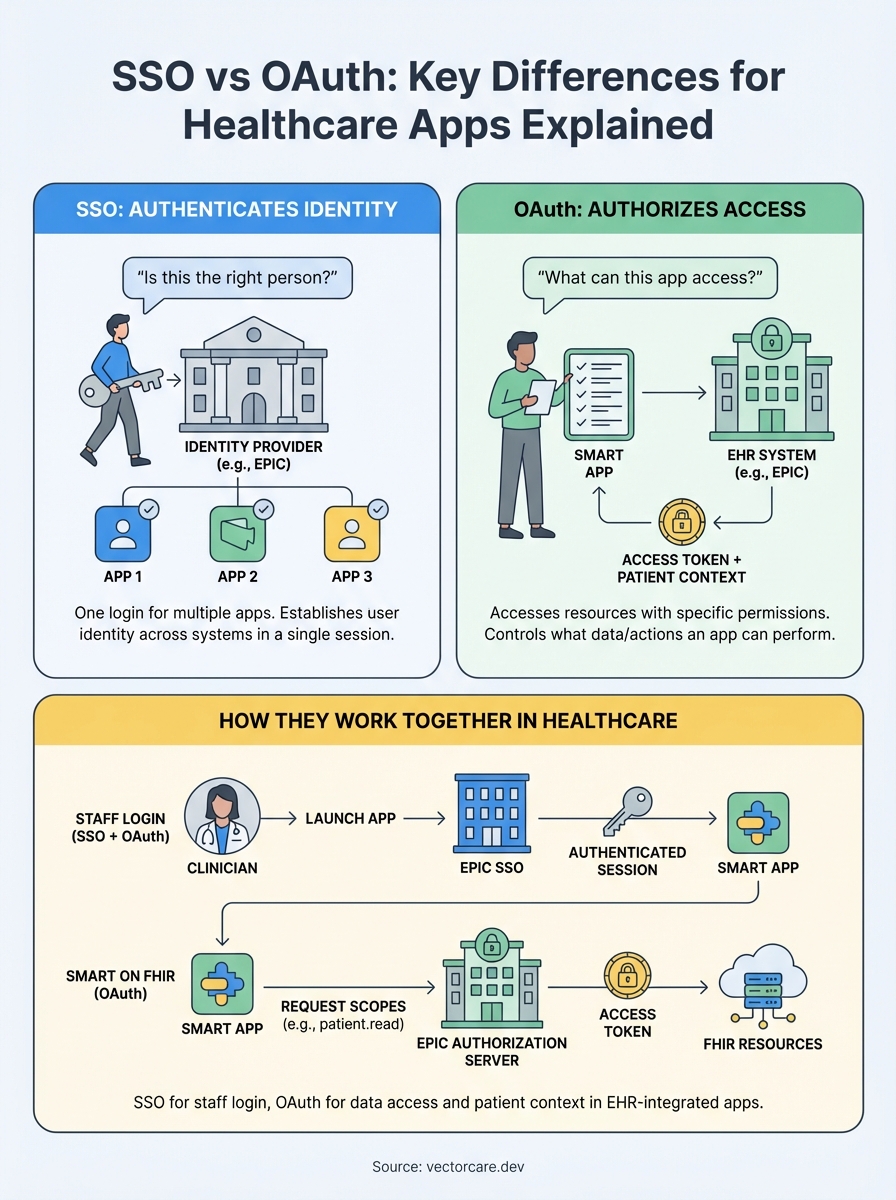
The fundamental difference in SSO vs OAuth comes down to their primary functions: SSO authenticates who you are, while OAuth authorizes what you can access. SSO answers "is this the right person?" across multiple applications using a single set of credentials. OAuth answers "can this app access specific resources on behalf of this person?" without giving the app the user's password.

Authentication vs authorization
SSO focuses on user authentication, establishing and maintaining identity across different applications in a single session. When a clinician logs into EPIC, SSO allows them to access your integrated app without entering credentials again. The system verifies their identity once and carries that authentication across connected applications within the healthcare network.
OAuth handles resource authorization, controlling what data or actions an application can perform after a user authenticates. Your healthcare app might use OAuth to request read access to patient demographics and write access to clinical notes. The clinician approves these specific permissions, and OAuth issues tokens that grant your app only the approved access, nothing more.
Authentication proves who you are. Authorization determines what you can do. Healthcare apps typically need both.
Token purposes
SSO tokens prove user identity and maintain session state across applications. These tokens tell each connected system "this person logged in and is authenticated." OAuth tokens grant specific permissions to access resources, carrying scopes that define exactly what data your app can read or modify within the EHR system.
How SSO works in healthcare apps
SSO creates a centralized authentication point where users log in once and gain access to multiple connected applications. In healthcare environments, this means a clinician authenticates through EPIC's identity provider at the start of their shift, and that authentication session extends to third-party applications integrated with the EHR system. Your app receives confirmation of the user's identity without ever seeing their password.
The authentication flow
When a clinician clicks to launch your app from within EPIC, the EHR system redirects them to your application with a session token that proves they already authenticated. Your app validates this token with EPIC's identity service, confirms the user is who they claim to be, and grants access. The clinician never enters credentials into your application because SSO handles identity verification centrally.
This flow protects security by keeping credentials in one place rather than distributing them across dozens of healthcare applications. Health systems prefer this approach because they can revoke a user's access to all connected apps by disabling one central account, making offboarding and access control significantly simpler than managing individual logins per application.
Integration with EPIC
EPIC supports SAML and OpenID Connect protocols for SSO, allowing your app to trust EPIC as the authentication authority for clinicians and staff. Your integration receives identity assertions from EPIC's identity provider, which tell your application who the user is and what role they hold within the health system. This differs from the SSO vs OAuth discussion because SSO only handles identity, while your app still needs OAuth to access patient data on behalf of that authenticated user.
How OAuth works in SMART on FHIR
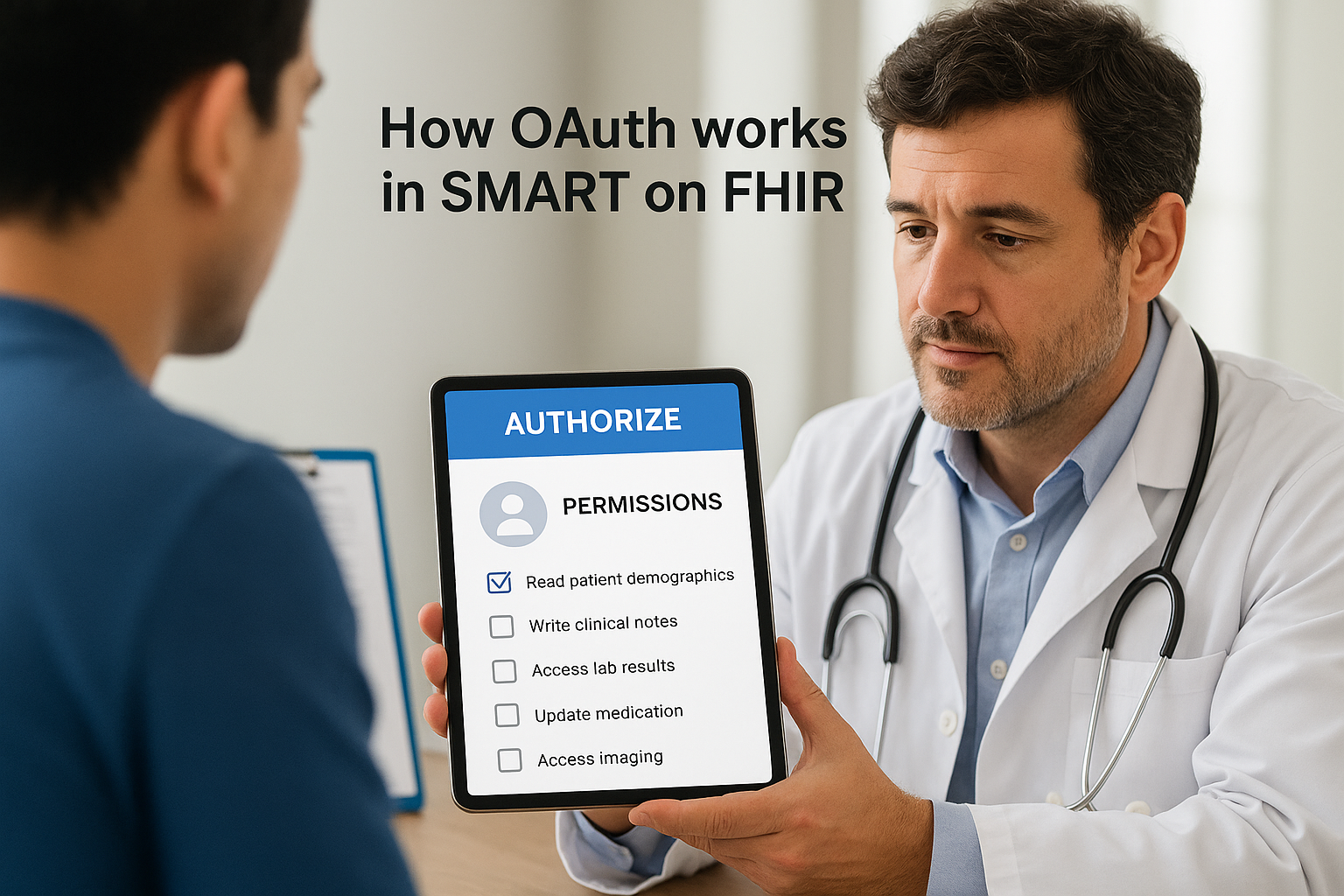
OAuth in SMART on FHIR controls what data your application can access from EPIC's EHR system and establishes patient context for clinical workflows. When a clinician launches your app from within EPIC, your application redirects to EPIC's authorization server, requesting specific scopes like reading patient demographics or writing clinical notes. The clinician reviews these permissions, and EPIC issues an access token that grants your app precisely the approved access to FHIR resources.
Authorization scopes and patient context
SMART on FHIR uses OAuth scopes to define granular permissions following the pattern "patient/Resource.read" or "user/Observation.write". Your app requests scopes during launch, and the access token EPIC returns carries these permissions alongside patient context that identifies which patient record the clinician is viewing. This connection between OAuth and clinical context makes SMART launches fundamentally different from generic OAuth implementations.
The scope mechanism ensures your application never accesses more data than necessary. You request only the FHIR resources your app needs to function, following the principle of least privilege that health systems require for compliance and security audits.
OAuth in SMART on FHIR doesn't just authorize access; it binds that access to specific patient records and clinical contexts.
Token lifecycle
Access tokens issued by EPIC expire after a defined period, typically requiring your app to use a refresh token to obtain new access tokens without forcing the clinician to re-authenticate. This distinction becomes relevant when comparing SSO vs OAuth: SSO maintains the user's authenticated session, while OAuth tokens control resource access and require periodic renewal based on security policies set by each health system.
How to choose for Epic and EHR integrations
You don't actually choose between SSO and OAuth for EPIC integrations because healthcare apps require both protocols working together. The question isn't which one to implement but rather understanding how each serves your integration architecture. SSO handles staff authentication when clinicians launch your app from within EPIC's interface, while OAuth controls what patient data your application can access once that authenticated user is inside your app.
Assess your authentication needs
Your authentication strategy depends on whether you serve staff, patients, or both. Staff-facing applications rely on SSO integration with EPIC's identity provider, allowing clinicians to access your app without separate login credentials. Patient-facing apps might use OAuth alone since patients typically authenticate directly through patient portals rather than SSO systems designed for healthcare staff.
Staff applications need SSO for seamless launch from EPIC. Patient applications typically authenticate through portal credentials with OAuth handling data access permissions.
Evaluate data access requirements
OAuth scope selection determines which FHIR resources your app can access and whether you need read-only or write permissions. Map your application's functionality to specific FHIR resources like Patient, Observation, MedicationRequest, or Condition. Request only the minimum scopes necessary to operate because health systems scrutinize applications that ask for excessive permissions during security reviews. SMART on FHIR's OAuth implementation bundles patient context with authorization, meaning your scopes automatically limit data access to the relevant patient record during clinical workflows.
Next steps with VectorCare
Understanding SSO vs OAuth helps you navigate security conversations with health system IT teams, but implementing both protocols correctly within EPIC integrations requires significant technical expertise and ongoing maintenance efforts. VectorCare's no-code platform handles all authentication and authorization protocols automatically, including SMART on FHIR compliance, SSO integration with EPIC's identity provider, and OAuth scope configuration for accessing patient data through FHIR resources.
You focus on building clinical workflows and features that differentiate your healthcare application while our platform manages the technical complexities of EHR integration. VectorCare ensures your app meets HIPAA and SOC2 requirements, passes security audits, and deploys to the EPIC App Orchard in 3-6 weeks instead of the typical 12-18 months. This approach eliminates the $250K+ engineering investment and year-long timelines that custom integrations demand from healthcare vendors, letting you allocate resources to product innovation instead of infrastructure challenges.
Build your SMART on FHIR app with VectorCare and deploy your EPIC integration without hiring specialized engineering teams or managing OAuth implementation complexity yourself.
The Future of Patient Logistics
Exploring the future of all things related to patient logistics, technology and how AI is going to re-shape the way we deliver care.
Thank you! Your submission has been received!
Oops! Something went wrong while submitting the form.