Single Sign On for Small Business: Benefits, Risks, Tools

Every employee at a small business juggles an average of 27 passwords. That's 27 opportunities for weak credentials, reused logins, and security gaps that put sensitive data at risk. Single sign-on for small business solves this by letting your team authenticate once and access every application they need, no repeated logins, no password fatigue. For healthcare vendors managing HIPAA-sensitive workflows across multiple platforms, this isn't just convenient. It's a compliance requirement hiding in plain sight.
SSO used to be reserved for enterprises with deep IT budgets. Not anymore. A growing number of affordable SSO solutions now target smaller organizations, offering the same security and usability benefits without the six-figure price tag. But choosing the right one means understanding how SSO actually works, what risks come with it, and which tools fit your specific needs.
At VectorCare, we build no-code SMART on FHIR applications that plug healthcare vendors directly into EPIC EHR systems, and secure authentication is baked into every integration we ship. That gives us a front-row seat to how SSO plays out in practice for small healthcare teams. This guide breaks down everything you need to know: what SSO is, why it matters for your business, the risks to watch for, and which tools are worth your budget.
Why SSO matters for small businesses
Small businesses often assume that security tools like SSO are overkill for their size. That assumption is wrong, and it costs teams real money and time every week. Password management failures account for over 80% of data breaches, according to Verizon's annual Data Breach Investigations Report. For a small team, a single breach can mean regulatory fines, lost contracts, and months of recovery work you don't have the bandwidth to handle.
The hidden cost of password sprawl
Your team likely uses between 10 and 30 applications on any given workday, from email and project management to billing software and CRM tools. Every new app adds another login, another password reset cycle, and another support ticket for whoever plays the IT role on your team. Help desk time spent on password resets costs organizations an average of $70 per incident, according to Gartner research. Multiply that across a 20-person team over a year, and the overhead is significant.
Implementing single sign on for small business cuts that cost at the root. Instead of managing separate credentials for each platform, your team authenticates once through a central identity provider and gains access to every application they're authorized to use. The result is fewer lockouts, fewer resets, and fewer employees waiting to get back into a critical tool during a busy shift.
Security incidents hit small businesses harder
Large enterprises absorb security incidents with dedicated response teams and broad cyber insurance coverage. Small businesses rarely have either. A single compromised credential can expose customer data, financial records, and internal communications simultaneously when your team reuses passwords across platforms.
SSO reduces the attack surface by eliminating the dozens of separate credential stores that attackers target through credential stuffing and phishing campaigns.
When your team authenticates through one identity provider, you can enforce consistent policies like multi-factor authentication, session timeouts, and device trust requirements across every connected app at once. Achieving that level of control is nearly impossible when every application manages its own login separately.
Compliance requirements raise the stakes
If your business operates in healthcare, finance, or any regulated industry, SSO becomes a compliance lever, not just a convenience. HIPAA-covered entities and business associates must control access to protected health information with strong authentication and audit logging. SSO delivers both, since every login event flows through one system you can monitor and report on.
Healthcare vendors integrating with EHR systems like EPIC face additional scrutiny during vendor security reviews. Health systems want to see documented access controls before they sign contracts, and SSO paired with multi-factor authentication is often the first item their security teams verify. Arriving at that conversation with SSO already in place removes a barrier that delays or kills deals for vendors who aren't prepared.
How SSO works and what it connects
Single sign-on for small business operates on a simple principle: one trusted system verifies your identity, and every other application takes that verification at its word. When you log in through your SSO provider, it issues a digitally signed token that travels with you to each connected application. That application reads the token, confirms it came from a trusted source, and lets you in without asking for a separate password. The whole exchange happens in milliseconds, invisibly.
The identity provider is the core
The identity provider (IdP) is the engine that runs SSO. It stores your credentials, handles the authentication step, and issues the tokens that other applications accept. Common protocols like SAML 2.0 and OpenID Connect (OIDC) define exactly how that token exchange works, which is why an IdP from one vendor can authenticate users into apps built by dozens of other vendors. When you configure SSO, you're essentially telling each application to trust your IdP to vouch for your team.
Once your identity provider is set up, adding a new application to your SSO environment typically takes minutes, not days, because the authentication logic is already handled centrally.
What SSO connects in a typical small business stack
Your IdP can connect to virtually any application that supports SAML, OIDC, or OAuth 2.0, which covers most modern SaaS tools. A standard small business setup might include email, file storage, project management, CRM, payroll, and industry-specific tools, all accessible through one login. Healthcare vendors often add EHR-adjacent platforms to that list, including SMART on FHIR applications, clinical decision support tools, and patient data portals.
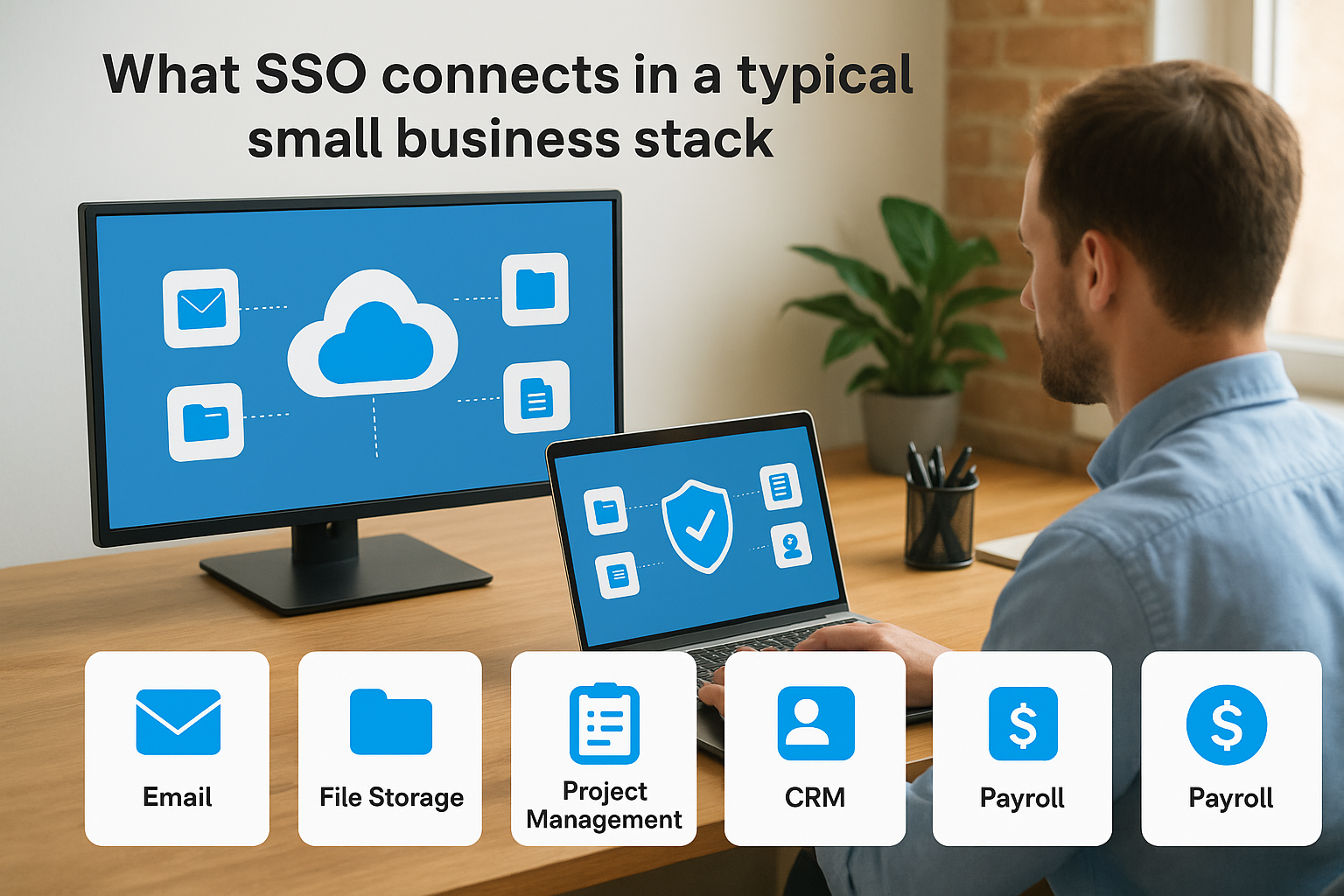
Here are the application categories SSO typically connects:
- Productivity tools: email, calendars, document management
- Business operations: CRM, billing, HR, and payroll platforms
- Collaboration: video conferencing, team messaging, project trackers
- Industry-specific software: EHR integrations, telehealth platforms, compliance tools
- Developer and IT tools: cloud infrastructure, code repositories, monitoring dashboards
Benefits and risks you need to plan for
Single sign on for small business delivers real, measurable advantages, but it also introduces a concentrated point of failure that you need to design around from day one. Understanding both sides of that equation lets you implement SSO in a way that strengthens your security posture rather than creating new vulnerabilities.
The concrete benefits SSO delivers
The most immediate benefit is reduced friction for your team. Your employees stop wasting time on password resets and login failures, which means they stay focused on actual work. Beyond productivity, SSO gives you centralized visibility into every login event across your entire application stack. When someone joins your team, you provision access once. When they leave, you revoke it in one place and know immediately that their access to every connected app is gone.
This centralized offboarding protection is one of the most underrated security wins for small businesses, where former employee accounts often remain active for weeks after departure.
Compliance audits also get significantly easier. Every authentication event creates a unified log you can pull for security reviews, vendor assessments, or regulatory inquiries without chasing records across a dozen separate platforms.
The risks you can't ignore
The biggest risk SSO introduces is a single point of compromise. If an attacker gains access to your identity provider account, they inherit access to every application connected to it. This is why mandatory multi-factor authentication on your IdP is not optional. It is the minimum acceptable configuration before you connect a single app.
You also take on availability risk with SSO. If your identity provider experiences an outage, your team loses access to all connected applications simultaneously. Before you go live, verify your chosen provider's uptime SLA and understand what emergency access procedures exist for critical systems when the IdP is unreachable. Most providers offer break-glass account options specifically for this scenario, and you should configure them before you need them.
How to implement SSO step by step
Implementing single sign on for small business does not require a dedicated IT department or a multi-month project plan. Most small teams complete a working SSO setup in a few days if they follow a structured sequence. Rushing past the early steps is where teams create gaps that surface later as security incidents or broken integrations.
Map your applications first
Before you touch a single configuration screen, document every application your team uses and confirm whether it supports SAML, OIDC, or OAuth 2.0. Some legacy tools only support username and password authentication, which means they cannot connect to an SSO provider directly. You need to know that before you build your rollout plan, not after.
Build a simple inventory that captures the application name, authentication protocol it supports, and how many users need access. This list becomes your migration roadmap and helps you prioritize which apps to connect in the first wave.
Configure your identity provider
Once your app inventory is ready, set up your identity provider account and lock it down before connecting anything else. Enable multi-factor authentication on your IdP immediately, and set up at least one break-glass admin account with documented recovery procedures stored somewhere other than a connected app.
Every application you connect later inherits the security posture of your IdP, so the time you invest hardening it upfront protects your entire stack.
After that, connect your applications one by one starting with the highest-risk or most-used tools. Most modern SaaS platforms include step-by-step SSO setup guides in their admin documentation, and your IdP's support team can walk you through any non-standard configurations.
Test before you go live
Run a full end-to-end login test for each connected application using a test account before you migrate your real users. Verify that login works, that session timeouts trigger correctly, and that revoking the test account in your IdP immediately blocks access to every connected app. Fix any gaps at this stage, not after your team depends on the system.
Best SSO tools for small business in 2026
Choosing the right SSO provider shapes how smoothly your rollout goes and what your ongoing costs look like over time. For single sign on for small business, the best option depends on what you already use, how technical your setup is, and whether you need healthcare-specific compliance features included. The tools below cover the most practical choices for teams under 100 users in 2026.
Start with what you already own
If your team already runs on Microsoft 365, you have Microsoft Entra ID included at no additional cost on most business plans. It supports SAML and OIDC and connects to thousands of apps through the Microsoft application gallery. Similarly, if your team works inside Google Workspace, Google's built-in SAML-based SSO lets you connect third-party apps directly from the Admin Console at no extra charge.
Both options reduce procurement complexity because you extend tools you already pay for. Before you evaluate any third-party vendor, check what your existing subscriptions include. Most small teams find they already have a usable SSO foundation sitting unused inside their current software stack.
Dedicated SSO platforms for more complex needs
When your app stack extends beyond what Microsoft or Google covers natively, a dedicated identity provider gives you broader application compatibility and more granular policy controls. Okta remains the most widely supported option across SaaS applications, with a free tier available for up to 100 monthly active users. JumpCloud targets small businesses specifically and bundles SSO, device management, and directory services into a single platform, which reduces the number of vendors you manage. OneLogin offers strong SAML support and a straightforward admin interface that non-technical owners can operate without significant training.
When evaluating any platform, confirm that it supports HIPAA-compliant configurations and offers a Business Associate Agreement if your team handles protected health information.
That single requirement eliminates several consumer-grade tools from contention immediately, which narrows your shortlist and makes the final decision considerably faster.
What to do next
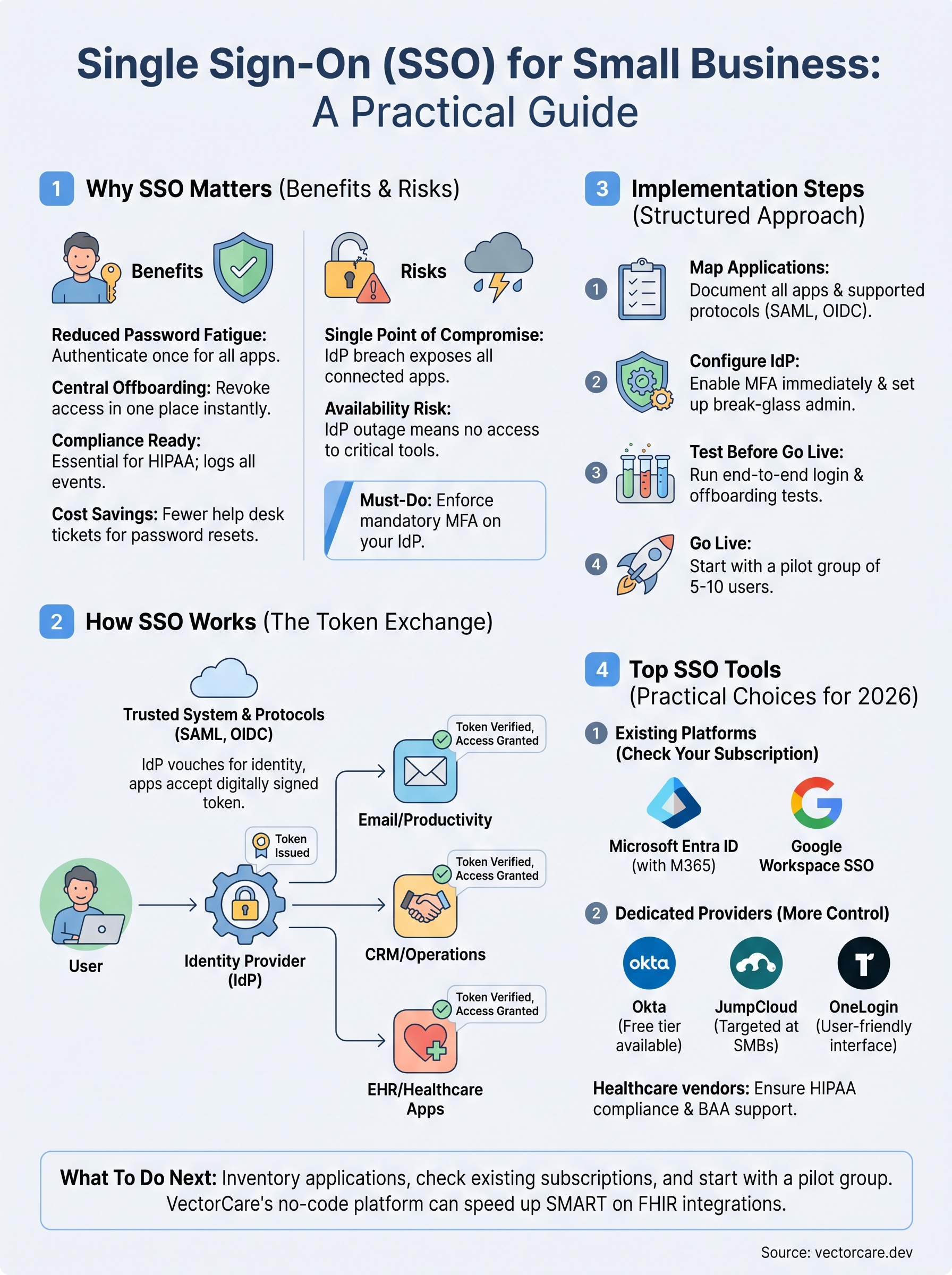
You now have a complete picture of single sign on for small business: how it works, what it costs you in time and risk if you skip it, and which tools fit your budget in 2026. The practical next step is to pull your application inventory this week, check whether your existing Microsoft 365 or Google Workspace subscription already includes a usable SSO foundation, and pick a pilot group of five to ten users to test your first integration. Starting small lets you find configuration gaps before they affect your entire team.
For healthcare vendors specifically, authentication is only one layer of the compliance and integration work required to connect with health systems. If you need to build and deploy SMART on FHIR applications that embed directly into EPIC workflows without a full engineering team behind you, explore what VectorCare's no-code platform can do for your integration timeline and see how fast you can move.
The Future of Patient Logistics
Exploring the future of all things related to patient logistics, technology and how AI is going to re-shape the way we deliver care.
Thank you! Your submission has been received!
Oops! Something went wrong while submitting the form.