AWS SOC 2 Compliance: Reports, Scope, And Best Practices

If you're a healthcare vendor hosting applications on AWS, AWS SOC 2 compliance isn't optional, it's a requirement that health systems expect before they'll even consider working with you. But the process raises immediate questions: Does AWS's own SOC 2 certification cover your application? Where do you download their reports? And what exactly falls on your shoulders versus what AWS already handles?
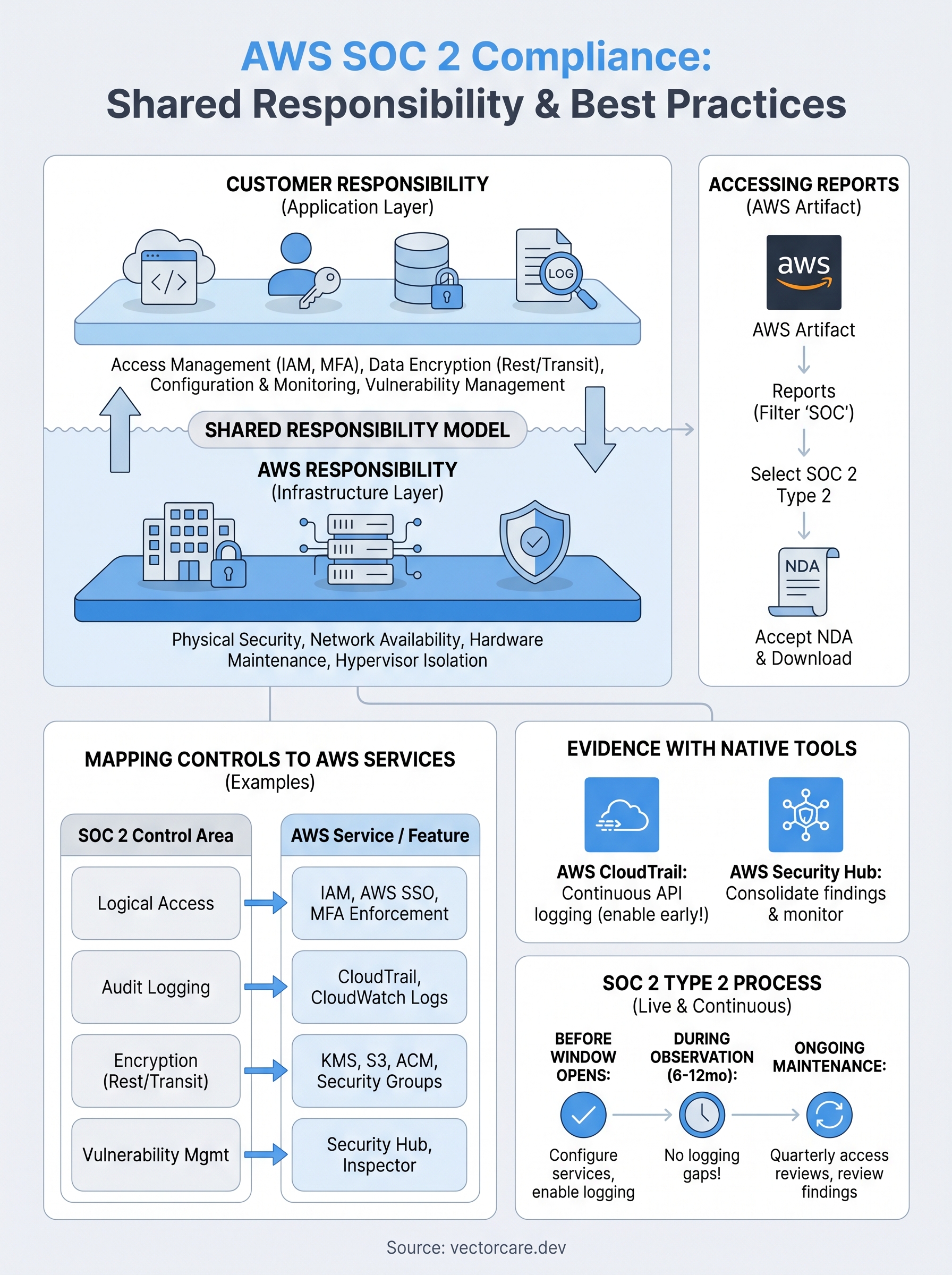
The short answer is that AWS secures its infrastructure, but you're responsible for everything you build on top of it. This is AWS's shared responsibility model, and misunderstanding it is one of the most common, and costly, mistakes vendors make when preparing for a SOC 2 audit. Your application code, data handling, access controls, and monitoring all fall squarely in your court.
At VectorCare, we deal with SOC 2 compliance daily as part of our managed SMART on FHIR platform for EPIC integrations. Every application we deploy for healthcare vendors meets SOC 2 and HIPAA standards out of the box, so we've built deep operational knowledge around what it actually takes to get and stay compliant on AWS. This guide walks you through accessing AWS's SOC 2 reports, understanding what's in scope, and implementing the controls you need to pass your own audit.
What AWS SOC 2 covers and what it does not
When a health system asks you about AWS SOC 2 compliance, they're asking about your environment, not just Amazon's infrastructure. AWS does hold SOC 2 Type 2 reports covering a wide range of its services, but those reports only certify the controls AWS itself operates. Knowing exactly where their responsibility ends and yours begins will prevent a very uncomfortable conversation during your audit.
What AWS's SOC 2 certification actually covers
AWS's SOC 2 reports address the controls AWS runs to secure its own infrastructure layer. These reports cover physical data center security, network availability, hardware maintenance, and hypervisor-level isolation between customer accounts. AWS publishes separate reports for different service families, so the controls scoped to Amazon EC2 differ from those covering Amazon RDS or S3. You'll need to confirm that every AWS service your application touches is included in the report you're citing.

Here's what typically falls under AWS's SOC 2 scope:
- Physical and environmental security of AWS data centers
- Network infrastructure controls and published availability SLAs
- Hardware provisioning, patching, and decommissioning procedures
- Hypervisor isolation between tenant environments
- AWS employee access controls and background screening processes
AWS's SOC 2 report tells auditors that the foundation you're building on is sound, but it says nothing about what you built on top of it.
What you still own
Your application layer is entirely your responsibility. Access management, meaning who can log into your AWS accounts and what permissions they hold, is yours to configure, document, and prove to an auditor. AWS does not control how you structure IAM policies, whether you enforce MFA, or whether your engineers hold overly broad permissions across production environments.
Data handling and encryption at the application level also fall to you. AWS provides the tools, such as KMS for key management and CloudTrail for audit logging, but configuring them correctly is your job. If patient data sits in an S3 bucket without proper encryption settings or access restrictions, AWS's certification will not protect you. Your auditor will examine your configuration, your written policies, and your collected evidence, not just the AWS report.
How to access AWS SOC 2 reports in AWS Artifact
AWS Artifact is Amazon's self-service portal for compliance documentation, and it's where you download AWS's SOC 2 reports at no additional charge. You need an active AWS account to access it, and the reports are available on demand, so you can pull them whenever a health system or auditor requests them. Knowing how to navigate this process quickly will save you time during due diligence.
Steps to download the report
The process is straightforward once you know where to look. Log into your AWS Management Console and follow these steps:
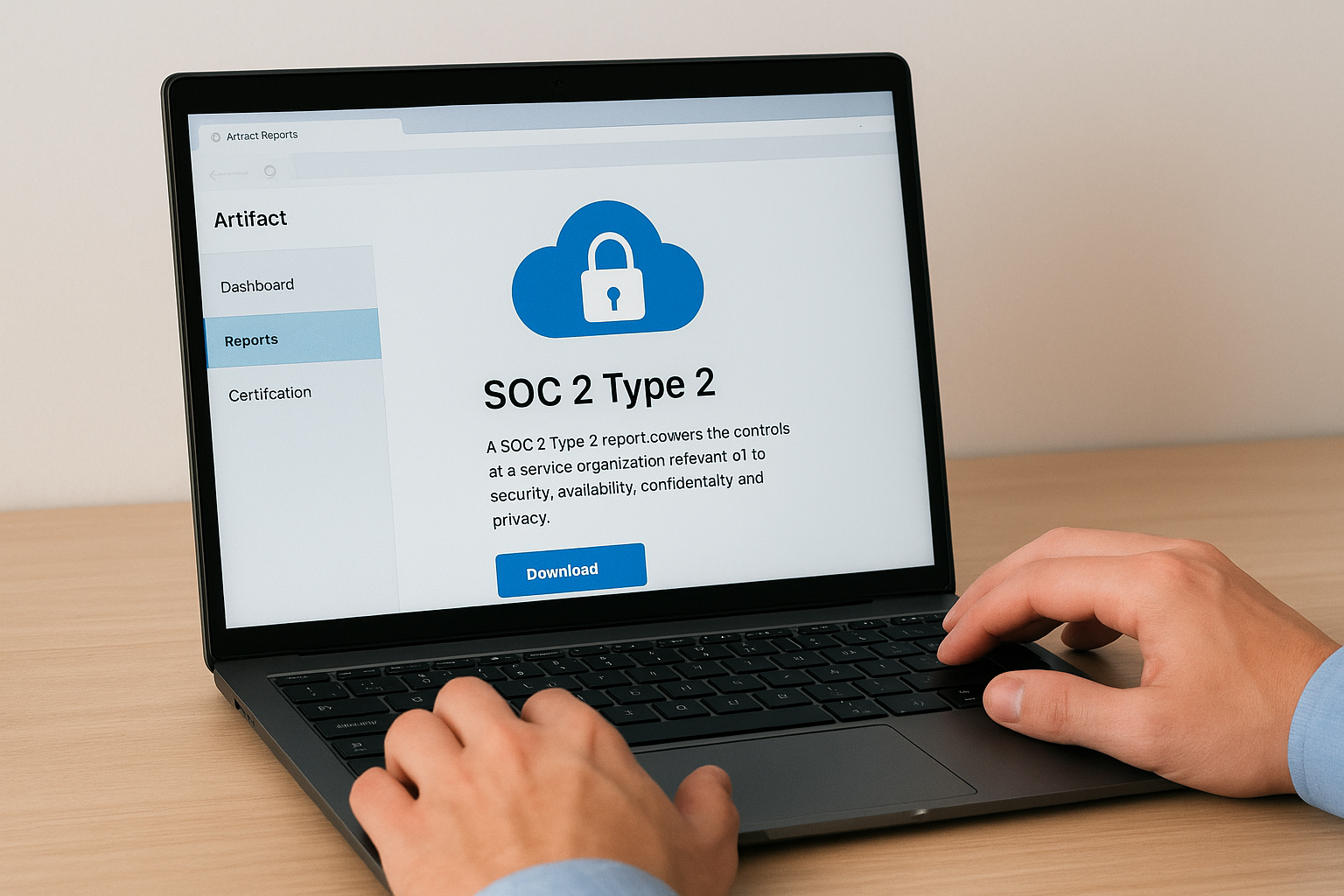
- Go to AWS Artifact (search "Artifact" in the console search bar)
- Select Reports from the left navigation panel
- In the search bar, filter by "SOC" to surface the relevant reports
- Locate SOC 2 Type 2 and select the report covering the AWS services your application uses (EC2, RDS, S3, etc.)
- Review and accept the non-disclosure agreement (NDA) that AWS requires before download
- Download the PDF and store it in your compliance documentation folder
AWS updates its SOC 2 reports on a rolling basis, so always confirm you're downloading the most recent version before sharing it with an auditor or health system.
What to check once you have the report
Your first priority is confirming that the specific AWS services your application relies on appear in the report's scope section. If a service isn't listed, AWS's certification provides no coverage for it, and you'll need to document compensating controls for that gap in your own aws soc 2 compliance documentation.
How to map your app to SOC 2 controls on AWS
Mapping your application to SOC 2 controls is the step that turns AWS's shared compliance foundation into your audit-ready framework. Start by identifying which of the five Trust Service Criteria (TSC) apply to your application. For most healthcare vendors, Security is mandatory, and Availability, Confidentiality, and Privacy are common additions depending on what data your app processes.
Identify which controls your app triggers
Each TSC maps to specific control categories. The Common Criteria (CC) series under Security covers logical access, change management, and risk assessment. If your application stores or transmits protected health information (PHI), Confidentiality controls apply automatically. Work through each criteria category and mark which ones your application activities touch before you write a single policy.
Skipping this step leads to scope creep during your audit, where your auditor identifies controls you never prepared for.
Map AWS services to each control
Once you know your applicable controls, match each control to the AWS service or configuration that satisfies it. The table below gives you a practical starting point for common mappings:
| SOC 2 Control Area | AWS Service / Feature |
|---|---|
| Logical access controls | IAM, AWS SSO, MFA enforcement |
| Audit logging | AWS CloudTrail, CloudWatch Logs |
| Encryption at rest | AWS KMS, S3 default encryption |
| Encryption in transit | ACM (TLS certificates), VPC security groups |
| Vulnerability management | Amazon Inspector, AWS Security Hub |
Use this table as your aws soc 2 compliance mapping worksheet, then document the specific configuration state of each service in your control environment.
How to collect evidence with AWS-native tooling
AWS gives you several built-in services that generate audit evidence automatically, so you don't need to build custom logging infrastructure from scratch. The key is enabling these services before your audit window opens and letting them run continuously so your auditor sees a complete evidence trail covering your full observation period.
Set up continuous logging with CloudTrail and CloudWatch
AWS CloudTrail records every API call made in your account, which directly satisfies the audit logging requirements under the Common Criteria. Turn it on in every region you operate in, send logs to a dedicated S3 bucket with object lock enabled, and configure CloudWatch Logs to alert on suspicious activity patterns like failed login attempts or unauthorized API calls.
Auditors expect logs that cover the full SOC 2 observation period, typically 6 to 12 months, so enable CloudTrail the moment you start your aws soc 2 compliance program, not the week before fieldwork begins.
Use Security Hub to consolidate findings
AWS Security Hub aggregates findings from Amazon Inspector, GuardDuty, and Config into a single dashboard. Run the AWS Foundational Security Best Practices standard inside Security Hub and export your findings report as evidence that you actively monitor your environment for vulnerabilities and misconfigurations. Your auditor can review this single report to satisfy multiple control requirements across logical access, vulnerability management, and configuration monitoring without you manually pulling data from five separate services.
How to run SOC 2 Type 2 on AWS and keep it live
SOC 2 Type 2 measures how well your controls actually operate over a defined period, typically six to twelve months, rather than just confirming they exist on a single day. Before your observation window opens, confirm your AWS environment is fully configured and all evidence collection services like CloudTrail and Security Hub are actively running. Any gap in your logging during this window will surface during fieldwork and slow your audit down significantly.
Set your audit window and define scope
Define your observation period with your auditor before you start, then document exactly which AWS accounts, regions, and services fall inside your aws soc 2 compliance boundary. A common mistake is expanding scope mid-audit by adding new AWS services without notifying your auditor first.
Run through this pre-audit checklist before your window opens:
- CloudTrail enabled in all in-scope regions with logs sent to a locked S3 bucket
- Security Hub running with AWS Foundational Security Best Practices active
- IAM access reviews completed and documented
- Encryption at rest confirmed for all data stores including RDS, S3, and EBS
- Change management policies written and applied to production deployments
Keep controls live after your first audit
Your continuous monitoring process is what turns a one-time certification into a renewable credential. Schedule quarterly IAM access reviews, review Security Hub findings monthly, and resolve any high-severity findings within a documented SLA you can show your auditor at renewal.
Letting controls drift between audits is the most common reason vendors fail their Type 2 renewal.
A simple plan to keep moving
AWS SOC 2 compliance breaks down into three repeating tasks: access AWS Artifact for Amazon's reports, map your application controls to AWS services, and collect evidence continuously using CloudTrail and Security Hub. None of these steps require a large team. Starting early matters more than starting perfectly, because your observation period does not wait.
Your next move is to open AWS Artifact today, download the SOC 2 Type 2 report, and confirm every service your application uses appears in scope. Document that confirmation in writing, then run through the pre-audit checklist from the previous section and resolve any gaps before your observation window opens.
If your application needs to meet both SOC 2 and HIPAA requirements while integrating with EPIC, VectorCare's managed SMART on FHIR platform handles compliance infrastructure out of the box, so your engineering team can focus on building your core product instead of managing certifications.
The Future of Patient Logistics
Exploring the future of all things related to patient logistics, technology and how AI is going to re-shape the way we deliver care.
Thank you! Your submission has been received!
Oops! Something went wrong while submitting the form.