Single Sign On Definition: How SSO Works And Examples

Single Sign On Definition: How SSO Works And Examples
Healthcare professionals often juggle dozens of applications throughout their workday, from electronic health records to clinical decision support tools. Without a unified authentication method, each system demands separate credentials, creating frustration and security vulnerabilities. Understanding the single sign on definition is essential for anyone building or deploying applications in healthcare environments, where seamless access directly impacts patient care.
SSO allows users to authenticate once and gain access to multiple connected applications without repeated logins. For healthcare vendors integrating with systems like EPIC, this authentication method isn't optional, it's a fundamental requirement. SMART on FHIR applications must support secure, standards-based authentication to embed properly within clinical workflows, and SSO sits at the core of that architecture. At VectorCare, we build these authentication flows into every application we deploy, so healthcare vendors can focus on their solutions rather than wrestling with OAuth tokens and identity protocols.
This article breaks down exactly what SSO is, how the authentication process works from start to finish, the security benefits it provides, and real-world examples you'll recognize. Whether you're evaluating integration options or trying to explain SSO to stakeholders, you'll leave with a clear, practical understanding of this critical technology.
Why single sign-on matters for security and UX
Understanding the single sign on definition isn't just about grasping a technical concept, it's about recognizing how this authentication method solves two critical problems at once. Healthcare organizations face constant pressure to strengthen security postures while simultaneously improving clinician workflows. SSO addresses both challenges by centralizing authentication and eliminating the password management burden that creates vulnerabilities and workflow friction. When you implement SSO properly, you're not choosing between security and usability, you're enhancing both simultaneously.
Security benefits that reduce organizational risk
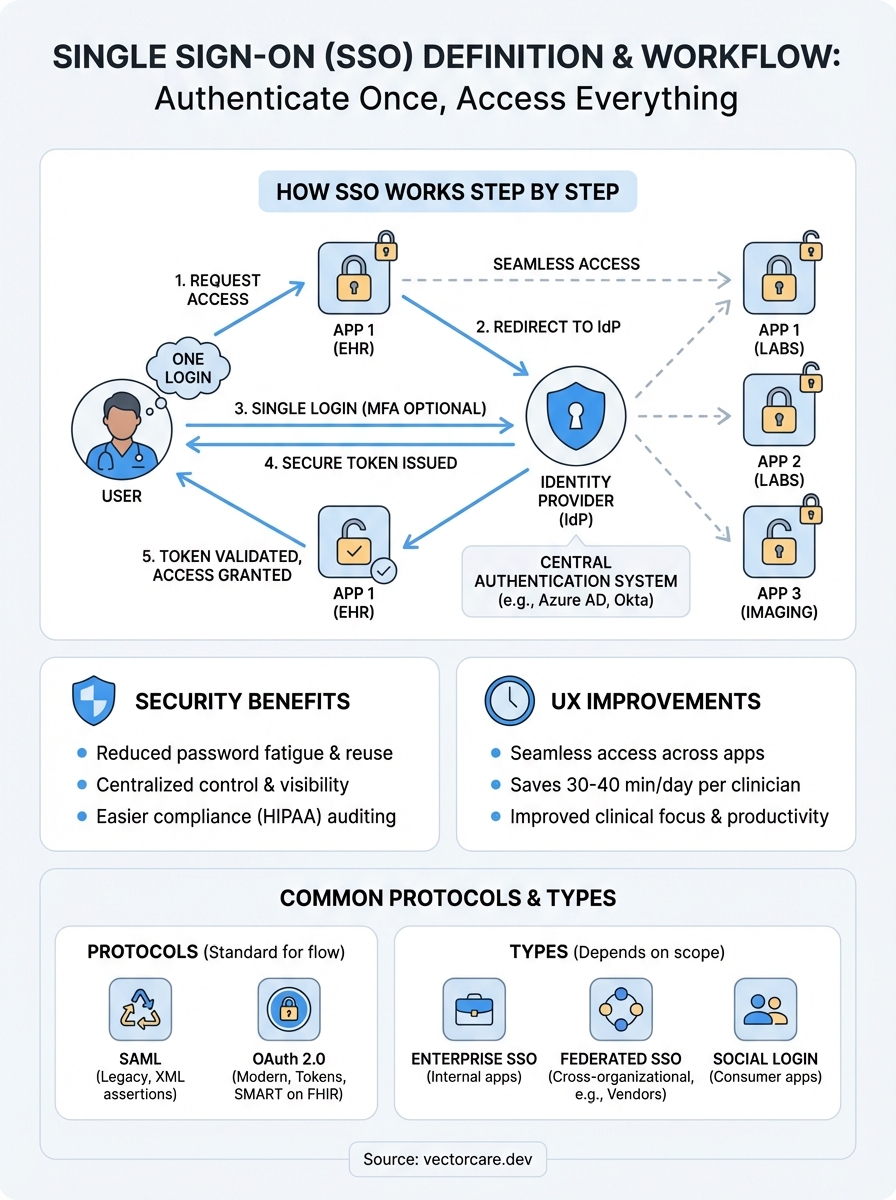
Password fatigue leads directly to security breaches. When you require clinicians to manage separate credentials for 10, 20, or 30 different systems, they resort to predictable patterns: reusing passwords, writing them down, or choosing weak combinations they can remember. Each of these behaviors creates entry points for attackers who exploit the weakest link in your security chain. SSO eliminates this problem by reducing authentication to a single, strong credential that your IT team can monitor and protect more effectively.
Centralized authentication also gives your security team unprecedented visibility and control. With SSO, you can enforce multi-factor authentication across all connected applications with a single policy change, disable access instantly when an employee leaves, and audit login attempts from one central dashboard. Compliance requirements like HIPAA become easier to demonstrate when you can produce comprehensive access logs from a unified identity provider rather than gathering disparate records from dozens of individual applications.
"Organizations using SSO report 50% fewer password-related help desk tickets and significantly reduced credential-based security incidents."
User experience improvements that boost productivity
Clinicians waste an average of 30-40 minutes per day on authentication tasks alone. They log into the EHR, then separately authenticate for laboratory systems, imaging platforms, prescription databases, clinical decision support tools, and specialized applications. Each login interruption breaks clinical focus and adds friction to time-sensitive workflows where seconds matter for patient outcomes. SSO removes these barriers, allowing seamless transitions between applications as clinicians move through their daily tasks.
The productivity gains extend beyond time savings. When you eliminate repeated login prompts, you reduce cognitive load during critical moments. A physician reviewing a patient case can pull up relevant clinical guidelines, check laboratory trends, and order follow-up imaging without stopping to recall different passwords or reset locked accounts. This seamless experience directly improves care delivery by keeping clinical tools accessible when providers need them most. For healthcare vendors, this matters because health systems increasingly demand integrations that match the SSO-enabled workflows already established in their primary EHR platforms.
How single sign-on works step by step
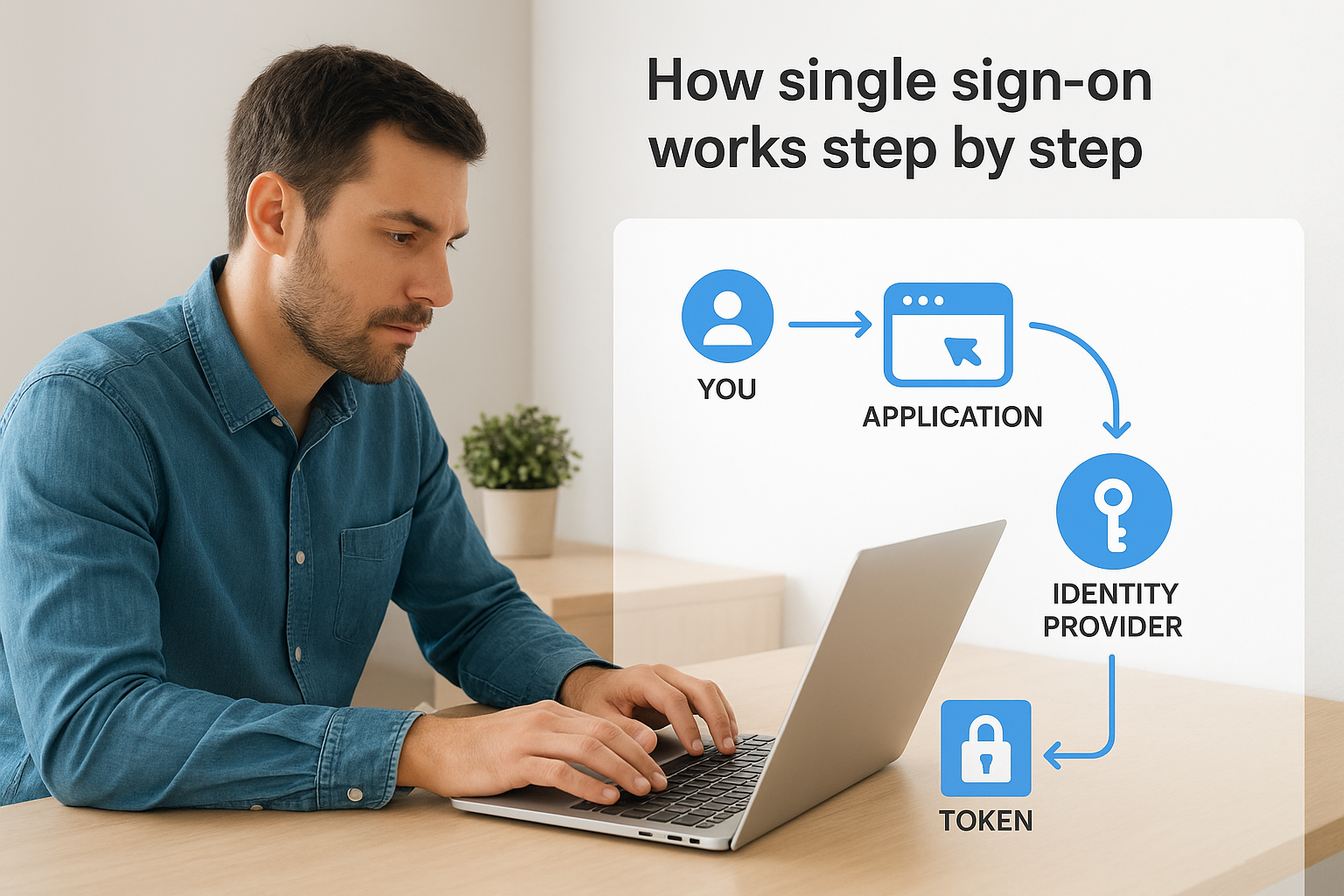
When you access an SSO-enabled application, a precise sequence of authentication events happens behind the scenes in seconds. Understanding this flow demystifies the single sign on definition and reveals why this method provides both security and convenience. The process involves three key players: you (the user), the application you want to access (the service provider), and the central authentication system (the identity provider). Each player has a specific role in verifying your identity and granting access without exposing your actual credentials to the applications themselves.
The initial authentication request
You click to access an application that requires authentication. The application immediately redirects your browser to the identity provider rather than presenting its own login screen. This redirect includes a unique authentication request containing information about which application needs access and what permissions it requires. If you've already authenticated with the identity provider during this session, the system recognizes your existing session and skips the credential prompt entirely. This recognition happens through secure cookies stored in your browser that prove you've already authenticated successfully.
When no active session exists, the identity provider presents a single login screen where you enter your credentials once. This centralized authentication point is where you might encounter multi-factor authentication if your organization requires it. The identity provider validates your credentials against its user directory, confirms your identity, and establishes a session that persists across all connected applications.
Token exchange and validation
After successful authentication, the identity provider generates a secure token that contains encrypted information about your identity and permissions. This token gets passed back to the requesting application through your browser, never exposing your actual password or credentials. The application validates this token by checking its cryptographic signature against the identity provider's public key, confirming it hasn't been tampered with during transmission.
"The token acts as a temporary access pass that proves you've already authenticated, eliminating the need for applications to handle or store your actual credentials."
Once validated, the application grants you access and stores the token for the session duration. When you navigate to another SSO-enabled application, the process repeats instantly because your identity provider session remains active, making the entire flow invisible to you.
Common SSO standards and key terms
The single sign on definition becomes clearer when you understand the technical standards that make it work. Several competing protocols power SSO implementations, each with distinct characteristics that determine how authentication data flows between systems. You'll encounter these standards repeatedly when evaluating integration options or troubleshooting authentication issues, so recognizing their differences helps you make informed decisions about which approach fits your needs. Healthcare vendors working with EPIC specifically need to understand SMART on FHIR authentication, which builds on these foundational protocols.
SAML and OAuth protocols
SAML (Security Assertion Markup Language) represents the older, enterprise-focused approach to SSO. This XML-based protocol excels at handling authentication between web applications and identity providers through structured assertions that contain detailed user attributes. You'll find SAML implementations across legacy healthcare systems where comprehensive user information needs to transfer during authentication. The protocol uses digital signatures to ensure assertion integrity and supports complex attribute mappings that enterprise security teams require.

OAuth 2.0 takes a different approach by focusing on authorization rather than authentication alone. This protocol powers most modern SSO implementations, particularly in healthcare where SMART on FHIR applications rely on OAuth flows. OAuth uses access tokens with limited scope and defined expiration times, giving applications specific permissions without exposing full credentials. Healthcare vendors prefer OAuth because it aligns with mobile and API-driven architectures that SAML wasn't designed to handle.
"SAML handles the 'who you are' question while OAuth handles the 'what you can access' question, though modern implementations often combine both concepts."
Essential SSO terminology
Identity providers (IdPs) serve as the central authentication authority that verifies user credentials and issues tokens. Your organization's IdP might be Microsoft Azure AD, Okta, or another enterprise system that stores user directories and enforces authentication policies. Service providers (SPs) are the applications requesting authentication, which rely on IdP validation rather than maintaining separate credential databases.
Understanding assertion and token lifecycles helps you troubleshoot access issues. Assertions contain encrypted statements about authenticated users, while tokens represent time-limited proof of authentication that applications validate. When tokens expire, applications automatically request fresh tokens through the IdP without requiring you to log in again, maintaining seamless access throughout your session.
Types of SSO setups and when to use each
The single sign on definition encompasses several distinct implementation approaches, each suited to different organizational needs and technical environments. You'll encounter three primary SSO architectures when evaluating authentication options: enterprise SSO, federated SSO, and social login implementations. Selecting the right approach depends on your user base, security requirements, and whether you control all systems in the authentication chain. Healthcare vendors working with EPIC specifically need federated SSO capabilities because they must authenticate users across organizational boundaries without managing those credentials directly.
Enterprise SSO for internal applications
Enterprise SSO works within a single organization's security boundary, connecting applications that share a common user directory like Active Directory or LDAP. You implement this approach when you control both the identity provider and all connected applications, making it ideal for internal tools and corporate systems. Healthcare organizations use enterprise SSO to connect their billing systems, scheduling platforms, and administrative tools under one authentication umbrella.
This setup delivers the fastest implementation timeline and simplest maintenance burden because you manage every component directly. You'll choose enterprise SSO when your applications serve employees or contractors whose accounts exist in your directory, but you'll need a different approach when external partners or patients require access to your systems.
Federated SSO for cross-organizational access
Federated SSO enables authentication across multiple organizations without requiring each organization to manage external users in their own directories. Healthcare vendors deploying SMART on FHIR applications into hospital systems rely on this model because clinicians authenticate through their hospital's identity provider, not through vendor-managed accounts. The federation establishes trust relationships where each organization validates its own users and issues tokens that partner organizations accept.
"Federated SSO allows you to provide services to external users without the security risks and administrative overhead of managing their credentials yourself."
You'll implement federated SSO when your application needs to serve users from multiple customer organizations, each with their own authentication policies and user management practices. This approach requires more complex initial setup but scales efficiently as you add new customer deployments.
Real-world SSO examples and how to spot SSO
When you grasp the single sign on definition conceptually, recognizing it in practice becomes straightforward. You interact with SSO systems constantly, often without realizing the authentication mechanics happening behind the scenes. Google Workspace, for instance, lets you move seamlessly between Gmail, Drive, Calendar, and YouTube using one login. Microsoft 365 operates similarly, connecting Outlook, Teams, SharePoint, and other applications through Azure Active Directory. These familiar examples demonstrate SSO's core principle: authenticate once, access everything.
Common SSO implementations you use daily
Healthcare environments rely heavily on SMART on FHIR applications that authenticate through the EHR's identity provider. When you launch a clinical decision support tool from within EPIC, you don't enter separate credentials because the application trusts EPIC's authentication token. This same pattern appears in Salesforce deployments where organizations connect dozens of third-party apps to their central Salesforce identity, or in university systems where students access library databases, course platforms, and email through one campus credential.
Consumer applications demonstrate SSO through social login options. When you sign into a retail website using your Google or Facebook account, that website relies on those platforms to verify your identity rather than creating its own credential database. Your authentication happens at Google or Facebook, and they send a confirmation token back to the retail site.
Signs that an application uses SSO
You can identify SSO implementations through several observable patterns. Redirect behavior serves as the clearest indicator: when you attempt to access an application and your browser redirects to a different login page (often showing your organization's branding), you're experiencing SSO authentication. Applications that remember your login across completely separate websites or domains rely on SSO architecture.
"If you access multiple applications without re-entering credentials, or you see familiar login screens regardless of which application you're accessing, you're using SSO."
Watch for session persistence across applications. When logging out of one application terminates your access to all connected systems simultaneously, that coordinated logout proves SSO integration. Healthcare vendors should recognize these patterns because EPIC integrations require identical authentication flows.
Key takeaways
The single sign on definition boils down to a straightforward concept that delivers significant impact: authenticate once, access everything. You've seen how SSO reduces security risks by eliminating password sprawl, improves clinician productivity by removing authentication friction, and operates through standardized protocols like OAuth and SAML that enable trusted authentication across organizational boundaries. Healthcare vendors building applications for EPIC environments can't ignore SSO because it's fundamental to SMART on FHIR integration requirements.
Implementing proper SSO authentication doesn't require building identity providers or becoming an OAuth expert yourself. VectorCare handles the complete authentication flow when you deploy SMART on FHIR applications, including SSO compliance, token management, and EPIC integration requirements. You can build and deploy your SMART on FHIR app in weeks rather than months, letting our platform manage the authentication complexity while you focus on your core healthcare solution. Every VectorCare application includes production-ready SSO that meets HIPAA requirements and EPIC certification standards.
The Future of Patient Logistics
Exploring the future of all things related to patient logistics, technology and how AI is going to re-shape the way we deliver care.
Thank you! Your submission has been received!
Oops! Something went wrong while submitting the form.