8 Single Sign-On Best Practices for Security & UX (2026)

Every time a clinician launches a third-party app from within EPIC, they expect it to just work, no extra login screens, no password prompts, no friction. That seamless experience depends on solid single sign-on best practices baked into the integration from day one. Get it wrong, and you're looking at security gaps, failed compliance audits, and frustrated users who abandon your app before it even loads.
For healthcare vendors building SMART on FHIR applications, SSO isn't optional, it's foundational. EPIC's OAuth2-based authentication flow demands precise implementation to maintain HIPAA compliance and earn trust from health systems. At VectorCare, we handle these authentication complexities inside our no-code platform, so vendors can launch into EPIC without engineering SSO infrastructure from scratch.
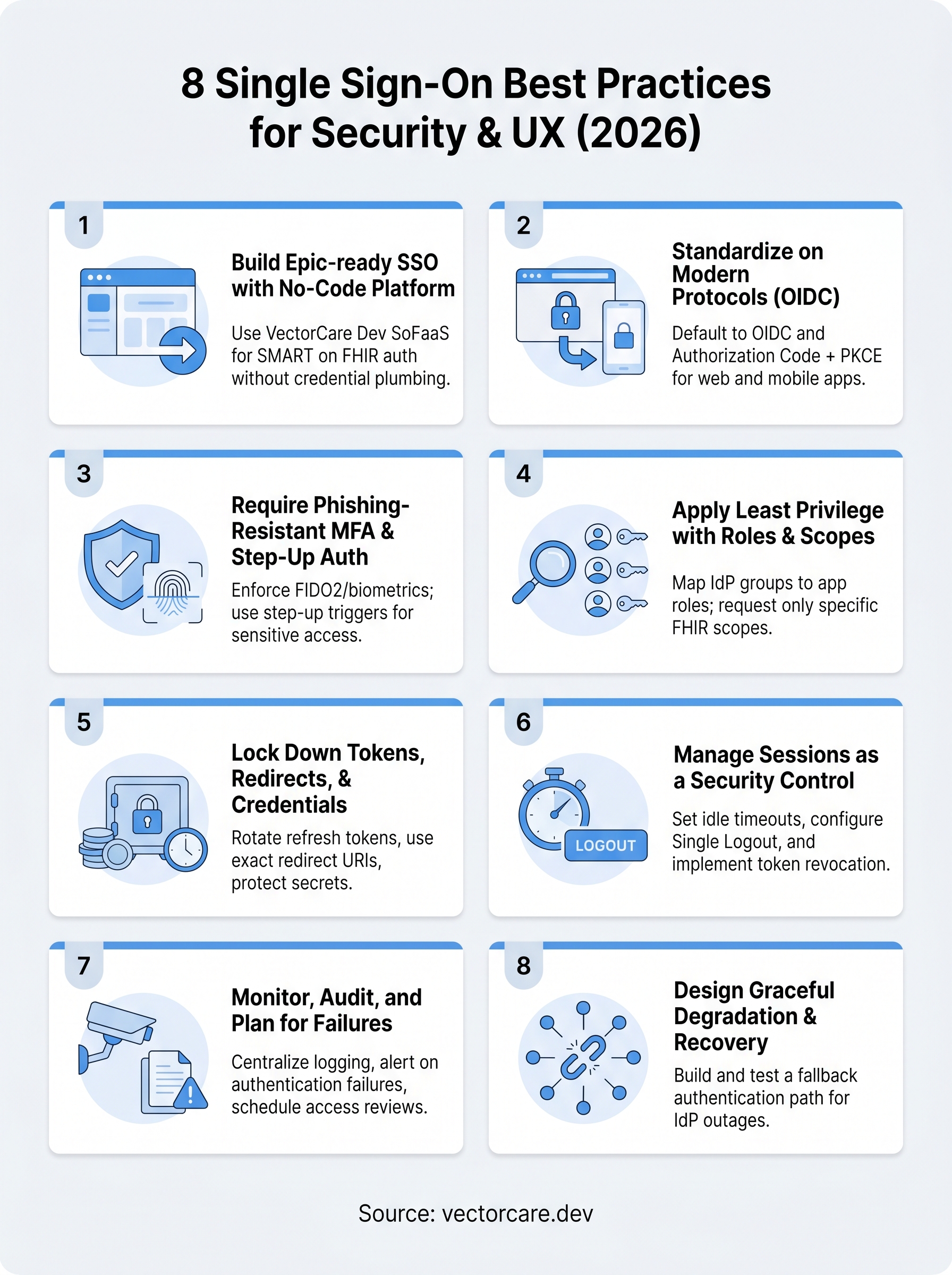
This guide breaks down eight proven SSO best practices that balance strong security with smooth user experience. Whether you're building your first EHR integration or hardening an existing one, these recommendations will help you ship a product clinicians actually want to use.
1. Build Epic-ready SSO with VectorCare Dev SoFaaS
Following single sign on best practices starts before you write a single line of configuration. VectorCare's no-code platform handles the SMART on FHIR authentication layer for you, which means you skip months of credential plumbing and go straight to configuring your app's specific clinical logic and workflows.
What to do
Your first move is to register your app inside the EPIC App Orchard and configure your OAuth2 client credentials through VectorCare's platform dashboard. You define your scopes, redirect URIs, and launch context in one place, and the platform pushes that configuration into a fully compliant SMART on FHIR container without requiring custom authentication code.
How to implement it in a SMART on FHIR app
SMART on FHIR uses a launch sequence where EPIC passes a launch token alongside the authorization request. VectorCare's platform handles the token exchange automatically, so your app receives a patient-scoped access token without custom OAuth logic on your end. You configure the FHIR resources you need through a visual interface, and the platform manages the full session lifecycle on your behalf.

Skipping or mishandling the SMART launch sequence is the most common reason apps fail EPIC's integration review.
Healthcare and Epic specifics to confirm early
Before you submit to the EPIC App Orchard, confirm that your redirect URIs are exact string matches, including trailing slashes, since EPIC enforces strict URI validation with no flexibility. You also need to verify that your Business Associate Agreement (BAA) with VectorCare is signed before any protected health information flows through the integration.
Common pitfalls to avoid
One frequent mistake is requesting overly broad FHIR scopes during development and then forgetting to tighten them before the production submission review. Another is misconfiguring the launch URL in EPIC's backend, which causes the app to open without a patient context and silently breaks the entire clinical workflow for every user.
Quick checklist
Run through these items before you submit to the EPIC App Orchard:
- Register your app with exact redirect URIs in VectorCare's dashboard
- Define only the FHIR scopes your app genuinely requires
- Confirm your BAA is signed before testing with real patient data
- Test the EHR launch flow inside EPIC's sandbox environment
- Verify your session timeout aligns with your target health system's security policy
2. Standardize on modern protocols and flows
Applying single sign on best practices means choosing the right protocol for each integration context, not defaulting to whatever is easiest to configure. In 2026, the authentication landscape has settled, and you have two dominant options: OpenID Connect (OIDC) and SAML 2.0. Each serves a different purpose, and picking the wrong one adds unnecessary complexity without improving security.
When to use OIDC vs SAML in 2026
OIDC is the right default for any modern web or mobile app, including SMART on FHIR applications. It runs on top of OAuth 2.0, uses compact JSON Web Tokens (JWTs), and fits naturally into REST-based architectures. SAML still makes sense when you're integrating with legacy enterprise identity providers that health systems have run for years and won't replace anytime soon.
If your EPIC integration is net-new, build on OIDC. Retrofitting SAML into a SMART on FHIR flow creates unnecessary friction during App Orchard review.
How to implement secure OAuth flows for web and mobile
For browser-based apps, use the Authorization Code flow with PKCE (Proof Key for Code Exchange), which prevents authorization code interception without requiring a client secret stored in the browser. For native mobile apps, PKCE is equally mandatory since mobile environments can't store secrets securely. Avoid the Implicit flow entirely; it was deprecated because it exposes tokens directly in the URL.
Common pitfalls to avoid
- Mixing OIDC and SAML in the same integration without a clear reason
- Using the client credentials flow where a user context is actually required
- Skipping PKCE on public clients
Quick checklist
- Use Authorization Code + PKCE for web and mobile apps
- Confirm your IdP supports OIDC before starting the integration
- Retire any Implicit flow configurations still in your codebase
3. Require phishing-resistant MFA and step-up auth
Passwords alone no longer meet the bar for healthcare applications, and single sign on best practices now treat multi-factor authentication as a baseline requirement rather than an optional upgrade. For EPIC integrations, your IdP must support phishing-resistant MFA methods such as FIDO2/WebAuthn or hardware security keys, not SMS-based one-time passwords, which remain vulnerable to SIM-swapping attacks.
How to roll out MFA without breaking UX
Rolling out MFA in clinical environments requires careful planning because clinicians move fast and won't tolerate authentication friction during patient care. Start by enabling hardware-backed authenticators or biometric prompts on hospital-issued devices, since these satisfy phishing resistance without adding a separate login step to an already demanding workflow. Begin your rollout with a pilot group of non-clinical staff to surface configuration gaps before clinicians encounter any friction.
Forcing a re-authentication every 30 minutes inside an ICU is a security policy that clinicians will immediately find a workaround for.
Where step-up auth fits in clinical workflows
Step-up authentication lets you require elevated verification only at high-risk decision points, such as when a user views a patient's full medication history or submits a controlled substance order. Configure your IdP to trigger step-up auth based on resource sensitivity or anomalous location signals, not a blanket timer that interrupts routine clinical actions throughout the day.
Common pitfalls to avoid
- Using SMS OTP as your primary second factor in a healthcare environment
- Applying the same MFA policy to all users regardless of role or risk level
- Skipping step-up auth for sensitive FHIR resource access because it seems complex to configure
Quick checklist
- Enforce FIDO2 or biometric MFA for all clinical users
- Define step-up triggers for sensitive FHIR resource access
- Remove SMS OTP from your approved authenticator list
- Test the full authentication flow inside a simulated clinical workflow
4. Apply least privilege with roles, groups, and scopes
Least privilege is one of the most overlooked single sign on best practices, and the gap usually surfaces during a health system's security review when your app requests more access than it can justify. Every role, group membership, and OAuth scope should map directly to a documented clinical need, nothing broader.
What to do
Start by auditing your current scope requests and cutting anything your app doesn't actively consume. Treat every permission as a liability that expands your attack surface, and confirm that a compromised token grants the smallest possible slice of patient data.
How to map IdP groups to app authorization
Your identity provider stores users in groups or organizational units that reflect their clinical role, such as nurse, physician, or billing admin. Map those groups directly to authorization roles inside your app rather than building a separate user management system. When a clinician's role changes in the IdP, their app access updates automatically without manual intervention.
Maintaining a parallel permissions database alongside your IdP is a synchronization problem waiting to cause a compliance incident.
How to design OAuth scopes for minimum access
Request resource-specific FHIR scopes tied to exact clinical functions. If your app displays a patient's medication list, request patient/MedicationRequest.read rather than a broad patient/*.read scope. Precise scoping keeps your App Orchard review cleaner and limits data exposure if a token is intercepted.
Common pitfalls to avoid
- Requesting wildcard scopes during development and forgetting to tighten them before your production submission
- Skipping scope documentation inside your App Orchard submission package
Quick checklist
- Map IdP groups to app roles directly
- Request only named, resource-level FHIR scopes
- Review and prune scope requests before each production submission
5. Lock down tokens, redirects, and credentials handling
Token security is where many single sign on best practices break down in practice. Authorization codes get logged, redirect URIs go unvalidated, and client secrets end up in version control before anyone notices.
What to do
Treat every token and credential as a high-value target that an attacker will actively look for. Your app should never store access tokens in browser localStorage, never log tokens to application logs, and never expose client secrets in front-end code.
How to protect authorization codes and tokens
Authorization codes must be single-use and short-lived, expiring within 60 seconds of issuance. Store access tokens in memory only during an active session, and use refresh tokens with rotation so each refresh request invalidates the previous token. If a token is replayed, the rotation mechanism detects it and revokes the entire session automatically.

A token stored in localStorage is accessible to any JavaScript running on your page, including third-party scripts.
How to validate redirect URIs and prevent hijacking
Register exact redirect URIs with your authorization server and reject any request where the URI doesn't match character-for-character. Never use wildcard or pattern-based URI matching, since attackers exploit open redirect vulnerabilities to intercept authorization codes before your app receives them.
Common pitfalls to avoid
- Storing client secrets in environment variables that get committed to repositories
- Accepting partial or wildcard redirect URI matches
- Logging full authorization request URLs that contain codes or tokens
Quick checklist
- Rotate refresh tokens on every use
- Register only exact, hardcoded redirect URIs
- Confirm tokens never touch localStorage or server logs
6. Manage sessions like a security control
Session management is one of the most underestimated single sign on best practices, and health systems will catch gaps here fast during their security reviews. A misconfigured session timeout or a broken logout flow isn't a minor UX issue, it's an open door to unauthorized patient data access on shared clinical workstations.
What to do
Treat every session configuration decision as a security policy decision, not a convenience setting. Define your session lifetime, idle timeout, and re-authentication rules based on the sensitivity of the clinical data your app handles, then document those choices before submitting to the App Orchard.
How to set timeouts, re-auth rules, and device policies
Set idle session timeouts between 15 and 30 minutes for shared clinical workstations, and configure shorter windows for sessions accessing sensitive FHIR resources like medication orders. Apply device trust policies so managed, hospital-issued devices can extend session lifetimes while unmanaged personal devices trigger stricter re-authentication requirements.
A 15-minute idle timeout on a shared emergency department workstation prevents the next clinician from accessing the previous user's patient context without re-authenticating.
How to handle logout, single logout, and session revocation
Configure Single Logout (SLO) so that signing out of one app propagates the logout signal to every connected service in the session. Pair SLO with server-side token revocation so that cached tokens become invalid the moment a user logs out or a session expires.
Common pitfalls to avoid
- Relying on client-side token expiry without server-side revocation
- Forgetting to test SLO across all connected services before go-live
Quick checklist
- Set idle timeouts based on device type and data sensitivity
- Configure and test Single Logout across all connected services
- Implement server-side token revocation on logout and expiry
7. Monitor, audit, and plan for failures
Monitoring is a core part of single sign on best practices that most teams treat as optional until something breaks. Your SSO layer generates a constant stream of identity events, and without structured logging and alerting in place, a compromised credential or misconfigured permission can sit undetected for weeks.
What to do
Define exactly which identity events you need to capture before your app goes live. Focus on authentication failures, token issuance, permission changes, and anomalous access patterns, since these signal the earliest indicators of a breach.
How to log and alert on the right identity events
Send all authentication logs to a centralized SIEM such as Microsoft Sentinel or AWS Security Hub. Configure alerts for repeated failed logins, token reuse attempts, and access from unexpected geographic locations immediately.
How to run access reviews and keep audit trails ready
Schedule quarterly access reviews to compare IdP group memberships against actual job roles. Keep immutable audit logs for a minimum of 90 days to satisfy HIPAA audit requirements and health system contract obligations.
Logging authentication events without reviewing them is the equivalent of installing a security camera and never checking the footage.
Best practice 8: Design graceful degradation and recovery
Build a fallback authentication path so your app stays accessible when your IdP experiences an outage. Test that fallback path on a scheduled basis so your team confirms it works before a real incident forces you to use it.
Common pitfalls to avoid
- Alerting on too many low-signal events, which causes alert fatigue
- Storing logs in the same environment as your application
Quick checklist
- Route all SSO events to a centralized logging system
- Schedule quarterly access reviews against IdP groups
- Test your fallback auth path at least twice per year
Next steps
These eight single sign on best practices cover the full stack from protocol selection to session revocation and graceful degradation. Each practice compounds the others, so a gap in one area weakens the entire authentication chain. Your strongest move now is to audit your current integration against this list and identify the two or three items where your implementation is thinnest.
For healthcare vendors building EPIC integrations, the fastest path to closing those gaps is a platform that handles SMART on FHIR authentication without requiring you to build and maintain the infrastructure yourself. VectorCare eliminates the credential plumbing, compliance configuration, and App Orchard submission work so your team focuses on clinical value instead of SSO architecture.
If you want to see how quickly you can ship a secure, compliant EPIC integration, explore what VectorCare Dev SoFaaS does for healthcare vendors.
The Future of Patient Logistics
Exploring the future of all things related to patient logistics, technology and how AI is going to re-shape the way we deliver care.
Thank you! Your submission has been received!
Oops! Something went wrong while submitting the form.