Secrets Management In Kubernetes: Best Practices & Tools

Kubernetes stores credentials, API tokens, database passwords, and encryption keys as "Secrets", but out of the box, those secrets are only base64-encoded, not encrypted. For healthcare vendors handling protected health information (PHI) and managing EHR integrations, that distinction isn't academic. It's a compliance liability. Proper secrets management in Kubernetes is foundational to meeting HIPAA and SOC2 requirements, and getting it wrong can derail a product launch, a health system contract, or both.
At VectorCare, we build and manage HIPAA-compliant, SOC2-certified infrastructure so healthcare vendors can deploy SMART on FHIR applications into EPIC without standing up their own engineering teams. Securing sensitive data at the orchestration layer, where Kubernetes operates, is part of that work. We've seen firsthand how mismanaged secrets create real vulnerabilities, and how the right practices turn Kubernetes from a risk surface into a trustworthy foundation for clinical applications.
This guide breaks down how Kubernetes Secrets actually work, where the native implementation falls short, and what you can do about it. You'll get a clear look at encryption at rest, RBAC scoping, external secret managers like HashiCorp Vault and AWS Secrets Manager, and the operational practices that keep sensitive data protected across clusters. Whether you're running your own infrastructure or evaluating a managed platform for healthcare deployment, this article gives you the technical grounding to make informed decisions about secrets management in production.
Why secrets management matters in Kubernetes
Kubernetes clusters routinely handle data that no unauthorized party should ever see. Database connection strings, OAuth tokens, TLS certificates, and API keys flow through pods and containers in ways that are easy to overlook when you're focused on getting deployments out the door. For healthcare vendors specifically, these aren't just operational assets. They're the gateway to protected health information (PHI), which means a misconfigured secret can trigger a HIPAA breach investigation before your product even reaches its first health system contract.
The compliance cost of getting it wrong
Effective secrets management in Kubernetes is not optional in regulated industries. HIPAA's Security Rule requires covered entities and business associates to implement technical safeguards that control access to electronic PHI, and SOC2's security trust service criteria demand demonstrable controls over sensitive credentials. If your secrets sit unencrypted in etcd or get inadvertently captured in a CI/CD pipeline log, those controls simply don't exist, regardless of what your policy documents say.
A single exposed credential in a Kubernetes cluster can invalidate an entire compliance posture built over months of careful engineering work.
Auditors reviewing SOC2 evidence or responding to a HIPAA inquiry will look directly at how your cluster stores and accesses sensitive data. Weak controls here don't just cost you points on a checklist. They cost you health system contracts, because procurement teams at large hospital networks run security questionnaires that probe exactly these areas. Demonstrating a mature secrets posture is one of the fastest ways to build trust with a new health system buyer.
The attack surface a Kubernetes cluster creates
Kubernetes introduces several points where secrets can leak if you don't actively manage them. Environment variables injected into pods are one of the most common exposure vectors. Developers often reach for environment variables because they're convenient, but container inspection tools, logging agents, and crash dumps can all surface those values to anyone with the right cluster access.
Your CI/CD pipeline is another high-risk zone. Build logs frequently capture environment variable values during test runs or deployment steps, and those logs are often stored with far weaker access controls than the production cluster itself. An attacker who gains access to a repository's pipeline logs can harvest credentials without ever touching your running workloads.
Role-based access control (RBAC) misconfigurations compound this problem significantly. If a service account has read access to all secrets in a namespace rather than just the specific secret it needs, a compromised pod can read credentials belonging to entirely different services. This lateral movement path is well-documented in Kubernetes security research and shows up consistently in real-world breach reports. Scoping permissions tightly, at the individual secret level rather than the namespace level, is one of the most impactful steps you can take to limit blast radius when something goes wrong.
Understanding why the risks are real is the foundation for fixing them. The next step is understanding what Kubernetes actually gives you out of the box, so you know exactly what you're working with and what you'll need to add.
How Kubernetes Secrets work
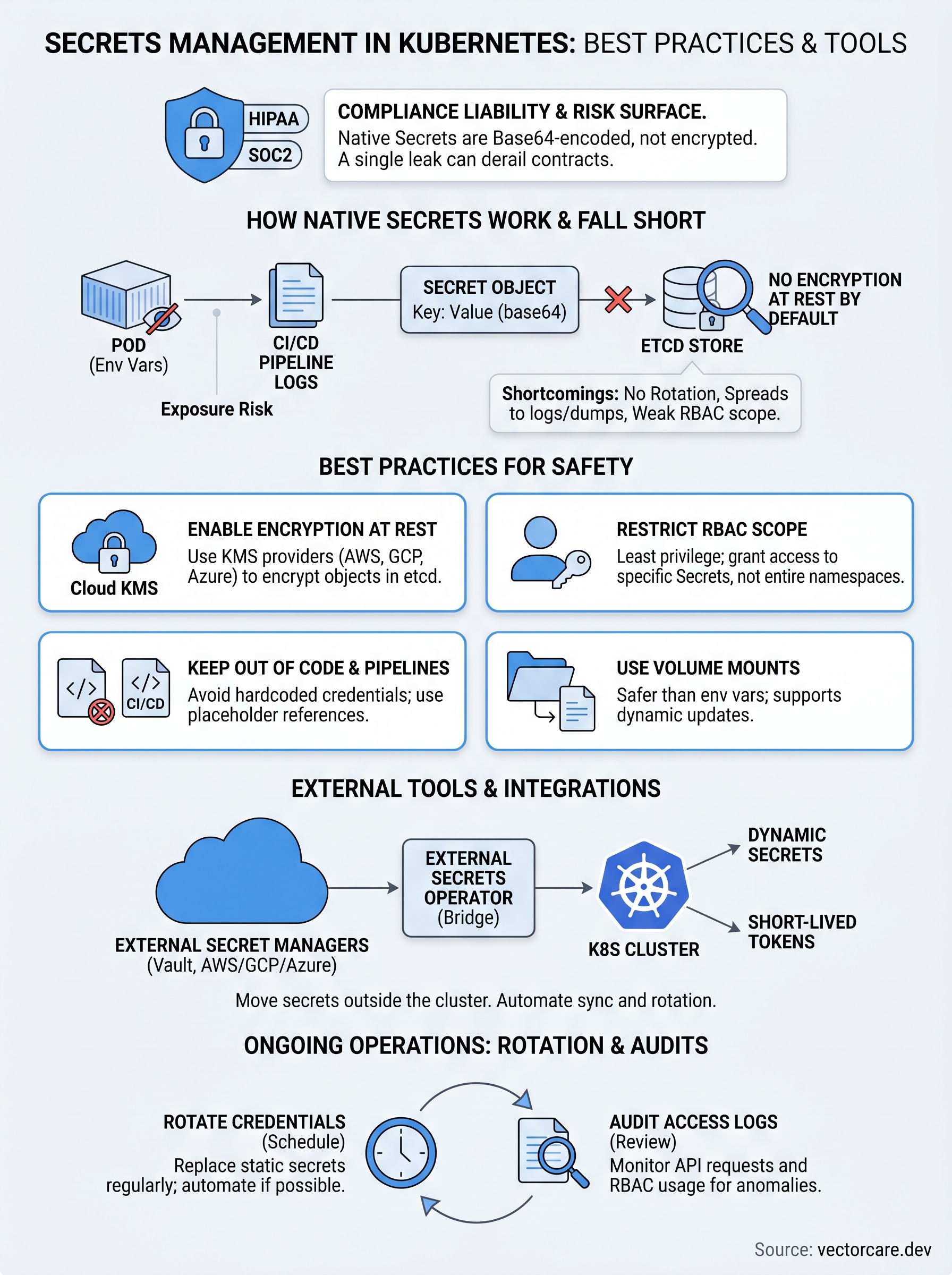
Kubernetes represents sensitive data as Secret objects, which are API resources stored in etcd, the cluster's key-value store. You create a Secret using kubectl or a manifest file, and Kubernetes encodes the values in base64 format before storing them. That encoding step is where many teams develop a false sense of security. Base64 is a reversible encoding scheme, not encryption. Anyone with read access to the Secret object can decode the value in seconds using standard command-line tools.
The Secret object structure
A Kubernetes Secret holds data as key-value pairs, where the values are base64-encoded strings. You define a Secret type when you create it: Opaque is the generic type for arbitrary credentials, while Kubernetes also provides dedicated types for TLS certificates, Docker registry credentials, and service account tokens. Each type has a specific structure that Kubernetes validates on creation, which helps prevent misconfigured credentials from reaching your workloads.
The
OpaqueSecret type is the most commonly used, but choosing the right type for your data lets Kubernetes apply the correct validation and access semantics automatically.
When you inspect a Secret with kubectl get secret <name> -o yaml, the encoded values appear in plain text in your terminal output. This matters for secrets management in Kubernetes because it means cluster access controls, specifically RBAC, become your primary defense at this layer.
How pods consume Secrets
Your pods access Secrets through two main mechanisms: environment variables and volume mounts. With environment variables, Kubernetes injects the decoded value directly into the container's process environment at startup. With volume mounts, Kubernetes writes each key as a file inside a specified directory in the container's filesystem, and your application reads the file at runtime.
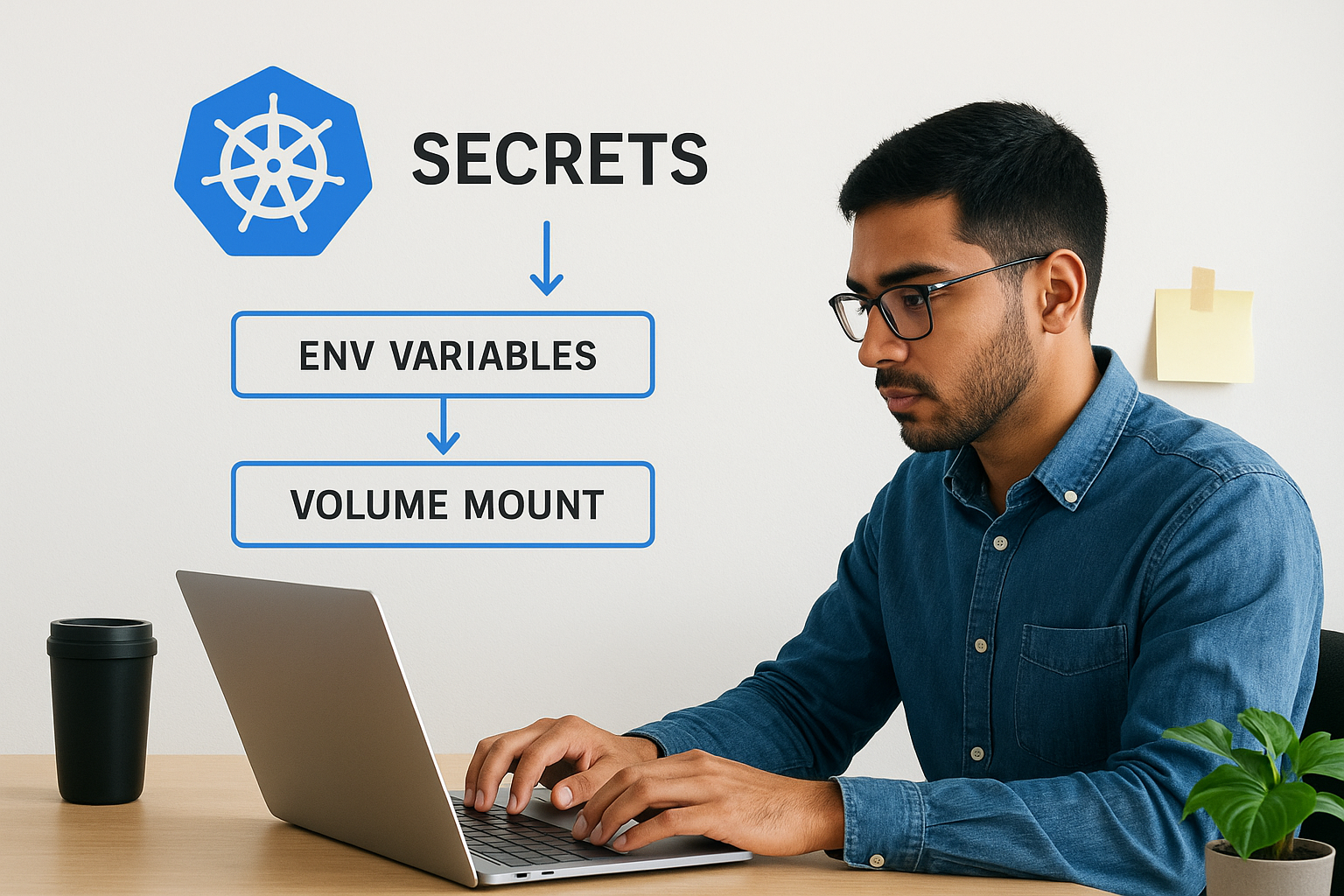
Volume mounts are generally the safer consumption pattern because they support dynamic updates when a Secret changes, whereas environment variables are fixed at pod startup and require a pod restart to reflect new values. Both methods expose the decoded credential to the running container, which means pod-level security controls determine who can read those values once the workload is live.
Where native Secrets fall short
Kubernetes gives you a structured way to separate sensitive data from your application code, and that's genuinely useful. But the native Secret implementation carries several limitations that matter significantly when you're operating in a regulated environment. Understanding these gaps is the first step toward closing them, and it helps explain why secrets management in Kubernetes rarely stops at what the platform provides out of the box.
Encryption at rest is off by default
Kubernetes stores Secret objects in etcd without encryption unless you explicitly configure it. That means the base64-encoded values sit on disk in a readable format, and any process or user with direct etcd access can retrieve them without any additional steps. This isn't a theoretical edge case. Backup files, snapshot exports, and misconfigured storage volumes can all expose etcd data to parties who were never supposed to see it.
Enabling encryption at rest through Kubernetes' EncryptionConfiguration API is a necessary step, but it shifts the key management problem rather than solving it entirely, since you still need to secure the encryption key itself.
Kubernetes does support encryption at rest via provider plugins, including integration with cloud KMS services from AWS, Google Cloud, and Azure. However, none of this is active by default, and many clusters running in production today have never had it turned on.
Secrets spread further than you expect
Even if your cluster has encryption at rest configured, Secret values travel beyond etcd once a pod starts. Environment variables get captured in process listings, crash reports, and logging agents. Volume-mounted files persist on node storage until the pod terminates. Your CI/CD pipeline is especially risky here because build logs frequently record secret values during test steps, and those logs often live in repositories with weaker access controls than your cluster.
No built-in rotation or expiration
Native Kubernetes Secrets have no rotation mechanism and no expiration metadata. Once you create a credential, it stays valid until something manually updates or deletes it. For healthcare vendors holding API keys tied to EHR integrations or OAuth tokens scoped to patient data, stale credentials represent a persistent attack surface that grows larger the longer they remain unchanged.
Best practices for handling secrets safely
Closing the gaps in native Kubernetes functionality starts with a few concrete changes to how you create, store, and access secrets across your cluster. Solid secrets management in Kubernetes doesn't require rebuilding your entire infrastructure from scratch. It requires applying targeted controls at each point where a secret can leak, starting with the foundational settings your cluster may not have enabled yet.
Enable encryption at rest and restrict RBAC scope
Your first priority should be activating encryption at rest through Kubernetes' EncryptionConfiguration API, ideally backed by a cloud KMS provider such as AWS KMS or Google Cloud KMS. This ensures that Secret objects written to etcd are encrypted on disk rather than stored as readable base64 strings.
Encryption at rest only protects secrets while they're stored. RBAC controls protect them while they're in motion through your cluster.
Once encryption is in place, audit every service account in your cluster and apply the principle of least privilege to each one. Grant access to specific named Secrets rather than broad namespace-level permissions. A compromised pod should never be able to read credentials that belong to a different service.
Keep secrets out of source code and pipelines
Hardcoded credentials in application code or Kubernetes manifests checked into a version control repository are one of the most common and preventable exposure vectors. Use placeholder references in your manifests and inject actual values at deploy time through a secrets manager or sealed secret mechanism.
Your CI/CD pipeline configuration deserves the same scrutiny. Review pipeline logs to confirm they don't capture decoded secret values during build or test steps. Restrict log retention and access so that pipeline artifacts don't become a secondary credential store that bypasses your cluster controls.
Use volume mounts instead of environment variables
Mounting secrets as files via volume mounts is safer than injecting them as environment variables. Process inspection tools, logging agents, and crash dumps can all surface environment variable contents without any special permissions.
Volume-mounted secrets also support live updates when you rotate a credential, so your pods can pick up a new value without requiring a full restart.
External secret tools and integrations
Native Kubernetes Secrets give you a starting point, but most production environments benefit from dedicated external tools that add encryption, auditing, and automatic rotation capabilities the platform doesn't include. Moving secret storage outside the cluster entirely means a compromised node or misconfigured RBAC rule doesn't automatically expose every credential your workloads depend on.
HashiCorp Vault
HashiCorp Vault stores credentials outside etcd entirely, serving them to pods dynamically at runtime through an agent injector. Your workloads receive short-lived, lease-based tokens that expire automatically and can be revoked instantly if a pod is compromised, which eliminates the persistent exposure that static Kubernetes Secrets create.
Vault also supports dynamic secrets, generating a fresh database credential each time a pod requests one rather than cycling a single static password. For healthcare vendors managing EPIC integrations, this produces a clear audit trail showing exactly which workload accessed which credential and when, directly supporting HIPAA technical safeguard requirements.
Cloud-native secret managers
AWS Secrets Manager, Google Cloud Secret Manager, and Azure Key Vault each provide managed secret storage that integrates directly with Kubernetes clusters running on their respective platforms. These services handle encryption, key management, and access logging without requiring you to operate additional infrastructure.
Using your cloud provider's native secret manager keeps your encryption key hierarchy inside a trusted, audited boundary rather than spreading it across cluster components.
Each service supports IAM-based access policies that map to Kubernetes service accounts through mechanisms like AWS IAM Roles for Service Accounts or Google Workload Identity. This lets your pods authenticate to the secret store using their cluster identity, removing the need to store a long-lived credential just to retrieve other credentials.
External Secrets Operator
The External Secrets Operator is a Kubernetes controller that bridges your cluster to external stores like Vault or AWS Secrets Manager. It watches ExternalSecret custom resources and syncs referenced values into native Kubernetes Secret objects automatically, so your application code doesn't need to change.

Defining where each secret lives in the external store through an ExternalSecret manifest lets the operator handle fetching and updating the local Secret whenever the upstream value changes. This pattern is central to mature secrets management in Kubernetes, combining strong external trust boundaries with full compatibility with workloads that already consume native Secrets.
How to run secret rotation and audits
Rotating credentials and reviewing access logs are the two operational practices that keep your secrets management in Kubernetes from drifting into a static, vulnerable state. A secret you created six months ago and never changed represents an attack surface that grows with every passing week. Building rotation and audit steps into your regular operations rather than treating them as one-time setup tasks is what separates a genuinely secure cluster from one that only looks secure on paper.
Rotating credentials on a schedule
Kubernetes has no built-in rotation mechanism, so you need to drive rotation through external tooling or a deliberate operational process. If you're using HashiCorp Vault or a cloud-native secret manager, configure lease durations and renewal policies that force your workloads to request fresh credentials at defined intervals rather than holding a single long-lived token indefinitely. For workloads still using static Kubernetes Secrets, update the Secret object with the new value and trigger a rolling restart so pods pick up the change without a full redeployment.
Short credential lifetimes don't eliminate every risk, but they dramatically limit the window an attacker has to exploit a leaked secret before it becomes invalid.
Your rotation schedule should reflect the sensitivity of each credential. OAuth tokens scoped to patient data or EPIC API keys warrant shorter lifetimes than, for example, internal service tokens with limited access. Document your rotation intervals and enforce them through automation so rotation doesn't depend on someone remembering to run a manual process.
Auditing secret access across your cluster
Kubernetes audit logs record every API request made to the cluster, including read and write operations on Secret objects. Enabling audit logging and routing those logs to a centralized SIEM or log management platform gives you a time-stamped record of which service accounts, users, or processes accessed which secrets. For healthcare vendors responding to a HIPAA inquiry or SOC2 audit, that record is direct evidence of your access controls working as intended.
Review your audit logs regularly to catch unexpected access patterns, such as a service account reading a secret outside its normal namespace or an API call originating from an unusual IP range. Pair log review with periodic RBAC audits to confirm that service account permissions haven't expanded beyond what each workload actually requires.
Next steps for your cluster
Secrets management in Kubernetes requires more than a one-time configuration pass. The practices in this guide, from enabling encryption at rest and tightening RBAC to adopting external tools like Vault or AWS Secrets Manager, work together as a layered defense rather than isolated fixes. Start with the gaps that carry the highest compliance risk for your environment, then build the rotation and audit routines that keep those controls active over time.
For healthcare vendors deploying into EPIC, every layer of that defense directly supports your HIPAA and SOC2 obligations and signals maturity to health system procurement teams reviewing your security posture. If you'd rather skip standing up and hardening this infrastructure yourself, VectorCare handles it for you. We manage compliant Kubernetes infrastructure so your team can focus on building clinical workflows instead of securing clusters. See how VectorCare deploys SMART on FHIR apps without the infrastructure burden.
The Future of Patient Logistics
Exploring the future of all things related to patient logistics, technology and how AI is going to re-shape the way we deliver care.
Thank you! Your submission has been received!
Oops! Something went wrong while submitting the form.