Role Based Access vs Attribute Based Access: RBAC vs ABAC

Controlling who sees what in a healthcare application isn't optional, it's a compliance requirement. When you're building integrations that sit inside EPIC and handle protected health information, the access control model you choose directly affects your HIPAA posture, your clinical usability, and your ability to pass security reviews. The debate around role based access vs attribute based access comes down to a fundamental question: do you gate permissions based on a user's job title, or based on a dynamic set of conditions like department, patient relationship, time of day, or data sensitivity?
Both models, RBAC and ABAC, solve real problems, but they solve them differently. RBAC is straightforward to implement and audit. ABAC handles complexity and context that roles alone can't capture. For healthcare vendors working to embed their solutions into clinical workflows, picking the wrong model creates friction with health systems, while picking the right one accelerates contract wins and simplifies compliance.
At VectorCare, we build no-code SMART on FHIR applications that integrate directly with EPIC EHRs, and access control is baked into every deployment we manage. This article breaks down RBAC and ABAC side by side, definitions, strengths, weaknesses, and specific use cases, so you can determine which approach (or which combination) fits your product and your buyers' security expectations.
What RBAC and ABAC mean
Understanding the difference between Role-Based Access Control (RBAC) and Attribute-Based Access Control (ABAC) starts with recognizing what each model uses to make an access decision. RBAC assigns permissions to roles, then assigns users to those roles. ABAC evaluates a set of attributes, things like the user's department, the resource's classification, or the current environment, before granting or denying access. The distinction matters because healthcare applications handle patient data that varies in sensitivity, and a single role label often can't capture that complexity when your application sits inside a live clinical workflow.
How RBAC works
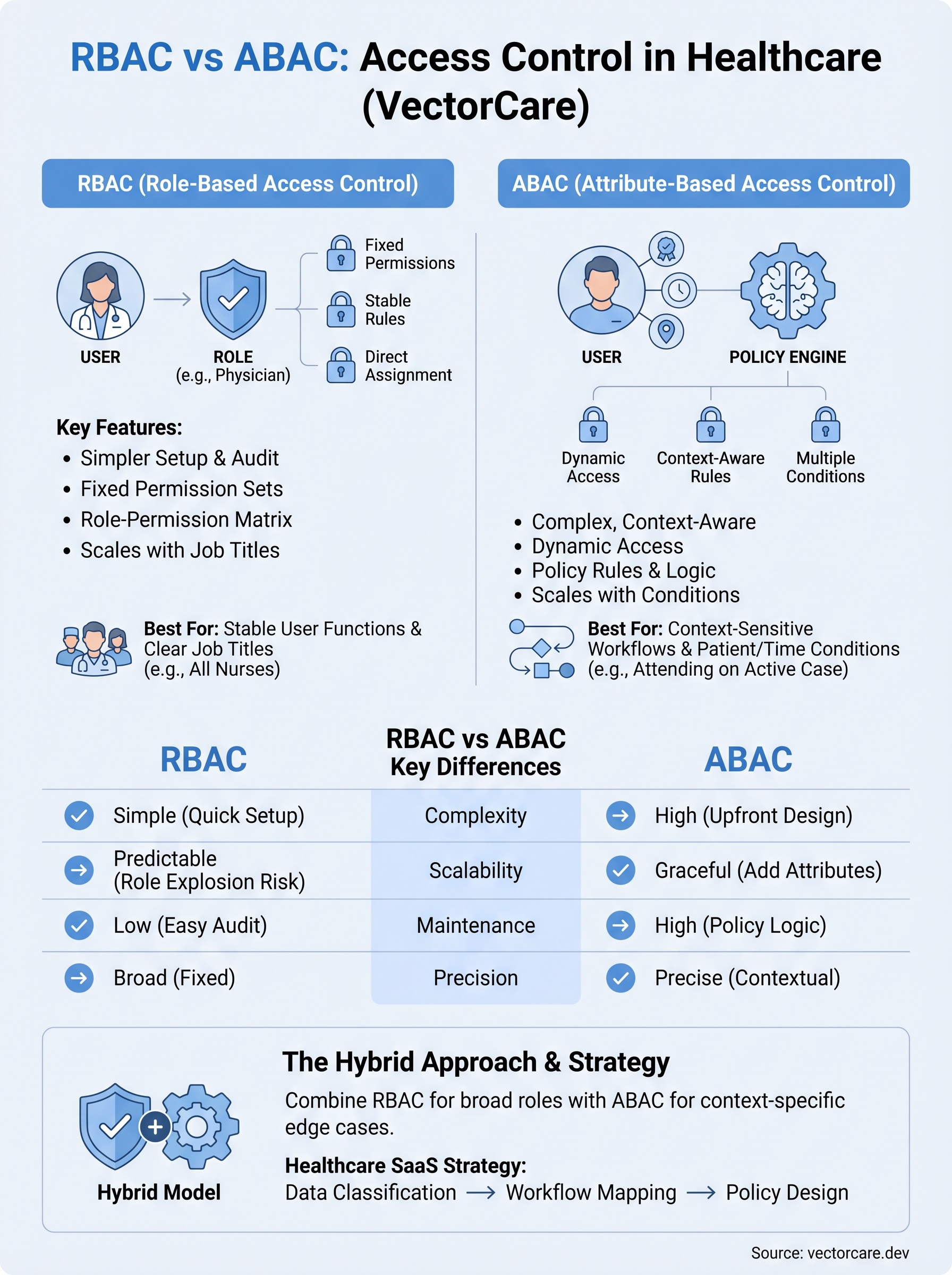
In RBAC, every permission ties directly to a role, and every user inherits those permissions automatically from the role they're assigned. A physician gets a "Physician" role; a billing specialist gets a "Billing" role. Each role carries a fixed set of access rights that apply regardless of context or circumstance. This model is straightforward to set up and audit because you can document every role and every permission it carries in a simple matrix. For EPIC integrations specifically, RBAC maps naturally to the job titles that health systems already define in their HR and identity management systems.
RBAC works best when your access rules stay stable and your user population fits into a manageable number of distinct job functions.
- Users are assigned to roles.
- Roles carry a fixed, predetermined set of permissions.
- Auditors can verify access by reviewing the role-permission matrix directly.
How ABAC works
ABAC takes a fundamentally different approach: access decisions evaluate multiple attributes simultaneously rather than relying on a single role label. Those attributes can belong to the user (specialty, license, department), the resource (sensitivity level, patient consent status), the action being taken (read vs. write), or the environment (time of day, location, device type). This makes ABAC far more flexible than RBAC, but it also means your policy definitions become significantly more complex to write, test, and maintain over time.
In a clinical setting, ABAC can enforce rules like "only the attending physician on this specific case can view this record during active care," something RBAC alone cannot express cleanly. When you look at role based access vs attribute based access side by side, RBAC prioritizes simplicity and predictability, while ABAC prioritizes precision and contextual accuracy.
Why the RBAC vs ABAC choice matters
The access control model you choose has direct consequences for your security posture, your development timeline, and how easily health systems approve your application. When you're building a SMART on FHIR app that touches protected health information (PHI) inside EPIC, the wrong choice creates compliance gaps that surface during security reviews and slow down contract negotiations with the health systems you're trying to win.
Compliance and audit implications
Your selection between RBAC and ABAC directly shapes how you document and demonstrate access controls to auditors. HIPAA's minimum necessary standard requires that users only access the PHI they need to perform their specific function. RBAC makes that simple to document because you can present a clear role-permission matrix that any auditor can follow. ABAC satisfies the standard with greater precision but requires you to maintain policy logic that auditors may find harder to verify quickly, which can stretch security reviews and delay your go-live date.
- RBAC: a straightforward matrix your compliance team can review in hours
- ABAC: richer, context-sensitive enforcement that demands detailed policy documentation and testing
The model you pick today determines how much time your engineering team spends on access control maintenance a year from now.
Contract and market implications
Health systems evaluate vendor applications carefully before granting access to their EPIC environment. When you understand role based access vs attribute based access at a technical level, you can speak directly to security teams in their language and align your controls to what buyers already expect. A well-structured access model signals product maturity to procurement teams and removes a friction point that commonly delays or kills deals with risk-averse health systems.
RBAC vs ABAC key differences
When you compare role based access vs attribute based access directly, the differences go beyond syntax. They reflect fundamentally different assumptions about how static or dynamic your users and data are in practice. Understanding these gaps helps you pick the model that fits without forcing your access control design to work against your architecture.

Complexity and setup
RBAC keeps policy creation simple because you define roles once and assign them to users. Your team can configure a full permission model in days rather than weeks. ABAC requires you to define attribute schemas, policy rules, and evaluation logic upfront, which takes longer to design and test. For teams without dedicated security engineers, that gap is significant.
ABAC's added complexity pays off only when your access rules genuinely require contextual conditions that roles cannot express.
- RBAC setup: Define roles, assign permissions, map users to roles
- ABAC setup: Define user attributes, resource attributes, environment conditions, and policy logic for each combination
Scalability and maintenance
RBAC scales well when your user types stay predictable, but it breaks down as your organization grows. Adding a new job function means creating a new role, and that role inventory can become difficult to manage over time, a problem known as "role explosion." ABAC handles growth more gracefully because you add attribute values rather than new roles, but your policy engine must evaluate more conditions with every access request. For healthcare SaaS vendors supporting dozens of health system deployments, maintenance overhead is a real cost that your engineering team absorbs over the entire contract lifecycle.
When RBAC, ABAC, or a hybrid fits best
Choosing between role based access vs attribute based access is not purely a technical decision. It depends on how dynamic your user population is, how sensitive your data categories are, and how much policy complexity your team can realistically maintain across a multi-tenant healthcare deployment.

When RBAC is the right call
RBAC fits best when your application serves clearly defined user types with stable, predictable permission sets. If every nurse on the platform needs the same access and every care coordinator performs the same functions regardless of context, RBAC gives you a clean model that auditors can verify quickly. Early-stage vendors integrating with EPIC for the first time often benefit from RBAC because it reduces implementation time and keeps security reviews straightforward.
If your product supports fewer than ten distinct job functions and your access rules don't change based on patient context, RBAC is likely sufficient.
When ABAC or a hybrid makes sense
ABAC earns its added complexity when your application handles context-sensitive workflows where the same user needs different access rights depending on patient relationship, care setting, or data classification. Remote patient monitoring platforms, for example, often need to restrict data access to the specific clinician assigned to a patient's care team, which RBAC cannot enforce without creating an unmanageable number of roles.
A hybrid approach gives you the best of both: define broad roles to simplify user management, then layer attribute conditions on top to handle the edge cases where context determines access. Many mature healthcare SaaS vendors land here as their integration footprint grows across health systems.
How to design policies for healthcare SaaS
Designing access policies for a healthcare SaaS product requires you to work backwards from your data types and clinical workflows, not forwards from what your framework makes easy to configure. Before you write a single permission rule, map out what PHI your application touches, who touches it, and under what conditions. That mapping drives every policy decision that follows, whether you've landed on role based access vs attribute based access or a hybrid of both.
Start with your data classification
Your first step is to classify every data object your application handles by sensitivity level and regulatory requirement. Patient diagnosis records, lab results, and medication histories carry different risk profiles than scheduling data or care coordinator notes. Once you have a clear classification, you can decide which data categories require contextual controls like ABAC and which categories are safely handled by simple role assignments.
Skipping data classification forces you to retrofit your access model later, which is significantly more expensive than designing it correctly upfront.
- Tier 1: Direct PHI requiring patient-specific access controls
- Tier 2: Clinical workflow data requiring department-level controls
- Tier 3: Administrative data that standard roles cover adequately
Map permissions to clinical workflows
After classification, trace each user type through your actual clinical workflows inside EPIC to identify where context changes what a user should see. A care coordinator managing referrals needs different access at intake than after discharge. Build your permission logic around those workflow states, not around abstract job titles, and your policies will hold up during health system security reviews without requiring constant revisions.
Final takeaways
The role based access vs attribute based access decision shapes your compliance posture, your development timeline, and how quickly health systems approve your application. RBAC gives you simplicity and auditability, which makes it the right starting point for most early-stage healthcare vendors. ABAC gives you contextual precision when your workflows require it, but it carries real maintenance overhead your team needs to budget for. A hybrid model lets you grow into complexity without rebuilding your access layer from scratch.
Your access control design is only one part of a successful EPIC integration. Building and maintaining a SMART on FHIR application that passes health system security reviews, meets HIPAA requirements, and embeds cleanly into clinical workflows takes significant engineering effort on its own. If you want to skip the months of groundwork and get your product in front of health systems faster, deploy your SMART on FHIR app with VectorCare and let the platform handle the complexity for you.
The Future of Patient Logistics
Exploring the future of all things related to patient logistics, technology and how AI is going to re-shape the way we deliver care.
Thank you! Your submission has been received!
Oops! Something went wrong while submitting the form.