HIPAA Risk Assessment Best Practices: Step-By-Step Guide

A single overlooked vulnerability in how you handle protected health information (PHI) can trigger fines north of $2 million and derail partnerships with health systems. That's not hypothetical, it's the reality HHS enforcement actions have shown year after year. Following HIPAA risk assessment best practices isn't just a regulatory checkbox; it's the foundation that proves to health systems, partners, and patients that your organization takes data protection seriously.
Yet many healthcare vendors, especially those building integrations with EHR systems like EPIC, treat risk assessments as a one-and-done exercise. They run through a spreadsheet, file it away, and forget about it until an audit or a breach forces them back to the table. The Office for Civil Rights (OCR) has been clear: incomplete or outdated risk assessments are the single most common finding in HIPAA enforcement cases. If your assessment doesn't reflect your current environment, it's essentially useless.
This guide walks you through a practical, step-by-step approach to conducting a HIPAA security risk assessment that actually holds up under scrutiny. You'll get actionable checklists, framework recommendations, and the specific criteria OCR looks for during investigations. At VectorCare, we build and manage HIPAA-compliant SMART on FHIR applications for healthcare vendors integrating with EPIC, so helping our partners maintain airtight compliance is something we deal with every day. Whether you're preparing for your first risk assessment or tightening up an existing one, this guide gives you a clear path forward.
Who needs a HIPAA risk assessment and why
The short answer is: any organization that touches protected health information (PHI). Under the HIPAA Security Rule, both covered entities (hospitals, clinics, health plans, and healthcare clearinghouses) and their business associates must conduct a thorough, accurate, and up-to-date risk assessment. If you're a healthcare vendor building software that integrates with an EHR system, sends patient data to a third-party analytics platform, or stores any electronic PHI (ePHI) on your infrastructure, you fall squarely within HIPAA's scope.
Covered entities and business associates
The HIPAA Security Rule, codified at 45 CFR § 164.308(a)(1), requires covered entities to conduct an accurate and thorough assessment of the potential risks and vulnerabilities to the confidentiality, integrity, and availability of ePHI. Business associates carry the same obligation under the HITECH Act. This means that digital health startups, remote patient monitoring vendors, clinical decision support companies, and medical device manufacturers that process ePHI must all run formal risk assessments, not just the hospitals they serve.

It's worth being precise about what triggers the requirement. If your product receives, stores, processes, or transmits ePHI in any form, including pulling patient records through a FHIR API, logging vitals to a cloud database, or routing referral data through an integration layer, you are a business associate and HIPAA applies to you. Many vendors discover this reality only after a health system requests proof of compliance during contract negotiations, which is a painful moment to find out you're unprepared.
Why the risk assessment is non-negotiable
Conducting a formal risk analysis is the first requirement the Office for Civil Rights (OCR) checks in any investigation. According to HHS enforcement data, failure to conduct an adequate risk analysis is consistently the most cited HIPAA violation. OCR does not accept a risk assessment that is incomplete, undated, or fails to reflect your current technology environment. If your organization has onboarded a new vendor, migrated data to the cloud, or added a new integration since your last assessment, that document is already out of date.
A risk assessment is not a one-time project. It's a living process that must reflect your current systems, data flows, and threat landscape at all times.
Following HIPAA risk assessment best practices also protects you commercially. Health systems increasingly require vendors to submit a completed risk assessment alongside their security questionnaire and BAA before signing any contract. Without a credible, documented assessment on hand, you lose deals to competitors who have already done the work.
What's at stake financially
The financial exposure is real and tiered. Civil monetary penalties range from $100 per violation for unknowing violations up to $2 million per violation category per year for willful neglect that goes uncorrected. A single breach affecting 500 or more individuals also triggers mandatory public reporting to HHS and media notification requirements, which compounds the reputational damage well beyond the fine itself.
Beyond fines, health systems that discover you lack a current risk assessment will pull contracts and remove you from vendor panels. The total cost of remediation after a breach consistently runs far higher than the investment required for a thorough, proactive risk assessment program. Treating the assessment as a core business activity rather than a compliance formality puts you in a much stronger position, both with regulators and with the health systems you're trying to close.
Step 1. Set scope and inventory ePHI
Before you can assess risk, you need to know exactly what you're protecting and where it lives across your entire environment. Scope-setting determines which systems, people, and processes fall inside your assessment boundary. If you define it too narrowly, you leave gaps that regulators and auditors will find. Every set of HIPAA risk assessment best practices starts here for a reason: a precise scope is the prerequisite for everything that follows.
Define your scope boundaries
Your scope should cover every system, application, and location that creates, receives, maintains, or transmits ePHI. That includes cloud infrastructure, on-premises servers, employee laptops, mobile devices, and third-party integrations. A common mistake is limiting scope to only the primary application while forgetting about log storage, backup systems, or staging environments where real patient data sometimes ends up.
If a system can touch ePHI, even temporarily or indirectly, it belongs inside your scope boundary.
Start by answering these questions to draw your boundary:
- Which applications does your product use to process or display patient data?
- Which environments (production, staging, development, disaster recovery) contain real ePHI?
- Which employee roles have access to ePHI, directly or through system credentials?
- Which third-party services receive or process ePHI on your behalf?
Build your ePHI inventory
Once your scope is set, create a formal ePHI inventory that catalogs every location where patient data exists. This document becomes the backbone of your entire risk assessment. Without it, you cannot accurately identify threats, assign risk levels, or demonstrate completeness to OCR.
Use the table below as a starting template:
| System / Location | ePHI Type | Storage Format | Access Controls | Owner |
|---|---|---|---|---|
| FHIR API integration layer | Patient demographics, diagnoses | Encrypted in transit (TLS 1.2+) | OAuth 2.0 tokens | Engineering |
| Cloud database (e.g., AWS RDS) | Clinical records | AES-256 at rest | IAM roles + MFA | DevOps |
| Data backup (S3 bucket) | All ePHI categories | Encrypted | Bucket policies + versioning | DevOps |
| Employee laptops | Occasionally cached records | Full-disk encryption | MDM-enforced | IT |
Review and update this inventory every time you add a new integration, migrate infrastructure, or onboard a vendor. An outdated inventory is one of the most common reasons risk assessments fail under OCR scrutiny, so treat this document as a living record, not a one-time deliverable.
Step 2. Map data flows and vendors
Knowing where ePHI lives is only half the picture. You also need to understand how that data moves through your systems and which external parties handle it along the way. A complete data flow map is one of the most actionable outputs of any HIPAA risk assessment best practices framework, because it reveals exposure points that a static inventory cannot show. Without it, you risk missing the exact spots where patient data crosses a trust boundary and becomes vulnerable.
Create your data flow diagram
A data flow diagram traces ePHI from its point of origin through every system, service, and person that handles it, all the way to its final destination or deletion point. You don't need expensive software to build one. Start with a simple diagram that documents each handoff.

Use the following structure as your template:
Source → Receiving System → Processing Step → Storage Location → Downstream Recipient
For example:
- Patient record requested via FHIR API → Integration layer → Data transformation service → Encrypted cloud database → Analytics platform
For each arrow in your diagram, document the transmission method (TLS, VPN, direct API call) and the data category being transferred (demographics, diagnoses, lab results). This level of detail is exactly what OCR expects to see when evaluating whether you have a complete picture of your ePHI environment.
A data flow diagram that stops at your application boundary is incomplete; ePHI doesn't stop moving just because it left your primary system.
Build your vendor inventory
Every third party that receives, processes, or stores ePHI on your behalf is a business associate and requires a signed Business Associate Agreement (BAA). This is not optional. Use the table below to track every vendor in your data flow:
| Vendor Name | Service Type | ePHI Shared | BAA Status | Security Review Date |
|---|---|---|---|---|
| AWS | Cloud infrastructure | All categories | Signed | 2025-01-15 |
| Twilio | SMS notifications | Phone + identifiers | Signed | 2025-03-01 |
| Analytics partner | Reporting | De-identified (verify) | Pending | Not started |
Review this vendor list every quarter and whenever you add a new integration. A vendor that receives ePHI without a current BAA on file is an open compliance violation, regardless of how small the data transfer appears.
Step 3. List threats and vulnerabilities
With your ePHI inventory and data flow map in hand, you're ready to catalog what could go wrong. This step requires you to identify every realistic threat and every known vulnerability that applies to your environment. OCR expects you to document both separately and systematically. A threat without a vulnerability to exploit cannot cause harm, and a vulnerability without a threat to trigger it carries lower risk. Distinguishing the two is a core HIPAA risk assessment best practices requirement that regulators use to judge the quality of your analysis.
Identify threats to ePHI
A threat is any circumstance or event with the potential to cause unauthorized access, disclosure, modification, or destruction of ePHI. Threats fall into three broad categories: human, environmental, and technical. Human threats include malicious insiders, phishing attacks, credential theft, ransomware, and unauthorized access by third-party contractors. Environmental threats include natural disasters, power failures, and facility outages. Technical threats include software vulnerabilities, misconfigured APIs, and failed backups.
Limit your threat list to threats that are realistic for your specific environment, not every possible scenario pulled from a generic checklist.
Use this starting list to document threats relevant to your systems:
- Phishing or social engineering targeting employees with ePHI access
- Ransomware or malware infection on endpoints or servers
- Unauthorized access through compromised API credentials or OAuth tokens
- Insider misuse of privileged access to patient records
- Third-party vendor breach exposing ePHI you shared with them
- Data loss due to failed or unverified backup processes
- Misconfigured cloud storage exposing ePHI publicly
Identify vulnerabilities in your systems
A vulnerability is a weakness in your system, process, or controls that a threat can exploit. Unlike threats, which are largely external, vulnerabilities are internal factors you can directly remediate. Common examples include unpatched software, missing multi-factor authentication, overly broad user permissions, absent encryption at rest, and missing audit logging on systems that process ePHI.
For each vulnerability you find, document the affected system, the specific weakness, and the control that is currently missing or inadequate. Pairing vulnerabilities directly to threats is what allows you to score risk accurately in Step 5. Skipping this pairing is one of the most common gaps OCR identifies during audits, so be thorough at this stage before moving on.
Step 4. Review existing safeguards
Before you can score risk accurately, you need to know what controls are already in place and whether they actually work. Reviewing your existing safeguards tells you where your defenses are solid and where they have gaps that a threat could exploit. This step directly feeds into your risk scoring in Step 5, so the quality of your review here determines how reliable your final risk levels will be. Many healthcare vendors skip a thorough controls review and jump straight to scoring, which produces risk estimates that don't reflect reality and fail to hold up under audit.
An existing control only reduces risk if it is implemented correctly, consistently enforced, and verified through testing.
Evaluate administrative and physical safeguards
Administrative safeguards are your policies, training programs, and access management procedures. Review each one against the specific requirements in the HIPAA Security Rule at 45 CFR § 164.308. For each control, note whether it exists, whether it is actively enforced, and when it was last tested or reviewed.
Use this checklist to assess your administrative and physical controls:
| Safeguard | In Place? | Last Reviewed | Gap Identified |
|---|---|---|---|
| Security awareness training | Yes / No | Date | Yes / No |
| Workforce access management policy | Yes / No | Date | Yes / No |
| Incident response plan | Yes / No | Date | Yes / No |
| Sanction policy for policy violations | Yes / No | Date | Yes / No |
| Physical access controls for server rooms | Yes / No | Date | Yes / No |
| Workstation use and security policy | Yes / No | Date | Yes / No |
Evaluate technical safeguards
Technical safeguards cover the controls built directly into your systems: encryption, access controls, audit logging, and automatic logoff. For each system in your ePHI inventory from Step 1, verify that encryption at rest and in transit is active and meets current standards. Confirm that audit logs capture who accessed ePHI, when, and from where, since OCR specifically looks for this during investigations.
Following HIPAA risk assessment best practices means documenting your findings at the control level, not just at the system level. For every gap you identify, record it with the specific system affected and the control requirement it violates. This evidence becomes the direct input for your remediation plan in Step 7 and shows regulators a complete, traceable audit trail from vulnerability to corrective action.
Step 5. Score likelihood and impact
With your threats, vulnerabilities, and existing safeguards all documented, you're ready to quantify risk. Scoring likelihood and impact is where your qualitative observations become a structured, defensible risk register. OCR does not prescribe a specific scoring methodology, but it expects you to apply a consistent, documented approach across every threat-vulnerability pair you identified in Step 3. Without scores, you have a list of concerns rather than a prioritized risk assessment.
Define your scoring scale
Before you score anything, establish a fixed scale that your entire team will use consistently. A three-tier scale (Low, Medium, High) works well for most healthcare vendors. A five-tier numerical scale (1 through 5) gives you more precision if your environment is complex. Either approach satisfies HIPAA risk assessment best practices requirements as long as you document what each tier means and apply it uniformly across all entries.
Use the definitions below as your scoring reference:
| Score | Likelihood Definition | Impact Definition |
|---|---|---|
| 1 - Low | Threat is unlikely given current controls and environment | Minimal ePHI exposure; no reportable breach likely |
| 2 - Medium | Threat is plausible; controls partially reduce probability | Moderate ePHI exposure; breach notification may be required |
| 3 - High | Threat is likely or has occurred before in similar environments | Significant ePHI exposure; breach, fines, or contract loss likely |
Document why you assigned each score, not just the number itself. OCR reviewers look for evidence of analytical reasoning, not just a completed table.
Score each threat-vulnerability pair
Pull every threat-vulnerability pair you identified in Step 3 and score each one independently for likelihood and impact. Likelihood reflects the probability that a specific threat will exploit a specific vulnerability given your current controls. Impact reflects the severity of the resulting harm to ePHI confidentiality, integrity, or availability if that exploitation occurs.
Apply your scores using this template:
| Threat | Vulnerability | Likelihood (1-3) | Impact (1-3) | Existing Control |
|---|---|---|---|---|
| Phishing attack | No MFA on admin accounts | 3 | 3 | Security training only |
| Ransomware | Unpatched OS on workstations | 2 | 3 | Partial patching schedule |
| Vendor breach | BAA missing for analytics partner | 2 | 2 | None |
| Misconfigured S3 bucket | No automated bucket policy checks | 1 | 3 | Manual review quarterly |
Your scores feed directly into Step 6, where you combine likelihood and impact into final risk levels and determine which items require immediate remediation.
Step 6. Assign risk levels and priorities
Your likelihood and impact scores from Step 5 are the raw inputs for this step. Now you combine them into a single composite risk level for each threat-vulnerability pair and use those levels to determine which items you address first. This is where following HIPAA risk assessment best practices pays off directly: a clear, documented priority ranking gives your remediation team an unambiguous action order and gives auditors evidence that your process was methodical rather than arbitrary.
Calculate your composite risk score
Multiply your likelihood score by your impact score to generate a composite risk score for each entry in your risk register. Using a 1-3 scale for both factors, your composite scores will range from 1 to 9. This multiplication approach is widely used in healthcare security programs because it amplifies high-severity combinations without requiring complex formulas. A threat with a likelihood of 3 and an impact of 3 produces a score of 9, which sits at the top of your priority list regardless of how many other items appear on it.

Apply your composite scores using the table below:
| Threat | Vulnerability | Likelihood | Impact | Composite Score | Risk Level |
|---|---|---|---|---|---|
| Phishing attack | No MFA on admin accounts | 3 | 3 | 9 | High |
| Ransomware | Unpatched workstations | 2 | 3 | 6 | High |
| Vendor breach | Missing BAA for analytics partner | 2 | 2 | 4 | Medium |
| Misconfigured S3 bucket | No automated policy checks | 1 | 3 | 3 | Low |
Document the rationale behind each composite score so that any reviewer can follow your reasoning without needing to ask for clarification.
Set your priority tiers
Once every entry has a composite score, assign it to a priority tier that dictates your response timeline. Use three tiers: High (scores 7-9) require remediation within 30 days, Medium (scores 4-6) within 90 days, and Low (scores 1-3) within 180 days or your next scheduled review cycle. These timelines are not arbitrary; they reflect a realistic remediation pace that OCR recognizes as evidence of an active risk management program.
Your final priority tier list becomes the direct input for your remediation plan in Step 7. Review it with your security lead and relevant system owners before you move forward, because cross-functional sign-off at this stage ensures accountability and prevents remediation tasks from stalling once they are assigned.
Step 7. Build a remediation plan
Your risk register now tells you what needs to be fixed and in what order. A remediation plan converts that priority list into assigned tasks with owners, deadlines, and verification steps. Without this structure, high-priority items sit open indefinitely and your risk assessment becomes a document that looks complete on paper but produces no actual change. Following HIPAA risk assessment best practices means translating your scores into a working action plan that your team executes and that you can demonstrate to OCR if needed.
Assign owners and deadlines
Every remediation item requires a named owner and a firm deadline tied to the priority tier you assigned in Step 6. Ownership should go to the person who controls the system or process involved, not to a generic security team. When a specific individual is accountable, tasks move faster and accountability is easier to track.
Use this template to structure each remediation item:
| Risk Item | Assigned Owner | Priority Tier | Deadline | Verification Method |
|---|---|---|---|---|
| Enable MFA on all admin accounts | IT Lead | High | 30 days | Screenshot + access log review |
| Patch all workstation OS versions | DevOps Lead | High | 30 days | Patch management report |
| Execute BAA with analytics partner | Legal / Compliance | Medium | 90 days | Signed BAA on file |
| Automate S3 bucket policy checks | Engineering Lead | Low | 180 days | Automated scan results |
Do not assign remediation items to roles or teams without a specific person attached; diffuse ownership is the most common reason remediation stalls.
Track progress and verify fixes
A remediation plan without a review cadence is just a list of intentions. Schedule a monthly check-in for High-priority items and a quarterly review for Medium and Low items. At each check-in, the assigned owner provides documented evidence that the fix is complete, not just a verbal update.
Verification matters as much as the remediation itself. If you enabled MFA on admin accounts, confirm it by pulling an access log that shows MFA-enforced logins. If you patched workstations, produce a patch compliance report from your endpoint management tool rather than relying on self-reporting. OCR expects evidence of remediation, not just a closed checkbox, so build verification into every item from the start and store that evidence alongside your risk assessment documentation.
Step 8. Document and keep it audit-ready
Your completed risk assessment is only as useful as its documentation. OCR does not accept verbal explanations or informal notes during an investigation; they expect a structured, dated, and complete paper trail that covers every step from scope-setting through remediation. Applying HIPAA risk assessment best practices at this stage means organizing your evidence so that any reviewer, whether an auditor, a health system security team, or your own compliance officer, can follow your process without needing you to narrate it.
Assemble your documentation package
Every component of your risk assessment should live in a single, organized location rather than scattered across email threads and shared drives. Structure your documentation package so each section maps directly to the steps you completed. A reviewer should be able to open your package and confirm completeness in minutes.
Include these components in your final documentation package:
- ePHI inventory with all systems, data categories, and access controls documented
- Data flow diagrams showing every point where ePHI moves across systems or vendors
- Threat and vulnerability register with each pair documented separately and sourced
- Safeguards review checklist with gap findings clearly noted
- Risk scoring worksheet with likelihood, impact, composite scores, and scoring rationale
- Priority tier assignments with supporting reasoning for each classification
- Remediation plan with named owners, deadlines, and verification evidence attached
- Signed Business Associate Agreements for every vendor in your data flow
- Assessment completion date and the name of the person responsible for conducting it
An audit-ready documentation package proves not just what your risk levels are, but that you followed a rigorous, repeatable process to get there.
Maintain version control and audit trails
Your risk assessment is a living document that requires formal version control. Every time you update the assessment, whether after adding a new integration, remediating a High-priority item, or completing an annual review, you create a new dated version and retain all prior versions. OCR specifically looks for version history during investigations because it demonstrates that your organization treats risk assessment as an ongoing program rather than a point-in-time exercise.
Store your documentation in a controlled-access repository where edit history is logged automatically. Cloud platforms like Google Drive with version history enabled, or Microsoft SharePoint with document versioning, both support this requirement without additional tooling. Restrict edit access to your compliance lead and restrict view access to personnel with a documented need, because your risk assessment itself contains a detailed map of your vulnerabilities.
Next steps to stay compliant
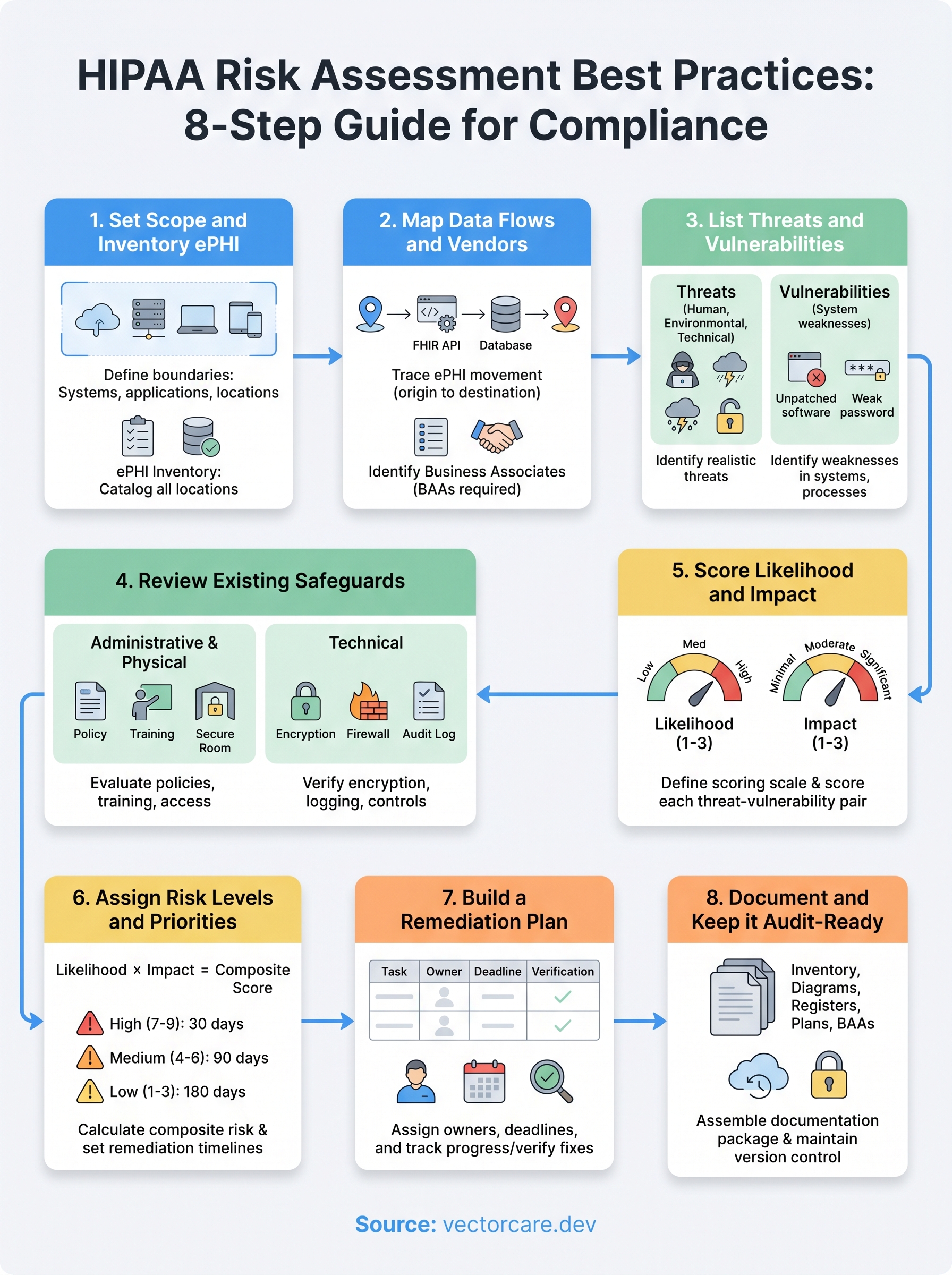
You now have a complete, eight-step framework that covers every component OCR expects to see in a credible HIPAA risk assessment. Put it into practice by scheduling your scope review and ePHI inventory within the next two weeks, not at the end of the quarter. Following HIPAA risk assessment best practices is an ongoing commitment, so set a calendar reminder for an annual full assessment and a quarterly check on your vendor list and remediation plan.
Your compliance posture is only as strong as the systems you build on. If your product integrates with EPIC, the technical environment you're building into, including your FHIR data flows, BAA coverage, and SMART on FHIR configuration, adds direct compliance complexity that a spreadsheet alone cannot manage. Build your EPIC integration on a HIPAA-compliant platform that handles the technical and security requirements so your team can focus on delivering clinical value.
The Future of Patient Logistics
Exploring the future of all things related to patient logistics, technology and how AI is going to re-shape the way we deliver care.
Thank you! Your submission has been received!
Oops! Something went wrong while submitting the form.