Identity Federation Explained: How It Works and How It Differs from SSO

If you're building a healthcare app that needs to talk to Epic or any other EHR, you've probably run into the term identity federation explained in some vendor's technical docs and wondered if it's just a fancy word for login. It isn't, and mixing it up with related concepts can cost you weeks of rework during an integration project.
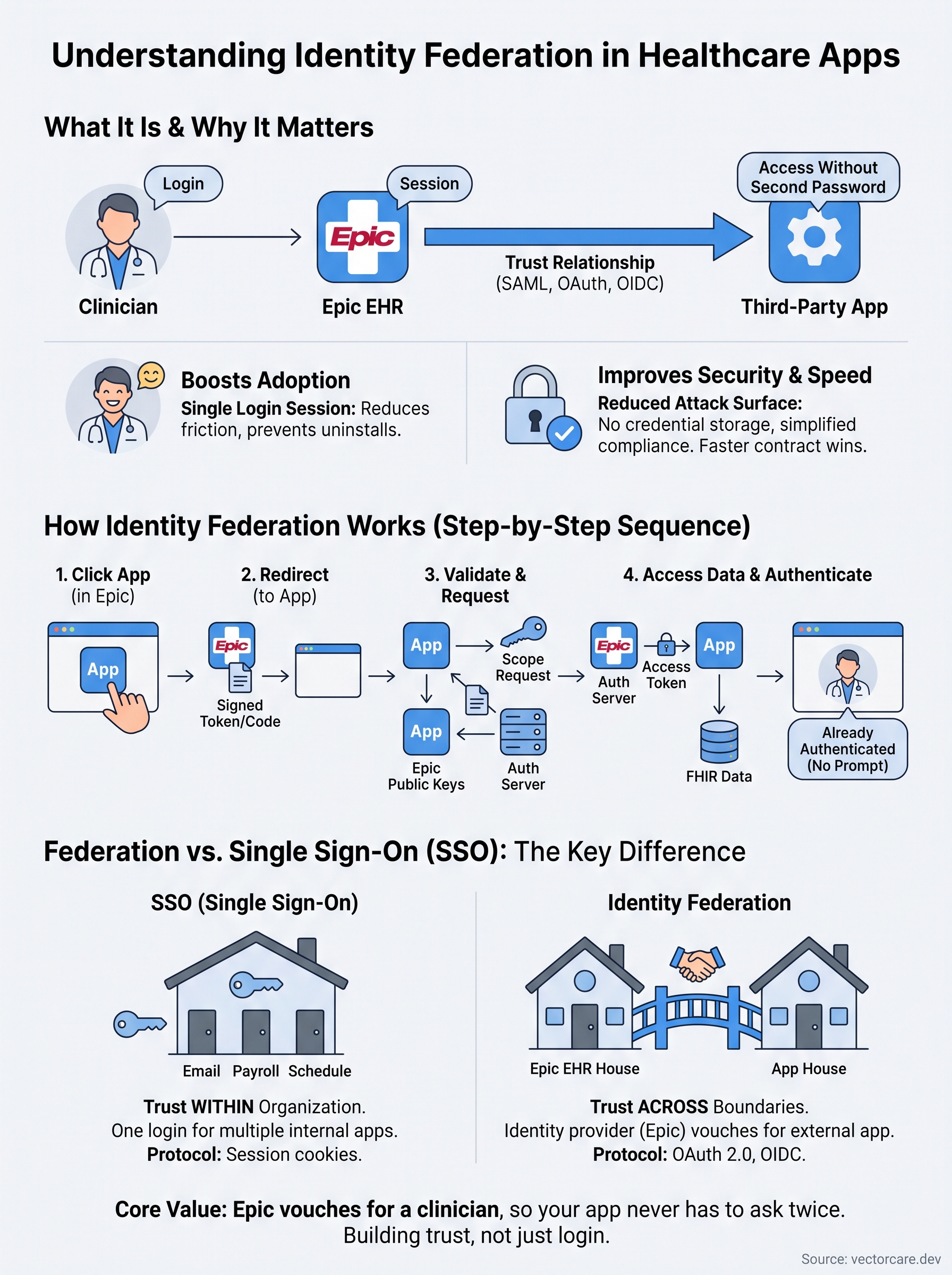
Identity federation is a system that lets a user's identity, verified by one organization, be trusted by another organization without creating a separate login. In healthcare, this is what allows a clinician logged into Epic to open your app without typing in a second password, because Epic's identity provider vouches for them through a trust relationship built on standards like SAML and OAuth. It's related to single sign-on, but it's not the same thing, and understanding the distinction matters for how you architect your integration.
This article breaks down how identity federation actually works, walks through the standards behind it, and clears up exactly where it overlaps with SSO and where the two concepts split apart. If you're building SMART on FHIR apps for Epic, this is the foundation you need before you touch a single line of authentication code.
Why identity federation matters for your organization
Clinicians work inside Epic all day, and every extra login screen you force on them is a login screen they'll route around. Identity federation solves this by letting your app trust the identity Epic already verified, so a nurse or physician launches your tool from within their existing session instead of stopping to type another password. This isn't a nice-to-have. Health systems evaluate vendor apps partly on how much friction they add to a shift, and a clunky login flow is a fast way to get uninstalled.
If clinicians have to log in twice, they'll stop using your app, no matter how good the underlying feature is.
Reducing risk instead of adding it
Beyond convenience, federation shrinks your attack surface. When you build your own login system, you're also building your own password storage, reset flows, and breach exposure, all of which fall under HIPAA scrutiny. Federating identity through Epic's identity provider means you're not the one holding credentials, which simplifies your compliance story and your HIPAA Security Rule obligations considerably.
Speeding up contract wins
Health system IT and security teams ask pointed questions about authentication during procurement, and vague answers stall deals. Vendors who can clearly explain their federation model, and point to a working SMART on FHIR launch, move through security review faster than vendors still explaining custom login logic.
| Without identity federation | With identity federation |
|---|---|
| Separate login per app | Single trusted session from Epic |
| Vendor stores/manages credentials | Vendor never touches passwords |
| Slower security review | Faster procurement approval |
| Higher breach liability | Reduced credential exposure |
Organizations that skip this step often discover the cost later, during a security audit or a stalled contract, rather than during development when it's cheap to fix. Setting up federation correctly from the start is one of the clearest ways to shorten your path from pilot to paid contract with a health system.
How identity federation works step by step
Underneath the convenience, identity federation runs on a handful of standardized handshakes between two parties: the identity provider (Epic, in most healthcare cases) and the service provider (your app). Neither side is guessing about trust. They've already exchanged cryptographic keys and metadata ahead of time, so when a clinician clicks into your app, the whole exchange happens in milliseconds without either system needing to ask "who is this person, really?" from scratch.
The actual sequence
Walking through a typical SMART on FHIR launch from inside Epic looks like this:
- A clinician clicks your app's icon inside their Epic session.
- Epic, acting as the identity provider, redirects the browser to your app with a signed token or authorization code.
- Your app validates that token against Epic's public keys, confirming it's genuine and unexpired.
- Your app requests an access token via OAuth 2.0, scoped to exactly the FHIR resources it needs.
- Epic's authorization server issues that token, and your app uses it to pull patient data through FHIR APIs.
- The clinician lands inside your app, already authenticated, with no separate password prompt.
The clinician never sees the handshake. If they do, something's already broken.
Why the standards matter
SAML handled a lot of this exchange in older enterprise systems, but modern EHR integrations lean on OAuth 2.0 and OpenID Connect because they're built for exactly this kind of token-based, API-driven exchange. Getting these steps wrong, especially token validation and scope requests, is where most vendor integrations stall during Epic's technical review.
Identity federation vs. single sign-on: key differences
People use "identity federation" and "SSO" interchangeably, but they solve different problems. Single sign-on lets one user access multiple apps within a single organization using one login, like an employee unlocking email, payroll, and a scheduling tool with one corporate password. Identity federation extends that trust across organizational boundaries, letting Epic vouch for a clinician's identity to your app even though you and the health system are entirely separate companies with separate systems.
Same session, different trust boundary
Think of SSO as trust within a house and federation as trust between houses. A hospital's internal SSO might let a nurse move between the scheduling system and the pharmacy portal without logging in again, all inside Epic's own walls. Federation is what happens when that same nurse opens your third-party app, built by a company Epic has never met in person, and Epic's identity provider still tells your app "this is a verified clinician" through a signed token.
SSO keeps you logged in. Federation tells other companies who you are.
Why the distinction changes your architecture
| Concept | Trust boundary | Typical protocol | Who verifies the user |
|---|---|---|---|
| SSO | Within one organization | Session cookies, internal directory | The organization's own IT system |
| Federation | Across organizations | SAML, OAuth 2.0, OpenID Connect | The identity provider, trusted externally |
If you design your SMART on FHIR app assuming SSO-style trust, you'll skip the token validation steps that federation actually requires, and Epic's technical reviewers will catch it during onboarding.
Real-world examples of identity federation in action
Abstract explanations only go so far, so it helps to see identity federation working in systems you already use. The clearest healthcare example is a clinical decision support tool launching directly from an Epic chart. The physician never leaves Epic, never types a password, and your app still knows exactly who's asking for data because Epic's identity provider signed off on the request.
Beyond the exam room
Federation shows up outside healthcare too, and those examples make the concept easier to grasp. When you log into a third-party app using "Sign in with Google" or "Sign in with Microsoft," you're watching identity federation in real time. Google or Microsoft verifies you, then vouches for you to an app that never sees your password. The mechanics are nearly identical to what happens when Epic vouches for a clinician launching your SMART on FHIR app.
Every time you skip creating a new password by using an existing account, you're using federation, whether you notice it or not.
Common healthcare federation patterns
A few patterns repeat across most Epic integrations:
- In-context EHR launch: Your app opens from inside a patient's chart, already trusted through Epic's session.
- Patient-facing federation: Patients access MyChart-connected apps using credentials Epic already verified, common in remote monitoring tools.
- Cross-network federation: Networks like CommonWell Health Alliance let identities and records move between unrelated health systems.
Each pattern solves the same core problem: proving who someone is without asking them to prove it twice. Once you recognize the pattern, spotting it in a new vendor's documentation gets much faster.
Making sense of federated identity
Once you strip away the acronyms, identity federation comes down to one idea: letting Epic vouch for a clinician so your app never has to ask twice. That trust relationship, built on OAuth 2.0, OpenID Connect, and signed tokens, is what separates a SMART on FHIR app clinicians actually use from one they route around after the first clunky login. Knowing how federation differs from plain SSO isn't academic. It's what determines whether your app passes Epic's technical review on the first try or bounces back with questions about token validation you didn't expect.
Building that federation layer correctly, from scratch, is exactly the kind of work that used to take vendors months and a dedicated engineering team. If you'd rather skip that timeline entirely, see how VectorCare gets your SMART on FHIR app built and deployed in days.
The Future of Patient Logistics
Exploring the future of all things related to patient logistics, technology and how AI is going to re-shape the way we deliver care.
Thank you! Your submission has been received!
Oops! Something went wrong while submitting the form.