Identity Federation Architecture: Patterns and Components

If you're building a SMART on FHIR app for EPIC, you'll hit identity federation architecture the moment a health system asks how your app authenticates against their EHR without storing a single password. That question decides whether your integration passes security review or gets sent back for rework.
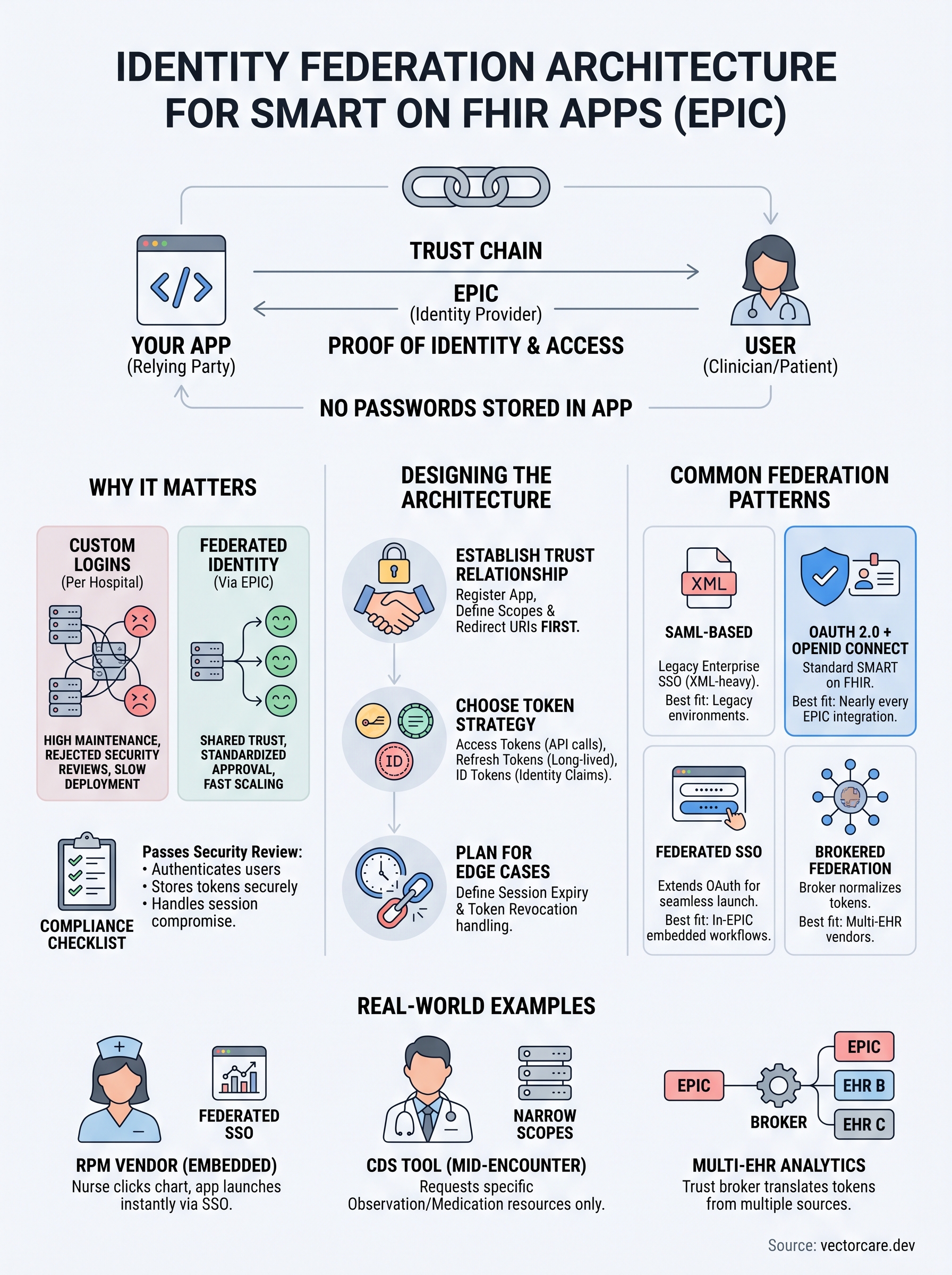
At its core, identity federation lets one system trust another system's proof of who a user is, instead of managing separate logins everywhere. In healthcare, this means your app trusts EPIC's identity provider, EPIC issues a token through OAuth 2.0, and your app reads that token to know exactly which clinician or patient is acting, all without touching credentials directly. Getting this trust relationship right is what makes SMART on FHIR authentication work across dozens of hospital systems without custom code for each one.
This article breaks down the actual federation patterns you'll encounter, the components involved (identity providers, token issuers, trust brokers), and how they fit together in a real EPIC integration. You'll walk away knowing exactly what happens between login and data access, and why getting the architecture wrong costs teams months in security review.
Why identity federation architecture matters
Every EPIC integration lives or dies on trust, and trust is exactly what identity federation architecture handles. Health systems won't let your app touch patient data unless they can verify, cryptographically, that the person clicking "approve" is actually a licensed clinician or an authorized patient. Skip proper federation and you're stuck asking each hospital to create separate accounts for your app, which no security review team will sign off on at scale.
The real cost of skipping federation
Building your own credential system for every EPIC-connected hospital sounds manageable until you count the maintenance burden. Each health system runs its own user directory, its own password policy, its own session rules. Without federation, your engineering team ends up managing dozens of separate login flows instead of a single trust relationship with EPIC's identity provider, and that difference shows up fast in your budget.
| Approach | Engineering effort per hospital | Ongoing maintenance | Security review outcome |
|---|---|---|---|
| Custom login per hospital | 4-8 weeks | High, per-instance patching | Frequent rejections |
| Federated identity via EPIC | Near zero after initial setup | Low, shared trust chain | Standardized approval |
What compliance teams check first
Reviewers at nearly every health system ask the same three questions before they approve a SMART on FHIR app: how do you authenticate users, where are tokens stored, and what happens if a session is compromised. Federation answers all three with a documented trust chain instead of a custom explanation for each deployment, which is exactly what auditors want to see when they compare your app against HL7's SMART App Launch framework.
Identity federation turns a security review from a months-long interrogation into a checklist.
Federation is the difference between one integration and a hundred
Scaling matters more than most vendors expect going in. A digital health startup targeting even a handful of regional hospital systems can burn through a full year of engineering time just handling authentication edge cases, before writing a single line of clinical workflow logic. Federated identity, configured once against EPIC's standard OAuth 2.0 flow, works the same way for every hospital that runs EPIC, because you're trusting one identity provider pattern rather than negotiating credentials system by system.
Getting this piece wrong doesn't just slow down one deal, it slows down every deal after it. Vendors who treat federation as an afterthought end up rebuilding authentication logic for each new health system contract, which erases the cost advantage of selling into healthcare in the first place. Vendors who architect it correctly once can point to the same trust model in every sales conversation, turning what used to be a technical risk into a repeatable, defensible part of their pitch.
How to design an identity federation architecture
Designing a working identity federation architecture starts with mapping out three roles: the identity provider, the relying party, and the trust broker between them. EPIC acts as your identity provider, your app is the relying party, and the trust broker is the configuration that tells both sides how to verify each other. Get this mapping wrong at the start and every downstream decision, from token format to session handling, inherits the mistake.
Start with the trust relationship, not the login screen
Most teams jump straight into building a login button, but that's backwards. You need to establish the trust relationship with EPIC's authorization server first, register your app in EPIC's App Orchard, and define your redirect URIs and scopes before any UI work happens. Skipping this step means rebuilding your login flow later once EPIC's registration requirements surface issues you didn't anticipate.
A federation architecture built around the trust relationship survives every hospital deployment; one built around a login screen doesn't.
Choose your token strategy deliberately
Once trust is established, decide how you'll handle the tokens EPIC issues. This isn't a minor implementation detail, it determines how your app behaves across sessions, refreshes, and revocations.
- Access tokens: short-lived, used for actual FHIR API calls, typically expire in under an hour
- Refresh tokens: longer-lived, used to get new access tokens without re-authenticating the user
- ID tokens: carry identity claims about the user, following the OpenID Connect layer on top of OAuth 2.0
- Scope definitions: determine exactly which FHIR resources your app can request, and narrower scopes pass review faster
Reference Microsoft's own guidance on OAuth 2.0 and OpenID Connect protocols if you want a vendor-neutral breakdown of how these pieces interact, since EPIC's implementation follows the same underlying standard.
Plan for session and error states before launch
Session expiry and token revocation are where most federation designs fall apart during security review. Reviewers will ask what happens when a token expires mid-session, or when a clinician's access gets revoked at the hospital level. Your architecture needs documented answers for both, not improvised ones. Building these edge cases into your design early, rather than patching them in after a failed review, saves weeks of back-and-forth with hospital IT teams who've seen incomplete federation designs before and know exactly what questions to ask.
Common identity federation architecture patterns
Four federation patterns show up again and again in SMART on FHIR work, and picking the right one for your app's use case matters more than most vendors realize before their first EPIC deployment. Each pattern solves a different trust problem, and mixing them up leads to either an overbuilt app or one that fails review because it's missing a piece a reviewer expects.

SAML-based federation
SAML predates OAuth and still shows up in enterprise health system environments, especially where hospital IT has existing SAML infrastructure tied to Active Directory. It's XML-heavy and verbose compared to token-based approaches, but some health systems still route internal staff logins through SAML assertions before handing off to EPIC's OAuth layer. You'll rarely build a new SMART on FHIR app on pure SAML, but you'll encounter it at the edges of larger hospital identity stacks.
OAuth 2.0 and OpenID Connect
This is the pattern EPIC's SMART App Launch framework is built on, and it's the one you'll use for nearly every EPIC integration. OAuth 2.0 handles authorization, deciding what your app can do, while OpenID Connect layers identity on top, telling you who's doing it. Together they give you a standardized handshake that works whether the user is a clinician launching your app from within EPIC or a patient accessing it through MyChart.
If your app talks to EPIC, OAuth 2.0 with OpenID Connect is the pattern you'll build on, full stop.
Federated single sign-on (SSO)
SSO extends the OAuth pattern so a user who's already authenticated once, say, logging into their hospital workstation, doesn't have to log in again when your app launches inside EPIC's interface. This pattern matters most for in-EPIC embedded workflows, where clinicians expect your app to open without an extra login screen interrupting their session.
Brokered identity federation
Some vendors connect to multiple health systems running different EHRs, not just EPIC, and need a broker sitting between their app and each identity provider. The broker normalizes tokens from different sources into a consistent format your app can read.
| Pattern | Best fit | Common pitfall |
|---|---|---|
| SAML-based | Legacy enterprise SSO | Overkill for new SMART apps |
| OAuth 2.0 + OIDC | Standard EPIC integration | Misconfigured scopes |
| Federated SSO | In-EPIC embedded launch | Session timeout mismatches |
| Brokered federation | Multi-EHR vendors | Token format inconsistency |
Most vendors building for EPIC alone only need the OAuth 2.0 and OpenID Connect pattern, with federated SSO layered on for embedded launches.
Real-world examples of identity federation architecture
Seeing how identity federation architecture plays out in actual EPIC deployments makes the patterns concrete instead of theoretical. Three scenarios come up constantly across digital health vendors, and each one leans on a different piece of the federation stack you just read about.

A remote patient monitoring vendor launches from within EPIC
Consider a vendor whose RPM dashboard needs to open the moment a nurse clicks a patient's chart inside EPIC. The nurse already authenticated once against the hospital's directory, so the app relies on federated SSO layered on top of EPIC's standard OAuth 2.0 flow. EPIC issues a short-lived access token scoped only to that patient's vitals data, the app reads the token, and the dashboard renders without a second login screen. No credentials pass through the vendor's servers, and the entire exchange happens in under two seconds.
A clinical decision support tool reads structured data mid-encounter
A CDS vendor embedding recommendations directly into a physician's workflow needs read access to specific FHIR resources, not a broad data dump. Here, tight scope definitions matter more than any other part of the setup. The app requests only Observation and MedicationRequest resources tied to the active encounter, and EPIC's authorization server grants a token limited to exactly that. Reviewers approve these integrations faster because the requested access maps directly to the clinical function.
The narrower the scope, the faster the review, and the fewer questions a hospital's security team has to ask.
A multi-EHR analytics platform brokers identity across systems
A vendor selling analytics to health systems running EPIC alongside other EHRs can't build a separate integration for every identity provider. Instead, a trust broker sits between the app and each EHR, translating tokens from different identity providers into one consistent internal format.
- EPIC issues an OAuth 2.0 token with EPIC-specific claims
- The broker normalizes that token alongside tokens from other EHR vendors
- The analytics app reads one standardized identity object regardless of source
This brokered pattern costs more to build upfront, but it's the only approach that scales once a vendor's client list includes more than one EHR vendor. Vendors who skip the broker end up maintaining separate authentication code paths per EHR, which defeats the purpose of federation in the first place.
Where federation fits in your identity strategy
Getting identity federation architecture right isn't a side task you bolt on before launch, it's the foundation every EPIC integration stands on. The trust relationship you establish with EPIC's identity provider, the token strategy you choose, and the pattern you pick all determine whether your app clears security review in weeks or gets stuck in revisions for months. None of this changes whether you're a two-person startup or a funded RPM company with a dedicated security team.
Building this stack from scratch still takes real engineering time, even when you know exactly which pattern fits your use case. That's the gap VectorCare closes, handling the OAuth 2.0 flow, scope configuration, and EPIC Showroom submission through a no-code platform built specifically for SMART on FHIR apps. If you'd rather skip months of federation architecture work and get your app in front of health systems, build and deploy your SMART on FHIR app in days.
The Future of Patient Logistics
Exploring the future of all things related to patient logistics, technology and how AI is going to re-shape the way we deliver care.
Thank you! Your submission has been received!
Oops! Something went wrong while submitting the form.