HIPAA Technical Safeguards Checklist: 12 ePHI Controls (2026)

The HIPAA Security Rule lists technical safeguards as one of its core requirement categories, and for good reason. These controls sit between your electronic protected health information (ePHI) and the breaches that trigger OCR investigations, six-figure fines, and lost health system contracts. Yet most healthcare vendors still treat compliance like a one-time checkbox exercise. A solid HIPAA technical safeguards checklist breaks that habit by giving your team a repeatable framework to assess, implement, and maintain the specific controls that actually protect patient data.
This matters more than ever for vendors building products that touch EHR systems. If you're integrating with EPIC or another major platform, health systems will scrutinize your technical controls before granting access to their patient populations. At VectorCare, we deal with this directly, our no-code SMART on FHIR platform is built with HIPAA and SOC 2 compliance baked in, so healthcare vendors launching EPIC integrations don't have to engineer these safeguards from scratch. But whether you use a managed platform or build custom, you still need to know what's required and verify it's in place.
This checklist covers 12 ePHI controls drawn from the HIPAA Security Rule's technical safeguard standards for 2026. Each item includes what the rule requires, why it matters, and what a compliant implementation looks like in practice. Use it to audit your current posture, identify gaps, and build a remediation plan that holds up to scrutiny, from your internal security team, your compliance officer, and the health systems evaluating your product.
1. Build on a managed SMART on FHIR platform
Your foundation matters more than any single control on this list. When you build ePHI-handling applications on a platform engineered for HIPAA compliance from day one, you reduce the attack surface your team has to defend. A managed SMART on FHIR platform handles the infrastructure-level safeguards the Security Rule requires, so you can direct engineering effort toward your core product rather than re-solving problems that already have answers.

What HIPAA expects
The HIPAA Security Rule (45 CFR § 164.312) requires you to implement technical security measures that guard against unauthorized access to ePHI transmitted over electronic networks. For vendors integrating with EPIC, every data exchange must use SMART on FHIR authorization flows that limit access to the specific FHIR resources a user or application is permitted to see.
The "addressable" label in the Security Rule does not mean optional. It means you must implement the control or formally document a compensating control with a clear rationale.
The rule also places obligations on business associates, which means any platform you use to process ePHI carries shared compliance responsibility. A signed BAA with your platform vendor is not a formality; it is a legal requirement that defines each party's obligations in clear terms.
Implementation checklist
Choosing a managed platform shifts a significant portion of this work to your vendor, but you still need to verify that the platform actually delivers on its promises. Work through these steps before you sign a BAA or go live:
- Confirm the platform holds a current HIPAA-compliant BAA that covers all ePHI processing activities.
- Verify SOC 2 Type II certification is in place, not just a self-attestation.
- Check that the platform's SMART on FHIR implementation uses properly scoped OAuth 2.0 tokens tied to specific patient contexts.
- Confirm the platform manages TLS configuration, certificate rotation, and security patching on your behalf.
- Verify network segmentation between tenant environments exists within the hosting infrastructure.
Evidence and audit artifacts
Auditors and health systems both want documented proof, not verbal assurances. Your evidence package for this control should include your signed BAA, the vendor's current SOC 2 report, and any available penetration test summaries. Keep these documents centrally located and version-controlled so you can produce them quickly when a health system requests them during vendor review. Your hipaa technical safeguards checklist should identify who owns each artifact and when it expires:
- Signed BAA with platform vendor (note renewal date)
- SOC 2 Type II report (confirm it covers the current period)
- Penetration test summary (dated within the last 12 months)
- Platform's SMART on FHIR compliance documentation
Common mistakes to avoid
The most common error vendors make is assuming a managed platform covers all of their obligations automatically. Your organization remains accountable for the controls you configure within the platform, including user permissions and the FHIR scopes your application requests. A second frequent mistake is letting your BAA lapse or failing to update it when the platform vendor adds new services that process additional ePHI categories. Catch both issues by scheduling a quarterly review of your vendor agreements and platform configuration settings.
2. Assign unique user IDs and kill shared accounts
Shared accounts are one of the most persistent compliance failures in healthcare vendor environments. When two people log in under the same username, you lose the ability to trace any specific action back to a specific individual, and that breaks one of the foundational requirements of your HIPAA technical safeguards checklist.
What HIPAA expects
The HIPAA Security Rule (45 CFR § 164.312(a)(2)(i)) requires covered entities and business associates to assign a unique name or number to every user for tracking and identity purposes. This is a required implementation specification, not an addressable one, meaning you have no flexibility here.
Every person who accesses ePHI must have a unique identifier tied exclusively to them, with no exceptions for convenience, cost, or staffing constraints.
Implementation checklist
Your provisioning and deprovisioning processes need to enforce uniqueness at every step. Work through the following before your next audit:
- Provision individual accounts for every employee, contractor, and vendor accessing ePHI systems.
- Disable or delete all shared, group, or generic accounts (e.g., "admin," "nurse-station") from every system that touches ePHI.
- Implement an automated provisioning workflow tied to your HR system so new hires get accounts created and terminated accounts get revoked on the same day.
- Enforce username uniqueness at the directory level so duplicates cannot be created.
- Run a quarterly user account audit that flags any account not linked to an active, identified individual.
Evidence and audit artifacts
Your auditors will ask for a user account report that maps every active account to a named individual. Pull this report directly from your identity provider and retain it with a timestamp. Supplement it with your provisioning and deprovisioning logs from your HR workflow system to show the full lifecycle.
Common mistakes to avoid
Many vendors eliminate shared accounts from their primary application but overlook database access tools and infrastructure dashboards that also query ePHI. Audit every system in your environment, not just the front-end application your users see daily.
3. Enforce least-privilege access with roles and scopes
Least-privilege access means every user gets only the permissions they need to do their job, nothing more. For vendors handling ePHI, this translates into a deliberate design decision at both the application role level and the FHIR scope level. Getting this right prevents a compromised account from exposing far more patient data than the user ever needed to see.
What HIPAA expects
The HIPAA Security Rule (45 CFR § 164.312(a)(1)) requires you to implement technical policies that allow only authorized persons to access ePHI. The access control standard includes an addressable specification for automatic logoff and a required specification for unique user identification, but the underlying principle that threads through your entire hipaa technical safeguards checklist is that access should be proportionate to role.
Granting broad access because it is easier to configure is not a valid rationale under the Security Rule. You must document your access model and be able to justify every permission granted.
Implementation checklist
Your access model needs to connect job function to data access in a traceable, reviewable way. Build and maintain the following:
- Define named roles (clinician, billing, admin, read-only auditor) and map each to a specific set of FHIR resource permissions.
- Request only the narrowest FHIR scopes your application needs during SMART on FHIR authorization.
- Conduct a role review every 90 days to catch permission creep from promotions, role changes, or project expansions.
- Enforce separation of duties so no single user can both approve and execute high-risk ePHI transactions.
Evidence and audit artifacts
Keep a role-to-permission matrix that documents every role in your system and the exact FHIR scopes or data fields each role can access. Pair this with access review sign-off records showing the date, reviewer, and outcome of each quarterly review.
Common mistakes to avoid
Most vendors define roles correctly at launch but allow permission creep over time as users request additional access and approvers default to yes. Set a formal approval workflow that requires a business justification for any permission expansion, and enforce a recertification step every quarter to reset access to its documented baseline.
4. Require strong authentication and phishing-resistant MFA
A password alone does not protect ePHI. Credential theft is the leading cause of healthcare data breaches, and attackers have proven repeatedly that they can bypass basic username-and-password authentication at scale. Building strong authentication into your access model is one of the most direct technical controls you can configure, and your hipaa technical safeguards checklist needs to treat it as non-negotiable.
What HIPAA expects
The HIPAA Security Rule (45 CFR § 164.312(d)) requires you to implement procedures that verify a user's identity before granting access to ePHI. This is a required specification with no opt-out path. While the rule predates modern multi-factor authentication standards, the intent is clear: you must verify that the person requesting access is who they claim to be, using controls that hold up under real-world attack conditions.
Phishing-resistant MFA methods like FIDO2 passkeys and hardware security keys eliminate the credential-interception risk that SMS-based codes and authenticator apps cannot fully address.
Implementation checklist
You need to enforce strong authentication at every entry point into systems that process ePHI. Work through the following before your next audit:
- Require phishing-resistant MFA (FIDO2/WebAuthn or hardware security keys) for all administrative and privileged accounts.
- Enforce MFA for all standard user accounts accessing ePHI, with no exceptions for convenience.
- Disable password reuse by setting a minimum password history of 12 cycles across your identity provider.
- Block commonly breached passwords using a credential stuffing prevention policy tied to known-breached password databases.
Evidence and audit artifacts
Your auditors will expect configuration records showing MFA is enforced across all relevant accounts. Export your identity provider's authentication policy settings and retain a timestamped copy. Supplement this with MFA enrollment reports showing the percentage of active users with phishing-resistant methods registered.
Common mistakes to avoid
Many vendors enable MFA but allow users to fall back to SMS one-time codes, which remain vulnerable to SIM-swapping attacks. Set your identity provider to block weaker fallback methods for any account that can access ePHI directly.
5. Set up emergency access with break-glass controls
Clinical environments do not stop during system failures, security incidents, or staff shortages. When your primary authentication system goes down, clinicians still need to reach patient data to deliver care. Break-glass access provides a controlled, auditable path for that scenario, and your hipaa technical safeguards checklist needs to treat it as a structured process rather than an informal workaround.
What HIPAA expects
The HIPAA Security Rule (45 CFR § 164.312(a)(2)(ii)) requires covered entities and business associates to establish procedures for obtaining necessary ePHI during an emergency. This is a required implementation specification, meaning you cannot skip it based on cost or complexity.
Emergency access must be as tightly controlled as standard access, with every use logged, reviewed, and justified after the fact.
Implementation checklist
Your break-glass process needs documented procedures that define when it applies, who can invoke it, and what happens after an incident is resolved. Build the following into your access management framework:
- Create dedicated break-glass accounts that are disabled by default and require a separate activation step.
- Restrict activation authority to named individuals such as your security officer or on-call IT lead, and log every activation request with a timestamp and justification.
- Configure your systems to send real-time alerts to your security team the moment a break-glass account is activated.
- Require a post-incident review within 24 hours of any break-glass use, documenting who accessed what data and why.
Evidence and audit artifacts
Retain a log of every break-glass activation that includes the activating user, the time, the system accessed, and the incident reference. Pair this with your post-incident review records to show your security team followed up on each use.
Common mistakes to avoid
The most common failure is creating break-glass accounts and then leaving them permanently enabled because deactivating them feels risky. Keep them disabled by default and test the activation workflow quarterly so you know it works before you actually need it.
6. Configure automatic logoff and secure session timeouts
Unattended workstations in clinical settings create a straightforward path for unauthorized access to ePHI. A clinician steps away to handle a patient emergency, and their active session stays open on a shared terminal for anyone nearby to use. Automatic logoff closes that window by terminating idle sessions before an unauthorized user can exploit them, and it belongs near the top of your hipaa technical safeguards checklist.
What HIPAA expects
The HIPAA Security Rule (45 CFR § 164.312(a)(2)(iii)) lists automatic logoff as an addressable implementation specification under the access control standard. Addressable does not mean optional. You must either implement it or formally document why an equivalent alternative control achieves the same protection, which is a high bar to clear in most clinical environments.
Your session timeout policy needs to reflect the sensitivity of the data accessed, not the convenience of your users.
Implementation checklist
Your timeout configuration needs to cover every system that touches ePHI, not just your primary application. Build these settings into your deployment and verify them at each release:
- Set idle session timeouts to 15 minutes or less across all ePHI-handling applications and infrastructure consoles.
- Require re-authentication rather than a simple screen unlock when a session resumes after timeout.
- Apply timeout policies to mobile and web sessions with the same rigor as desktop clients.
- Disable the ability for end users to override or extend timeout settings without an administrative approval step.
- Test timeout behavior in your staging environment before every production release.
Evidence and audit artifacts
Pull configuration screenshots or policy exports from each application and infrastructure layer showing the exact timeout values in place. Retain these with timestamps and link them to your change management records so auditors can trace any modification back to an approved change request.
Common mistakes to avoid
Many vendors configure timeouts correctly in their application but leave administrative dashboards and database tools with no timeout at all. Audit every access point in your stack, and treat infrastructure tools with the same standard you apply to your patient-facing application.
7. Encrypt ePHI in transit and block legacy protocols
Data moving between systems is vulnerable at every hop. Whether your application pulls patient records from EPIC or sends clinical data to a downstream analytics platform, unencrypted traffic exposes ePHI to interception by anyone positioned between the two endpoints. Encryption in transit is one of the most direct controls on your hipaa technical safeguards checklist, and blocking legacy protocols is the step most vendors skip.
What HIPAA expects
The HIPAA Security Rule (45 CFR § 164.312(e)(1)) requires you to implement technical security measures that guard against unauthorized access to ePHI transmitted over electronic communications networks. The transmission security standard includes an addressable specification for encryption, but given the current threat landscape, documenting a valid alternative is nearly impossible to justify for any organization handling real patient data.
Any ePHI transmitted over a public or shared network must use current, vetted encryption standards; anything less fails the intent of the rule.
Implementation checklist
Your encryption policy needs to cover every channel your application uses, not just browser traffic. Apply the following controls across your full stack:
- Enforce TLS 1.2 at minimum, with TLS 1.3 preferred, on all connections that carry ePHI.
- Disable TLS 1.0, TLS 1.1, SSLv3, and all older protocol versions at the server and load balancer level.
- Configure HTTP Strict Transport Security (HSTS) headers to prevent protocol downgrade attacks.
- Validate certificate chains fully and reject self-signed certificates in production environments.
Evidence and audit artifacts
Run a TLS configuration scan against each of your public endpoints and retain the output with a timestamp. Pair this with your server and load balancer configuration exports showing which protocol versions are explicitly disabled, so auditors can verify your settings without relying solely on your word.
Common mistakes to avoid
Many vendors enforce TLS on their public-facing application but leave internal service-to-service calls unencrypted because those connections never touch the public internet. Internal traffic carrying ePHI requires the same encryption standard as external traffic, and your next audit should cover both layers.
8. Encrypt ePHI at rest with tight key management
Encrypting ePHI while it sits in a database, object store, or backup volume closes a critical gap that transit encryption alone cannot address. When an attacker exfiltrates a database file or an employee walks out with a storage device, encryption at rest is your last line of defense between that event and a reportable breach.
What HIPAA expects
The HIPAA Security Rule (45 CFR § 164.312(a)(2)(iv)) and the transmission security standard both reference encryption as an addressable specification, but the logic for skipping it for stored ePHI is nearly impossible to justify in 2026. Any organization that suffers a breach and cannot demonstrate encryption at rest will face intense scrutiny from OCR during their investigation.
Unencrypted storage devices containing ePHI qualify as a breach by default under HHS guidance, meaning encryption at rest is your primary mechanism for triggering the safe harbor provision.
Implementation checklist
Your encryption policy needs to cover every location where ePHI lands, including primary databases, backups, and temporary files. Work through these controls as part of your hipaa technical safeguards checklist review:
- Encrypt all databases and object storage buckets holding ePHI using AES-256 or equivalent.
- Store encryption keys in a dedicated key management service (KMS), never alongside the data they protect.
- Rotate encryption keys on a defined schedule (annually at minimum) and log every rotation event.
- Verify that backup volumes and snapshots apply the same encryption standard as your live data.
- Confirm that temporary files and log buffers containing ePHI are encrypted or purged immediately after use.
Evidence and audit artifacts
Retain KMS configuration exports showing your key policies, rotation schedule, and access controls. Pair these with storage configuration records that confirm encryption is enabled on every relevant volume, not just your primary database.
Common mistakes to avoid
The most common failure is storing encryption keys in environment variables or application config files rather than a dedicated KMS. Separation between the key and the data it protects is what makes encryption at rest meaningful under real-world attack conditions.
9. Turn on audit logs for every ePHI touchpoint
Audit logs are your primary evidence that access to patient data was authorized, appropriate, and traceable. Without complete logging across every system that touches ePHI, you cannot investigate a suspected breach, satisfy an OCR inquiry, or prove to a health system that your application behaves as expected. Every point in your hipaa technical safeguards checklist ultimately depends on logs to verify that controls are working.
What HIPAA expects
The HIPAA Security Rule (45 CFR § 164.312(b)) requires you to implement hardware, software, and procedural mechanisms that record and examine activity in systems containing or using ePHI. This is a required specification with no alternative path.
Your logs must capture not only successful access events but also failed access attempts, permission changes, and administrative actions that affect how ePHI is stored or shared.
Implementation checklist
Your logging configuration needs to cover the full breadth of your environment, not just your application layer. Apply these settings before your next audit:
- Enable application-level logs that capture every read, write, update, and delete operation on ePHI records, including the user ID, timestamp, and resource accessed.
- Log authentication events including successful logins, failed attempts, MFA challenges, and session terminations.
- Capture administrative actions such as role changes, permission grants, and configuration updates in all ePHI-adjacent systems.
- Route all logs to a centralized, write-protected log storage system that prevents tampering or deletion by any single operator.
Evidence and audit artifacts
Retain your log retention policy documentation alongside actual log samples showing the fields captured for each event type. Auditors want to see that your logs contain enough detail to reconstruct a specific access event from start to finish.
Common mistakes to avoid
Many vendors enable logging at the application layer but forget to log database queries and infrastructure API calls that also touch ePHI directly. Every layer in your stack that reads or writes patient data needs its own logging configuration, verified independently.
10. Review logs, alert on anomalies, and prove follow-up
Generating logs without reviewing them is the compliance equivalent of installing smoke detectors with no batteries. Your log review process transforms raw audit data into actionable intelligence, and the ability to prove you acted on that intelligence is what separates a defensible posture from a paper compliance program. Health systems and OCR auditors both look for evidence that your team catches and responds to suspicious activity, not just collects it.

What HIPAA expects
The HIPAA Security Rule (45 CFR § 164.308(a)(1)(ii)(D)) requires you to implement procedures to regularly review records of system activity, including audit logs and access reports. This is a required implementation specification tied to your information system activity review obligation, and it sits alongside the technical safeguards your logging infrastructure captures.
Logging without review provides no protection; your obligation under the Security Rule covers both the collection and the active monitoring of that data.
Implementation checklist
Your review process needs a defined schedule, assigned ownership, and documented outcomes to hold up under audit. Build these steps into your hipaa technical safeguards checklist review cycle:
- Configure automated anomaly detection that triggers alerts when access patterns deviate from established baselines, such as bulk ePHI exports or logins from unexpected locations.
- Assign a named individual to review flagged alerts on a daily basis and escalate confirmed incidents within a defined timeframe.
- Conduct a weekly manual review of access reports covering high-risk users and privileged accounts.
- Document the outcome of every alert review, including the reviewer, the finding, and the action taken or rationale for dismissal.
Evidence and audit artifacts
Retain your alert configuration exports alongside a log of every review session that shows who reviewed what and when. Pair these with incident tickets or dismissal records for each flagged alert so auditors can trace the full decision chain.
Common mistakes to avoid
Most vendors configure alerts but route them to a shared mailbox that nobody actively monitors. Assign alert ownership to a named individual with a backup, and verify monthly that alerts are reaching the right person and receiving a documented response.
11. Protect integrity with change controls and immutability
ePHI integrity means the data your application stores and transmits remains accurate and unaltered from the moment it is created. Attackers who gain write access to clinical records can manipulate treatment histories, lab results, or medication dosages without leaving an obvious trace, and change controls paired with immutable storage prevent that scenario by making unauthorized modifications both difficult to execute and impossible to hide.
What HIPAA expects
The HIPAA Security Rule (45 CFR § 164.312(c)(1)) requires you to implement policies that protect ePHI from improper alteration or destruction. The integrity standard includes an addressable specification for electronic mechanisms to corroborate that data has not been changed without authorization.
Unauthorized modification of clinical data can be as damaging as unauthorized disclosure; integrity controls protect the accuracy of patient records that clinicians rely on for care decisions.
Implementation checklist
Your change control process needs to cover both your application code and the ePHI it handles. Apply these controls as part of your ongoing hipaa technical safeguards checklist review:
- Enable write-once or immutable storage for audit logs and critical ePHI records.
- Require code reviews and approval gates before any change reaches production systems.
- Use cryptographic hashing to verify that data retrieved from storage matches the value originally written.
- Enforce change management tickets for every infrastructure modification affecting ePHI systems.
Evidence and audit artifacts
Retain your change management records for every deployment touching ePHI systems, including the requester, approver, and rollback plan. Pair these records with hash verification logs or immutability configuration exports to give auditors confirmation that your data integrity controls are active and not just documented in policy.
Common mistakes to avoid
The most frequent error is applying immutability to audit logs alone while leaving the ePHI database itself unprotected from silent modification. Your integrity controls need to cover both layers.
A second common gap is failing to test your hash verification process after each deployment, which can leave a broken integrity check in place for months before anyone notices.
12. Secure APIs and integrations with SMART on FHIR patterns
Your application does not live in isolation. Every API call to EPIC, every outbound connection to a downstream vendor, and every webhook your platform fires represents a potential entry point for unauthorized access to ePHI. SMART on FHIR authorization patterns exist precisely to close those entry points with a standardized, auditable framework, and your hipaa technical safeguards checklist needs to treat every integration as a security boundary that requires explicit controls.
What HIPAA expects
The HIPAA Security Rule (45 CFR § 164.312(e)(1)) requires technical security measures that prevent unauthorized access to ePHI transmitted across electronic networks. Every API integration your application maintains falls under this obligation, whether it calls an EHR, a lab system, or an external analytics platform.
Exposing broad API credentials that exceed the minimum necessary access standard violates the intent of both the Security Rule and the FHIR specification simultaneously.
Implementation checklist
Your API security posture needs to enforce scope minimization and token validation at every layer, not just at the point of initial authorization. Apply these controls across every integration your application maintains:
- Request only the narrowest FHIR scopes needed for each specific workflow, avoiding wildcard or overly broad resource permissions.
- Validate OAuth 2.0 tokens on every API request, not just at session initiation.
- Rotate API credentials and client secrets on a defined schedule and revoke unused credentials immediately.
- Log every outbound API call including the resource requested, the user context, and the response code.
Evidence and audit artifacts
Retain your OAuth client configuration records showing the exact scopes registered for each integration. Pair these with API call logs that demonstrate your application requests only those scopes in production, giving auditors a clear match between your declared policy and your actual behavior.
Common mistakes to avoid
Many vendors request broad FHIR scopes during development for convenience and then never narrow them before going live. Audit your registered OAuth scopes against your actual application workflows before every production deployment to catch that drift early.
Next steps
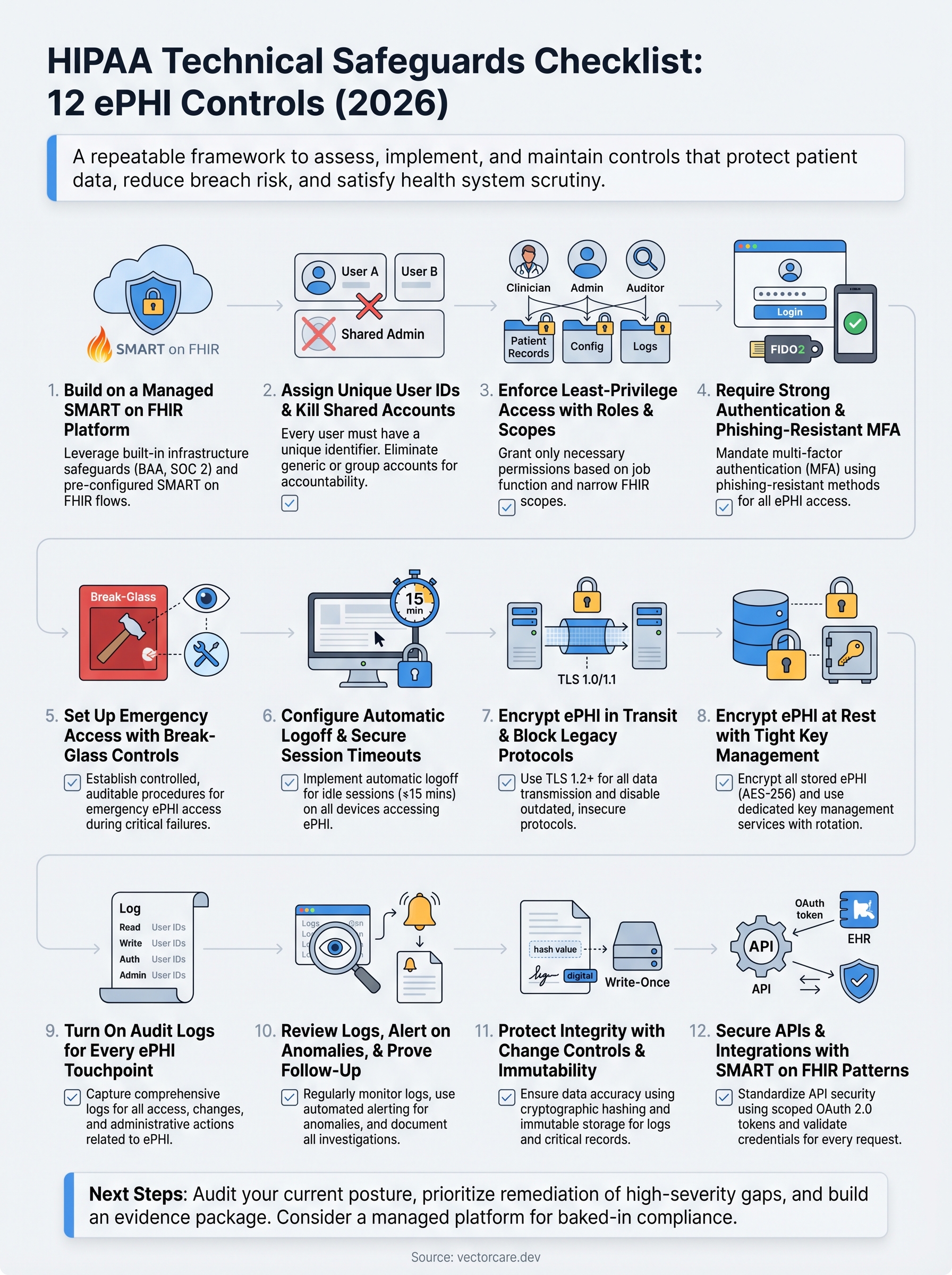
Working through this hipaa technical safeguards checklist gives you a clear picture of where your controls are solid and where gaps remain. The 12 items above cover every required and addressable technical specification under the HIPAA Security Rule, from unique user identification and encryption to API security and anomaly detection. Use each section's evidence and audit artifacts list to build a documentation package your compliance team, your auditors, and health systems can actually verify.
Your next move is to prioritize remediation by risk. High-severity gaps, such as missing MFA or unencrypted storage, need immediate attention before anything else. Lower-severity items can enter your standard sprint cycle with assigned owners and target completion dates.
If you are building EPIC integrations and want the compliance infrastructure handled for you, explore what VectorCare's managed SMART on FHIR platform delivers and see how quickly your team can go live with the technical controls already in place.
The Future of Patient Logistics
Exploring the future of all things related to patient logistics, technology and how AI is going to re-shape the way we deliver care.
Thank you! Your submission has been received!
Oops! Something went wrong while submitting the form.