HashiCorp Vault Secrets Management: Features, Setup, And Use

HashiCorp Vault Secrets Management: Features, Setup, And Use
Storing API keys in environment variables or hardcoding database credentials might work for a weekend project, but it becomes a liability the moment sensitive data enters the picture. HashiCorp Vault secrets management offers a centralized solution for storing, accessing, and auditing credentials across your infrastructure, without scattering secrets across config files and hoping for the best.
For organizations handling protected health information or building integrations that touch clinical systems, secrets management isn't optional, it's foundational to HIPAA and SOC2 compliance. At VectorCare, we build no-code SMART on FHIR applications that integrate directly with EPIC EHRs, which means secure credential handling is baked into everything we do. Vault plays a critical role in how modern healthcare platforms protect OAuth tokens, encryption keys, and service credentials at scale.
This guide covers Vault's core features, walks through practical setup steps, and explains how it manages the full lifecycle of sensitive data. Whether you're evaluating Vault for the first time or looking to deepen your implementation, you'll find actionable information to move forward with confidence.
Why secrets management matters for modern apps
Modern applications authenticate to dozens of external services, from databases and message queues to third-party APIs and cloud providers. Each connection requires credentials, and every credential represents a potential vulnerability if mishandled. The traditional approach of hardcoding secrets into source code or storing them in configuration files creates a sprawling attack surface that grows with every new integration.
Scattered secrets create operational risk
When you distribute credentials across environment variables, CI/CD platforms, container orchestras, and developer laptops, you lose visibility into who accessed what and when. A departing engineer might still have production database passwords saved locally. A compromised CI runner could expose API keys to unauthorized systems. These risks compound when your application scales across multiple environments, each with its own set of credentials that need rotation and auditing.

Static secrets also become stale quickly, which leads teams to avoid rotation entirely rather than face the operational burden of updating every instance manually. This creates a dangerous cycle where credentials remain unchanged for months or years, increasing the window of exposure if a breach occurs. The longer a secret lives, the more likely it is to appear in logs, backups, or version control history where it shouldn't.
Compliance demands centralized control
HIPAA, SOC2, and other regulatory frameworks require auditable access to sensitive data, which becomes nearly impossible when secrets are scattered across infrastructure. Auditors need to see who accessed which credentials, when they were rotated, and what systems touched protected resources. Without centralized secrets management, you're left assembling evidence from multiple sources, hoping you haven't missed a critical access point.
Healthcare applications face particularly strict requirements around credential lifecycle management and encryption at rest. When you integrate with clinical systems like EPIC, every OAuth token and encryption key must follow documented procedures for creation, distribution, rotation, and revocation. Manual processes don't scale, and they introduce human error at every step. Hashicorp vault secrets management addresses these challenges by centralizing credential storage and providing granular audit trails that satisfy compliance requirements.
"Centralized secrets management transforms compliance from a documentation nightmare into an automated audit trail."
Access control becomes clearer when credentials live in a single system with policy-based permissions. You can define exactly which applications and users can retrieve specific secrets, and revoke access instantly when team members change roles or leave the organization. This level of control is impossible to achieve when secrets are distributed across files and environment variables.
Dynamic infrastructure needs automation
Cloud-native applications spin up and tear down instances constantly, which means static credentials don't match the pace of modern infrastructure. A database password that worked yesterday might be tied to an instance that no longer exists today. You need credentials that can be generated on demand, scoped to specific workloads, and automatically revoked when those workloads complete.
Service-to-service authentication adds another layer of complexity when microservices need to prove their identity before accessing shared resources. Hard-coded credentials create a shared-secret problem where every service has the same level of access, rather than following the principle of least privilege. Dynamic secrets allow each service to receive time-limited credentials with exactly the permissions it needs, reducing the blast radius if one component is compromised.
Integration platforms like VectorCare, which connect healthcare vendors to EPIC EHRs, must handle credentials for multiple health systems simultaneously. Each organization has its own OAuth flows, API endpoints, and security requirements. Managing these integrations manually doesn't scale beyond a handful of customers, and it introduces the risk of credential leakage between tenants. Automated secrets management becomes essential infrastructure, not an optional security feature.
What HashiCorp Vault is and how it works
HashiCorp Vault is an identity-based secrets management system that centralizes credential storage, generates dynamic secrets, and provides detailed audit logs for every access request. You interact with Vault through its API, CLI, or UI, and it handles the entire lifecycle of sensitive data from creation through rotation to revocation. Unlike traditional password managers built for humans, Vault serves machine-to-machine authentication where applications and services retrieve credentials programmatically.
Vault stores secrets in encrypted backends while maintaining strict access control through policies that define who can read, write, or delete specific paths. The system requires explicit authentication before serving any credentials, which means every request gets validated against identity and policy rules before Vault releases the requested secret. This approach shifts security from perimeter defense to identity verification, where proving who you are matters more than which network you're on.
The encryption and storage layer
Vault encrypts every secret before writing it to disk using a master encryption key that never leaves memory in plaintext form. You initialize Vault with a set of unseal keys that combine to reconstruct this master key, and the system remains sealed until you provide enough key shares to decrypt the encryption key. This multi-layer approach means compromising the storage backend alone doesn't expose your secrets, since the attacker would also need the unseal keys to decrypt anything.
The storage backend can run on local disk, cloud object storage, or dedicated systems like Consul, but Vault treats all backends as untrusted storage that only holds encrypted data. You choose your storage backend based on your infrastructure requirements for high availability, disaster recovery, and performance. Cloud providers like AWS, Azure, and Google Cloud all support Vault deployments with their respective storage services, giving you flexibility in where the encrypted data lives.
"Vault assumes the storage layer is compromised and designs every encryption decision around that threat model."
How requests flow through Vault
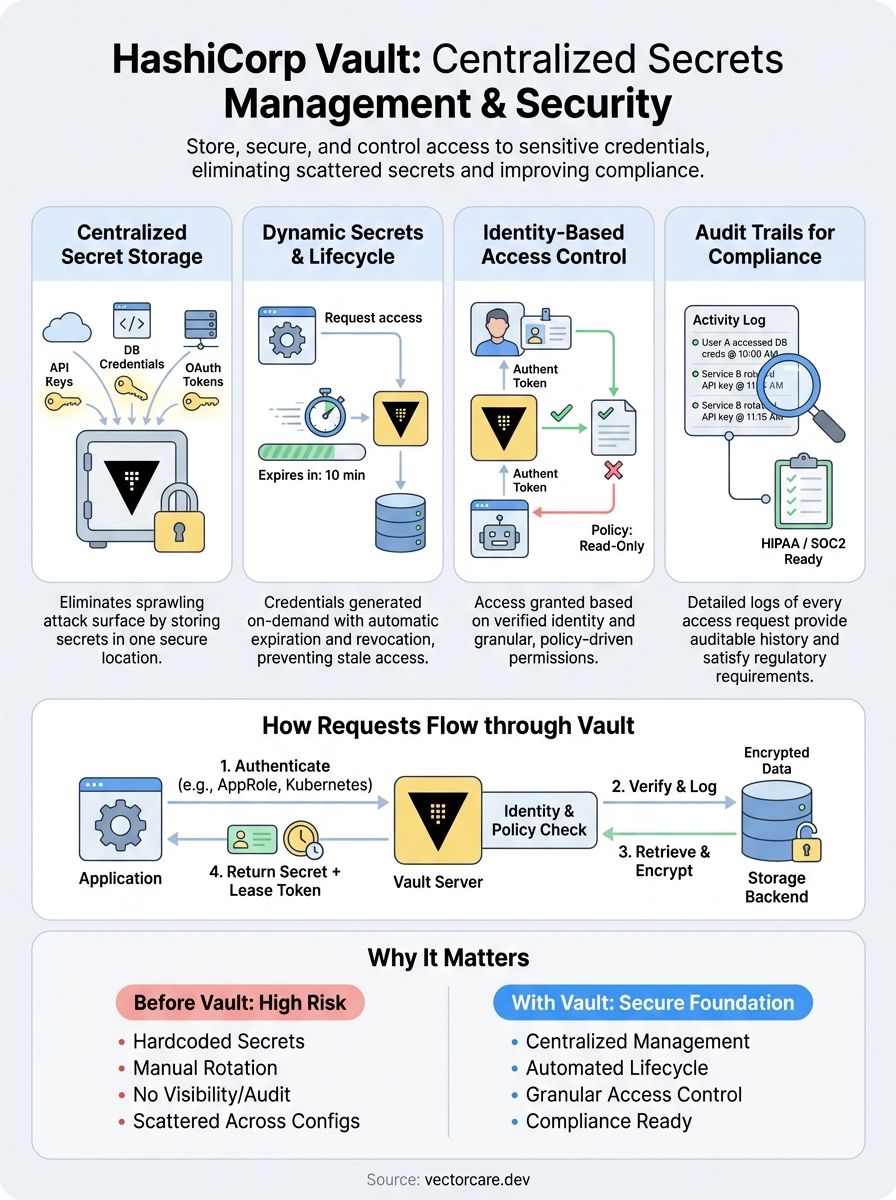
When your application needs a credential, it authenticates to Vault using an approved authentication method like AppRole, AWS IAM, or Kubernetes service accounts. Vault verifies the identity, checks which policies apply to that identity, and then determines if the request is allowed. This entire flow happens in milliseconds, which means hashicorp vault secrets management doesn't introduce noticeable latency into your application's startup or runtime behavior.
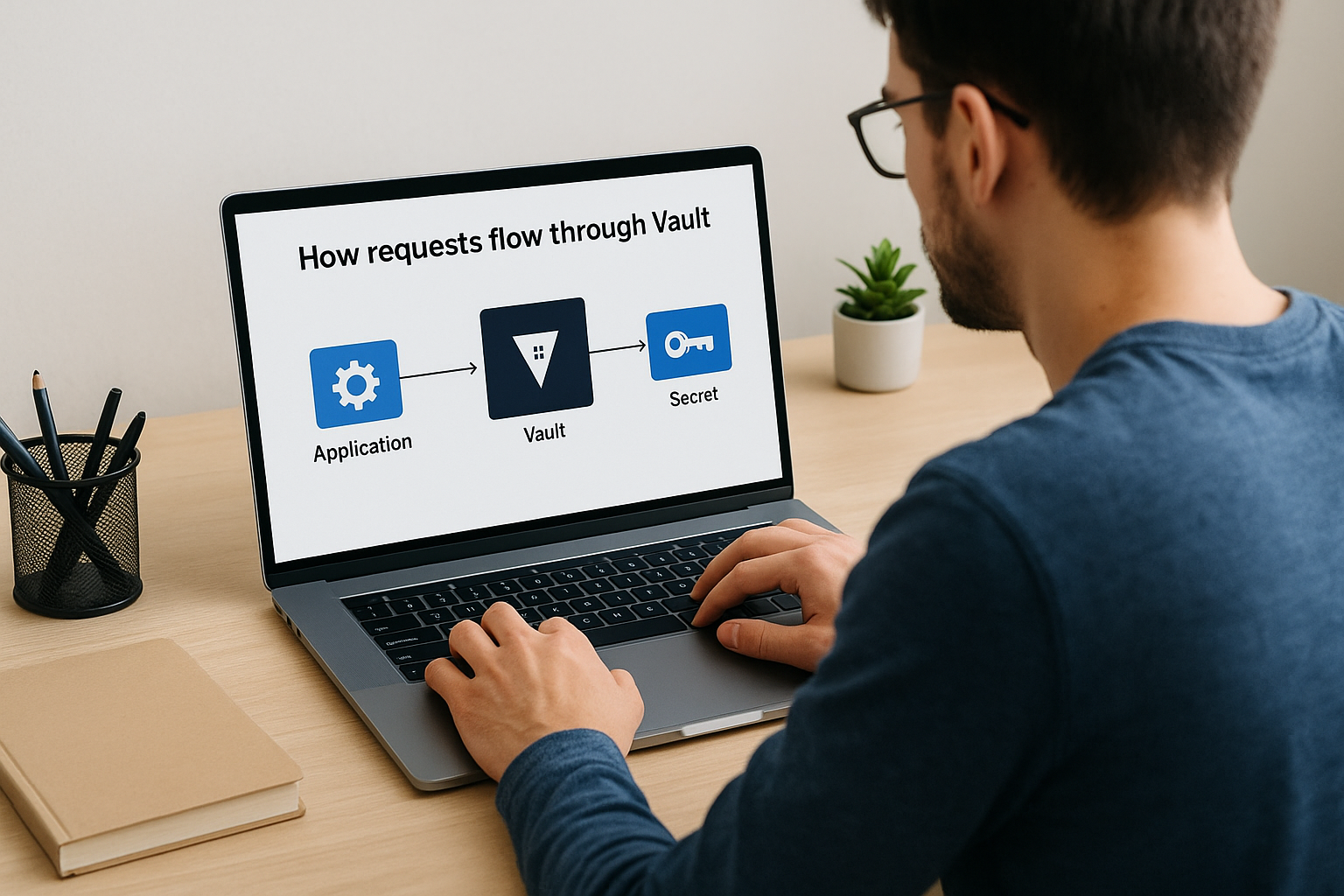
After authentication succeeds, Vault evaluates the requested path against your defined policies to confirm the identity has read permission for that specific secret. If authorized, Vault decrypts the secret from storage and returns it to your application, while simultaneously logging the access event with details about who requested what and when. Your application receives a time-limited token alongside the secret, which expires automatically and forces re-authentication on the next request.
Vault concepts you must know first
Understanding a few core concepts makes hashicorp vault secrets management far more approachable than diving straight into configuration commands. Vault organizes everything around sealed and unsealed states, authentication methods, and path-based access control that determines which identities can reach which secrets. These building blocks repeat throughout every Vault deployment, so grasping them early saves you from confusion later when you start writing policies or debugging access issues.
Sealed versus unsealed state
Vault starts in a sealed state where it knows where encrypted data lives but cannot decrypt anything because the master key remains split into key shares. You must provide a threshold number of these unseal keys to reconstruct the master encryption key and transition Vault into an unsealed state where it can serve secrets. This design protects against scenarios where someone gains physical access to your storage backend but lacks the key shares needed to decrypt the data.
Once unsealed, Vault stays operational until you explicitly seal it again or the process restarts. You configure the number of key shares and threshold during initialization, which means you might generate five key shares but only require three to unseal. This gives you flexibility in key distribution while maintaining security through shared responsibility. Losing too many key shares permanently locks you out of your Vault instance, so you need a documented recovery plan from day one.
"The seal/unseal mechanism transforms storage compromise from a catastrophic event into a manageable incident."
Authentication methods and tokens
Every interaction with Vault requires authentication first, which proves your identity before Vault checks what you're allowed to access. Authentication methods range from simple username and password combinations to cloud provider IAM roles, Kubernetes service accounts, or GitHub team membership. You choose methods based on where your workloads run and which identity systems you already operate.
Successful authentication returns a client token that your application uses for subsequent requests until the token expires. Tokens carry policies that define permitted actions, lease durations that control how long the token remains valid, and metadata that appears in audit logs. Short-lived tokens reduce risk because compromised credentials become useless after expiration, forcing attackers to re-authenticate using the original identity proof.
Path structure and policies
Vault organizes secrets into a hierarchical path structure similar to a filesystem, where you might store database credentials at secret/database/prod and API keys at secret/api/external. Policies grant or deny access to these paths using pattern matching and explicit rules that you write in HashiCorp Configuration Language. A policy might allow reading everything under secret/app-name/* while denying writes, giving your application read-only access to its configuration.
How Vault handles the secret lifecycle
Vault manages every secret from the moment you create it through its eventual expiration or revocation, treating credentials as temporary resources rather than permanent fixtures. This lifecycle approach forces you to think about rotation, expiration, and access patterns from the beginning, which reduces the risk of stale credentials accumulating across your infrastructure. Unlike static password storage where secrets live indefinitely until someone manually changes them, hashicorp vault secrets management automates expiration and renewal as core features of how the system operates.
Creation and initial storage
When you write a secret to Vault, the system encrypts it immediately using the master encryption key and stores the ciphertext in your configured backend. You assign each secret a path that determines which policies govern access, and Vault records metadata about who created the secret and when for audit purposes. Static secrets remain available until you explicitly delete them or update them with new values, but dynamic secrets trigger additional lifecycle steps the moment Vault generates them.
Dynamic secrets get created on demand when your application requests credentials, which means Vault reaches out to the target system like a database or cloud provider to generate fresh credentials with a specific time limit. The system writes these credentials with associated lease information that tracks when they expire, and Vault returns both the secret and the lease identifier your application uses for renewal requests. This approach gives you credentials that never existed before the request and won't outlive their intended purpose.
Lease management and renewal
Every dynamic secret comes with a lease duration that defines how long the credentials remain valid before Vault automatically revokes them. Your application can renew the lease before it expires by sending a renewal request with the lease identifier, which extends the credentials' lifetime without requiring regeneration. Vault enforces maximum time-to-live limits that prevent infinite renewal, ensuring even long-running processes eventually receive fresh credentials.
"Lease-based credentials transform security from preventing access to limiting the damage window when access is compromised."
Rotation and revocation
Vault revokes credentials automatically when their lease expires, which triggers cleanup actions like deleting database users or invalidating API tokens in the target system. You can also revoke secrets manually through the API or CLI, either targeting specific leases or entire secret paths when you need immediate termination. Rotation happens on a schedule you define, where Vault generates new versions of static secrets while maintaining previous versions for a configurable history depth that supports rollback scenarios.
Secrets engines and when to use each
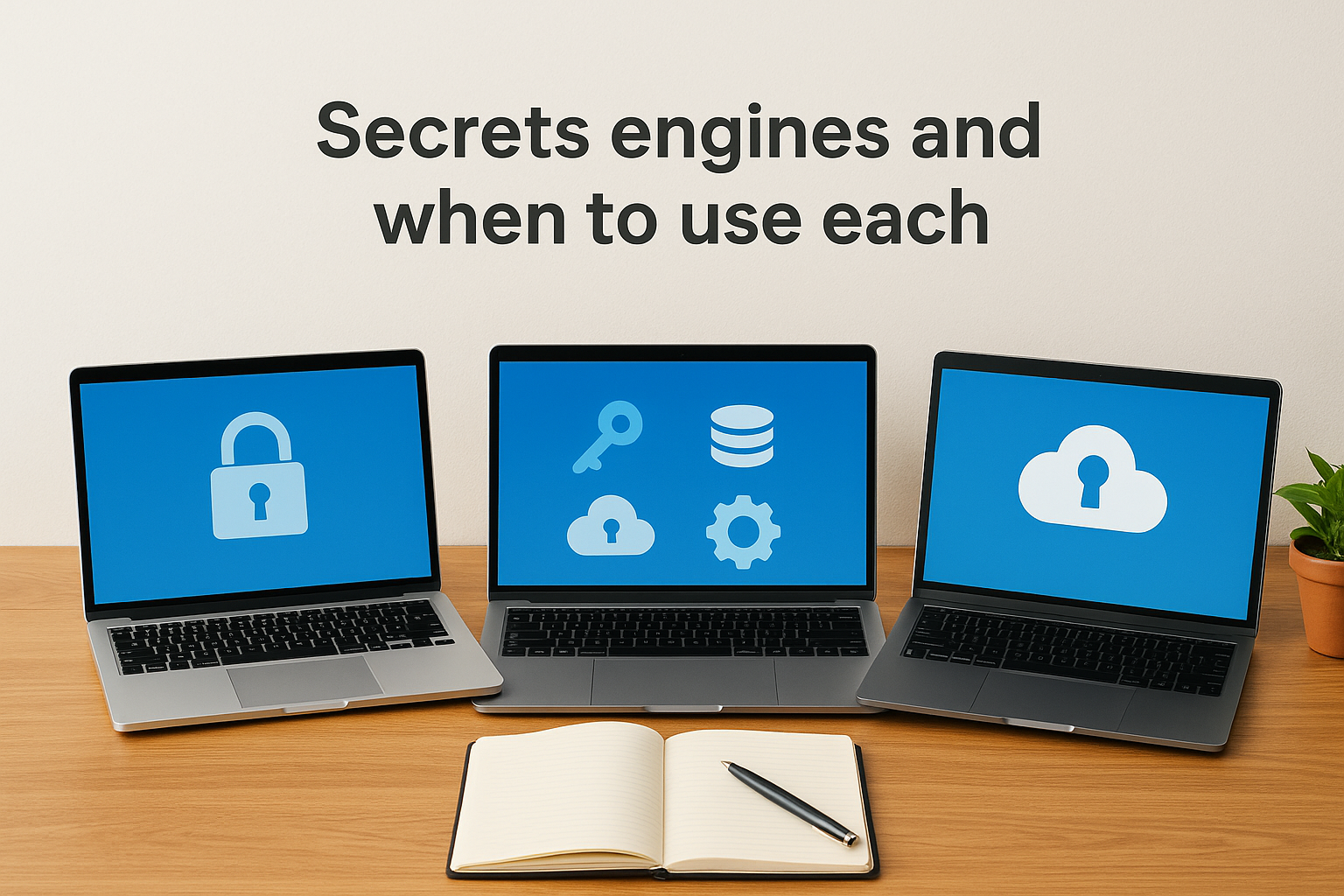
Vault organizes secret types into pluggable backends called secrets engines, where each engine handles a specific category of credentials with its own API endpoints and lifecycle rules. You enable engines at specific paths in your Vault instance, which means you might run a key-value engine at secret/ for static credentials while mounting a database engine at database/ for dynamic user generation. Choosing the right engine depends on whether your secrets are static or dynamic and how the target system expects authentication to work.
Key-value secrets engines
The key-value engine stores static secrets that you write once and retrieve multiple times, making it ideal for API keys, encryption keys, and configuration values that don't change frequently. Version 2 of the KV engine adds automatic versioning and soft deletes, which lets you roll back to previous secret values or recover accidentally deleted credentials. You use this engine when you need to store third-party API tokens, webhook signing secrets, or any credential that the external system generates rather than allowing Vault to create dynamically.
KV engines work well for secrets that applications read during startup and cache throughout their lifecycle. Healthcare integrations often store OAuth client secrets and EPIC endpoint configurations here because these values remain constant across deployments. The versioning feature proves valuable when you need to coordinate secret rotation across multiple application instances, since you can update the secret in Vault while older versions remain accessible until all instances restart.
Database secrets engines
Database engines generate temporary credentials with specific permissions each time your application requests access, then revoke those credentials automatically when the lease expires. You configure the engine once with a root connection and SQL templates that define how to create users, and Vault handles all subsequent credential generation without additional input. This approach eliminates shared database passwords across your application fleet while giving you granular control over which permissions each workload receives.
"Dynamic database credentials reduce breach impact from months of exposure to minutes of validity."
You should use database engines when applications need short-lived database access rather than permanent credentials. The engine supports PostgreSQL, MySQL, MongoDB, and many other systems through plugins that understand each database's user management model. Your application requests credentials at startup, uses them for the session duration, and lets Vault handle cleanup automatically when the lease expires or your application terminates.
Cloud provider engines
AWS, Azure, and Google Cloud engines generate time-limited IAM credentials that grant specific permissions to cloud resources without requiring permanent access keys. Vault authenticates to the cloud provider using configured root credentials, then generates temporary credentials with exactly the permissions your application needs based on policy templates you define. These engines integrate hashicorp vault secrets management directly into cloud-native workflows where applications assume roles instead of storing static keys.
You choose cloud engines when your infrastructure runs on cloud platforms and needs programmatic access to services like S3 buckets, compute instances, or managed databases. The temporary credentials expire automatically and carry only the permissions required for specific tasks, which follows the principle of least privilege while eliminating the operational burden of rotating static cloud access keys across your infrastructure.
How to set up Vault step by step
Setting up Vault requires several distinct phases that build on each other, starting with installation and ending with a functional system ready to serve secrets. You need to make configuration decisions early about storage backends and unseal key distribution, since these choices affect your deployment's security and availability characteristics. This walkthrough covers a development-mode setup that demonstrates core concepts, though production deployments need additional hardening around storage, networking, and key management.
Download and initialize Vault
You download Vault as a single binary from HashiCorp's official distribution channels, which works identically across Linux, macOS, and Windows without additional dependencies. After placing the binary in your PATH, you run vault server -dev to start a development server that automatically unseals and runs entirely in memory. The command outputs a root token and unseal key directly to your terminal, which you use immediately but never rely on for production systems since they disappear when the process stops.
Development mode lets you test configurations quickly without managing storage backends or unseal ceremonies, making it ideal for learning hashicorp vault secrets management before investing in production infrastructure. You set the VAULT_ADDR environment variable to http://127.0.0.1:8200 and authenticate with vault login using the root token from startup output. This gives you unrestricted access to explore Vault's API and test secret storage patterns before implementing proper access controls.
"Development mode removes operational complexity so you can focus on understanding Vault's core security model first."
Configure storage and unseal keys
Production Vault requires a persistent storage backend like Consul, integrated cloud storage, or PostgreSQL that survives server restarts. You define storage configuration in a file that specifies the backend type and connection parameters, then initialize Vault with vault operator init to generate unseal keys and a root token. The initialization process splits the master key into five shares by default and requires three shares to unseal, though you adjust these thresholds based on your security and operational requirements.

You must distribute unseal keys to separate trusted individuals who can collectively unseal Vault after restarts, and you store the root token securely since it grants unlimited access to your entire Vault instance. Each key holder runs vault operator unseal with their key share until Vault reaches the threshold and transitions to an unsealed operational state. Never store all unseal keys together or automate unsealing without hardware security modules, since this defeats the entire purpose of Vault's protection model.
Enable your first secrets engine
Vault starts with minimal engines enabled, so you explicitly mount the secrets engines you need at paths that match your organizational structure. Running vault secrets enable -path=secret kv-v2 creates a key-value version 2 engine at the secret/ path where you can store static credentials immediately. You write your first secret with vault kv put secret/demo username=admin password=changeme, which Vault encrypts and stores with automatic versioning enabled.
Testing retrieval confirms everything works correctly when vault kv get secret/demo returns the credentials you just stored. You should also enable the database secrets engine or cloud provider engines relevant to your infrastructure, which requires additional configuration steps to connect Vault to target systems. Each engine mounts at a distinct path that becomes part of your policy structure when you define which applications can access which secrets.
How to integrate apps with Vault safely
Applications need a secure pattern for retrieving credentials from Vault without exposing tokens in logs, environment variables, or configuration files. The integration process starts with choosing an authentication method that matches your infrastructure, then implementing token lifecycle management that handles renewal and expiration automatically. Your application should authenticate once during startup, retrieve the secrets it needs, and maintain a valid token throughout its runtime without storing credentials in plaintext anywhere on disk.
Choose the right authentication method
You select an authentication method based on where your application runs and which identity systems you already operate. Applications running on AWS should use the IAM authentication method that proves identity through the instance metadata service without requiring stored credentials. Kubernetes workloads benefit from the Kubernetes authentication method that validates service account tokens automatically, while applications on bare metal or traditional infrastructure might use AppRole authentication with role IDs and secret IDs that you distribute separately.
The authentication request returns a client token with an associated time-to-live that determines how long your application can use it before renewal becomes necessary. You store this token in memory only, never writing it to disk or including it in log output. Applications that integrate hashicorp vault secrets management correctly treat tokens as temporary resources that expire and require fresh authentication when the renewal window closes.
"Separating authentication credentials from the secrets they protect creates defense in depth that survives partial compromise."
Implement token renewal logic
Your application must check token expiration before every Vault request or implement background threads that renew tokens automatically before they expire. Vault's client libraries include built-in renewal logic that handles this for you, but custom integrations need explicit code to call the token renewal endpoint using the current token and lease identifier. You set renewal timers to trigger at half the token's time-to-live, which gives your application sufficient buffer to handle network delays or temporary Vault unavailability.
Failed renewal attempts should trigger exponential backoff before retrying, and your application needs fallback logic that re-authenticates from scratch when renewal becomes impossible. Never cache secrets longer than their lease duration, since Vault might revoke them without warning if policies change or administrators trigger manual revocation. Applications that respect lease boundaries and implement proper renewal create reliable integrations that survive token expiration without service interruption.
Minimize secret exposure windows
You retrieve secrets just before you need them rather than at application startup, which reduces the window where credentials sit in memory vulnerable to process dumps or debugging tools. Database connections should request credentials immediately before opening connections, and API integrations should fetch tokens right before making requests to external services. This pattern works well when secret retrieval latency remains low enough that on-demand fetching doesn't impact application performance.
Some applications need to balance security with performance by caching credentials for their full lease duration while implementing memory protection that zeroes buffers after use. You never log secret values, store them in databases, or transmit them over unencrypted connections between services.
Policies, auth methods, and access control
Access control in Vault operates through policy-based authorization that you define in HashiCorp Configuration Language, where every token carries specific policies that determine which paths and operations it can access. You write policies that grant or deny capabilities like read, write, delete, and list on specific secret paths, and Vault evaluates these policies against every API request before returning data. The default-deny model means tokens can only access paths explicitly granted in their policies, which forces you to be intentional about permissions rather than accidentally exposing secrets through overly permissive defaults.
Writing policies that enforce least privilege
You structure policies around the minimum permissions each application or user needs to function, which reduces the blast radius when credentials become compromised. A policy might allow reading database credentials at database/creds/app-name while denying all access to other database roles or secret engines, ensuring applications only retrieve their own credentials. You use path wildcards and templating to write maintainable policies that scale across multiple applications without creating separate policies for each workload.
Policy templating becomes particularly powerful when you incorporate identity information into path construction, allowing a single policy to grant each application access to its own namespace under a shared parent path. You can reference the authenticated entity's metadata in policies, which means the same policy document adapts its effective permissions based on who authenticated. Hashicorp vault secrets management relies on these policy mechanisms to enforce boundaries between different applications sharing the same Vault instance.
"Policies that reference identity metadata let you write once and enforce everywhere without manual duplication."
Authentication methods for different workloads
You enable multiple authentication methods simultaneously, each mounted at a different path and configured for specific identity sources like cloud provider IAM, Kubernetes service accounts, or application-specific credentials. The AppRole method works well for applications that can't leverage cloud-native identity, where you generate a role ID as a persistent identifier and a secret ID as a one-time password that proves the application's authenticity. Cloud authentication methods like AWS IAM or Azure Managed Identity eliminate secret distribution entirely by validating identity through the cloud provider's metadata service.
Kubernetes authentication validates service account tokens that pods already possess, turning your existing container identity system into a Vault authentication mechanism without storing additional credentials. You configure each authentication method with policies that apply to all tokens issued through that path, though you can also bind specific policies to individual roles within the method for granular control.
Managing identity and access patterns
You track authenticated entities through Vault's identity system that creates stable identifiers across different authentication methods, letting you apply consistent policies regardless of how someone authenticates. Entity aliases map authentication method outputs to canonical identities, which means the same person authenticating through GitHub one day and LDAP the next receives identical permissions. You leverage identity groups to assign policies to collections of entities, simplifying administration when multiple applications share common access patterns.
Operating Vault in production and compliance
Production deployments require architectural decisions around high availability, disaster recovery, and audit logging that single-server setups ignore. You need multiple Vault instances running behind a load balancer with shared storage backends that replicate data across availability zones or regions, ensuring service continuity when individual nodes fail. Compliance frameworks like HIPAA and SOC2 demand specific operational practices around access logging, encryption at rest, and documented procedures for credential rotation that you must implement from day one rather than bolting on later.
High availability and disaster recovery
You deploy Vault in high availability mode by configuring multiple server nodes that share a storage backend like Consul or integrated cloud storage supporting concurrent access. One node operates as the active leader handling all requests while standby nodes remain ready to assume leadership immediately if the active node fails. This configuration eliminates single points of failure and provides automatic failover without manual intervention, though you still need to distribute unseal keys across your operations team to recover from full cluster restarts.
Backup strategies focus on protecting the storage backend rather than Vault itself, since all secrets live encrypted in your chosen storage system. You configure automated snapshots of Consul, database backups for SQL backends, or leverage cloud provider backup services for object storage implementations. Testing recovery procedures quarterly ensures you can restore from backups successfully, and you maintain copies in geographically separated locations to survive regional outages that might affect your primary deployment.
Monitoring and audit logging
You enable Vault's audit devices that write detailed logs of every API request, including who authenticated, which secrets they accessed, and whether the request succeeded or failed. These logs stream to syslog endpoints, local files, or centralized logging platforms where you configure retention policies that satisfy your compliance requirements. Monitoring focuses on metrics like seal status, storage backend health, authentication failures, and token expiration rates that indicate when hashicorp vault secrets management needs operational attention before problems affect application availability.
"Audit logs transform Vault from a security tool into compliance evidence that proves your credential handling meets regulatory standards."
Meeting compliance requirements
Healthcare organizations using Vault to manage EPIC integration credentials or protected health information need documented policies covering how secrets enter the system, who can access them, and when they expire or rotate. You generate compliance reports directly from audit logs that show every credential access with timestamps and requesting identities, providing auditors with concrete evidence of access controls. Your Vault configuration should include encryption at rest, role-based access control, and automated secret rotation aligned with your organization's security policies and regulatory obligations.
Key takeaways
You now understand how hashicorp vault secrets management centralizes credential storage, automates the secret lifecycle, and provides audit trails that satisfy compliance requirements. The system eliminates scattered credentials across your infrastructure by enforcing policy-based access control and generating dynamic secrets that expire automatically. You've seen how to choose the right secrets engine for your workload, implement authentication patterns that prove identity without storing tokens, and operate Vault in production with high availability configurations.
Healthcare applications integrating with clinical systems need this level of credential protection to meet HIPAA and SOC2 standards while maintaining audit documentation for regulators. At VectorCare, we handle the entire infrastructure stack for SMART on FHIR applications, including secrets management for EPIC integrations, so you can focus on your core product instead of building compliance infrastructure from scratch. Build and deploy your Smart on FHIR app in days with a platform that manages OAuth tokens, encryption keys, and service credentials as part of the fully managed solution.
The Future of Patient Logistics
Exploring the future of all things related to patient logistics, technology and how AI is going to re-shape the way we deliver care.
Thank you! Your submission has been received!
Oops! Something went wrong while submitting the form.