FHIR Integration: What It Is and How It Works

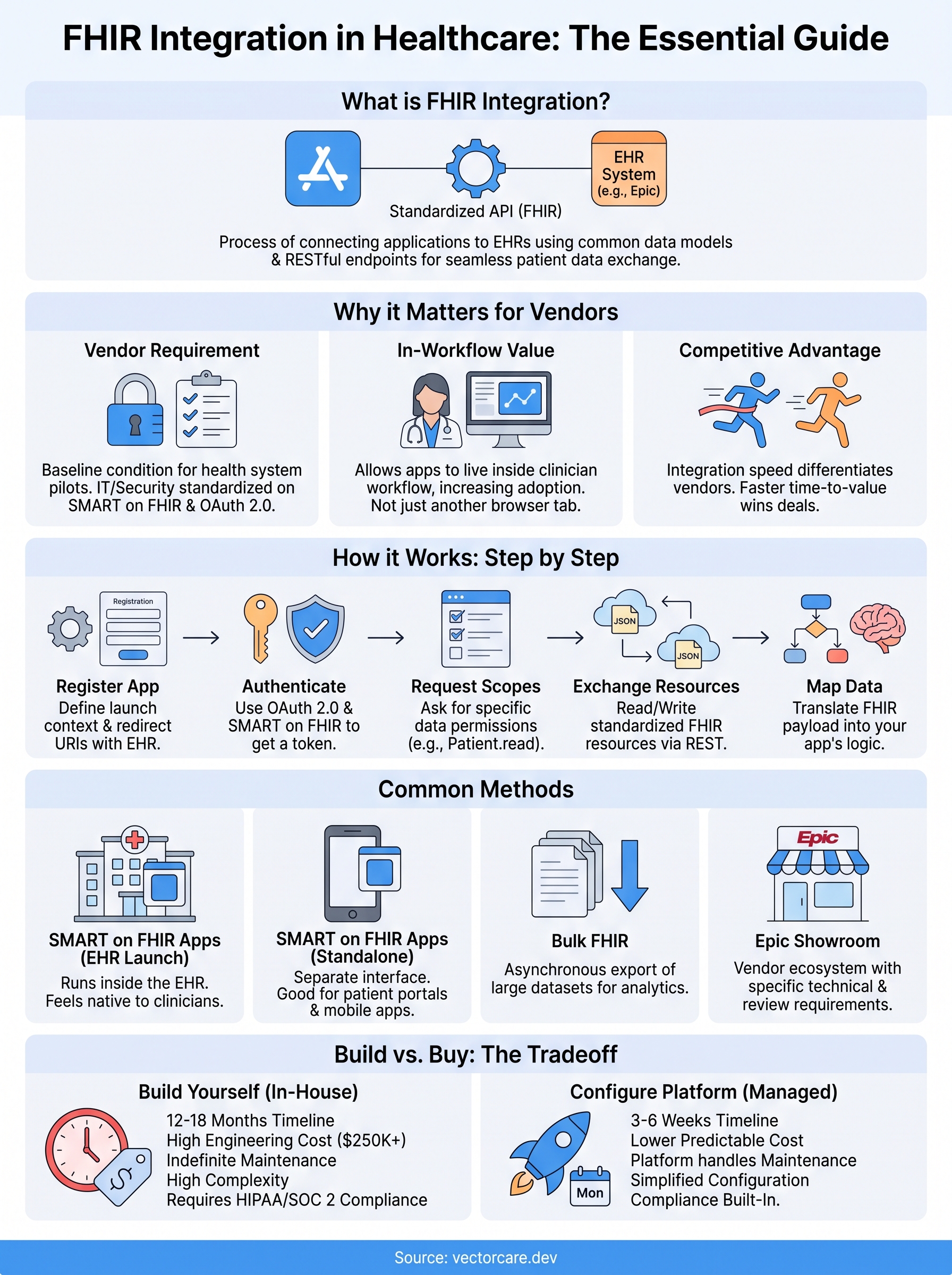
If you build software for healthcare and someone just asked you to "support FHIR," you already know the term gets thrown around a lot without much explanation. FHIR integration is the process of connecting your application to an electronic health record system, like EPIC, using a standardized API so patient data, orders, and clinical documents can move back and forth without custom-built plumbing for every health system you work with.
At its core, FHIR API integration works through a common data model and RESTful endpoints that any compliant EHR exposes. Instead of negotiating a one-off data format with each hospital, you write to a single standard and, in theory, connect to any system that speaks it. In practice, FHIR EHR integration still involves OAuth, SMART on FHIR scopes, and vendor-specific quirks that trip up teams who assume
Why FHIR integration matters for healthcare vendors
Ask any digital health founder what stands between them and a signed contract with a hospital system, and the answer is almost never the clinical value of their product. It's the integration. Health systems increasingly require FHIR-based connectivity as a baseline condition before they'll even pilot a new tool, because IT and security teams have standardized their vetting process around SMART on FHIR and OAuth 2.0 rather than reviewing a custom API for every vendor that walks in the door. If your app can't speak FHIR, you're not in the conversation.
The business case behind the technical requirement
Beyond compliance checkboxes, FHIR EHR integration is what lets your application actually live inside a clinician's workflow instead of sitting next to it as another browser tab. A remote patient monitoring company that pushes vitals into Epic's flowsheet gets used. One that emails a PDF report gets ignored after week two. Nurses and physicians already juggle dozens of screens during a shift; they won't add one more unless it shows up where they're already looking. FHIR is the mechanism that makes that possible, because it lets your app read encounter data, write observations, and trigger workflows using the same data model the EHR itself runs on.
If your app doesn't speak FHIR, it doesn't get invited to the health system's workflow, no matter how good the underlying product is.
What building it yourself actually costs
Here's where most vendors underestimate the problem. Teams that have never built a healthcare integration assume it's a matter of hitting a REST endpoint, similar to any other SaaS API. It isn't. You need OAuth 2.0 authorization flows specific to SMART on FHIR, scope negotiation that varies by EHR vendor, a security posture that satisfies HIPAA and often SOC 2, and a submission process through Epic's App Orchard (now branded Showroom) that has its own review cycle and technical requirements. None of that touches your actual product logic; it's pure integration overhead.
| Approach | Typical timeline | Typical cost | Who owns maintenance |
|---|---|---|---|
| Custom in-house build | 12 to 18 months | $250K to $500K+ in engineering | Your team, indefinitely |
| Managed no-code platform | 3 to 6 weeks | ~$500/month + $3K/month per instance | Platform provider |
Question these numbers if you want, but talk to any CTO who's shipped a custom Epic integration and you'll hear a version of the same story: the first six months go to compliance and OAuth plumbing before a single patient record gets pulled. That's six months of engineering salary spent on infrastructure that has nothing to do with your core product, before you even account for what FHIR certification actually costs.
The competitive cost of moving slowly
Slow integration timelines don't just cost money, they cost deals. Health system procurement cycles move on their own schedule, and if a competing vendor already has a working Epic connection while you're still six months from a pilot, you lose the contract before you ever get to demonstrate clinical value. FHIR API integration speed has become a genuine competitive differentiator in categories like clinical decision support, remote monitoring, and care coordination, where multiple vendors chase the same handful of health system budgets each year.
Compliance isn't optional, and it isn't simple
Health systems also won't sign off on an integration that can't demonstrate a Business Associate Agreement, documented HIPAA safeguards, and increasingly a SOC 2 report before granting production access. This is a real gate, not a formality: hospital security teams review vendor applications the same way they'd review any system touching protected health information, and a missing BAA or an incomplete security questionnaire can stall a deal for months even after the technical integration works. Vendors who treat compliance as an afterthought discover this the hard way, usually right when a deal is otherwise ready to close.
This is exactly the gap platforms like VectorCare's no-code FHIR builder exist to close. Rather than each vendor rebuilding OAuth flows, SMART on FHIR scopes, and Showroom submissions from scratch, a managed platform handles the integration layer once, correctly, and lets you configure your workflow logic on top of it. The result isn't just faster time to market, it's fewer surprises during the health system's own security review, since compliance was built into the platform from day one rather than bolted on under deadline pressure.
How FHIR integration works, step by step
Strip away the marketing language and FHIR integration breaks down into a repeatable sequence: register your app, authenticate through OAuth, request specific data scopes, pull or push FHIR resources, and then map that data into your application's own logic. Every vendor ends up walking through the same five stages, whether they build it by hand or configure it through a platform. Understanding each step helps you spot where teams typically get stuck.
Registering your app with the EHR
Before you exchange a single byte of patient data, you register your application with the target EHR, usually Epic in a hospital setting, and receive a client ID tied to specific launch contexts. This registration step defines whether your app launches from inside a clinician's EHR session (an EHR launch) or from your own standalone interface (a standalone launch), and it determines what redirect URIs and scopes you're allowed to request later. Get this wrong and your OAuth flow will fail before you ever see a FHIR endpoint.
Authenticating through OAuth 2.0 and SMART on FHIR
Once registered, your app authenticates using OAuth 2.0 as profiled by the SMART on FHIR specification. This is the step most non-healthcare engineers underestimate, because it isn't a simple API key exchange. Your app requests specific scopes, things like patient/Observation.read or user/Encounter.write, and the EHR's authorization server issues a token only after the user (and often the health system's IT policy) approves that exact scope. A typical token request looks like this:
POST /oauth2/token
grant_type=authorization_code
code=abc123
redirect_uri=https://yourapp.com/callback
client_id=your-client-id
Miss a required scope and your token comes back valid but useless, since the EHR simply won't return data your app never asked permission for.
Get the OAuth scopes wrong once, and every downstream FHIR call fails silently, no matter how correct your data mapping is.
Requesting and exchanging FHIR resources
With a valid token in hand, your app can now call FHIR RESTful endpoints to read or write resources, structured data objects like Patient, Observation, Condition, or MedicationRequest. A FHIR EHR integration typically involves both reads (pulling a patient's active medications before an assessment) and writes (pushing a completed intake form back into the chart as a QuestionnaireResponse). Each resource follows a defined schema, so your app parses a predictable JSON structure rather than a proprietary format that changes hospital to hospital.
Mapping data into your workflow
The final step is where the real product value happens: taking that standardized FHIR payload and mapping it into your app's decision logic, UI, or downstream systems. This is also where vendors spend the most ongoing engineering time, translating the individual FHIR resource types into the fields, alerts, and workflows their clinical users actually need, and keeping that mapping current as Epic updates its FHIR implementation guide or adds new resource versions.
FHIR integration methods, from SMART on FHIR apps to Epic
Not every integration project looks the same, and picking the wrong method costs you months you don't have. FHIR integration methods fall into a handful of recognizable patterns, and which one you need depends on whether you're building a clinician-facing tool, a patient app, or a background service that never touches a user interface directly.

SMART on FHIR apps: launched from inside the EHR
Most vendor integrations take the form of a SMART on FHIR app, meaning it authenticates through the SMART framework and runs either embedded inside a clinician's EHR session or as a standalone application the user opens separately. An EHR-launch app appears as a tile or button inside Epic itself, inheriting the current patient and user context automatically, which is exactly what makes it feel native to clinical staff. A standalone-launch app, by contrast, runs outside the EHR session and asks the user to select a patient explicitly, which suits patient portals and mobile apps better than in-workflow clinical tools.
Where your app launches from determines whether clinicians treat it as part of their workflow or as one more login screen to avoid.
Bulk FHIR for population-level data
Sometimes you don't need one patient's record in real time, you need thousands of records for analytics, quality reporting, or risk stratification. Bulk FHIR (built on the FHIR Bulk Data Access specification) handles this by exporting large datasets asynchronously as NDJSON files rather than making individual REST calls per patient. Analytics vendors and population health tools rely on this method almost exclusively, since polling a REST endpoint patient by patient for a health system with 200,000 covered lives simply doesn't scale.
Epic-specific paths: App Orchard and Showroom
Epic runs its own vendor ecosystem, now branded the Showroom (formerly App Orchard), and getting listed there is its own distinct integration method with requirements beyond the FHIR spec itself. Building for Epic means passing Epic's technical review, meeting its interoperability testing requirements, and navigating a submission process that runs independently of whatever FHIR version you've implemented. Because most health systems in the US run Epic, this path matters disproportionately even though FHIR itself is vendor-neutral by design.
| Method | Best for | Typical complexity |
|---|---|---|
| EHR-launch SMART app | In-workflow clinical tools | Moderate to high |
| Standalone SMART app | Patient portals, mobile apps | Moderate |
| Bulk FHIR | Analytics, population health | High |
| Epic Showroom listing | Any Epic-facing vendor | High, plus review cycle |
Choosing a method without rebuilding it from scratch
Given how much these methods diverge in setup, most vendors don't need to pick just one, they need a platform that supports whichever combination their product requires without forcing a separate engineering effort for each. That's the practical case for a no-code FHIR configuration approach: instead of your team learning Epic's Showroom requirements, SMART launch contexts, and bulk export formats independently, you configure the method you need visually while the underlying compliance and connection logic stays consistent across all of them.
Common challenges and best practices in FHIR integration
Even a technically correct FHIR integration runs into problems that have nothing to do with the spec itself. Most of the pain shows up after launch, when a working connection starts breaking in ways nobody predicted during the build. Knowing where these failures cluster saves you from relearning the same lessons every vendor before you already learned the hard way.

Scope and permission mismatches
Requesting the wrong OAuth scope, or a scope that's technically valid but not what your workflow actually needs, is the single most common failure point in FHIR API integration. A vendor builds against Patient.read in a sandbox, ships to production, and discovers the health system's IT policy restricts that scope to a narrower resource set than expected. Suddenly a feature that worked in testing returns empty responses in the field, and there's no error message pointing you to the fix, just silence where data should be.
Most FHIR integration failures in production trace back to a scope that was valid in testing but restricted in the real health system's policy.
Data model drift across EHR versions
Epic doesn't run one FHIR implementation forever. It updates its FHIR implementation guide, adds resource versions, and occasionally deprecates fields your app depended on. A FHIR EHR integration built against one Epic release can quietly stop matching the schema after a hospital upgrades its instance, and you often won't know until a clinician reports missing data. Vendors who treat their integration as a one-time build, rather than something that needs ongoing version tracking, get blindsided by this every year or two.
The maintenance burden nobody budgets for
Beyond version drift, every health system configures Epic slightly differently: custom fields, local terminology mappings, site-specific workflow rules layered on top of the standard. Two hospitals running the same Epic version can still return subtly different data shapes for the same resource. Handling this well requires ongoing engineering attention that most product roadmaps never account for, since the initial integration budget rarely includes a line item for "maintain this indefinitely as every client's EHR configuration evolves."
Best practices that actually prevent these problems
Teams that avoid these traps tend to follow a similar discipline, whether they build in-house or configure through a managed platform:
- Test against a SMART Health IT sandbox that mirrors production scopes and permissions before requesting live access.
- Log every failed or empty FHIR response so scope mismatches surface immediately instead of weeks later.
- Track EHR version changes proactively rather than discovering them through a support ticket.
- Document your scope requirements clearly enough that a health system's IT team can approve them without back-and-forth.
- Plan for per-site configuration differences instead of assuming one integration behaves identically everywhere.
Handling all five well, consistently, across every client health system is exactly the ongoing work a platform like VectorCare absorbs, so your team isn't the one fielding the 2 a.m. ticket when a hospital's Epic upgrade breaks a mapping you built two years ago.
Putting FHIR integration into practice
At this point, the pattern should be clear. FHIR integration isn't one task, it's registration, OAuth, scope negotiation, resource mapping, and then years of maintenance as EHR versions and site configurations drift. None of that is optional if you want a health system to sign off, and none of it touches the actual product you're trying to sell. Building it yourself means owning that overhead indefinitely, on top of your real roadmap.
That tradeoff is why so many vendors now configure their FHIR EHR integration instead of coding it from scratch, skipping the 12-to-18-month build without skipping compliance, OAuth correctness, or Epic's review process. If you're weighing whether to hire for this or hand it off, see how to build and deploy your SMART on FHIR app in days rather than months.
The Future of Patient Logistics
Exploring the future of all things related to patient logistics, technology and how AI is going to re-shape the way we deliver care.
Thank you! Your submission has been received!
Oops! Something went wrong while submitting the form.