Epic FHIR API: What It Is and How It Works

If you're building a health tech product and a health system just asked
Why the Epic FHIR API matters for healthcare vendors
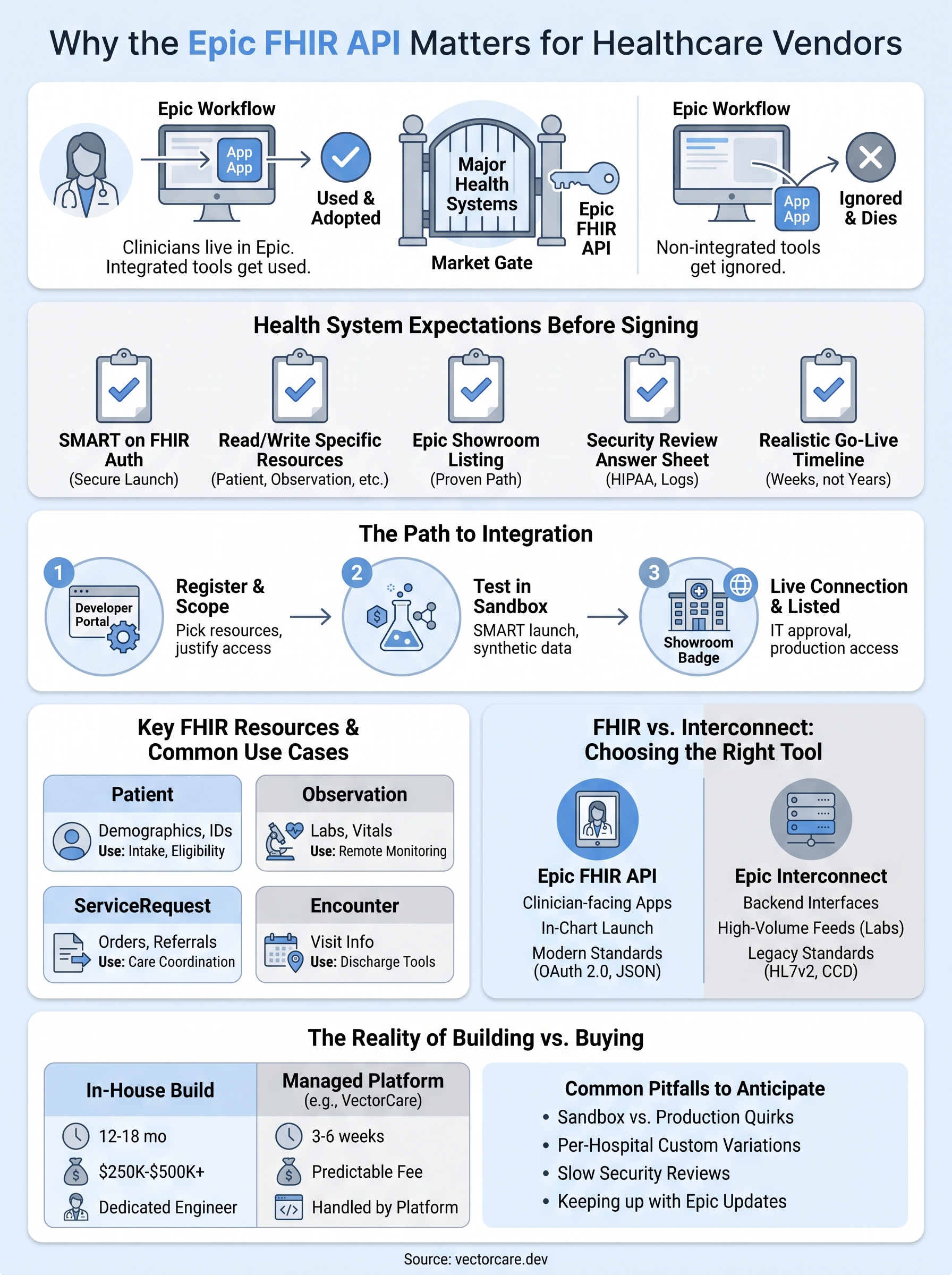
Health systems don't ask vendors to "integrate with Epic" as a courtesy. They ask because their clinicians live inside Epic all day, and any tool that doesn't show up inside that workflow gets ignored, no matter how good it is. The Epic FHIR API is the mechanism that lets your product read and write patient data directly inside that environment, which means it's the difference between a pilot that gets used and one that quietly dies after the demo.
If your app can't talk to Epic, most health systems won't talk to you.
Epic controls access to the largest EHR footprint in the US
Epic holds roughly a third of the US hospital EHR market and an even larger share among large academic and multi-hospital health systems, according to data cited by the Office of the National Coordinator for Health IT. That concentration matters more than the raw percentage suggests, because the health systems most likely to sign six and seven figure contracts with digital health vendors are disproportionately Epic shops. If your target customer list includes major academic medical centers, integrated delivery networks, or large regional hospital systems, you're going to run into Epic sooner rather than later. Knowing how to integrate with Epic EHR isn't a nice-to-have feature you bolt on after product-market fit. For a large slice of the buyer market, it's the gate you have to pass through before the conversation about your actual product even starts.
What health systems expect before they sign a contract
Procurement teams and CMIOs have seen enough failed integration projects to know what to ask for upfront. Before they'll move a deal past the pilot stage, most expect a vendor to show working, standards-based connectivity, not a promise to build it later. That typically includes:
- SMART on FHIR authentication so the app launches securely from inside a clinician's Epic session
- Read and write access to the specific FHIR resources your workflow touches, like Patient, Observation, or ServiceRequest
- Evidence of a completed Epic Showroom listing or a clear path to one
- A security review answer sheet covering HIPAA safeguards and audit logging
- A realistic go-live timeline that doesn't stretch into next fiscal year
Vendors who can answer all five points in the first sales call close faster, because IT and compliance stop being a blocker and start being a formality.
The real cost of skipping it (or building it wrong)
Skipping proper FHIR integration doesn't make the requirement go away, it just delays the reckoning. Vendors who try to fake it with screen-scraping, manual data entry, or a clunky separate login window almost always lose the deal once the health system's technical team gets involved. Others attempt a real build in-house, only to discover that Epic's FHIR implementation has enough quirks and undocumented behavior that a project estimated at three months stretches past a year.
Table below shows how the two most common paths compare on the metrics that actually decide whether a deal closes on time.
| Approach | Typical timeline | Engineering cost | Ongoing maintenance |
|---|---|---|---|
| Custom in-house build | 12-18 months | $250K-$500K+ | Dedicated FHIR/OAuth engineer required |
| Managed no-code platform | 3-6 weeks | $500/mo + $3K/mo per instance | Handled by the platform |
Understanding this tradeoff early changes how a vendor prioritizes engineering headcount. Vendors who route their limited engineering time into their core clinical or operational product, rather than into learning the specifics of Epic's OAuth flows and resource versioning, tend to close health system deals faster and with less internal frustration. That's the practical reason platforms like VectorCare exist: not to replace the FHIR standard itself, but to remove the months of trial and error most teams spend before they get their first successful Epic connection working in production.
How to access and integrate with Epic's FHIR API
Getting your app talking to Epic starts long before any health system signs a contract. Epic runs an open developer program at fhir.epic.com, and anyone can create a free account, register an app, and start pulling test data step by step within an hour. This self-service model is deliberate: Epic wants vendors to prove their FHIR integration works before a real hospital ever touches it. The catch is that "free to start" doesn't mean "free to finish." Registration gets you a sandbox, not a production connection.
Registering your app and requesting scopes
Once you're in the developer portal, you pick the FHIR version (Epic supports both DSTU2 and R4, though R4 is the current standard) and request the specific API scopes your app needs, like patient demographics, lab results, or care team information. Epic reviews each scope request, so asking for broad access you don't actually use slows down approval and raises red flags during the security review. A tight, well-justified scope list moves faster than a wide one.
Testing in Epic's open sandbox
Epic's sandbox environment for testing SMART on FHIR apps ships with synthetic patient records specifically so vendors can build and test without touching real PHI. This is where you implement the SMART on FHIR launch sequence, which is non-negotiable for any app that expects to run inside a clinician's Epic session:
- Register your app's redirect URI and client credentials
- Implement the OAuth 2.0 authorization code flow (or backend services flow for system-to-system apps)
- Handle the SMART launch context so your app knows which patient and encounter the clinician has open
- Call the relevant FHIR endpoints and confirm the returned resources match FHIR R4 formatting
- Test token refresh and session expiration handling
Skip the OAuth handshake and Epic will reject your app before it ever reaches a real patient chart.
Building this yourself means someone on your team needs working knowledge of OAuth 2.0, JWT signing, and FHIR resource structures, which is exactly the specialized skill set most digital health startups don't have sitting idle.
Getting a live connection and Epic Showroom listing
Sandbox success doesn't equal production access. Before you can connect to a real health system's Epic instance, that health system's IT team has to approve your app internally, and Epic typically expects you to complete a listing in Epic's vendor marketplace, the Showroom (formerly App Orchard) before health systems will take a pilot seriously. This step involves a security questionnaire, documentation of your data handling practices, and evidence your app performs as advertised in sandbox testing. Health systems increasingly search the Showroom directly when they're evaluating vendors, so a listing isn't just a formality, it's part of getting your app in front of Epic customers in the first place.
This is the stretch where most in-house timelines blow past their original estimate, since the sandbox-to-production gap involves back-and-forth with both Epic and individual hospital IT teams. Platforms built specifically to manage this handoff, like VectorCare's help getting listed in the Showroom, exist because that gap is where most vendors lose months they didn't budget for.
Key Epic FHIR resources and real-world examples
Every Epic FHIR integration is built from a small set of standardized data objects called FHIR resource types, and knowing which ones matter for your use case saves weeks of guessing during the build. Epic supports well over a hundred resource types, but in practice, most healthcare vendors only ever touch a dozen of them. The epic fhir api exposes these resources through predictable REST endpoints, so once you understand the pattern for one resource, the rest follow the same logic.
The resources vendors actually use
Below are the resources that show up most often in real vendor integrations, along with the type of product that typically relies on each one.

| FHIR Resource | What it contains | Common vendor use case |
|---|---|---|
| Patient | Demographics, identifiers, contact info | Intake forms, eligibility checks |
| Observation | Vitals, lab results, device readings | Remote patient monitoring dashboards |
| ServiceRequest | Orders for tests, referrals, DME | Referral routing, order management |
| Encounter | Visit type, location, status | Care coordination, discharge tools |
| Condition | Diagnoses and problem list entries | Clinical decision support |
| CarePlan | Goals, activities, care team | Chronic disease management apps |
| DocumentReference | Clinical notes and attachments | Document exchange, records requests |
A remote patient monitoring vendor will spend almost all its integration effort on Observation and Patient. A referral management platform lives in ServiceRequest and Encounter. Knowing this ahead of time lets you scope your Epic Showroom submission around the resources you'll actually use instead of requesting broad access you don't need.
How these resources play out in production
Consider a durable medical equipment vendor doing care coordination and post-acute placement work that needs to receive orders directly from a hospital's Epic instance. Instead of faxing forms or waiting on a phone call, the vendor's app subscribes to new ServiceRequest resources tagged for DME, pulls the associated Patient and Encounter data for context, and pushes order status updates back into Epic so the ordering clinician sees real-time progress without leaving their workflow. That's epic integration FHIR doing exactly what it's designed for: replacing manual handoffs with structured, machine-readable data.
A well-scoped FHIR integration touches only the resources your workflow actually needs, nothing more.
A clinical decision support platform offers a different example. Their app reads Condition and Observation resources to flag a patient at risk of readmission, then writes a CarePlan update recommending a follow-up call. Because the write happens through the same FHIR endpoint structure Epic uses internally, the recommendation shows up inside the clinician's normal chart review, not in a separate app they have to remember to check.
Read-only vs read-write access
Not every use case needs write access, and Epic scrutinizes write requests more heavily during security review. Analytics and monitoring tools often stay read-only. Referral, ordering, and care coordination tools almost always need both directions to be useful, since a tool that can see data but not act on it usually just becomes another screen clinicians have to check.
Epic FHIR API vs Interconnect: which to use
Vendors researching Epic integration options quickly run into a second term: Interconnect. It's Epic's older, broader integration engine, and it predates the FHIR standard by years. Interconnect still handles a huge share of real-world data exchange between Epic and outside systems, so the question isn't which one is "better" in the abstract, it's which one matches the workflow you're actually building. Confusing the two, or assuming FHIR replaced Interconnect entirely, is one of the more common planning mistakes vendors make before they've written a line of integration code.
What Interconnect actually handles
Interconnect is Epic's proprietary web services layer, built on HL7v2 messaging and CCD documents rather than the RESTful FHIR resources described earlier in this article, and its API and OAuth setup docs reflect that older design. It's been around since long before SMART on FHIR existed, and many legacy interfaces, like lab result feeds, ADT (admit-discharge-transfer) messages, and bulk document exchange, still run through it today. Health systems rely on Interconnect for high-volume, system-to-system data flows where a human clinician isn't clicking a launch button inside a chart.

Why most new vendor apps should default to FHIR
If you're building a clinician-facing app that launches from inside a patient chart, the Epic FHIR API is almost always the right choice. It supports the SMART on FHIR launch sequence, uses modern OAuth 2.0 authentication, and returns standardized resources that work the same way across FHIR-compliant EHRs beyond Epic. That last point matters for any vendor planning to expand past a single EHR vendor down the road.
Build for FHIR unless you have a specific reason to build for Interconnect.
When Interconnect still wins
Interconnect makes more sense for backend, high-volume interfaces that don't need a clinician-facing launch experience, like nightly batch feeds of lab results or bulk document transfers between systems. It's also still the path for some older, deeply embedded hospital interfaces that predate FHIR adoption and haven't been migrated.
| Factor | Epic FHIR API | Interconnect |
|---|---|---|
| Data format | FHIR resources (JSON) | HL7v2, CCD documents |
| Authentication | OAuth 2.0 / SMART on FHIR | Proprietary, interface-specific |
| Best fit | Clinician-facing apps, in-chart launches | High-volume backend interfaces |
| Cross-EHR portability | Yes, standards-based | No, Epic-specific |
| Modern tooling support | Strong, actively developed | Legacy, stable but static |
For most digital health vendors reading this, the decision resolves quickly once you name your workflow out loud. A remote monitoring dashboard, a referral tool, or a clinical decision support app all point toward FHIR. A nightly claims file or a legacy lab interface points toward Interconnect. Epic integration FHIR work and Interconnect work aren't competitors so much as tools built for different jobs, and picking the wrong one early tends to cost you a rebuild later rather than a quick fix.
What Epic FHIR API access really costs
Epic doesn't publish a single price tag for FHIR access, and that ambiguity trips up a lot of vendors budgeting their first integration. Registering for the sandbox and testing your Epic FHIR API connection costs nothing. The real expenses show up once you move toward production: engineering time, security review preparation, Epic App Orchard fees and tiers, and the ongoing maintenance that keeps your connection working after Epic pushes an update.
The direct costs of a custom build
For a vendor building in-house, the biggest line item is almost always headcount. You need someone fluent in OAuth 2.0, FHIR resource mapping, and Epic's specific quirks, and that person doesn't come cheap or work fast on their first Epic project. Add security documentation, a HIPAA risk assessment, and the back-and-forth with each health system's IT team, and a project scoped for three months routinely stretches to a year or more.
| Cost category | Custom in-house build | Managed no-code platform |
|---|---|---|
| Initial development | $250K-$500K+ | Included in setup |
| Monthly platform fee | N/A | $500/mo |
| Per-instance fee | N/A | $3K/mo |
| Security/compliance prep | Separate consulting cost | Included |
| Epic Showroom listing | Managed separately, weeks of coordination | Included |
| Ongoing maintenance | Dedicated engineer | Included |
The sticker price of "free sandbox access" hides a six-figure production bill for most in-house builds.
Hidden costs vendors don't budget for
Beyond salaries, several costs surprise first-time integrators:
- Business Associate Agreement (BAA) review, which often needs legal counsel familiar with HIPAA-covered entity relationships
- Security questionnaire responses, which some health systems require per-instance, not just once
- Version upgrades, since Epic periodically deprecates older FHIR endpoints and expects vendors to migrate
- Multi-instance overhead, because each health system runs its own Epic build, including Community Connect arrangements, so a connection that works at one hospital may need reconfiguration at the next
That last point catches vendors off guard the most. Signing five health systems doesn't mean five copies of the same integration, it often means five slightly different configurations to test and maintain.
What a managed platform costs instead
Rather than staffing an ongoing FHIR maintenance function, most vendors get further paying a flat, predictable fee for the same outcome. VectorCare's pricing runs $500 a month for the platform plus $3,000 a month per health system instance, which covers the no-code workflow builder, HIPAA and SOC2 compliance handling, Showroom listing management, and hosting. You can review the full breakdown on VectorCare's pricing page. Compared against a six-figure custom build plus a salaried engineer to maintain it, the math tends to favor the managed route for any vendor that isn't planning to build EHR integration as its core competency.
Common challenges in Epic FHIR integration
Even vendors who understand FHIR in principle run into friction once they try to build against Epic's specific implementation. Documentation gaps, per-hospital variation, and slow-moving approval chains turn what looks like a straightforward API integration into a project with a lot of hidden edge cases. Knowing these pitfalls ahead of time won't eliminate them, but it lets you budget realistic timelines instead of getting blindsided halfway through a build.
Undocumented quirks between sandbox and production
Sandbox testing goes smoothly for most vendors, which is exactly why the production gap catches people off guard. Epic's public documentation covers the standard FHIR resource structures well, but specific field behaviors, custom extensions, and how certain resources populate in a live clinical environment often differ from what the sandbox returns. A ServiceRequest that looks complete in test data might arrive from a real Epic instance missing a field your workflow logic depends on. Teams that haven't hit this before usually lose one to two sprints just diagnosing why production data doesn't match their sandbox assumptions.
Sandbox success tells you your code works. It doesn't tell you it will survive contact with a real Epic instance.
Every health system runs a different Epic build
Hospitals don't run identical copies of Epic. Each health system customizes its own build, which means the same epic fhir api call can behave differently depending on which hospital you're connecting to. A resource mapping that works cleanly at one academic medical center might need adjustment at the next, even though both run the same Epic version. This is the multi-instance overhead mentioned earlier in this article, and it shows up as a recurring engineering cost, not a one-time setup task. Vendors scaling past two or three health systems without a plan for this variability tend to find their support tickets pile up fast.
Security review and IT approval timelines
Getting your app technically working is only half the battle. Health system IT and security teams run their own review process before granting production access, and that process rarely moves at the pace a sales team wants, which is a big part of what stretches Epic timelines out. Common bottlenecks include:
- Incomplete or vague answers to HIPAA security questionnaires
- Missing documentation on data retention and encryption practices
- Slow BAA negotiation between legal teams
- Requests for scope reductions after an initial security review
Each of these can add weeks to a timeline that looked finished from an engineering standpoint.
Keeping up with Epic's own changes
Finally, Epic doesn't freeze its FHIR implementation once you've built against it. Endpoint deprecations, new resource versions, and updated OAuth requirements roll out on Epic's schedule, not yours, and a connection that worked fine last quarter can break without warning. Maintaining epic integration fhir work long-term means someone on your team needs to track Epic's release notes indefinitely, which is exactly the ongoing burden a platform like VectorCare is built to absorb instead of leaving it on your engineering roadmap.
Final thoughts on Epic FHIR integration
The Epic FHIR API isn't a checkbox you knock out in a sprint. It's a standards-based system with real depth, from OAuth scopes and SMART launch sequences to the per-hospital quirks that show up only after you're live. Vendors who treat it that way, rather than as a quick bolt-on feature, tend to close health system deals faster because they've already answered the technical questions procurement will ask anyway.
Getting there yourself is entirely possible. It just usually costs more time and engineering headcount than most teams budget for, especially once you factor in Showroom listings, security reviews, and keeping pace with Epic's own changes. If your team would rather spend that time on your actual product than on OAuth debugging, you can build and deploy your SMART on FHIR app in days instead of months, and skip straight to the part where your app actually shows up in a clinician's workflow.
The Future of Patient Logistics
Exploring the future of all things related to patient logistics, technology and how AI is going to re-shape the way we deliver care.
Thank you! Your submission has been received!
Oops! Something went wrong while submitting the form.