Audit Trail vs. Audit Log: What's the Difference?

If you're building a healthcare app that touches patient data, you've probably heard your compliance team or an auditor use audit trail vs audit log interchangeably, then get corrected in the same meeting. That mix-up isn't just semantics. When HIPAA auditors or EPIC's security reviewers ask for your access records, knowing exactly what they mean shapes what you hand over and how fast you pass review.
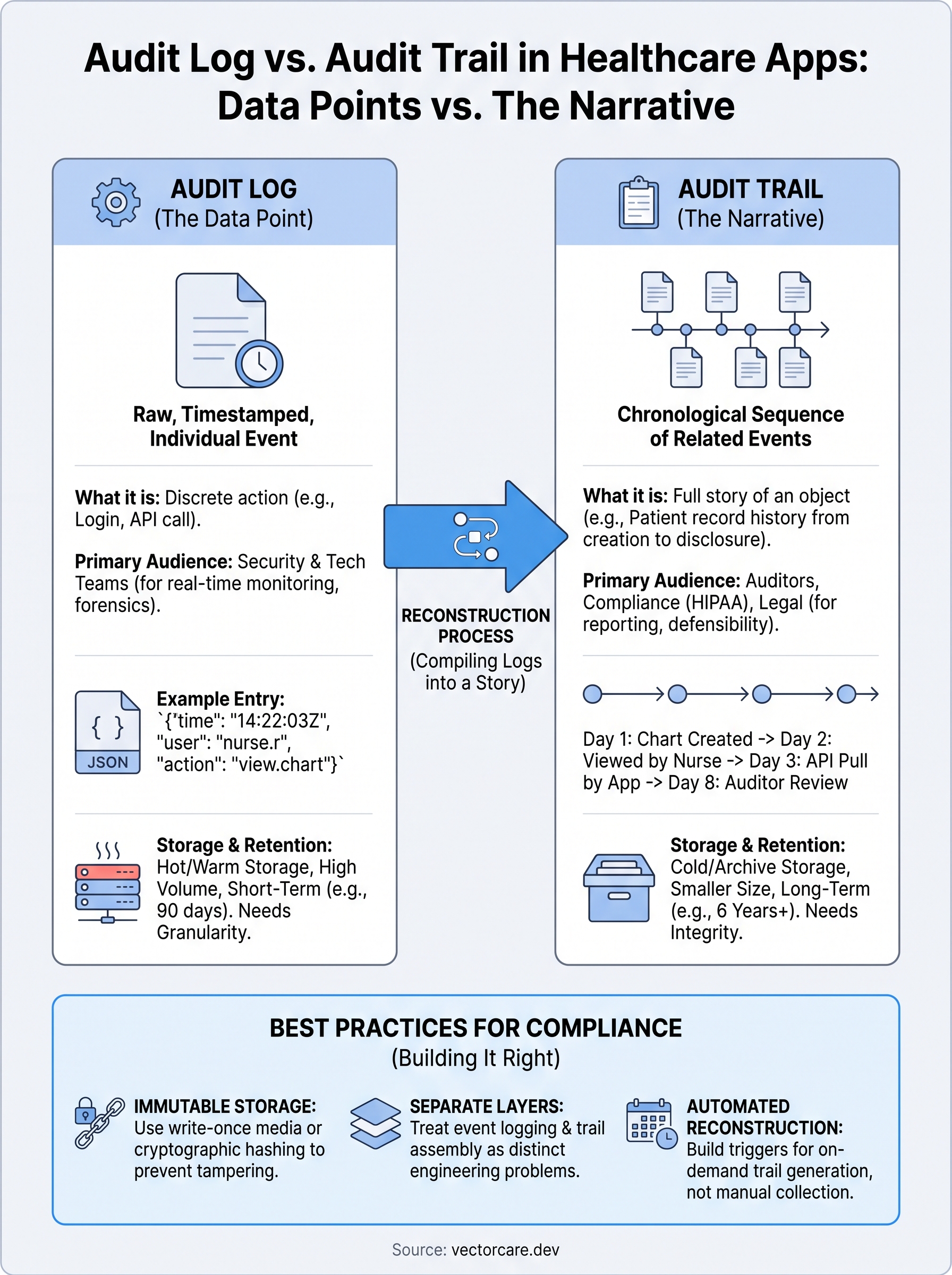
Here's the short answer: an audit log is a raw, timestamped record of individual system events, like a login attempt or a database query. An audit trail is the bigger picture, a chronological sequence of related logs stitched together to show the full story of who did what to a specific patient record, from creation to disclosure. One is a data point. The other is a narrative built from many data points.
This article breaks down both terms in plain language, with real examples pulled from clinical workflows and EHR integrations. You'll see how each fits into HIPAA compliance, why auditors care about the difference, and how systems like EPIC generate and expose this data for vendors building SMART on FHIR applications.
Why the audit trail vs. audit log distinction matters
Confusing these two terms causes real problems during audits, breach investigations, and EPIC's App Orchard review. If you hand a HIPAA auditor a pile of raw logs when they asked for a patient access history, you'll spend hours reconstructing a story that should have already existed. If you build only a narrative trail without the underlying granular logs, you lose the forensic detail needed to prove exactly what happened at 2:47 AM when a record was accessed outside business hours. Getting the audit trail vs audit log distinction right from day one saves you from scrambling later.
HIPAA auditors want the full story, not raw data
Auditors reviewing your HIPAA compliance posture rarely ask "show me your logs." They ask "who accessed this patient's chart, when, and why." That question requires an audit trail, a reconstructed sequence pulled from potentially dozens of individual log entries across authentication systems, EHR access records, and API calls. The HHS Office for Civil Rights explicitly requires covered entities to maintain the ability to reconstruct this kind of activity history under the HIPAA Security Rule's audit controls standard. If your system only stores flat logs with no way to link them into a coherent record, you fail that requirement even if every individual event was captured somewhere.
An audit log tells you what happened. An audit trail tells you why it matters.
Security teams live in the logs, not the trail
Unlike auditors, your security operations team rarely cares about the polished narrative. They want raw, high-volume logs streaming in real time so intrusion detection tools can flag anomalies, like a service account suddenly querying ten thousand patient records in a minute. Building an audit trail from that same data takes processing time you don't have during an active incident. This is why most mature systems maintain both layers separately: logs feed real-time monitoring and alerting, while trails get assembled on demand or on a schedule for compliance reporting and investigations.
Legal defensibility depends on trail integrity
Breach litigation and regulatory investigations hinge on whether you can produce a defensible record of access, not just proof that logging existed. Courts and regulators want to see continuity: a record that shows creation, every view, every edit, and every disclosure of a specific patient's data, with no gaps. A pile of disconnected logs, even if technically complete, doesn't demonstrate that continuity on its own. You need the trail assembled and tamper-evident, ideally with cryptographic hashing or write-once storage, so nobody can argue the record was altered after the fact.
EPIC's reviewers check both layers separately
EPIC's App Orchard and Showroom review process evaluates vendor applications on exactly this split. Reviewers want to see that your app generates granular event logs for every FHIR resource call, and separately, that you can produce a coherent access trail per patient record on request. Vendors who conflate the two often submit incomplete documentation and get bounced back for revisions, adding weeks to a listing timeline that should take days. Here's a quick comparison of what each concept covers and who typically asks for it:
| Aspect | Audit Log | Audit Trail |
|---|---|---|
| Granularity | Single event | Sequence of related events |
| Primary audience | Security engineers, SIEM tools | Auditors, compliance officers, legal teams |
| Typical question answered | "Did this event occur?" | "What happened to this record over time?" |
| Storage format | Raw, high-volume, often append-only | Reconstructed, structured, often report-ready |
| EPIC review relevance | Confirms event capture at the API level | Confirms end-to-end patient data accountability |
Distinguishing between the two also changes how you architect storage costs. Logs accumulate fast, often millions of rows per day for an active clinical app, so most teams age them out to cold storage after 90 days while keeping trails, which are far smaller and derived, retained for the full six-year HIPAA retention window. Skipping this planning step means either paying for expensive hot storage you don't need or losing granular logs before you've extracted the trail data they support. Vendors building on VectorCare's platform get this separation handled automatically, since the workflow builder logs every FHIR action at the event level while compiling patient-level trails behind the scenes, ready for whichever audience, security or auditor, comes asking.
How to build audit trails and logs into your app
Getting this right in your own codebase means treating event logging and trail assembly as two separate engineering problems, not one feature. Most teams that struggle with the audit trail vs audit log question technically did build logging, they just never designed a way to stitch those logs into something an auditor or a security reviewer can actually use. The fix isn't more logging. It's structure.
Capture granular events first
Every meaningful action, a login, a FHIR resource pull, a record edit, a failed permission check, needs its own immutable log entry the moment it happens. Skip this step and there's nothing to build a trail from later. Structure each entry consistently so downstream tools can parse it without guesswork:

{
  "timestamp": "2026-07-30T14:22:03Z",
  "actor_id": "user_48291",
  "action": "fhir.read",
  "resource": "Patient/883921",
  "outcome": "success",
  "source_ip": "10.4.2.19",
  "session_id": "sess_ac7f"
}
Write these to append-only storage, something that rejects updates and deletes at the database level, so nobody can quietly edit history after a bad event.
Build the trail as a derived view
Once granular logs exist, the trail becomes a query problem, not a storage problem. Query all events tied to a given patient identifier, order them chronologically, and enrich each entry with human-readable context, like the actor's role and the reason code for access. Store this reconstructed trail separately, since regenerating it from scratch every time an auditor asks wastes time you don't have during an active investigation.
Log every event, but build the trail before someone asks for it, not after.
Pick your storage layers deliberately
Storage decisions here affect both cost and compliance posture, so plan them upfront:
- Hot storage for logs: keep the last 90 days fast and queryable for security tooling.
- Cold storage for older logs: archive raw events past 90 days to cheaper storage, since they're rarely needed individually.
- Long-term storage for trails: retain compiled trails for the full six-year HIPAA window, since they're smaller and carry the compliance weight.
- Write-once configuration: apply object lock or similar controls so trail records can't be silently altered.
Skipping this tiering means either paying for hot storage you don't need or losing the raw logs before you've pulled trail data out of them.
Automate reconstruction triggers
Manual trail assembly doesn't scale past a handful of patients, so wire up automated triggers that build a trail whenever specific conditions fire, like an access request from compliance, a breach investigation ticket, or a scheduled quarterly review. Building this pipeline from scratch takes real engineering time most digital health teams don't have lying around, which is exactly why VectorCare's workflow builder handles both layers natively for every EPIC-connected app deployed through it, no custom logging code required.
Audit trail and log examples in healthcare and EHR data
Picture a Medicare patient admitted for a hip replacement, tracked across five days in the hospital and three follow-up visits from a home health vendor. Along the way, dozens of clinicians, a billing coordinator, and an external remote monitoring app all touch that chart. Each individual touch generates a log entry. The complete record of everyone who touched that chart, in order, with context, is the audit trail. Seeing both side by side in a real clinical scenario makes the distinction click faster than any definition.
A single audit log entry in EPIC
When a nurse opens a medication administration record in EPIC, the system writes a discrete event capturing who, what, and when. It doesn't explain why she opened it or what happened before and after. A typical entry looks like this:
Event: chart_view
User: nurse.rodriguez
Patient MRN: 0044921
Timestamp: 2026-07-28T09:14:02Z
Module: MAR
Action: view
That's a log. Useful on its own for confirming an access occurred, but useless for telling the full story of the patient's care episode.
Assembling the trail across a care episode
Now pull every log tied to that same patient, order them chronologically, and enrich each with role and context, and you get a trail that reads like a story instead of a spreadsheet:

| Time | Actor | Role | Action |
|---|---|---|---|
| Day 1, 08:02 | Dr. Osei | Surgeon | Created chart |
| Day 1, 09:14 | Nurse Rodriguez | RN | Viewed MAR |
| Day 2, 14:30 | Home Health Vendor App | External SMART app | Pulled discharge summary via FHIR |
| Day 3, 07:45 | Billing Coordinator | Admin | Accessed claims data |
| Day 8, 11:00 | Compliance Officer | Auditor | Reviewed access history |
That table is essentially a compressed audit trail, and it's exactly the format HIPAA auditors and EPIC reviewers expect to see when they ask for a patient access history.
A log shows one frame. A trail shows the whole film.
Break-glass access, the classic edge case
Emergency access, where a clinician overrides normal permissions to view a chart during a crisis, generates one of the most scrutinized entries in any EHR audit system. EPIC flags break-glass events distinctly in its logs, and any trail reconstruction has to surface that flag prominently, since regulators and internal compliance teams treat these events as high-risk by default regardless of outcome.
Vendor access via SMART on FHIR
When a remote patient monitoring app pulls vitals through a SMART on FHIR connection, EPIC logs that API call with the vendor's client ID, the FHIR resource requested, and the OAuth scope used. Multiply that across thousands of daily calls, and a vendor without automated trail assembly ends up buried in raw API logs the moment a health system asks for proof of appropriate data use.
Best practices for keeping audit records compliant
Getting the audit trail vs audit log distinction right on paper doesn't help if your actual records fall apart under scrutiny. Compliance officers and EPIC reviewers don't just check whether logs exist, they check whether you can produce them intact, complete, and within the timeframes regulators expect. The practices below cover the gaps that trip up most healthcare vendors during their first real audit.
Match retention to the rule, not your storage budget
HIPAA requires covered entities and their business associates to retain relevant documentation for six years from the date of creation or last effective date, whichever is later, under the HIPAA Security Rule's documentation requirements. That clock applies to your audit trails, not necessarily every raw log line. Set retention policies deliberately instead of defaulting to whatever your database's disk space allows:
- Raw logs: keep 90 days hot, archive the rest to cold storage for at least one year past the trail's compilation date.
- Compiled trails: retain the full six years, since these carry the compliance weight auditors actually check.
- Break-glass and emergency access records: retain indefinitely where your compliance team flags elevated risk, since these draw the most scrutiny in investigations.
Make tampering technically impossible, not just against policy
Policy alone doesn't satisfy an auditor asking how you know a record wasn't altered after an incident. Tamper-evidence has to be built into the storage layer itself, through write-once object storage, cryptographic hashing of each log entry, or a blockchain-style chain of custody where each record references the hash of the one before it. Verify this setup periodically rather than assuming it works because you configured it once during initial deployment.
If a record can be edited without a trace, it's not an audit record, it's just a note.
Lock down who can view the audit data itself
Ironcially, audit logs and trails are themselves sensitive data, since they reveal exactly who accessed which patient's chart and when. Restrict read access to compliance officers, designated security staff, and auditors on a need-to-know basis, and log every access to the audit system separately, creating a meta-trail of who's been checking the checkers. Skipping this step turns your compliance asset into a second attack surface.
Run scheduled reviews, don't wait for an incident
Quarterly spot-checks catch gaps before a real auditor does. Pull a sample of trails, confirm they reconstruct cleanly, and verify break-glass flags and unusual access patterns get escalated to a human reviewer rather than sitting unread in a dashboard. Document each review, since the review process itself becomes evidence of a functioning compliance program during an OCR investigation.
Keep the two layers separate in your compliance documentation
When you write your HIPAA policies and procedures, describe your logging and trail-assembly processes as distinct controls, not one bullet point. Reviewers expect to see how raw events get captured, how trails get derived, who can access each, and how long each is retained. Vendors deploying through VectorCare inherit this documentation structure automatically, since the platform's compliance framework already separates event logging from trail compilation at the architecture level.
Putting audit trails and logs to work
The audit trail vs audit log distinction isn't academic. Logs give you the raw, granular proof that an event happened. Trails turn that proof into a story an auditor, a lawyer, or an EPIC reviewer can actually follow. Miss the difference and you'll either drown reviewers in raw data or hand them a narrative with no forensic backbone underneath it. Build both layers deliberately, with clear retention rules and tamper-evident storage, and you pass reviews faster instead of scrambling every time someone asks for a patient access history.
Most digital health teams don't have months to build this infrastructure from scratch, and you shouldn't have to. If you're building a SMART on FHIR app for EPIC and want event logging and trail assembly handled for you out of the box, build and deploy your app on VectorCare and skip the audit engineering entirely.
The Future of Patient Logistics
Exploring the future of all things related to patient logistics, technology and how AI is going to re-shape the way we deliver care.
Thank you! Your submission has been received!
Oops! Something went wrong while submitting the form.