Audit Logging Best Practices: Secure Design For Compliance

Audit Logging Best Practices: Secure Design For Compliance
Every HIPAA breach investigation and SOC2 audit starts in the same place: the logs. If your audit logging best practices are weak, or worse, nonexistent, you're flying blind when regulators come knocking. For healthcare vendors building integrations with EPIC EHR systems, proper audit trails aren't optional; they're the backbone of compliance and trust.
Audit logs answer the critical questions: who accessed what data, when, and why. Get this wrong, and you risk failed audits, breach notification obligations, and lost contracts with health systems that demand proof of accountability. Get it right, and your logs become a strategic asset, supporting compliance, debugging, and security monitoring all at once.
This article breaks down how to design, implement, and manage audit logging for healthcare applications. We'll cover what to capture, how to store it securely, retention policies, and architectural patterns that scale. At VectorCare, we bake HIPAA and SOC2 compliance directly into our no-code SMART on FHIR platform, so healthcare vendors don't have to build audit infrastructure from scratch. But whether you're using our platform or rolling your own integration, these fundamentals apply.
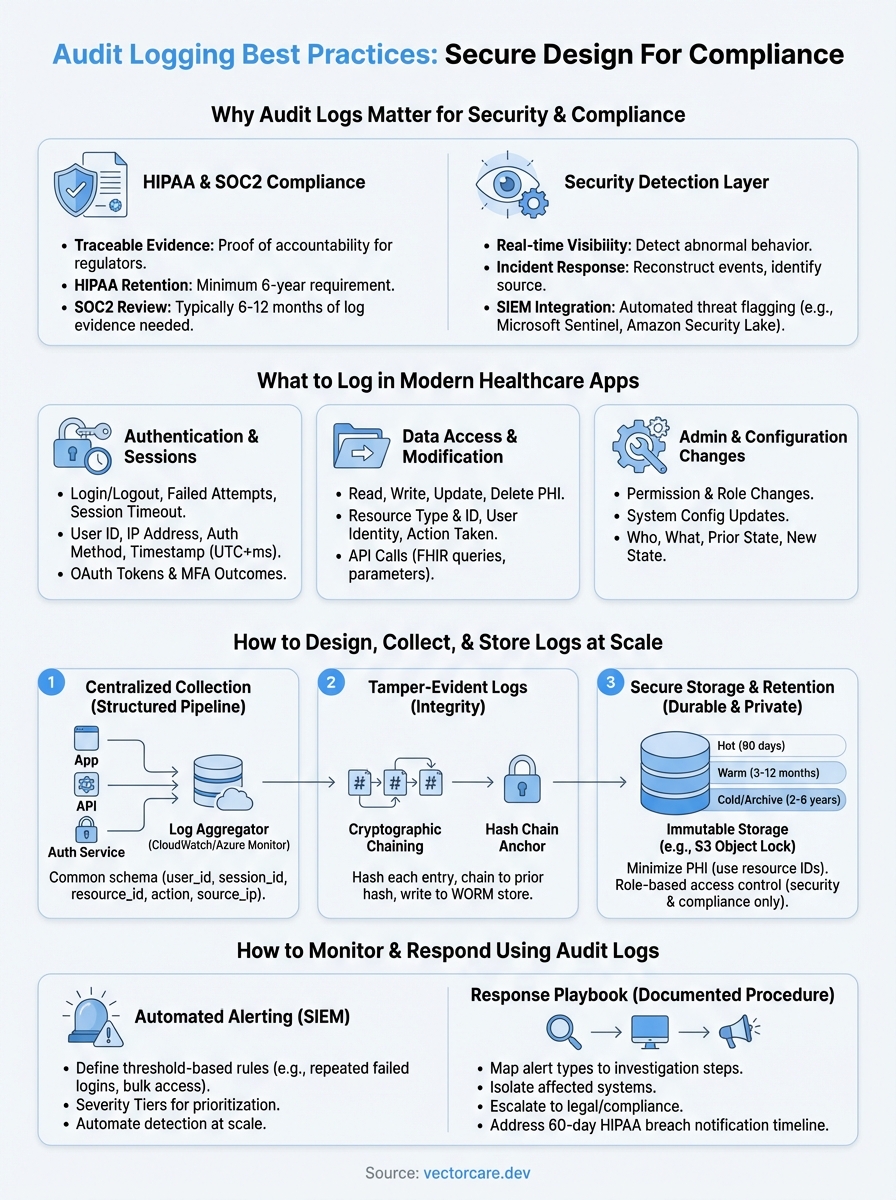
Why audit logs matter for security and compliance
Healthcare applications handle protected health information (PHI) at every layer, from patient intake to clinical decision support. When a breach occurs or an auditor requests evidence, your audit logs are the only objective record of what actually happened inside your system. Without them, you cannot prove compliance, identify the source of a violation, or defend your organization in a regulatory investigation.
Audit logs are not a defensive measure you implement after something goes wrong; they're the foundation of accountability you build before anything does.
HIPAA and SOC2 demand traceable evidence
The HIPAA Security Rule explicitly requires audit controls under the Technical Safeguard standard (45 CFR §164.312(b)). Your system must implement hardware, software, and procedural mechanisms that record and examine activity in any system containing PHI. SOC2 Type II certification goes further, requiring auditors to review actual log evidence over a defined period, typically six to twelve months, to confirm that your controls operated consistently.

Following solid audit logging best practices directly determines whether you pass or fail these reviews. Auditors do not take your word that access controls worked; they look at the log records that prove it. If your logs are incomplete, inconsistently formatted, or missing key events, that's a finding, and findings delay contracts and damage trust with health systems you're trying to win.
Audit logs as a security detection layer
Beyond compliance checkboxes, audit logs give your security team real-time visibility into abnormal behavior. Unusual access patterns, like a user pulling hundreds of patient records in minutes or authenticating from an unexpected location, only surface if your logging captures the right signals. Without this data, intrusion attempts and insider threats go undetected until the damage is already done.
Your logs also support incident response workflows. When a potential breach occurs, your security team needs to reconstruct exactly what happened: which accounts were active, which records were accessed, and in what sequence. Logs with precise timestamps, user identifiers, and resource references cut investigation time from weeks to hours.
Well-structured logs also integrate with SIEM platforms like Microsoft Sentinel or Amazon Security Lake, where automated rules flag suspicious activity before it escalates. This transforms your audit logs from a static compliance artifact into an active layer of your security posture, one that detects threats rather than simply documenting them after the fact.
What to log in modern healthcare apps
Not everything deserves a log entry, but critical system events absolutely do. In healthcare applications, the goal is to capture a complete, tamper-evident record of actions that affect PHI or system security, without generating so much noise that meaningful signals get buried. Following audit logging best practices means being deliberate about what you capture and consistent about how you capture it.
Authentication and session events
Every login attempt, logout, and session timeout belongs in your audit log. Failed authentication attempts are especially valuable; they signal credential attacks before a breach actually occurs. For each event, capture the user identifier, IP address, authentication method, and precise timestamp, including OAuth token exchanges when your app connects with EPIC via SMART on FHIR. Multi-factor authentication outcomes belong here too.
A single failed login is noise; fifteen failed logins against the same account in two minutes is a signal your system should act on immediately.
Data access and modification events
When a user reads, writes, updates, or deletes patient records or clinical data, your log must capture exactly what happened. Record the resource type, resource identifier, user identity, and action taken along with a millisecond-accurate timestamp. For FHIR-based apps pulling data from EPIC, log each API call including the query parameters so you can reconstruct precisely what data was requested and returned during any investigation.
Administrative and configuration changes
Permission changes, role assignments, and system configuration updates carry significant risk when made without proper authorization. Log who made the change, what the prior state was, and what it changed to. These records prove that your access controls operated as intended during a SOC2 review period and provide the concrete evidence HIPAA auditors require when evaluating whether your administrative safeguards functioned consistently over time.
How to design audit logs for integrity and privacy
A well-captured log entry is worthless if someone can alter or delete it without detection. Audit log design must balance two pressures: logs rich enough to reconstruct events and stripped of unnecessary PHI that would create a secondary compliance liability. Applying solid audit logging best practices at the design stage prevents these problems before a regulator asks for evidence.
Build tamper-evident log records
Your logs serve as trustworthy evidence only if they cannot be silently modified after the fact. Cryptographic hashing links each entry to the next; any modification breaks the chain and surfaces tampering immediately. Store your hash chain anchors in a write-once store, such as Amazon S3 Object Lock, so no single compromised account can quietly erase the record.
If your audit logs can be edited without detection, they cannot serve as evidence in a HIPAA investigation or SOC2 review.
Build your chain with these three steps:
- Generate a hash of each log entry at write time
- Chain each hash to the prior entry's hash value
- Write anchors to a separate, append-only storage bucket
Minimize PHI exposure in log data
Keeping your log store lean on PHI requires deliberate field selection from the start. Use resource identifiers and record types rather than raw patient values: log patient_id: 8821, resource: Observation instead of a name or clinical finding. This satisfies the HIPAA minimum-necessary standard while still giving investigators everything they need to reconstruct an access event accurately.
Apply role-based access controls to the log store itself, not only to your application layer. Restricting log query access to security and compliance personnel treats your log store as the sensitive asset it actually is, and closes the gap between capturing useful evidence and inadvertently expanding your PHI exposure surface.
How to collect, store, and retain logs at scale
Healthcare applications generate thousands of log events per hour across authentication services, FHIR API calls, and administrative actions. Without a structured collection pipeline, your logs arrive as inconsistent, hard-to-query noise that fails to support investigations or compliance reviews. Applying audit logging best practices at the infrastructure level ensures your log data stays organized, durable, and queryable as your system grows.
Centralize collection with a structured pipeline
Route all log events through a centralized log aggregation layer rather than storing logs on individual application servers. Services like Amazon CloudWatch Logs or Microsoft Azure Monitor let you ingest structured log streams from multiple services, apply consistent formatting, and forward data to long-term storage automatically. Enforcing a common log schema at ingest time means every event carries the same fields, timestamps use the same format, and analysts run queries without cleaning data first.

Inconsistent log formats are as damaging to an investigation as missing logs; analysts waste hours normalizing data instead of reconstructing what actually happened.
Use a schema that includes these fields across every event:
timestampin UTC with millisecond precisionuser_idandsession_idfor identity linkageresource_typeandresource_idfor the affected recordactionandoutcometo describe what succeeded or failedsource_ipfor network context
Set retention policies before you need them
HIPAA requires a minimum six-year retention period for documentation related to security controls, and SOC2 auditors typically review twelve months of log evidence. Define your retention tiers early: hot storage for the most recent 90 days for active monitoring, warm storage for months 3 through 12, and cold archive storage for years two through six. Automating lifecycle transitions in your storage layer eliminates manual overhead and reduces the risk of accidentally discarding evidence before a retention period expires.
How to monitor and respond using audit logs
Collecting logs without reviewing them is the equivalent of installing a security camera and never watching the footage. Actively monitoring your audit logs turns static compliance records into a live detection layer. Following audit logging best practices means defining alert rules, response procedures, and escalation paths before an incident forces you to improvise.
Set up automated alerting rules
Your log pipeline should feed directly into an alerting system that flags anomalies without requiring someone to stare at dashboards all day. Define threshold-based rules for high-risk events: repeated failed logins, bulk record access within a short window, or privilege escalation outside normal business hours. Connect your log stream to a SIEM platform like Microsoft Sentinel to automate detection at scale across every service your application touches.
Alerts without clear ownership become background noise; assign each rule to a specific team member responsible for triage.
Configure alerts with severity tiers so your team knows immediately whether an event needs a five-minute response or a next-business-day review. High-severity rules should trigger notifications directly to on-call personnel, not just email inboxes that go unread overnight.
Build a response playbook
When an alert fires, your team needs a documented procedure to follow, not a blank screen and a group chat debate. Map each alert type to a specific investigation step: which log fields to query, which systems to isolate, and when to escalate to legal or compliance. For HIPAA-regulated applications, your playbook must also address breach notification timelines, since the 60-day clock for notifying affected individuals starts from the date you discover a potential violation, not the date you finish investigating it.
Key takeaways
Solid audit logging best practices come down to three commitments: capture the right events, protect log integrity, and act on what your logs reveal. Healthcare applications face unique pressure because PHI access must be traceable, tamper-evident, and retained long enough to satisfy both HIPAA and SOC2 requirements. If you treat logs as a compliance checkbox rather than an operational tool, you will fail audits and miss security incidents that proper monitoring would catch early.
Your pipeline needs a consistent schema and automated alerting before you face a crisis. Centralized collection, cryptographic chaining, and role-based access to your log store close the gaps that regulators and attackers look for first. Document your response playbook now, because the 60-day HIPAA breach notification clock does not pause while your team figures out what to do.
Building this infrastructure from scratch is one of the hardest parts of launching a healthcare application. VectorCare's no-code SMART on FHIR platform handles compliance infrastructure, including audit controls, so you can focus on your core product instead.
The Future of Patient Logistics
Exploring the future of all things related to patient logistics, technology and how AI is going to re-shape the way we deliver care.
Thank you! Your submission has been received!
Oops! Something went wrong while submitting the form.