AWS Cognito Federated Identities: What They Are & How They Work

If you're building a SMART on FHIR app that needs to talk to AWS services, you've probably hit a wall trying to figure out where aws cognito federated identities fit into your authentication setup. Cognito's documentation splits User Pools and Identity Pools into separate concepts, and it's easy to conflate the two when all you want is a way to hand out temporary AWS credentials to your users.
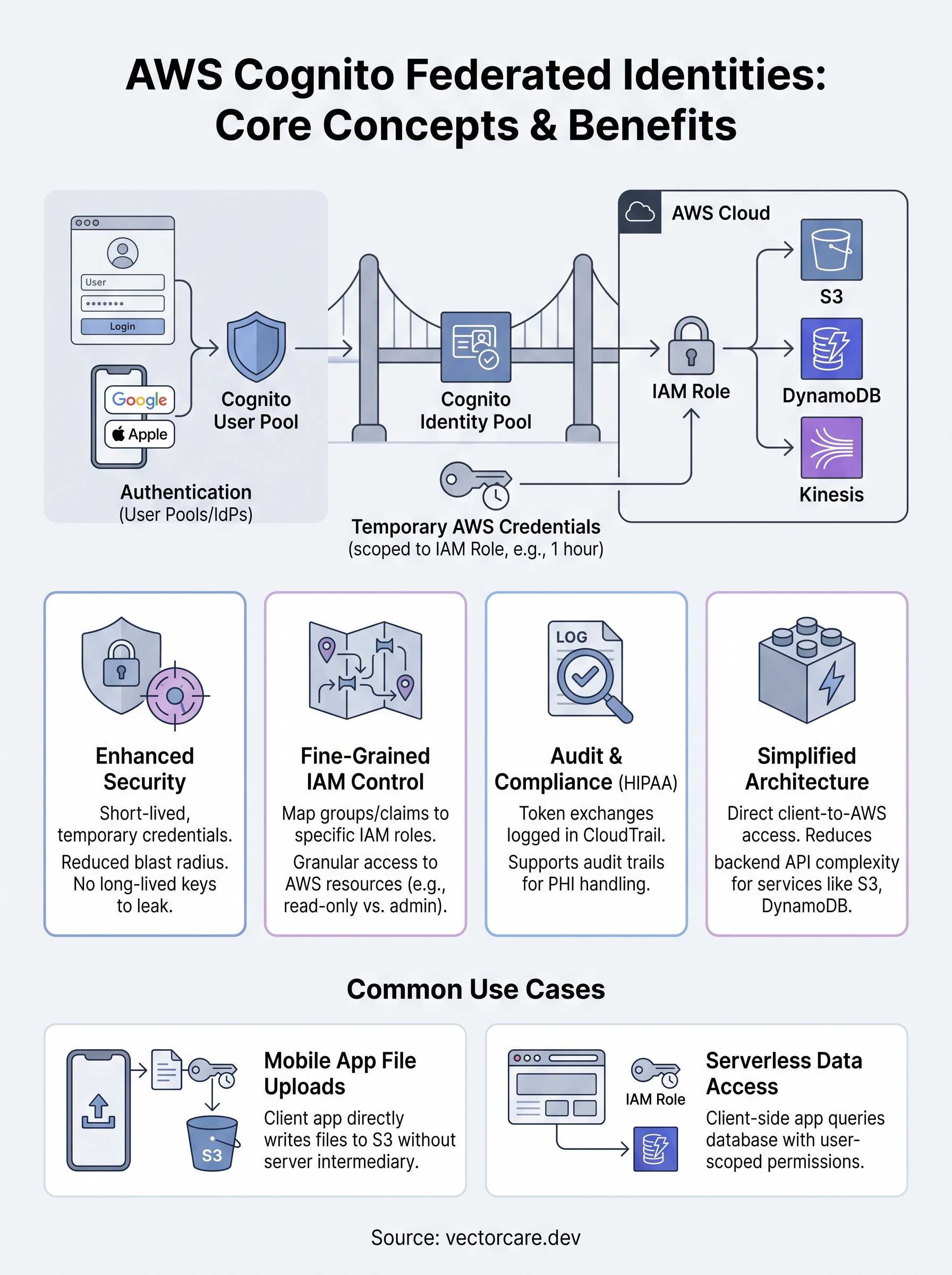
Federated Identities, now called Cognito Identity Pools, exist for one job: exchanging a token from an identity provider, whether that's a Cognito User Pool, Google, or your own OIDC provider, for temporary AWS credentials. Those credentials let your app call S3, DynamoDB, or other AWS resources directly, scoped to an IAM role, without you managing long-lived keys.
In this article, we'll walk through what Identity Pools actually do, how they differ from User Pools, and how the token exchange flow works in practice. For teams building healthcare integrations, where every credential and access path matters for HIPAA compliance, understanding this distinction upfront saves you from rearchitecting authentication later. We'll cover setup steps, common configuration mistakes, and how federated identities plug into a broader FHIR integration workflow.
Why AWS Cognito federated identities matter
Hardcoded AWS access keys sitting in a mobile app or a client-side script are a breach waiting to happen. Federated identities solve this by issuing short-lived, scoped AWS credentials instead of static keys that never expire and often end up committed to a repo by accident. When a user authenticates through Google, Apple, SAML, or your own Cognito User Pool, the Identity Pool exchanges that identity token for temporary credentials tied to an IAM role, typically valid for an hour. If those credentials leak, the exposure window is small and the blast radius is limited to whatever permissions you attached to that role.
Temporary, role-scoped credentials shrink your attack surface far more than any key rotation policy ever will.
Fine-grained access without extra infrastructure
Granular IAM control comes built in once you're using Identity Pools correctly. You can map different user groups to different IAM roles, so a clinical admin gets write access to an S3 bucket while a read-only reviewer only gets list and get permissions on the same resource. This mapping happens through role-based access rules configured directly in the Identity Pool, with no separate authorization service required.
Why this matters for teams handling PHI
Regulated industries feel this benefit most acutely. Healthcare vendors building SMART on FHIR apps need every credential path documented for audits, and temporary credentials generate a clean trail: each token exchange is logged in CloudTrail, tied to a specific authenticated identity, with a defined expiration. That's a meaningfully different story than a shared API key that five developers have copied into their local environments over the past two years.
Security teams reviewing your architecture will ask about this distinction, and having a good answer matters:
- No long-lived secrets to rotate, store, or accidentally expose
- Per-user IAM role mapping for fine-grained data access
- CloudTrail-logged token exchanges that support HIPAA audit requirements
- Reduced blast radius if a credential does leak
AWS documents the underlying mechanics in its Cognito developer guide, which is worth bookmarking once you start configuring roles.
How federated identities differ from user pools
Confusion between these two services trips up almost every team new to Cognito. User Pools handle authentication, verifying who a person is through sign-up, sign-in, password resets, and MFA. Identity Pools handle authorization to AWS resources, taking a verified identity token and exchanging it for temporary AWS credentials. You can run a User Pool without ever touching an Identity Pool if all you need is login and session management for your own app's API. But the moment your app needs to call S3, DynamoDB, or another AWS service directly from the client, you need an Identity Pool sitting on top.

User Pools answer "who is this person," Identity Pools answer "what can they touch in AWS."
Where each service sits in the flow
Think of a User Pool as the front door and an Identity Pool as the badge reader inside the building. A user logs into your User Pool, receives a JWT, then hands that token to the Identity Pool, which checks it against a configured provider and issues scoped AWS credentials.
| Feature | User Pools | Identity Pools |
|---|---|---|
| Purpose | Authentication | AWS authorization |
| Output | JWT tokens | Temporary AWS credentials |
| Supports external IdPs | Yes (as a provider) | Yes (directly or via User Pools) |
| Grants AWS resource access | No | Yes |
Combining both gives you full-stack identity: verified users, mapped to IAM roles, calling AWS services safely.
How to set up AWS Cognito federated identities
Getting an Identity Pool running takes about fifteen minutes if you already have a User Pool or another identity provider ready to go. Setting up federated identities correctly the first time saves you from re-mapping IAM roles later, which usually means retesting every client that depends on those credentials.
Creating the identity pool
Start in the Cognito console under Identity Pools, then walk through these steps:
- Name your identity pool and choose whether to allow unauthenticated identities (skip this for healthcare apps).
- Add your authentication provider: a Cognito User Pool, Google, Apple, SAML, or a custom OIDC provider.
- Let AWS auto-generate the default authenticated and unauthenticated IAM roles, or attach your own.
- Save the pool and note the Identity Pool ID, you'll need it in your client SDK config.
Mapping roles to providers
Role mapping determines what each authenticated identity can actually do once it has credentials. You can map roles by provider, by a token claim, or by rules you define yourself, like checking a custom department attribute.
A misconfigured role mapping is the single most common cause of "access denied" errors in federated identity setups.
Here's a simplified example using a rules-based mapping:
{
 "Rules": [
 {"Claim": "custom:role", "MatchType": "Equals", "Value": "admin", "RoleARN": "arn:aws:iam::123456789012:role/AdminRole"}
 ],
 "AmbiguousRoleResolution": "Deny"
}
Test this with a real token before shipping, mismatched claim names are an easy mistake to miss.
Common use cases for federated identities
Teams reach for Identity Pools whenever a client app needs to touch AWS resources directly instead of routing every call through a backend API. Mobile apps uploading files to S3 are the classic example: a patient-facing app captures a photo or document, gets temporary credentials scoped to a patient-uploads/{userId}/ prefix, and writes straight to the bucket without your servers ever handling the file.
Direct-to-AWS data access
Beyond uploads, federated identities work well anywhere you want scoped, per-user access to a managed AWS service. Serverless apps calling DynamoDB directly skip an entire API layer when the IAM role restricts each user to their own partition key. Analytics dashboards use the same pattern to read from Kinesis or query Athena, with role mapping ensuring a clinician only sees data tied to their assigned patients.
Direct-to-AWS access patterns only stay safe when role mapping is airtight, so treat that config like production code.
Federating third-party identity providers
Healthcare vendors often need to accept logins from a hospital's existing SSO setup rather than forcing users into a new account. SAML and OIDC federation through Identity Pools lets a health system's Active Directory or Okta instance act as the identity provider, while Cognito still issues the temporary AWS credentials on the back end. Common patterns include:
- Mobile RPM apps writing device data to S3 or IoT Core
- Web dashboards querying DynamoDB or Timestream per authenticated user
- SAML-federated logins from hospital SSO systems
- Guest or unauthenticated access for public-facing kiosks, tightly scoped
Each pattern hinges on the same principle: authenticate once, then let IAM roles do the enforcement work.
Where federated identities fit in your app
Getting aws cognito federated identities right means treating Identity Pools as the bridge between "who logged in" and "what they can touch in AWS," not as a replacement for your authentication layer. User Pools verify identity, Identity Pools hand out scoped, temporary credentials, and IAM roles enforce the boundaries in between. Get that sequence backward and you'll spend weeks debugging access errors that trace back to a single mismatched role mapping.
Building this correctly for a healthcare app takes real FHIR and IAM expertise, on top of everything else you're already juggling: EPIC's Showroom requirements, SMART on FHIR compliance, and clinical workflow design. If you'd rather skip months of credential plumbing and get straight to shipping a working integration, build and deploy your SMART on FHIR app in days with a platform that handles the identity and compliance layer for you.
The Future of Patient Logistics
Exploring the future of all things related to patient logistics, technology and how AI is going to re-shape the way we deliver care.
Thank you! Your submission has been received!
Oops! Something went wrong while submitting the form.